Using the Text Plugin With RequireJS To Load Remote HTML Templates
Earlier this week, I started looking into the RequireJS library as a way to manage JavaScript dependencies and modular application design. In addition to the core functionality of loading modules, RequireJS also has a plugin architecture that enables the loading of non-JavaScript data types. The "Text" plugin, for example, allows text files to be loaded-in as dependencies in the context of define() and require() method calls. Since a large part of our thick-client applications involve heavy DOM (Document Object Model) manipulation, I thought this would be a good feature to explore next.
Plugins, in RequireJS, are simply modules that adhere to a specific API. When you want to load a module using a plugin, you define the plugin as a prefix of the dependency. So for example, when using the Text plugin to load an HTML file, you might define the dependency as such:
text!template.htm
Notice that a "!" character is being used to separate the plugin prefix from the dependency suffix. In the above definition, it is not necessarily clear that the "text" plugin is actually a module itself; but, consider that the above line could be rewritten with this kind of format:
./plugins/text!./templates/template.htm
In this format, it starts to become a bit more obvious that the Text plugin is a module that gets loaded by RequireJS as a type of implicit dependency.
To explore this feature, I wanted to take an array of data objects and merge them into the DOM using a remote template. In order to make use of the "Text" plugin, however, I had to download the Text.js file and put it in an accessible directory, relative to the RequireJS demo.
<!DOCTYPE html>
<html>
<head>
	<title>Using The Text Plugin With RequireJS</title>

	<script type="text/javascript" src="./require-jquery.js"></script>
	<script type="text/javascript">


		// Define the friends module. This is just a JSON object
		// that we want to use as our test data. Since this is not
		// being loaded in from a file, we have to give it an
		// explicit name (such that it can be used as a dependency
		// for other modules).
		//
		// NOTE: You need to supply an empty dependencies array in
		// order to not confuse the define() method.
		define(
			"friends.data",
			[ /** no dependencies. **/ ],
			[
				{
					"id": 1,
					"name": "Sarah",
					"age": 35
				},
				{
					"id": 2,
					"name": "Tricia",
					"age": 38
				},
				{
					"id": 3,
					"name": "Joanna",
					"age": 29
				},
				{
					"id": 4,
					"name": "Libby",
					"age": 37
				}
			]
		);


		// -------------------------------------------------- //
		// -------------------------------------------------- //


		// Now, let's require the data AND the template in order to
		// render the page properly.
		require(
			[
				"friends.data",
				"text!friend-template.htm"
			],
			function( friendsData, friendHtml ){

				// Now that we've loaded the template and data, let's
				// make sure we're waiting for the DOM-ready event.
				// Since we loaded the jQuery/RequireJS library, we
				// can use jQuery to get the DOM-ready.
				$(function(){

					// Get the friends list.
					var friendsList = $( "ul.friends" );

					// Get the template node (which we will use to
					// create the friends.
					var template = $( friendHtml );

					// Map the array of friends' data into an array
					// of template nodes to be added to the DOM.
					var buffer = $.map(
						friendsData,
						function( friendData, index ){

							// Close the template.
							var friend = template.clone();

							// Set the name.
							friend.find( "span.name" ).text(
								friendData.name
							);

							// Set the age.
							friend.find( "span.age span.value" ).text(
								friendData.age
							);

							// Return the raw node.
							return( friend.get() );

						}
					);

					// Insert the friend template DOM node buffer
					// into the page.
					friendsList.append( buffer );

				});

			}
		);


	</script>
</head>
<body>

	<h1>
		Using The Text Plugin With RequireJS
	</h1>

	<h2>
		Friends
	</h2>

	<ul class="friends">
		<!-- To be populated dynamically. -->
	</ul>

</body>
</html>
Notice that in this exploration, I am putting a define() function call right into the main file. While it is recommended that each module be placed in its own file, I thought I was seize this as an opportunity to explore explicitly named modules; since this define() usage, in this case, cannot map a file path to a module, we have to provide the module name - friends.data - as part of the define() invocation.
Once the friends data has been loaded, I use a require() call and the Text plugin to load in the HTML template. Here is the HTML file that is being loaded:
friend-template.htm (Our Remote HTML Template)
<!-- BEGIN: Friend Template. -->
<li class="friend">
	<span class="name">NAME</span>
	<span class="age">( Age: <span class="value">AGE</span> )</span>
</li>
<!-- END: Friend Template. -->
Once this dependency has been loaded, I can then merge the "friends.data" module with the template in order to update the DOM (Document Object Model). When we run the above code, we get a dynamically populated page:
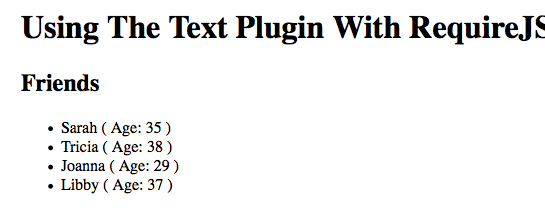
As you can see, the Text plugin automatically loaded the remote HTML template and then passed the string value through to the given asynchronous callback. We were then able to use jQuery (which was loaded as part of the "require-jquery.js" library version) in order to convert the HTML string into a usable DOM fragments.
So far, everything I've tried with the RequireJS library just seems to work. I feel somewhat silly for having put it off for so long. I had assumed that it would be difficult to use; but, it's exactly the opposite. I'm really liking it.
Want to use code from this post? Check out the license.

Reader Comments
Nice video, helped a lot. Why do we define modules when the function of Require JS is just to load things, not to manage things?
One question -- in your usage of jQuery to ensure the DOM is ready, there's no $(document).ready() wrapped around your function. Is the DOM's ready state already implied in some other way? I'm scratching my head over that part.
Love these RequireJS posts, by the way.
very informative. i was explicitly adding text.js in my project, and didn't realized what was behind text!. i think requirejs and textjs combined are great for templating, and i plan to use it with knockoutjs. thanks alot!
template *.html works in android but not in iOS, why?
Hey,
I know that this post is pretty old, but was wondering if you think that inside a template one can add an img tag as well.
Say that the data received has a path attribute or something like that.
I ask of course, because I tried doing this using the setup you provided in this post :). Problem is that I get an error in the browser's console :"Resource interpreted as Image but transferred with MIME type text/html".
Thanks.
Awesome.
This technique allowed me to go beyond Amber's canvas and load templates too.
http://amber-lang.net