
Using Google's Targeted Site Search Protocol To Search My Site
The search form on my site (top-right at the time of this writing) used to display Google Search results directly within the context of my site. At one time, it did this with an embedded IFrame widget. Then, for a while, I was using an XML API. Then, a few months ago, I got an email from Google explaining that the particular service I was using would no longer be offered and would soon be shut down. I never did anything about it and then my site search suddenly stopped working a few weeks ago. Yesterday, I finally took a minute to put something in place until I figure out what the proper Google API is. It's not fancy, but for now, I'm linking directly to Google.com using their targeted site search protocol.
When you search Google.com, you've probably noticed that all kinds of URL query string values get used to define the search results page. We can use a number of search parameters to make sure that the search results only come from a specific site and only contain (or exclude) certain phrases. In this demo, we'll be using the following search parameters:
q - This is probably the most important parameter; it defines the criteria for the search. The coolest thing about this parameter is that it can be used multiple times without any adverse affect. In fact, Google will simply concatenate each individual "q" value and use it as a single search term. This makes it extremely easy to use hidden form fields that contribute to the final search phrase.
site:domain - This is a sub-parameter of the "q" value. This allows us to target the search for the given domain only.
intitle: - This is a sub-parameter of the "q" value. This allows us to make sure that a given phrase is within the Title of the page. And, when used in conjunction with the minus sign (-intitle:), we can make sure the resultant pages do not contain the given title phrase.
safe - This query string parameter allows us to turn off moderate search results. We're all adults here.
pws - This query string parameter allows us to turn off Personalized Web Search. Since we are targeting a given site, we don't necessarily want the search results to be pre-filtered for a given user.
Now that we see what parameters we can use (and this is only a subset of the possible Google WebSearch Protocol), let's take a look at some code. Notice that in the following HTML markup, I'm using multiple form fields named, "q". On the search results page, Google will concatenate all of these values for us:
<!DOCTYPE html>
<html>
<head>
	<title>Using Google's Targeted Site Search Protocol</title>
</head>
<body>

	<h1>
		Using Google's Targeted Site Search Protocol
	</h1>

	<form
		method="get"
		action="http://www.google.com/search"
		target="_blank">


		<p>
			Search Phrase:<br />
			<input type="text" name="q" value="" />
			<input type="submit" value="Search!" />
		</p>


		<!--
			Make sure that Google only searches the given site (in
			this case, bennadel.com).
		-->
		<input
			type="hidden"
			name="q"
			value="site:bennadel.com"
			/>

		<!--
			Make sure that Google does not include any results
			that have Code Viewer in it (these are code-snippets
			that won't be relevant).
		-->
		<input
			type="hidden"
			name="q"
			value="-intitle:"Code Viewer""
			/>

		<!-- Turn OFF safe search... bow-chicka-wow-wow! -->
		<input
			type="hidden"
			name="safe"
			value="off"
			/>

		<!--
			Turn OFF personalized web search (PWS) since you want
			to search ALL of the given site!
		-->
		<input
			type="hidden"
			name="pws"
			value="0"
			/>


	</form>

</body>
</html>
As you can see, we use multiple "q" values, some of which are hidden. This allows our end-user to only worry about the important parts of the query - their search term; the rest of the filtering can be performed implicitly by the form post.
When we submit this form, we get a Google Search Results page that looks like this:
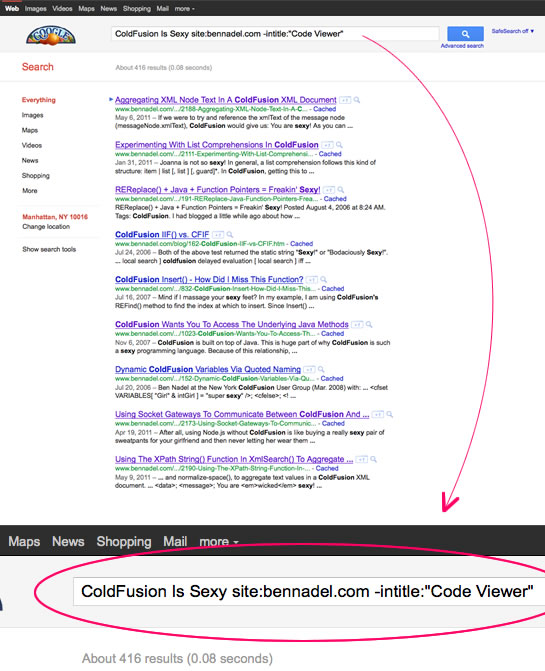
Sure, you take the user out of the context of your site, which isn't all that glamorous. But, for something that takes two minutes to configure, you do get all the benefits and the power of the Google Search engine. And, that's pretty snazzy (and far better than anything I could code myself). I'm pretty sure they still have a search API; when I have time to read up on it, I'll move this stuff back into the context of my site.
Want to use code from this post? Check out the license.

Reader Comments
I had a similar situation as yours; hopefully I won't have to rewrite things in 6 months.
The CSE control panel now has a "results only" option for look and feel, which allows you to separate search box and results.
It's worked pretty well, except that Google now apparently limits the number of result pages to 10 (?!) for its custom search. Crazy.
Ben, I was considering Google for my static blog's search, but ended up with a much more satisfactory integrated solution.
http://cfsimplicity.com/39/integrated-search-for-a-static-website-part-1
Haven't got round to posting the details yet, but as a JS guru I'm sure you'd come up with something far better then I did.
Otherwise for an integrated blog search without the bother of maintaining your own collection, then take a look at http://tapirgo.com/
Is this because you don't want to pay for this?
http://www.google.com/sitesearch/
I noticed something odd just now...
I was on the google home page in google chrome. In my address bar, I typed "www.bennadel.com scheduled tasks", and it sent me to your old search page (which of course returns 0 results). How would that automatically send me to your search page?
@Ben,
I am not sure what you mean by CSE? Is that in one of the Google control panels or something?
@Julian,
Tapir has a really nice looking site! I've never heard of it. I'll have to check it out. Looks like a neat little remotely hosted search service. Thanks for the link.
@Brian,
I wouldn't mind paying for something, I just haven't had the time to look. Probably, the email that Google sent me was saying I could upgrade to the paid version... but email is not a strong suit of mine either :D
@Kevin,
Wow, that's really weird. I just tried it and got the standard Google Search page (in Chrome and Firefox). Maybe it switched to an existing Tab in your browser or something?? Very odd.
@Ben Nadel,
CSE = Custom Search Engine.
Google still offers a free search service (www.google.com/cse), although it kinda seems like they're encouraging folks to use their not-free version. It's confusing to me.
Anyway, because Google was phasing out the iframe version and because their API was deprecated, I started looking into other ways to do the two things I cared about:
- separate the search box from the results and
- access results via jQuery (so that I could do some custom page-tracking)
The CSE's "results only" option worked well for both... You can see it at: extension.uga.edu
Ben W
@Ben,
This actually looks like a new feature of Google Chrome, it is happening for a very wide variety of sites for me. If the site has a built-in search, it is using that site's search rather than google search. I'm using version 13.
Haha, this feature is actually more than a year old. Basically, if you are in google chrome and use a site's search, google chrome can sometimes recognize that search page as a search page and use it instead of google site search when you use the google chrome address bar.
@Kevin:
Sounds like the downside of search engine optimization. You provide Google with a site map to get higher page rank, and then they actually use it when they detect something that looks like a server name.
I guess, if you want a site that mentions www.bennadel.com, you're expected to use link: or something like that.
@Ben,
This seems like free "Lite" apps in the App Store or the 30-day free trial version of ColdFusion Enterprise. Try before you buy.
@WebManWalking:
I wouldn't consider it a downside, they aren't using the site map. What actually happens is when you use a search box on a website that uses url parameters such as q or term, Google Chrome will recognize the result page as a search engine and store it in your settings as a search engine. You can see what I mean by right-clicking on the address bar and clicking manage search engines after using the wikipedia.org search box.
Therefore, when I wanted to search ben's website for a specific site, it actually used ben's search page. The only problem currently is that ben's search page isn't working anymore due to the api it is using being discontinued. I can fix the issue by going into my settings and deleting the bennadel.com search engine.
Just add <link rel="search" type="application/opensearchdescription+xml" title="MySite" href="/opensearch.xml" /> where opensearch.xml is an opensearchdescription file to enable the chrome search results. (Chrome isn't doing any magic :P )
Thanks Ben,
Great quick fix for my site search.
Cheers,
Sam
Great post, really helpful!
@Kevin,
Very cool :)
@David,
Thanks for the insight. I've not heard of that version of the Link tag before.
@Sam, @John,
Thanks!
And now Google Maps.
I actually thought that they were already charging for free key limit overages (because, why else require the key?):
http://search.slashdot.org/story/11/11/01/1424207/google-maps-to-charge-for-api-usage
@WebManWalking,
I'm not against them charging money. While I love when APIs are free (and Maps still has a big free "buffer"), I can't see how it's possible for most vendors to keep things free. I try not to begrudge.
That is rally an awesome use of Google search keywords.
Thanks for sharing this tips. Where, I have learned about Google maps. You may also learn about some interesting things in Google Maps. How to Styled Maps or Customize colors in Maps? For More info: http://www.labstech.org/styled-maps-google-maps-2014-06-26/