Empty SRC And URL() Values Can Cause Duplicate Page Requests
Yesterday, I spent a good four hours trying to track down a super frustrating problem. I had a page that needed some additional security features added to it. Basically, I wanted to make sure that once the given page was loaded, only one link on said page could be used. To do this, I stored a random value in the user's session. Then, I would pass that value through each link and compare it to the stored session value. On each target link, I would then clear the random session value, rendering every existing link invalid until the original page was reloaded. The approach seemed simple enough; but, the session value kept getting lost. After several hours, I finally tracked the problem down to a few empty SRC and URL() values in the markup.
To get an understanding for the general workflow, take a look at the following demo page. Notice that at the top of the page, I am creating a UUID (Universally Unique Identifier) that gets stored in the session object. Then, as I lay out the links on the page, I am passing said UUID through as a "key."
<!---
	We want to single-file the user through this page onto the next.
	As such, we will need to set a new session-based flash-key that
	can be passed through and compared on the subsequent page.
--->
<cfset session.flashKey = createUUID() />

<!--- Set the content type and reset the buffer. --->
<cfcontent type="text/html; charset=utf-8" />

<cfoutput>

	<!DOCTYPE html>
	<html>
	<head>
		<title>Empty SRC and URL() Value Carnage</title>
	</head>
	<body>

		<h1>
			Empty SRC and URL() Value Carnage
		</h1>

		<p>
			Please select your page:
		</p>

		<!---
			Notice that in these URLs, we are passing through the
			Flash-key that we defined above.
		--->
		<ul>
			<li>
				<a href="target.cfm?key=#session.flashKey#">One</a>
			</li>
			<li>
				<a href="target.cfm?key=#session.flashKey#">Two</a>
			</li>
			<li>
				<a href="target.cfm?key=#session.flashKey#">Three</a>
			</li>
		</ul>

		<!--- Copyright information. --->
		<p style="background: url() no-repeat ##FAFAFA ;">
			Copyright #year( now() )#,
			<img src="" width="100" height="25" class="logo" />.
			All rights reserved.
		</p>

	</body>
	</html>

</cfoutput>
In this demo, all of the links point to the page, target.cfm. This page will check the URL-based key against the stored, session UUID to make sure that the single-click action has not been exhausted. Here is the target page:
Target.cfm
<!--- Param the URL values. --->
<cfparam name="url.key" type="string" default="" />


<!--- ----------------------------------------------------- --->
<!--- ----------------------------------------------------- --->


<!---
	As a security precaution, make sure that the key passed-through
	matches the flash key stored in the session. If it does not,
	then the user has to go back to the previous page to re-create
	a valid flash key.
--->
<cfif (
	!len( url.key ) ||
	(url.key neq session.flashKey)
	)>

	<!--- Whoa there, fella. You are not authorized! --->
	<cfheader
		statuscode="401"
		statustext="Not Authorized"
		/>

	<p>
		Please go back to the previous page.
	</p>

	<!--- Exit the page so no further processing can take place. --->
	<cfexit />

</cfif>


<!---
	No matter what, clear the flash key. The user has used it up.
	Remove it so that no further pages can be accessed without re-
	creating the key on the previous page.
--->
<cfset session.flashKey = "" />


<!--- ----------------------------------------------------- --->
<!--- ----------------------------------------------------- --->


<!--- Set the content type and reset the buffer. --->
<cfcontent type="text/html; charset=utf-8" />

<cfoutput>

	<!DOCTYPE html>
	<html>
	<head>
		<title>Target Page</title>
	</head>
	<body>

		<h1>
			Target Page
		</h1>

		<p>
			Welcome to your target page!
		</p>

	</body>
	</html>

</cfoutput>
This target page does two crucial things: first, it checks to make sure that the passed-through key matched the stored UUID. But then, once this check has been performed, it clears the stored, session key. This means that the links on the original page, defined with the original UUID, are no longer valid. Any subsequent clicks on those links will result in a 401 Unauthorized response.
Essentially, I had created a page in which only one link behavior would be valid per page load. Or, at least I thought I did. As it turned out (which you can see in the video), none of the links were valid. The source of page revealed that the session key was being set; however, by the time I clicked on any of the links - even the first one - it appeared that the session key was no longer valid (I was getting 401 response codes).
A look at Firebug revealed that something odd was happening. On my production page, there were literally dozens (sometimes hundreds) of HTTP requests taking place; as such, this oddity was not so easy to locate. But, as you can clearly see in the following screenshot of my demo, multiple requests are being made to the same page (our landing page):
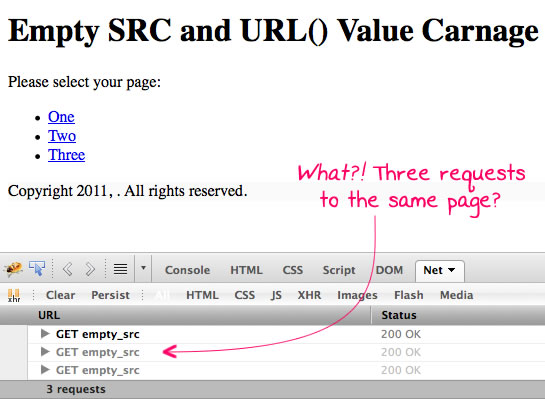
If the landing page is responsible for generating the session-based flash-key, then it's no wonder that the flash-key was invalid by the time I clicked any of the links. While the first request (the one that gets rendered in the browser) functioned "properly," the two subsequent request were each overwriting the session key, respectively.
So, what the heck was going on? Where were these subsequent requests coming from?
After much debugging, I finally narrowed the problem code to something that looked like this:
<p style="background: url() no-repeat ##FAFAFA ;">
	Copyright #year( now() )#,
	<img src="" width="100" height="25" class="logo" />.
	All rights reserved.
</p>
There are two issues in this code. The first is that the CSS background is set to "url()". The second is that the logo image has an empty SRC attribute. Since both of these constructs require the loading of a linked asset, the browser was making two subsequent requests to the server; however, since the Url in each case was empty, the browser simply interpreted the target location as pointing back to the current page.
To fix this problem, I updated the CSS code (which was being generated dynamically) to use "none" for the background. Then, I updated the image SRC attribute (which was a placeholder for dynamic HTML) to be "about:blank". Both the "none" and the "about:blank" values prevented the browser from making any subsequent requests for linked assets.
With these fixes in place, the primary landing page was only being loaded once. This ensured that the session key was only be generated once per page load, as expected, which allowed the single-link functionality to work properly. This problem was mixed in with tons of code, including thousands of lines of JavaScript. Debugging this was a super pain; but, at least now, I'll know what kind of problem causes weird, unexpected subsequent page requests.
Want to use code from this post? Check out the license.

Reader Comments
Nice tip!
@Mavelar,
Thanks! I'm glad that I was finally able to figure out what the heck was going on :)
Ben, check out this article by Nicholas Zakas:
http://www.nczonline.net/blog/2009/11/30/empty-image-src-can-destroy-your-site/
Intersting stuff, but I wonder why you have an image without a source? Even if you are going to programatically assign a source, shouldn't you put in a defalut value. This is also typically true for variables, so why not images?
Thanks for sharing! Hard to say if I agree with the browser's behavior or not. I know I commonly code: <form action=""> to reference itself. But that does not involve external assets.
@Ben,
For hrefs and form actions, a self-executing anonymous do-nothing script makes a WONDERFUL do-nothing URL:
I know, I know, we're not supposed to use URLs with the javascript: protocol anymore. But that's because they do nothing when JavaScript's OFF, right? But in this case, that's exactly what you WANT it to do, even when JavaScript's ON. So I argue, it's the perfect cross-browser no-op URL.
It's even more cross-browser than "javascript:void(0);", which I've seen throw an error, though I don't remember in which browser.
Not sure if it'll work with src attributes or url() values in CSS, but it's an alternative to about:blank that's worth trying in a pinch.
This knowledge is part of the Yahoo! "Best Practices for Speeding Up Your Web Site," which should be on every webdev's reading list.
http://developer.yahoo.com/performance/rules.html#emptysrc
Apparently the rule was inspired by the link that Ben Alman provided above.
@Ben,
I was just now examining some web mail using Firebug's Right-Click > "Inspect Element" to find out what kind of file an attachment was, and saw a much pithier no-op URL. I hereby withdraw my self-executing anonymous function suggestion in favor of the following:
End of statement, implicitly void, perfect. Wish I'd thought of it.
I've just spent hours banging my head on the wall because of this problem :-)
I found it myself with a long human binary search... and found the explanation right after on this site.
Thanks for the hint!!!
@WebManWalking,
I like that terse solution with just the Javascript:;. That's pretty cool for HREF values that will be assigned programatically.
@Daniel,
At least that only happens on submit, not on page load. But good to know, regardless.
@Grumpy,
Thanks for the link. Yahoo! probably has a wealth of information that I have never tapped before. So sad :( I'll definitely be reading up on the performance stuff.
@Thomas,
No problem! Glad to help.