jQuery has a core method called trigger(). This method will trigger the given event on the selected elements and then propagate the event up the DOM before activating the default behavior (assuming it wasn't explicitly prevented somewhere in the bubbling phase). If you don't want to involve the bubbling and default behavior, jQuery also provides the method, triggerHandler(). This will trigger all the event handlers without any propagation; however, it will only do so on the very first element within the current collection.
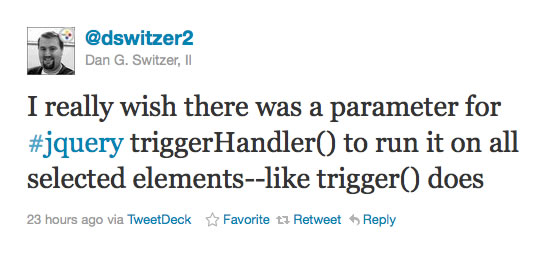
Yesterday, on Twitter, Dan G. Switzer, II mentioned that it would be cool to find a compromise between these two methods; that it would be nice to keep the handler-only execution, but extend this execution to involve all selected elements.
I thought this would be a fun little augmentation to make to the jQuery library; so, I created a plugin called triggerHandlers() - notice the "s" for plural. This takes exactly the same arguments as the native triggerHandler() method; only, it doesn't limit the handler invocation to the first selected element.
To see this in action, let's take a look at a page that has an unordered list. In this demo, we're going to attach two "click" handlers to each LI in the list. This is to demonstrate that triggerHandler() still honors "immediate" propagation while preventing bubbling. Then, we'll create our triggerHandlers() plugin and invoke it on the collection of LI elements.
<!DOCTYPE html>
<html>
<head>
	<title>jQuery Plugin: triggerHandlers()</title>

	<!-- Include jQuery. -->
	<script type="text/javascript" src="./jquery-1.6.1.js"></script>
</head>
<body>

	<h1>
		jQuery Plugin: triggerHandlers()
	</h1>

	<ul class="friends">
		<li>
			Sarah
		</li>
		<li>
			Joanna
		</li>
		<li>
			Tricia
		</li>
	</ul>


	<script type="text/javascript">


		// Get a reference to the collection of friends.
		var friends = $( "ul.friends" );

		// Add an event to each of the friends.
		friends.children().bind(
			"click",
			function( event ){

				// Introduce yourself.
				console.log(
					"Hello, my name is",
					$.trim( $( this ).text() )
				);

			}
		);


		// Add a subsequent event (of the same type) to each of
		// the friends.
		friends.children().bind(
			"click",
			function( event ){

				// Excuse yourself.
				console.log( "Sorry, but I really must go." );

			}
		);


		// -------------------------------------------------- //
		// -------------------------------------------------- //
		// -------------------------------------------------- //
		// -------------------------------------------------- //


		// First, we're going to use the native triggerHandler()
		// method. This will activate all of the handlers on the
		// first element only. These events to not propagate.
		console.log( "Native triggerHandler()" );
		console.log( "---------------------------------------" );

		// Trigger the handlers.
		friends.children().triggerHandler( "click" );


		// -------------------------------------------------- //
		// -------------------------------------------------- //
		// -------------------------------------------------- //
		// -------------------------------------------------- //


		// Now, we're going to define a plugin for the "fn" namespace
		// (which is the jQuery prototype reference). We'll create a
		// triggerHandlers() (notice - plural) that will do the same
		// thing, but on all elements.
		$.fn.triggerHandlers = function( type, data ){

			// Flag that we want to use handlers only. This will take
			// care of all the bubbling and propagation limitations.
			var handlersOnly = true;

			// Loop over each element in the current collection to
			// trigger the handlers on each.
			this.each(
				function(){

					jQuery.event.trigger(
						type,
						data,
						this,
						handlersOnly
					);

				}
			);

			// Return this object reference for method chaining.
			return( this );

		};


		// Now that we have defined our plugin, we're going to invoke
		// the handlers on all selected elements.
		console.log( "\nPLUGIN triggerHandlers()" );
		console.log( "---------------------------------------" );

		// Now, call triggerHandlers() on the children.
		friends.children().triggerHandlers( "click" );


	</script>

</body>
</html>
As you can see, the triggerHandlers() plugin turns around and invokes the native method:
jQuery.event.trigger( type, data, element, handlersOnly )
Both the core fn.trigger() and fn.triggerHandler() methods invoke this native method as well. The aspect of our code that makes the triggerHandlers() plugin work is the fact that it loops over each() element and passes in true as the fourth argument.
When we run the above code, we get the following console output:
Native triggerHandler()
---------------------------------------
Hello, my name is Sarah
Sorry, but I really must go.PLUGIN triggerHandlers()
---------------------------------------
Hello, my name is Sarah
Sorry, but I really must go.
Hello, my name is Joanna
Sorry, but I really must go.
Hello, my name is Tricia
Sorry, but I really must go.
Notice that when we invoked the native triggerHandler() method, both "click" event handlers were invoked, but only on the first LI of the selected collection. Our jQuery plugin - triggerHandlers() - on the other hand, invoked both "click" event handlers on each of the selected LI elements.
Typically, when I invoke the native triggerHandler() method, I am doing so on a single element. As such, the first-selected-element limitation that jQuery imposes has never been a huge issue for me. But, I have definitely run into a few situations where it would be nice to activate the handlers over an entire set of elements. Luckily, jQuery's plugin architecture makes this incredibly easy.

Reader Comments
Nice augmentation!
@Ben:
For comparisons sake, here's what I ended up implementing yesterday:
// works like triggerHandler, but runs on all selected elements
$.fn.triggerHandlerAll = function (){
var self = this, args = arguments;
return self.each(function (i){
var $el = self.eq(i);
$el.triggerHandler.apply($el, args);
})
};
I decided not to use any internal methods--just in case they change the API in the future, so essentially my solution just loops through the collection and applies the triggerHandler() to each item.
@Raghav,
Thanks :)
@Dan,
Yeah, that's probably more stable, long run. I was thinking of doing something along those lines; but, when I looked up to see how triggerHandler() was implemented, as-is, I decided to use the core trigger() method.
Also, I checked your blog this morning before I wrote this up to see if you had posted anything. I didn't want to step on any toes ... seeing as I got the idea from you :)
Hey Ben, I'm with Dan! Please don't call
directly. It's not part of the public API for jQuery and may change. In fact it has changed _very_ recently, as part of jQuery 1.6:
https://github.com/jquery/jquery/commit/235080e1256fc10468ce09b9d1e8db712c797f24
If people start depending on the behavior of jQuery internals, their code will eventually break and we'll face the cruel choice of either making jQuery better/faster or avoiding regressions on undocumented behavior.
@Dave,
I'll agree with you guys. You raise a really valid point. When I was writing this up, that internal API thought never occurred to me. I may have thought the trigger() method was public... who knows. But, I like what you're saying.
@Ben/Dave:
I've spent the better part of fixing and QA'ing changes to our application due to changes between jQuery v1.3.2 and v1.6.2.
Part of what I had to fix was code that relied on undocumented jQuery functions--which is why I choose to use the triggerHandler() in my method. It's a little more expensive processing-wise, but should be forward compatible.
@Dan,
I was intrigued by your use of .eq for getting the jQuery objects inside your each loop. It got me thinking that it would be nice to roll that into an "eachjQ" method. Seems Ben Alman ( and probably others ) beat me to it.
.each2()
http://benalman.com/projects/jquery-misc-plugins/#each2
I tried revising a jsPerf test of .each2() against .eq() and $(this) but kept getting a error 101 on submitting the revision. Anyway in a few informal test in my Chrome console using .eq() ...
appears to be slower than $(this) ...
Is there any benefit to .eq() in this scenario?
@all,
Does anyone have any thoughts on Ben Alman's each2? On the issue of future stability is directly assigning the jq.context and indexed values dangerous?
> On the issue of future stability is directly assigning the jq.context and indexed values dangerous?
Assigning to jq[0] is fine as long as the current jQuery object has only one element (meaning the length property is 1). You'll just replace the current element by doing that.
Assigning to jq.context is overkill since it's not used much inside jQuery (http://api.jquery.com/context/). The only documented use is for calling .live() and you should NOT be using .live() now (use .delegate() instead).
All of the .each() replacements are targeted to the situation where you're looping over collections with many hundreds or thousands of objects. If you need to do that, my advice would be to ditch .each() entirely and use a simple loop along with the jq[0] trick. Here's why:
http://jsperf.com/each-vs-for-loops
Hi guys (Dan and Ben) I am trying to implement what you posted and it still only runs on the first object in the collection.
This is what I currently have:
a bunch of input boxes with the same class eg:
Then a button that i want to trigger a click on all of them and run the click handler on each
seems no matter what i do only the first object has it's bound click event fired.
Any advice would be greatly appreciated