
A couple of people have asked me about running ColdFusion query-of-queries within the new script-based query object (Query.cfc) in ColdFusion 9. Because the new Query.cfc is an actual ColdFusion component, it introduces some new encapsulation and scoping limitations not previously present in the CFQuery tag. These limitation can be easily overcome; however, if you don't understand how the code is being executed, these limitations can quickly confuse and frustate you.
Moving from CFQuery to Query.cfc involves more than a simple shift in syntax; it also requires a different understanding of execution context. To see what I mean, take a look at some code that would, at first glance, appear to be valid:
<!--- Build a query for getting all friends. --->
<cfset getFriends = new Query(
	sql = "SELECT id, name FROM friend",
	datasource = "testing"
	) />

<!--- Get the query results. --->
<cfset friends = getFriends.execute().getResult() />

<!--- Dump out the current result set. --->
<cfdump
	var="#friends#"
	label="ALL Friends"
	/>


<!--- ----------------------------------------------------- --->
<!--- ----------------------------------------------------- --->
<br />
<!--- ----------------------------------------------------- --->
<!--- ----------------------------------------------------- --->


<!---
	Now, let's query our previous query, to get all of the friends
	whose name ends with "a".
--->
<cfset getAFriends = new Query(
	sql = "SELECT * FROM friends WHERE name LIKE '%a'",
	dbtype = "query"
	) />

<!--- Get the query results. --->
<cfset aFriends = getAFriends.execute().getResult() />

<!--- Dump out the current result set. --->
<cfdump
	var="#aFriends#"
	label="[%A] Friends"
	/>
In the first query, we are gathering all "friends" from the database. Then, in our second query - our ColdFusion query-of-queries - we are filtering that "friends" record set on names that end in the letter "a". Syntax aside, this is exactly what we would do in previous versions of ColdFusion. Running this in ColdFusion 9, however, gives us the following error:
Error Executing Database Query. Query Of Queries runtime error. Table named friends was not found in memory. The name is misspelled or the table is not defined.
According to the error, the in-memory query engine cannot find the variable, "friends." However, if you look at our code, you can clearly see that we have a "friends" variable that references the original record set. This is true - but, our query-of-queries is not actually executing in the current page context. This is where the real mental shift in script-based components has to happen!
When a Query.cfc is created, SQL executed by that Query instance is executed in the context of the component. That means that the encapsulated CFQuery tag (what actually runs inside of the Query.cfc) executes in the context of the component's own Variables and This scope - the encapsulated CFQuery tag does not execute in the Variables scope of the calling page.
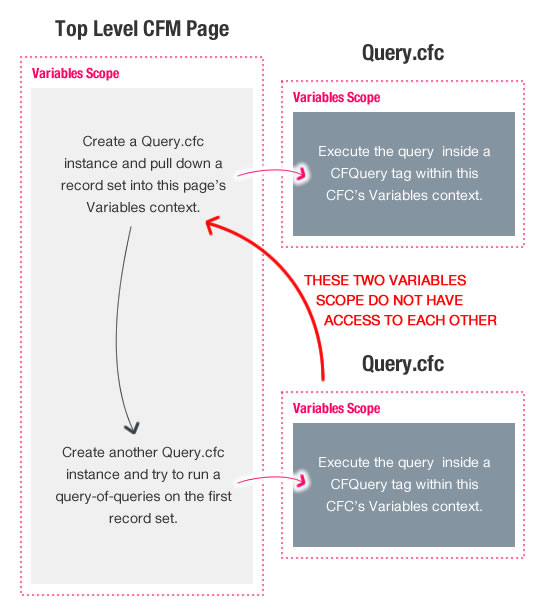
This is where the CFQuery tag and the Query.cfc component really diverge - they have completely different execution contexts. In order to run a query-of-queries in the Query.cfc ColdFusion component, you have to pass the necessary in-memory tables into the Query.cfc context before you execute the in-memory SQL.
To do this, you simply have to understand how the Query.cfc (and any of the "script-based" ColdFusion tags) work. Within their init() methods, they copy the named arguments into the local Variables scope:
public com.adobe.coldfusion.query function init()
{
	if(!structisempty(arguments))
	{
		structappend(variables,arguments,"yes");
	}
	return this;
}
As you can see, the init() method of the Query.cfc simply appends the arguments scope onto the Variables scope. This means that in order to inject our original friends record set into the query-of-queries execution context, we simply have to pass it in as a named argument to the second Query.cfc instance:
<!--- Build a query for getting all friends. --->
<cfset getFriends = new Query(
	sql = "SELECT id, name FROM friend",
	datasource = "testing"
	) />

<!--- Get the query results. --->
<cfset friends = getFriends.execute().getResult() />

<!--- Dump out the current result set. --->
<cfdump
	var="#friends#"
	label="ALL Friends"
	/>


<!--- ----------------------------------------------------- --->
<!--- ----------------------------------------------------- --->
<br />
<!--- ----------------------------------------------------- --->
<!--- ----------------------------------------------------- --->


<!---
	Now, let's query our previous query, to get all of the friends
	whose name ends with "a".

	NOTE: This time, we are passing the [friends] query as a named
	argument into the second query object. This way, it will be
	injected into the encapsulated VARIABLES scope and will be
	available in the SQL execution context.
--->
<cfset getAFriends = new Query(
	sql = "SELECT * FROM friends WHERE name LIKE '%a'",
	dbtype = "query",
	friends = friends
	) />

<!--- Get the query results. --->
<cfset aFriends = getAFriends.execute().getResult() />

<!--- Dump out the current result set. --->
<cfdump
	var="#aFriends#"
	label="[%A] Friends"
	/>
As you can see, when we instantiate the second Query.cfc instance, we pass in our original friends variable as a named argument. This time, when we run the code, the friends query is available to the second, encapsulated CFQuery tag. Running the above code gives us the following output:
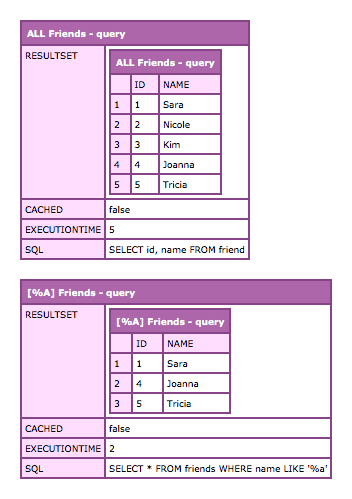
This time, the second CFQuery tag - the one executing our ColdFusion query-of-queries - has access to the friends query stored in the Query.cfc's local Variables scope.
As far as I'm concerned, the CFQuery tag is far easier to use, read, and maintain than ColdFusion 9's new script-based Query.cfc ColdFusion component. I don't really see why anyone would want to jump through these kinds of hoops. That said, you can still use all of the features of the CFQuery tag, including ColdFusion query-of-queries, within the Query.cfc component; you just need to understand how everything is being executed.

Reader Comments
Okay . . . where do I get the CFQuery.cfc?
@Lola,
It's buried in your ColdFusion install somewhere. I'm running a multi-instance install and mine was at (broken up on a few lines):
JRUN/servers/cf9-main/cfusion.ear/cfusion.war/
-- WEB-INF/cfusion/
-- CustomTags/com/adobe/coldfusion/Query.cfc
It's basically in the custom-tag path so that it's in one of the places ColdFusion will search for components that aren't in the local folder.
Good post Ben. Taking the whole query part out of it (just looking at what happened and why) - this is a perfect example of injecting a dependency.
The way Adobe handled it within this particular CFC I find quite elegant.
@Michael,
Yeah, I think they dealt with it as best as could be.
Ben, thanks for the very clear and concise post.
As for jumping thru hoops, the more I use cfscript, the more I prefer it for relatively complex logic. For me there is simply less visual noise on the page. In this case, I like having the capability to remain in cfscipt rather than mixing tags and script as necessary when I need to process a few queries along the way.
@Nando,
I can believe that. I use JavaScript all the time, which is, obviously, script based. And, I love it. When it comes to ColdFusion, however, I just can't get into the script-based versions of things. Maybe I just have too much history with the language.
One of these days, I'll try to use CF9 for a site and just see how an all-script diet suits me.
Thanks for the variable context explanation Ben, couldn't find any good info on this elsewhere!
Ben, have you tried using CFWheels? I'm learning it as my first MVC framework and liking it, although the learning curve for building a site from scratch is steep.
Anyway the reason I mention it is that it's not all-or-nothing with cfscript, I'm using what I've heard is the common approach of using cfscript in models and controllers, and cf tags in views.
I think this approach makes it easier to code complex business logic as @Nando mentioned, but keeps the views designer and WYSIWYG-editor friendly by using tags only.
Thank you Ben for once again taking the time to provide valuable information to the CF community in a very clear way.
You have become the CF knowledge base (to say the least).
The truth is that most of the time, when I get an error that I can't figure out I Google the error + "Ben Nadel". I've got a feeling I'm not the only one doing that.
You know, one of these days you should write "The Ben Nadel Bible".
@Ben
I've used the cfquery component to great effect when writing my own model component. One of the frustrations in the past has been that you can't use cfqueryparam inside cfscript. The cfquery component allows you to include not just indexed parameters, but even named parameters. This is an incredible tool for building queries on the fly.
@Chris T,
I haven't tried CFWheels yet; but, I have definitely adopted a partial approach. We use CFScript for all of our controllers and service-oriented components. We still use CF Tags for our "gateways" since they just make writing SQL too easy to abandon. And, of course, our Views are in tags as well.
@Rolando,
Ha ha, thanks my man!!
@Paul,
What I would love is if the addParam() method returns a reference to the query object itself. Then, I could get rid of the intermediary variable that has to store the query before it is executed.
Right now, addParam() returns void; but, if it returned "this", the we could have code that looks like this:
... and no intermediary variable.
I guess I could just patch it myself; but, as I was saying above, I mostly use CFQuery tags for my queries anyway.
@Ben
Having addParam and other functions that currently return void return references to the objects on which they operate would be nice. I'll admit that I appreciate how jQuery tends to do that (e.g., attr(attribute, value)) where the relevant inherent functions do not (c.f., setAttribute(value)).
@Paul,
Yeah, I think jQuery kind of ruined for everybody else :)
Thanks master, you are my savior!!