Adding Secure Publishing To The PubNub Realtime Messaging Workflow
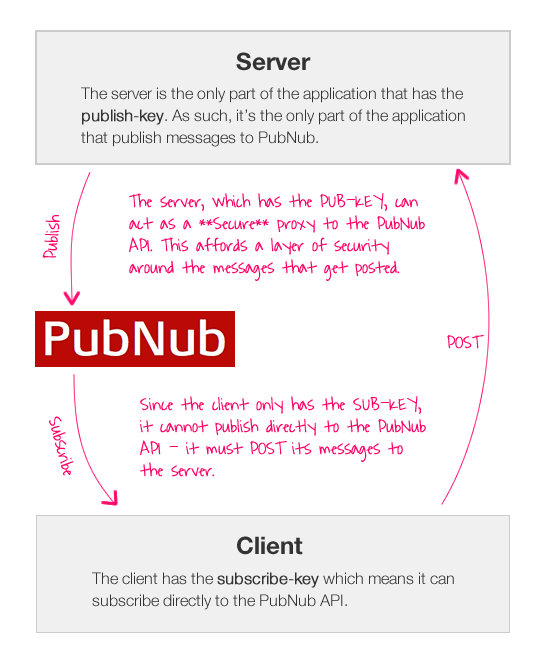
Last week, I took a look at PubNub, the cloud-based realtime messaging platform. In my first experiment, I demonstrated that PubNub enabled bi-directional communication directly between client devices within your application. This is really cool because it doesn't require any server-side technology; but it publicly exposes your "publish key" which means you lose the ability to moderate the messages being broadcast within your application. Today, I wanted to look at creating a server-side proxy that would afford a layer of security and moderation on top of the PubNub publishing API.
On the client-side, the PubNub JavaScript library creates the PUBNUB namespace. This namespace is configured using the DOM element with ID, "pubnub". In the previous demo, this DOM element had two custom attributes:
- pub-key="....."
- sub-key="....."
The sub-key attribute allows the client to subscribe directly to the PubNub API. The pub-key, allows the client to publish directly to the PubNub API. The existence of both of these attributes provide client-to-client communication. If we remove the pub-key from the DOM element, however, the client loses the ability to publish directly to the PubNub API. Instead, it will have to POST messages to a proxy that, in turn, has the ability to publish directly the PubNub API.
NOTE: At the time of this writing, PubNub had debugging code in place that allowed for a throttled number of messages to be published to the API without a valid publish key (~ 1 per minute). This is in place for testing purposes and will be removed shortly).
To explore this workflow, I created a small ColdFusion application that would require the user to login before they could broadcast messages within the application. Once logged-in, however, the client can subscribe directly to the PubNub API and post messages to the ColdFusion application which will act as a sever-side proxy to the publish API.
Let's take a look at the Application.cfc ColdFusion framework component. This simply sets a cached instance of the PubNub.cfc and initializes the user's session.
Application.cfc
<cfcomponent
	output="false"
	hint="I define the application settings and event handlers.">

	<!--- Define the appliation settings. --->
	<cfset this.name = hash( getCurrentTemplatePath() ) />
	<cfset this.applicationTimeout = createTimeSpan( 0, 0, 20, 0 ) />
	<cfset this.sessionManagement = true />
	<cfset this.sessionTimeout = createTimeSpan( 0, 0, 10, 0 ) />

	<!--- Map the COM library for the examples. --->
	<cfset this.mappings[ "/com" ] = (getDirectoryFromPath( getCurrentTemplatePath() ) & "../../com/") />

	<!--- Define the request settings. --->
	<cfsetting
		showdebugoutput="false"
		requesttimeout="20"
		/>


	<cffunction
		name="onApplicationStart"
		access="public"
		returntype="boolean"
		output="false"
		hint="I initialize the application.">

		<!---
			Create and cache an instance of our PubNub component.
			This will be used to publish messages to the PubNub
			API as the server-side proxy to the client.
		--->
		<cfset application.pubnub = createObject( "component", "com.PubNub" ).init(
			publishKey = "pub-7b6592f6-4ddb-4af6-b1b3-0e74cefe818d",
			subscribeKey = "sub-f4baaac5-87e0-11e0-b5b4-1fcb5dd0ecb4"
			) />

		<!--- Return true so the application can load. --->
		<cfreturn true />
	</cffunction>


	<cffunction
		name="onSessionStart"
		access="public"
		returntype="void"
		output="false"
		hint="I initialize the session.">

		<!---
			Set up the initial user. In order for the user to be
			able to post messages to the channel, they will have
			to be logged-in.
		--->
		<cfset session.user = {
			isLoggedIn = false,
			uuid = createUUID(),
			name = ""
			} />

		<!--- Return out. --->
		<cfreturn />
	</cffunction>


	<cffunction
		name="onRequestStart"
		access="public"
		returntype="boolean"
		output="false"
		hint="I initialize the request.">

		<!--- Check to see if we need to re-initialize the app. --->
		<cfif structKeyExists( url, "init" )>

			<!--- Manually restart the application and session. --->
			<cfset this.onApplicationStart() />
			<cfset this.onSessionStart() />

		</cfif>

		<!--- Return true so the request can load. --->
		<cfreturn true />
	</cffunction>

</cfcomponent>
For this demo, the user's logged-in status is tracked with a simple, session-based boolean value.
NOTE: Typically, I would use the "demo" account to illustrate PubNub behavior. In this case, however, that was not possible. From what I can tell, you cannot get the demo account to ever reject a publish resources even when the pub-key is missing from the client.
Now that you see how the user is being tracked, let's take a quick look at the server-side proxy that will act as our launchpad for PubNub message broadcasting.
Publish.cfm (Our Server-Side Publish Proxy)
<!---
	Since the client has to publish by going THROUGH the ColdFusion
	application, we can add any kind of server-side security that we
	need to. In this case, we are just going to make sure the user is
	logged into the system.
--->
<cfif !session.user.isLoggedIn>

	<!--- Not authorized! --->
	<cfheader
		statuscode="401"
		statustext="Not Authorized"
		/>

	<h1>
		404 Not Found
	</h1>

	<!--- Halt processing of this template. --->
	<cfexit />

</cfif>


<!--- ----------------------------------------------------- --->
<!--- ----------------------------------------------------- --->


<!--- Param the form variables. --->
<cfparam name="form.uuid" type="string" />
<cfparam name="form.text" type="string" />

<!--- Construct the message object. --->
<cfset message = {} />
<cfset message[ "uuid" ] = form.uuid />
<cfset message[ "text" ] = form.text />


<!--- Publish the message to PubNub. --->
<cfset application.pubnub.publish(
	channel = "coldfusion:secure_publish",
	message = message
	) />

<!--- Return a success response. --->
<cfcontent
	type="application/json"
	variable="#toBinary( toBase64( 1 ) )#"
	/>
As you can see, the first thing we do in this server-side proxy is check to see if the user is logged-in. We are keeping it very simple for the demo; but you can see that using a server-side proxy affords a layer of security and moderation around the messages that get broadcast within the application. In addition to checking logged-in status, I could also examine the message content, interact with the user's account, or perform any number of other business-logic-related tasks that might surround publication.
Now, let's take a look at the client-side code to see how the publish/subscribe workflow is being pulled together.
Index.cfm (The Client-Side Code)
<cfoutput>

	<!DOCTYPE html>
	<html>
	<head>
		<title>Secure PubNub Publish ColdFusion Demo</title>

		<!-- jQuery. -->
		<script type="text/javascript" src="./linked/jquery-1.6.1.min.js"></script>

		<!--
			Include PubNub from THEIR content delivery netrwork. In
			the documentation, they recommend this as the only way to
			build things appropriately; it allows them to continually
			update the security features.

			The ID and the SUB-KEY attributes of this script tag are
			used to configure the PUBNUB JavaScript wrapper.

			Notice that I am including the SUB-KEY but that I am NOT
			including the PUB-KEY. This will allow the client to
			subscribe to the PubNub API, but will refurese any
			attempts to publish directly to the PubNub API.
		-->
		<script
			id="pubnub"
			type="text/javascript"
			src="http://cdn.pubnub.com/pubnub-3.1.min.js"
			sub-key="sub-f4baaac5-87e0-11e0-b5b4-1fcb5dd0ecb4"
			ssl="off">
		</script>

	</head>
	<body>

		<h1>
			Secure PubNub Publish ColdFusion Demo
		</h1>

		<h2>
			Messages:
		</h2>

		<ol class="messages">
			<!--- This will be populated dynamically. --->
		</ol>

		<!---
			Check to see if the user is logged-in. If not, they will
			not be able to submit to the server.
		--->
		<cfif session.user.isLoggedIn>


			<form class="message">

				<input type="hidden" name="uuid" value="#session.user.uuid#" />

				<input type="text" name="text" value="" size="40" />

				<button type="submit">
					Send Message
				</button>

			</form>

			<p>
				<a href="./logout.cfm">Log Out</a>.
			</p>


		<cfelse>


			<!---
				The user is not logged-in. Hide the form and only
				show them a way to login.
			--->
			<p>
				You must <a href="./login.cfm">Log In</a> in order
				to post messages.
			</p>


		</cfif>

		<p>
			<em>
				<strong>Note:</strong> At the time of this writing,
				PubNub had some temporary debugging in place that
				allowed a throttled number of publish requests to go
				through with "invalid" keys. This is for testing and
				is something they will be removing (or so I'm told).
			</em>
		</p>


		<!--- --------------------------------------------- --->
		<!--- --------------------------------------------- --->


		<script type="text/javascript">

			// Cache DOM references.
			var dom = {};
			dom.messages = $( "ol.messages" );
			dom.form = $( "form.message" );
			dom.uuid = dom.form.find( "input[ name = 'uuid' ]" );
			dom.text = dom.form.find( "input[ name = 'text' ]" );


			// Override the form submission. Since the user cannot
			// publish to the PubNub channel without a known PUB-KEY,
			// they will have to publish by-proxy, going through our
			// secure ColdFusion API.
			dom.form.submit(
				function( event ){

					// Prevent the default submit action.
					event.preventDefault();

					// Publish through the API.
					$.ajax({
						type: "post",
						url: "./publish.cfm",
						data: {
							uuid: dom.uuid.val(),
							text: dom.text.val()
						},
						dataType: "json",
						success: function(){

							// Clear the message text and re-focus
							// it for futher usage.
							dom.text
								.val( "" )
								.focus()
							;

						},
						error: function(){

							// The user is probably not logged-in.
							alert( "Something went wrong." );

						}
					});

				}
			);


			// I add the incoming messages to the UI.
			function appendMessage( message ){

				// Create a new list item.
				var messageItem = $( "<li />" )
					.attr( "data-uuid", message.uuid )
					.text( message.text )
				;

				// Add the message to the current list.
				dom.messages.append( messageItem );

			}


			// Subsribe to the appropriate PubNub channel for
			// receiving messages in this secure application.
			PUBNUB.subscribe({
				channel: "coldfusion:secure_publish",
				callback: appendMessage
			});

		</script>

	</body>
	</html>

</cfoutput>
In the Head of this document, we are using the PubNub JavaScript library to both create and configure the PubNub namespace. As part of this configuration, however, we are including the sub-key and excluding the pub-key. As I explained earlier, the exclusion of the pub-key prevents the client from publishing directly to the PubNub API. If the client did try to publish a message, PubNub would return the following response:
[ 0, "Invalid Key." ]
With the pub-key missing, the client-side code has no choice but to use the server-side proxy as its only means of publication.
Login.cfm / Logout.cfm
These pages simply toggle the session-based login boolean, so I won't bother showing them here. If you want to see them, you can look at the PubNub.cfc project. I have added all of this code as an example within the Github repository.
Client-to-client communication is very cool; but in a many-to-many user graph, a publicly-know publish key can present a security problem. We can easily increase the level of security within our realtime application by requiring a server-side proxy for all broadcast requests. This keeps our publish key private and allows us to implement any number of security measures around realtime communications.
Want to use code from this post? Check out the license.

Reader Comments
Thanks Ben, very helpful. I followed your posts on Pusher a while back and implemented it in my portal framework. Now that you've looked at PubNub as well, which of the two services do you prefer? Did you notice any advantages with over the other in terms of performance? I know PubNub uses http streaming while Pusher uses sockets.
Interested in your take.
@Mario,
That's a good question. A couple of people have asked me about the different platforms. I don't really have a good sense of pros and cons. One thing that I do think about, however, is the Key stuff.
In PubNub, I have my one set of publish and subscribe keys per account. In Pusher, the thing that it really cool is that I create "Application" inside of my account. Then, each application gets its own set of keys. This means that I could create temporary apps with keys and then destroy those apps and not worry about the keys again.
As far as I can tell, I don't see a way to even reset my PubNub keys. So, take this blog post, for example; I had to put my actually pub/sub keys into the code in order to demo how it works. Well, what happens when I got to create an actual production site? I wouldn't feel comfortable using keys that I *also* put in a blog post; as such, I'd have to create a new PubNub account just for that project.
And, it seems that I'd have to create a new PubNub account for *each* project in which I wanted to use the PubNub platform.
So, from a key-standpoint, I like the way Pusher does it. But, from a technical standpoint, I think PubNub is probably a bit easier to implement. From a performance standpoint, I'm not sure that I notice any significant difference.
Ben,
The html5 embed tag is a Netscape nonstandard. It is largely supported tag by other Browsers for sound and video clips. Html5 has a keygen tag. It specifies a key pair generator field used for forms. The embed tag does not have an attribute for the keygen yet but I bet it will.
I have been able to embed a compete web site. Sub Domain, written in PhP with an SQL Data Base, swtchelp.com to alhanson.com. It is in the menu as embedded swtc site. This means a ColdFusion site can be embedded it to html5 site. They both could to run parallel to each other.
I have been trying to pass a variable from the html5 code to the embedded page code, but some how I can seem to do this. Dumb me. I think this is a good thing. The solution would be to have 2 PhP or ColdFusion pages seamlessly embedded passing the variable between them. With having a keygen attribute in the embed tag would create a key at the session layer of the OSI model the key could be passed to the embedded page to create a client to client session key - the Marc Andreessen "te.la-port" to the cloud. So i will admit Marc is a genius. What more could he want? Everyone to know the boy that fell to Earth is his biological father? Who the [i] in the iPhone is? Well secret are secret when you declare them like variables.
A am curious - can we just create a separate channel for each client and maintain all communication through the server, as a proxy?
I know this article is over a year old, but since this article was published, PubNub does support multiple apps per account with a unique set of keys per app.