
Extending EventEmitter In Order To Create A Response Proxy In Node.js
I've been doing a lot of experimenting with Node.js lately and one thing that I thought might be useful would be some additional hooks into the various parts of the HTTP response lifecycle. When you create an HTTP server, each request provides a response stream to which you can write data; but, other than hooking into the "finish" event on the response, Node.js doesn't appear to offer any other events - at least none that I could find (the Node.js documentation is decidedly sparse on the matter). In order to learn more about events in Node.js, I wanted to see if I could use the EventEmitter class in order to create a response Proxy object that would publish more events during the HTTP response lifecycle.
The ResponseProxy() class that I created extends the EventEmitter class using prototypal inheritance. It exposes a smaller API but a more robust event set. In particular, I chose to publish the following four events during the HTTP response lifecycle:
commitStart - Fires right before the headers are flushed to the client (which commits the response).
commitEnd - Fires right after the headers have been flushed to the client.
requestStart - Fires right before any content has been written to the response output.
requestEnd - Fires right before the response is closed.
In order to make these events possible, each ResponseProxy() instance has to manage the way in which the response stream is used. In particular, it has to be very explicit about when the headers are written and when the underlying stream is actually closed. To do this, the ResponseProxy() class exposes the following methods:
end( [ data [, encoding ]] ) - Closes the response with an optional output write.
getResponse() - Returns the underlying response object.
setHeader( name, value ) - Sets an HTTP header.
setStatus( code [, text ] ) - Sets the HTTP response code.
write( data [, encoding ] ) - Writes data to the output.
Ultimately, these methods just proxy the underlying HTTP response stream. But, in doing so, we can wrap event publication around the first "write" action and event publication around the "end" action.
Let's take a look at the code. In the following Node.js HTTP server, notice that every single request results in a new ResponseProxy() instance. Also notice that the response is altered both by direct calls as well as by event listeners.
Server.js - HTTP Server
// Include core libraries.
var http = require( "http" );
var events = require( "events" );


// ---------------------------------------------------------- //
// ---------------------------------------------------------- //
// ---------------------------------------------------------- //
// ---------------------------------------------------------- //


// I am the response proxy constructor.
function ResponseProxy( response ){

	// Initialize super class properties. This will make sure that
	// two instances of the response proxy don't accidentally share
	// and event listeners.
	events.EventEmitter.call( this );

	// Store the original response object.
	this._response = response;

	// Set up the default status code.
	this._status = {
		code: 200,
		text: "OK"
	};

	// Set up the default headers collection.
	this._headers = {
		"content-type": "text/plain"
	};

	// I determine whether or not the headers have been flushed.
	this._isCommitted = false;

	// Return this object reference.
	return( this );

}

// Extend the EventEmitter class allowing us to use on() and emit()
// methods like the underlying response.
ResponseProxy.prototype = new events.EventEmitter();


// I commit the response to the client. This will flush the headers
// and flag the response as committed.
ResponseProxy.prototype._commitResponse = function(){

	// Raise the commit-start event - this will give people one last
	// hook for setting headers before they are flushed.
	this.emit( "commitStart" );

	// Flag the response as committed.
	this._isCommitted = true;

	// Write the status code.
	this._response.writeHead(
		this._status.code,
		this._status.text,
		this._headers
	);

	// Raise the commit-end event. At this point, no one can write
	// anymore headers to the response.
	this.emit( "commitEnd" );

	// Raise the response-start event. This will be the first
	// opporunity for someone to write to the output.
	this.emit( "responseStart" );

};


// I end the current response, flushing any headers and additional
// content that have not yet been committed.
ResponseProxy.prototype.end = function( data, encoding ){

	// Check to see if the current response has been committed.
	// If not, then we have to commit before we end the response.
	if (!this._isCommitted){

		// Commit the response.
		this._commitResponse();

	}

	// Check to see if any data was send with the end() request.
	// If so, we want to write it manually - this way, we can still
	// put a hook around the underlying end() request.
	if (data){

		// Write the last piece of data.
		this._response.write( data, encoding );

	}

	// Raise the response-end event. This will provide one last
	// hook for content to be written to the response.
	this.emit( "responseEnd" );

	// End the event.
	this._response.end();

	// Return this object reference for method chaining.
	return( this );

};


// I provide access to the underlying response.
ResponseProxy.prototype.getResponse = function(){

	// Return the underlying response.
	return( this._response );

};


// I add the given header name/value pair to the header collection.
ResponseProxy.prototype.setHeader = function( name, value ){

	// Store the header.
	this._headers[ name ] = value;

	// Return this object reference for method chaining.
	return( this );

};


// I set the given status code and text.
ResponseProxy.prototype.setStatus = function( code, text ){

	// Set the status code.
	this._status.code = code;
	this._status.text = (text || "");

	// Return this object reference for method chaining.
	return( this );

};


// I write data to the response, flushing any headers that have not
// yet been committed.
ResponseProxy.prototype.write = function( data, encoding ){

	// Check to see if the current response has been committed.
	// If not, then we have to commit before we write.
	if (!this._isCommitted){

		// Commit the response.
		this._commitResponse();

	}

	// Write the data to the underlying response.
	this._response.write( data, encoding );

	// Return this object reference for method chaining.
	return( this );

};


// ---------------------------------------------------------- //
// ---------------------------------------------------------- //
// ---------------------------------------------------------- //
// ---------------------------------------------------------- //


// Create the HTTP server.
var server = http.createServer(
	function( request, response ){


		// Create a new response proxy for our response.
		var responseProxy = new ResponseProxy( response );


		// Bind the commit-start event so we can add one more header
		// before the content is flushed.
		responseProxy.on( "commitStart", function(){

			// Add one more header.
			this.setHeader( "Commit-Start", "Test event hook" );

		});

		// Bind to the response-start event so we can be the first
		// people to write to the output.
		responseProxy.on( "responseStart", function(){

			// Write the very first output data.
			this.write( "I am the very first output!\n" );

		});

		// Bind to the response-end event so we can write more
		// data to the output before the connection is closed.
		responseProxy.on( "responseEnd", function(){

			// Write one more bit of output.
			this.write( "I am the last possible output!\n" );

		});


		// -- Start using proxy directly. -- //


		// Set a header.
		responseProxy.setHeader( "Explicit-Set", "Header value." );

		// Write some output.
		responseProxy.write( "This is the inline-write.\n" );

		// End the response.
		responseProxy.end( "Ending.\n" );


	}
);

// Point the server to listen to the given port for incoming
// requests.
server.listen( 8080 );


// ---------------------------------------------------------- //
// ---------------------------------------------------------- //


// Output intialization confirmation message.
console.log( "HTTP sever is running on port 8080." );
Notice that our ResponseProxy() event listeners allow us to alter the headers right before the response is committed and to write output right before the response is closed. When we boot up the above HTTP server and make a request, we get the following response:
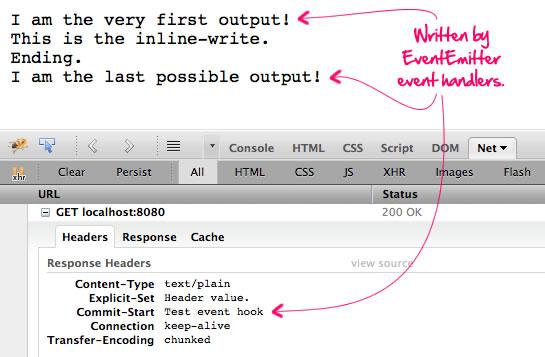
As you can see, our event-based publication and subscription functionality provided by the inherited EventEmitter class allows us to augment the response based on the response lifecycle in addition to explicit writing, flushing, and closing. Since the EventEmitter class is being inherited, however, it is critical that the super constructor - EventEmitter - be invoked during the initialization of each ResponseProxy() instance. This will prevent two proxy objects from accidentally sharing the same set of event listeners (theoretically).
In a simple request / response context, something like this would probably be unnecessary. However, if you were building a Node.js HTTP framework, I can easily see some powerful functionality provided by a more robust set of response lifecycle hooks. If nothing else, this helped me get more comfortable with the core event model being used in Node.js.
Want to use code from this post? Check out the license.

Reader Comments
Ben, I see you're starting to dive into Node these days. As much as I love CF, I honestly haven't used it since picking up Node a couple of months back. You should check out the Express and Geddy frameworks. Also check out Supervisor for node. Supervisor will monitor the node process and relaunch if it fails or reload if the source changes.
requestStart, requestEnd, keep it up and you'll have an application.cfc on node in no time :)
@Chris,
It's definitely a cool server technology. I don't see it replacing CF for me (at least not till I know a ton more about it). Supervisor sounds cool. At Nodejitsu (where I took my class over the weekend), they use a module they built called "Forever", which I think is the same concept - it monitors child processes and re-launches them if they die.
@Nelle,
I'd be lying if that wasn't *exactly* what I was thinking ;)
If you haven't already give Socket.io (http://socket.io) a look see - combined with Express, the two make a formidable web tech stack.
@Brian,
I haven't used Socket.io directly; but, I did play around with NowJS, which, I believe, uses Socket.io under the covers. I think it's all part of the socket-based realtime communication.... which is wicked awesome :D
I haven't looked at Express yet, either.