
Years ago, in my introduction to xmlSearch() and XPath in ColdFusion, I talked about the / and // expressions. As far as describing node locations, both of these expressions have a different meaning depending on where they are located within the greater XPath value. Up until now, however, I had never thought too deeply about the use of these expressions in an xmlSearch() call that didn't originate at the root XML element. As is turns out, sub-tree searching has few interesting expression-based caveats.
Before we get into the sub-tree searching, let's just quickly recap how / and // work in relation to the root node. When / is used at the beginning of a path:
/a
... it will define an absolute path to node "a" relative to the root. As such, in this case, it will only find "a" nodes at the root of the XML tree.
When // is used at the beginning of a path:
//a
... it will define a path to node "a" anywhere within the XML document. As such, in this case, it will find "a" nodes located at any depth within the XML tree.
These XPath expressions can also be used in the middle of an XPath value to define ancestor-descendant relationships. When / is used in the middle of a path:
/a/b
... it will define a path to node "b" that is a direct descendant (ie. a child) of node "a".
When // used in the middle of a path:
/a//b
... it will define a path to node "b" that is any descendant of of node "a".
Ok, so that brings us back up to speed with how / and // expressions can be used with root-relative XPath values; but, what about when we have an existing reference to a sub-node of an XML tree? How do these expressions work?
As it turns out, they work exactly the same - but, in order to define a "relative" path you have to use dot-notation. ColdFusion's xmlSearch() function takes a node and an XPath value. That XPath value adheres to the same rules thats we discussed above. And, if you want to use the "in the middle of a path" concept, you have to start your XPath value with a "." (period).
So, given some sub-node, "x", the XPath:
//y
... will still find any node, "y", located anywhere within the XML tree. But, the XPath:
.//y
... will find any node, "y", that is a descendant of the node "x." In other words, preceding the "//" expression with a "." tells the XML search engine to execute the search relative to the current node reference.
To illustrate this concept, take a look the following code. In it, we're going to grab a sub-node reference and then perform a few searches using "//" and ".//" notation.
<!---
	Define our XML node tree. Notice that this is going to have
	a bunch of nested nodes of the same type; this way, we can see
	how relative pathing will work.
--->
<cfxml variable="data">

	<nodes id="1" level="root">

		<nodes id="2" level="1">

			<nodes id="3" level="2">

				<nodes id="4" level="3">

					<node />

				</nodes>

				<nodes id="5" level="3">

					<node />

				</nodes>

			</nodes>

		</nodes>

		<nodes id="6" level="1">

			<nodes id="7" level="2">

				<nodes id="8" level="3">

					<node />

				</nodes>

				<nodes id="9" level="3">

					<node />

				</nodes>

			</nodes>

		</nodes>

	</nodes>

</cfxml>


<!--- ----------------------------------------------------- --->
<!--- ----------------------------------------------------- --->


<!---
	Now, get a reference to the first level-2 nodes
	element. Our subsequent searches will be performed
	in relation to that one.

	NOTE: This is the node with ID: 3.
--->
<cfset searchNode = data.nodes[ 1 ].nodes[ 1 ].nodes[ 1 ] />


<!--- ----------------------------------------------------- --->
<!--- ----------------------------------------------------- --->


<!---
	Now that we have a base node for searching, we are going to
	search for all NODES using both a dot-relative and
	non-dot-relative approaches.
--->

<!--- The first uses tree-wide location -- //. --->
<cfset nodes = xmlSearch( searchNode, "//nodes" ) />

<!--- Output the results. --->
<cfdump
	var="#nodes#"
	label="Using // Notation"
	/>


<br />


<!--- The first uses LOCAL tree-wide location -- .//. --->
<cfset nodes = xmlSearch( searchNode, ".//nodes" ) />

<!--- Output the results. --->
<cfdump
	var="#nodes#"
	label="Using .// Notation"
	/>


<br />


<!--- ----------------------------------------------------- --->
<!--- ----------------------------------------------------- --->


<!---
	And, just as a sanity check, we'll use a double-slash a
	sub-path of a greater XPath value. This should be the same
	thing as the local-relative pathing.
--->
<cfset nodes = xmlSearch(
	data,
	"/nodes[ 1 ]/nodes[ 1 ]/nodes[ 1 ] // nodes"
	) />

<!--- Output the results. --->
<cfdump
	var="#nodes#"
	label="Using // In-Path"
	/>
When we run the above code, comparing the use of "//" and ".//" XPath expressions in node-relative xmlSearch() calls, we get the following output:
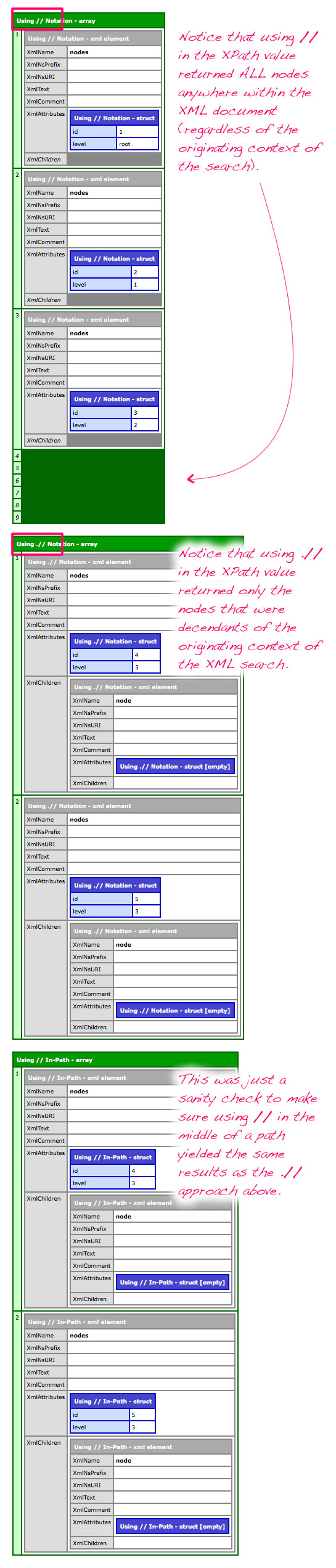
As you can see, when performing a node-relative xmlSearch() call in ColdFusion, you have to prefix the XPath value with "." to make the expression "//" location-relative; otherwise, the given XPath value will operate as if you were searching from the root node.

Reader Comments
That is excellent! I *just* ran into a need for that very syntax.
@Steve,
Awesome then - perfect timing :)
Somewhat reminiscent of *NIX, with . representing the current [folder/node].
Very useful to know. Even though you can set up a schema so that a certain node can always be found in a certain place in a document (so that absolute XPath references seem to be appropriate), it's probably better to look for a node based on where the business requirement says it should be rather than where the current schema says it could be found. Someone coming along behind you may need to update the schema ...
@Dave,
Yeah, very much like that. You can use "." for current node and ".." to get to the parent node, very much like a file path.
I've heard of the schema being used to set variables (I believe Adam Tuttle mentioned it once in a comment for high-ascii values or something). I have that concept filed away for further investigation.
@Ben,
I was thinking of it from a more abstract perspective. For example, you might have an XML document that contains NCAA teams, with a top-level level* element, child conference elements, and child team elements. (So you could find a team with /level/conference/team.)
You want to display all teams within a conference, so if you are looking at a conference node, it's tempting to look for ./team to get all teams in the conference.
However, that only works as long as team is a direct child of conference. If the conference expands to include divisions, and teams are now children of divisions (/level/conference/division/team), ./team doesn't work at the conference level, but .//team does.
*For those familiar with NCAA sports, yes, I know the top level in the hierarchy is Division, but then we may run into problems distinguishing Division (I/II/III) from Division (East/West).
Excellent...
You just gave me, exactly what I have been looking for...
I do have 1 more questions as well...
What is the meaning of ".." on xPath?
Does /a/../z this equals to below path(s)?
1. /a/b/z [or] /a/c/z [or] /a/d/z ?
2. /a/b/c/d/z [and] /a/b/c/d/e/f/z ?
Thanks for the tips, i'm using XPath in Java, but it works the same way.
Really clear and helpful!
Thanks Ben, another useful post -- I was scratching my head wondering why subqueries "weren't working".
hey ben, i want get my current node tag and also want the root node tag withing. So, how can i fix it.. !
@Ben,
my question is that i want the current node with its tag and its parent node. i just want only that data. So, give me the solution for that. and remember solution is working on " xpath 1.0 " .
@Daxesh,
I am not sure I understand the question about the current node. If you already have a reference to the current node, why would you need to query for it? As for parent node, I believe that you should be able to use "../". Also, there is an xmlParent reference that shows up in the ColdFusion XML document:
www.bennadel.com/blog/1493-Use-XmlParent-To-Get-The-Parent-Node-In-An-XML-Document-In-ColdFusion.htm
... but it won't show up in the dump of the document.
actually this is xml as for example:
abc
a x1 /a
b x2 /b
c x3 /c
/abc
and i want the answer like this for above xml:
abd
a x1 /a
/abc
with using xpath 1.0 !
Thank you. This helped me a lot :)
this post saved my life! thanks for sharing your expertise!
Thanks This saved my code
Thank you so much for this post!