
In jQuery, we have the ability to make one-off AJAX requests with the $.ajax() method, or any one of its short-hand versions (ie. get(), post(), etc.). We also have the $.ajaxSetup() function which allows us to define globally-shared properties for all the AJAX requests made within a single page. Up until yesterday, I had thought that $.ajaxSetup() worked in a substitution-only manner; but, according to Cody Lindley it appears that the "data" value is actually accumulative.
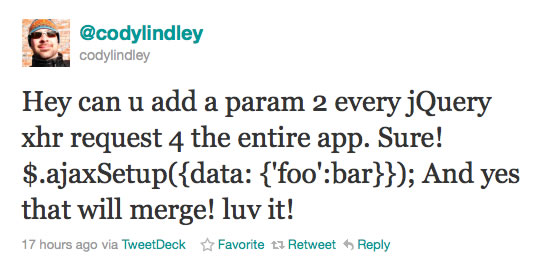
Once I saw his tweet, I needed to see the accumulation for myself; so, I set up this quick little demo. In the following code, you'll see that I am using two $.ajaxSetup() calls followed by an $.ajax() request.
<!DOCTYPE html>
<html>
<head>
	<title>Using $.ajaxSetup() To Accumulate Data</title>
	<script type="text/javascript" src="./jquery-1.5.js"></script>
	<script type="text/javascript">


		// Set up some default data for jQuery-driven AJAX requests.
		// In general, ajaxSetup() builds the options hash; but when
		// it comes to data, the effect is accumulative.
		$.ajaxSetup({
			data: {
				username: "sakura",
				password: "Hadoken!!!"
			},
			dataType: "jsonp"
		});

		// Add another data item to the global confiruguration.
		$.ajaxSetup({
			data: {
				gameID: "SF"
			}
		});


		// -------------------------------------------------- //
		// -------------------------------------------------- //


		// Now make an AJAX request in which we add additional
		// data points to teh outgoing request.
		$.ajax({
			type: "get",
			url: "./ajax_setup_data.htm",
			data: {
				id: 4,
				name: "Jill",
				gameID: undefined
			},
			complete: function(){
				console.log( "Request complete." );
			}
		});


	</script>
</head>
<body>
	<!-- Intentionally left blank. -->
</body>
</html>
Here, we are building up the data key for our AJAX requests using two different $.ajaxSetup() requests; then, we build up the data key even further at the point of request. When we run this code and examine the requests parameters, we can clearly see that data key is accumulative:
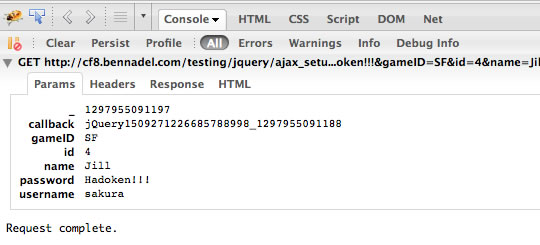
As you can see, this outgoing request includes the data points provided by both $.ajaxSetup() calls and the final $.ajax() request. The one caveat to be aware of, however, is that "undefined" values won't subtract data points. If you look at my $.ajax() request, you'll notice that I am passing in the "gameID" value as an undefined value; however, if you look at the outgoing parameters, you'll see that the gameID is being sent as "SF" - the value provided by $.ajaxSetup(). While undefined values don't get sent in an AJAX request, we can also see that in the case of $.ajaxSetup(), undefined values don't remove an existing data point.
Pretty cool stuff. I've not made too much use of the $.ajaxSetup() method to date; but, knowing how it works can only help me better decide when using it would be appropriate. It's probably time that I start diving back into client-side application architecture.

Reader Comments
This is a very useful feature. I use it all the time with CSRF tokens. You can just append the token to every ajax request, to simply add the feature. Google and all major frameworks recently discovered the even local ajax calls are vulnerable.
"Recently, engineers at Google made members of the Ruby on Rails development team aware of a combination of browser plugins and redirects which can allow an attacker to provide custom HTTP headers on a request to any website. This can allow a forged request to appear to be an AJAX request, thereby defeating CSRF protection which trusts the same-origin nature of AJAX requests."
All in all cool stuff
@Michael,
Wouldn't it be nice if we lived in a world where security wasn't a constant issue :) It's good to know you're making use of this function, though. I need to practice my client-side programming a bit more - see where this kind of thing can really be put to use.
Very usefull! Now it makes sense that ajax calls with jQuery are easier!
It doesn't work if you put query string (like x=hello) in data param within $.ajax(). The 'global' data will get overwritten.
@Florencia,
Glad that was useful :)
@Quincy,
I am not sure I understand what you mean?
@Ben,
Data parameter can either be object or string(query string)
http://api.jquery.com/jQuery.ajax/
If you provide a query string as "data" in $.ajax(), the "data" specified using $.ajaxSetup would not be merged but got overwritten instead.
So if we want to use this "global data" feature, make sure no js libraries you are using will modify the "data" param using a query string. (e.g. jQuery Form Plugin)
Also note that this only works with jQuery 1.5+.
If you are using jQuery 1.4 data in $.ajaxSetup is overwritten, not accumulated.
@Quincy,
As an additional FYI I would like to add that
also produces a query string, something that I found out the hard way now when I tried this.
Should've read the comments here before trying to figure out what was wrong.. :-P
Good post, saved me time confirming this.
Thanks,
Thanks for the nice post. You guys save me lot of time.