
jQuery Does Not Post Undefined Values In AJAX Requests
NOTE: The original premise of this post was WRONG. I talked about NULL values, but demonstrated "undefined" values. This only applies to Undefined values!! Thanks to Justice for this critical catch!!
When you trigger an AJAX request in jQuery, you have the option to supply a "data" object with the request. This data object contains a collection of key-value pairs that get posted as individual form (or url) parameters. There is a small feature of the AJAX request model that took me a little while to get used to; but, now that I understand it, I completely love to use it. What I'm referring to is the fact that Undefined values are not posted during an AJAX request.
To demonstrate what I'm talking about, take a look at the following jQuery page:
<!DOCTYPE html>
<html>
<head>
	<title>Undfined Values And AJAX Requests</title>
	<script type="text/javascript" src="../jquery-1.4.4.js"></script>
</head>
<body>

	<h1>
		Undefined Values And AJAX Requests
	</h1>

	<form>

		<input type="submit" value="Post AJAX" />

	</form>

	<div id="results" style="margin-top: 30px ;">
		<!--- This is where we'll post the AJAX response. --->
	</div>


	<!--- ------------------------------------------------- --->
	<!--- ------------------------------------------------- --->


	<script type="text/javascript">

		// Create an object to hold a number of values that we are
		// going to be posting to the AJAX request handler.
		var clientSideData = {
			a: 1,
			b: 2,
			z: 3
		};


		// Now, bind to the form to trap the submission and handle it
		// via an AJAX request.
		$( "form" ).submit(
			function( event ){

				// Prevent the default form submission.
				event.preventDefault();

				// Now, post varaibles to the request handler.
				//
				// NOTE: As we do this, some of the values we pass
				// will exist, some will not.
				$.ajax({
					type: "post",
					url: "./handler.cfm",
					data: {
						a: clientSideData.a,
						b: clientSideData.b,
						c: clientSideData.c,
						x: clientSideData.x,
						y: clientSideData.y,
						z: clientSideData.z
					},
					dataType: "html",
					success: function( html ){

						// Dump the response into the page.
						$( "#results" ).html( html );

					}
				});

			}
		);

	</script>

</body>
</html>
At the top of my Javascript, you'll notice that I am defining a client-side data structure with a few properties. Then, when I go to trigger my AJAX request, you can see that I am posting both defined (a, b, z) and undefined (c, x, y) properties from said data structure. Now, rather than passing c, x, and y as Undefined values or some sort of empty string or falsey value, jQuery simply ignores them.
To illustrate this, my AJAX request handler - handler.cfm - echoes its own FORM scope:
handler.cfm
<!--- Set the response type. --->
<cfcontent type="text/html" />

<!---
	Simply CFDump out the FORM post values so that we show the
	client which form variables were passed with the AJAX request.
--->
<cfdump
	var="#form#"
	label="Form Post"
	/>
And, when we make the AJAX request, we can clearly see that our undefined values are neither posted to the handler nor echoed back in the response:
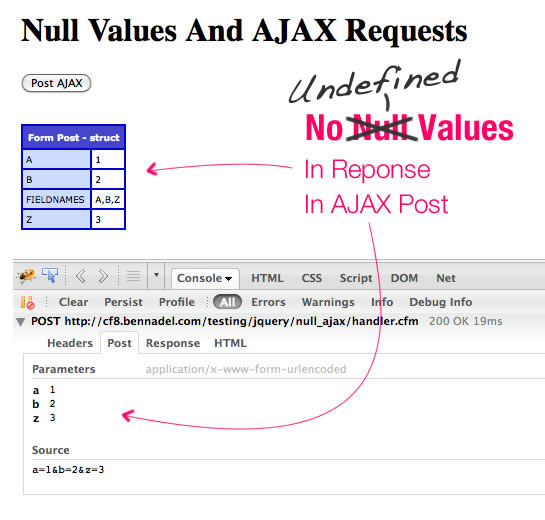
At first, this might feel weird; after all, if you tell jQuery to post something, shouldn't it at least try to post the Key? Once you get used to this concept, however, it becomes really nice to work with. Take, for example, something like the Javascript Geolocation API. When you work with geolocation and the browser, the user has the opportunity to deny geolocation access; and, even if access is granted, there is a chance that the browser won't be able to determine the proper location.
This means that if you need to post geolocation information back to the server, there's a chance that no location information will be available. You could use some complex client-side logic to dynamically build your AJAX data object based on the information that is available; or, you could just post NULL values and live hassle-free.
// Default the location to a undefined coordinate set. This way, we
// have a constant data structure.
var location = {};


// -- Get geolocation... code not shown. Will update the
// -- the location data struct once latitude and longitude
// -- become available.


// Post location to the server. It may be UNDEFINED.
$.ajax({
	...
	data: {
		latitude: location.latitude,
		longitude: location.longitude
	}
	...
});
Here, you can see that the location information starts off as undefined coordinate values that may or may not be updated over time. Then, when we go to post the location, we simply post the local coordinates, not taking into account whether or not they are defined. We leave the "checking" up to jQuery and allow our client-side code to remain as simple as possible.
I know this is just a tiny feature of the jQuery AJAX request model; but, it is a feature that I have come to really like. And, as your client-side code starts to become more robust, the chances that you'll post Undefined values to the server definitely go up. It's nice to know that jQuery doesn't require us to worry about the insignificant details.
Want to use code from this post? Check out the license.

Reader Comments
Hey Ben,
What do you use to annotate your screenshots?
@Anthony,
I just take a screenshot and mark it up in Adobe Fireworks.
There's a plugin for Chrome that allows you to do this as well. Here it is:
https://chrome.google.com/extensions/detail/alelhddbbhepgpmgidjdcjakblofbmce
Not sure if the Chrome version can do the Console (if that exists for this browser), though.
@Lola,
In Firefox, I have a great extension called "ScreenGrab!". It allows you take a screen shot not just of the visible screen, but also of the entire web page (below the fold of the window).
For things like this, though, where I need to get the Console in the picture, I just the OS native functionality. On Mac, I'm rocking SHIFT+CTRL+CMD+3 (that's a finger-twister for you!).
@Anthony: Ben draws all the pretty pink lines and text himself. ;)
@Ben,
Note that in the sample code with screenshot, you did not include *null* values. You included *undefined* values. These are two very different things in JavaScript. In the example of clientSideData.c, c is undefined. What happens if you set clientSideData.c = null (rather than undefined, i.e., setting a value of null to that key rather than never having set any value at all to that key) and then attempt the POST with jQuery?
Cheers,
Justice
Hi @Ben.
Did you notice that AJAX was rewritten from the ground up in jQuery 1.5? Since you used 1.4.4 in your experiment above, you might want to download 1.5 and see if its behavior is upward compatible.
We have 1.5, but the behavior above doesn't change how we have to code. Our callbacks are generally to look up a hand-entered Zip code or NAICS code in a text box, for example. In other words, this.form.Zip.value could be the nullstring, which makes it defined, which means we have to code cfif IsDefined ("URL.Zip") and (Len(URL.Zip) gt 0) anyway.
P.S.: Pre-OS-X slang calls Shift-Command-digit utilites FKEYs. The full screen grab is called FKEY 3, for example. You can also (minimally) annotate your screen grabs in Preview. You can also crop in Preview via select, copy, New from Clipboard. In a pinch, these techniques can be used on any OS X Mac, where you can't necessarily control what 3rd party software is installed.
@Justice,
Hmmm, crap, you're right :( In the middle of a meeting - will clarify afterward. I think I made a big mistake here :)
@Justice,
You are right, by the way; null values get converted to the string, "null" and undefined values get ignored... still in my meeting, but this makes the post mostly irrelevant.
I swear I thought I have tested this. But, I suppose that I do typically use this with undefined values.
Will update shortly.
@Todd,
Pink for the win!!
@Justice,
The post has been updated. Your eagle-eye has once again proved immensely valuable. Thanks for getting my back!
@WebManWalking,
Yeah, I typically have to add some sort of server-side check like isNumeric(). I also use CFParam to default values when acceptable.
Does this still strictly identical with jQuery 1.5 and its AJAX module rewrited or some changes has been made ?
@Pomeh,
I have not had a chance to play with jQuery 1.5 just yet. I think the changed made to $.ajax() in 1.5 had more to do with multiple handler assignments and assignment after-the-fact. I am not sure than any core "behavior" has changed.
http://blog.jquery.com/2011/01/31/jquery-15-released/
@WebManWalking,
I'm especially interested in the Deferred stuff. I know very little about that and am curious to see what the buzz is about. In my Seven Languages book, they sometimes talked about things called, Futures, which were results that had not been created yet; but, that kind of stuff was happening at the language level.
@Ben,
It's easy to confuse null and undefined if you're a ColdFusion or Java developer. You've already written on that similarity in ColdFusion. Consider also a HashMap in Java:
Once the values have been moved out to Strings, how do you distinguish getNullOne from getNullTwo? You don't. They both contain null, getNullOne because that's what got put to it and getNullTwo because the key was never defined.
Of course, you can define an Iterator over hm and discover defined keys that way. Or you can call hm.containsKey(). But after the values are moved out to Strings, they're both null and indistinguishable.
So don't beat yourself up too excessively over null versus undefined. Common problem.
I didn't find this problem. It's probably only related to POST requests. I will check further when I have a server to see if things came through.
var data = {
a: 1,
b: 2};
jQuery.ajax({
url:'www.bennadel.com/',
type: 'post',
dataType: "html",
data:{
a: data.a,
b: data.b,
c: data.c
}
});
---Firebug output---
Parametersapplication/x-www-form-urlencoded
a 1
b 2
c undefined
Source
a=1&b=2&c=undefined
jQuery version 1.3.1 (firebug on your site)
@WebManWalking,
I appreciate the support - I feel like I was just being sloppy :) It's ok though, onward and upward!
@Drew,
On my testing server, I am getting the same behavior (undefined not passed) using either the GET or POST approaches. But, this blog was probably tested in jQuery 1.4.x and the local testing I just did was on jQuery 1.5. Perhaps it was a behavior they added later on?
@Ben, I checked on jsFiddle. This started after 1.3.2, this behavior occurred in 1.4.2 and 1.4.4. I'm going through their changelog/bugs and see if this is intended behavior or a regression.
@Drew,
Nice detective work, and excellent use case for jsFiddle! I have to believe that this is the intended behavior; I can't think of a reason why an "undefined" value would want to get passed through.
//This is totally false, strict JSON parsing is on the return not the request. I have no idea why this changed in 1.4. https://github.com/jquery/jquery/commits/1.4/src/ajax.js
@Ben, I think it boils down to their switch to using 'proper' JSON parsing. "{"a":1,"b":undefined}" must not be valid JSON.
In order to avoid reading the entire spec (because I want to go running before lunch), I made this simple test to prove my hypothesis:
[Console]
var data = {a: 1, b: undefined};
JSON.stringify(data); //"{"a":1}"
Of course, only a subset of browsers support JSON.stringify. TBH, I don't see where jQuery stringifys (which it doesn't provide direct support for, because of these reasons http://bugs.jquery.com/ticket/5947).
I would like to see how IE6/7 work with this same type of request. Anyways, the $.ajax demo is available here: http://jsfiddle.net/xEym4/
You are right, I don't believe this is a bug and a very good thing to know. Thanks!
@Drew,
I just hope that it is working the same way across browsers, given then same version of jQuery. I thought maybe it had to do with the iteration over the object; but, you can check for keys with undefined values and they do exist.
@Ben,
I wanted to thank you so much for this! I was having a little problem with my jquery I had written, and I did a search on Google. Your blog popped up about the 5th or 6th answer down. Because they were above yours, I checked the others first before even realizing it was your blog. Your blog was the only one out of the list that helped me. (and that was actually my second search for this) It really helped a lot. Thanks so much!!! You are such a huge help to me when I have problems pop up with my coding, both big and small. This was a problem I had been spending quite a bit of time trying to solve. Your solution here helped me so much...and I am writing using php with jquery and not ColdFusion! Yet it still helped immensely. Thank you so much! Do you know if you happen to have a blog related to a loading gif for when jquery is doing work with the database so users understand that something is going on and happening behind the scenes and don't go crazy with your app? Just thought I'd ask. But anyway, regardless...thanks so much for all of the help I've already gotten from you.
*of course, I meant do you know if you have a blog post for that...I wouldn't expect you to have an entire blog dedicated solely to that. Just wanted to clarify. :-D