
ColdFusion 8 added the ability for the listToArray() function to include empty fields (rather than just skipping over them). Then, ColdFusion 9 added the ability for the listToArray() function to use multi-character delimiters (rather than using each character as a separate delimiter). This is some great functionality; however, I have a love affair with Regular Expressions and I thought it would be nice to have a splitting function that used patterns rather than static delimiters.
As of ColdFusion 8, we have the reMatch() function. This allows us to extract values that match a given pattern. What I've coded here is reSplit(). This allows us to extract values that exist between matches of a given pattern. In essence, reSplit() lets you view a string as a list in which the value delimiters are regular expression pattern matches.
reSplit( regexPattern, string ) :: Array
The reSplit() functionality builds on top of Java's String::split() method. However, rather than using this as an "undocumented" feature, I am using JavaCast() to ensure that I'm dealing with a valid Java string before any splitting is applied.
<cffunction
	name="reSplit"
	access="public"
	returntype="array"
	output="false"
	hint="I split the given string using the given Java regular expression.">

	<!--- Define arguments. --->
	<cfargument
		name="regex"
		type="string"
		required="true"
		hint="I am the regular expression being used to split the string."
		/>

	<cfargument
		name="value"
		type="string"
		required="true"
		hint="I am the string being split."
		/>

	<!--- Define the local scope. --->
	<cfset var local = {} />

	<!---
		Get the split functionality from the core Java script. I am
		using JavaCast here as a way to alleviate the fact that I'm
		using *undocumented* functionality... sort of.

		The -1 argument tells the split() method to include trailing
		parts that are empty.
	--->
	<cfset local.parts = javaCast( "string", arguments.value ).split(
		javaCast( "string", arguments.regex ),
		javaCast( "int", -1 )
		) />

	<!---
		We now have the individual parts; however, the split()
		method does not return a ColdFusion array - it returns a
		typed String[] array. We now have to convert that to a
		standard ColdFusion array.
	--->
	<cfset local.result = [] />

	<!--- Loop over the parts and append them to the results. --->
	<cfloop
		index="local.part"
		array="#local.parts#">

		<cfset arrayAppend( local.result, local.part ) />

	</cfloop>

	<!--- Return the result. --->
	<cfreturn local.result />
</cffunction>


<!--- ----------------------------------------------------- --->
<!--- ----------------------------------------------------- --->
<!--- ----------------------------------------------------- --->
<!--- ----------------------------------------------------- --->


<!--- Create a list of values in which some are empty. --->
<cfset womenList = ",Katie,,Jill,Sarah," />

<!--- Split this list, using the comma as our pattern. --->
<cfset women = reSplit( ",", womenList ) />

<!--- Output the resultant collection. --->
<cfdump
	var="#women#"
	label="reSplit() Women"
	/>
As you can see, our value argument is passing through JavaCast() before the .split() method is invoked. This split() method takes a regular expression and returns a typed String array. This typed string array then needs to be converted to a valid ColdFusion array.
When we run the above code, we get the following CFDump output:
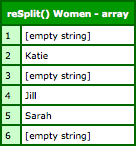
As you can see, our list was split on the regular expression pattern, ",". This not only split the list, but it maintained the empty values between adjacent delimiters.
NOTE: Because our pattern, in this case, was nothing more than a comma, the same outcome could have been handled with listToArray() and the optional third argument, "includeEmptyFields."
This kind of pattern-based splitting could be great for parsing simple CSV data (ie. data that doesn't have any embedded special characters). Because CSV row delimiters might use the new line, the carriage return, or a combination of the two depending on the originating operating system, we can't really use the listToArray() function. Even with ColdFusion 9's optional argument, "multiCharacterDelimiter," there'd be no way to handle both empty lines as well as the variations in row delimiter.
With pattern-based splitting, however, delimiter variations become much easier:
<!--- Define the tab for our field delimiter. --->
<cfset tab = chr( 9 ) />

<!--- Define our tab-delimited data. --->
<cfsavecontent variable="csvData">
<cfoutput>
Name#tab#Age#tab#Hair
Katie#tab#29#tab#Brown
<!--- Totally empty row. --->
Jill#tab##tab#Brown
#tab##tab#
Sarah#tab#33#tab#
</cfoutput>
</cfsavecontent>


<!---
	Remove non-relevant white space - ie. remove the leading or
	trailing line breaks, but do not remove any TABS.
--->
<cfset csvData = reReplace(
	csvData,
	"^[\r\n]+|[\r\n]+$",
	"",
	"all"
	) />


<!--- Get the rows using the line breaks. --->
<cfset rows = reSplit( "\r\n?|\n", csvData ) />

<!---
	Now that we have the rows, loop over them and split each row
	value by the tab-delimiter. This will result in an array of
	arrays.
--->
<cfloop
	index="rowIndex"
	from="1"
	to="#arrayLen( rows )#"
	step="1">

	<!---
		Convert the row data to an array of field values (as
		delimited by Tabs).
	--->
	<cfset rows[ rowIndex ] = reSplit( tab, rows[ rowIndex ] ) />

</cfloop>

<!--- Output our resultant CSV data. --->
<cfdump
	var="#rows#"
	label="Parsed CSV Data"
	/>
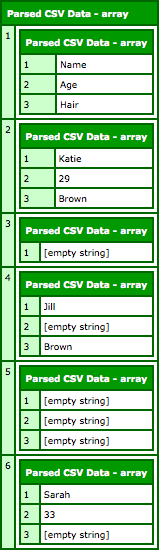
As you can see, we are splitting the CSV data based on the row-delimiter pattern:
\r\n?|\n
We are then splitting each resultant row on the field-delimiter pattern:
tab
NOTE: Our "tab" here is the variable containing the tab character literal.
When we run this code, we get the following CFDump output:
reMatch() added some awesome extraction functionality in ColdFusion 8; I think that reSplit() would be the prefect complement to that regular expression based parsing.

Reader Comments
Any particular reason you would use Java over a completely native CFML one? Ala http://www.cflib.org/udf/resplit
(Holy crap - look at the date that was released!)
@Ray,
Ha ha, "requires ColdFusion 5" :)
In my experience, I've just found that doing anything with regular expressions is faster when you dip down into the Java layer. Plus, the Java String object already has a split() method, so it just seemed like the easiest approach.
Sensible enough to me.