
Geocoding IP Addresses For Free Using IPInfoDB And ColdFusion
Geocoding is the act of getting unknown geographic information based on existing related geographic information. So, for example, when we use Google Maps, we are often geocoding addresses; that is, we are getting latitude and longitude values based on street address (ex. 123 Main St.). While not nearly as accurate as street addresses, IP addresses are also a form of geographic information. Using services like IPInfoDB, we can geocode IP address in ColdFusion; that is, we can get the general geographic location of an internet request based on the incoming IP address.
As I was recently telling Mike Lewis, when it comes to geocoding IP addresses, I've been playing with IPInfoDB because it is both free and very easy to use. In addition to providing a web-accessible API, IPInfoDB also allows you to download an IP database for fast, local lookups. The API has no real usage limits; however, if you query the API more than twice a second, your requests will automatically be queued.
To use the API in ColdFusion, all we need is the CFHTTP tag:
<!--- Set the IP address that we want to geocode. --->
<cfset ipAddress = "71.167.205.201" />

<!--- Loop up the location of the given IP address. --->
<cfhttp
	result="ipRequest"
	url="http://ipinfodb.com/ip_query.php?ip=#ipAddress#"
	method="get"
	/>

<!--- Check to make sure the result is good. --->
<cfif reFind( "20\d", ipRequest.statusCode )>

	<!--- Parse the XML response. --->
	<cfset ipInfo = xmlParse( ipRequest.fileContent ) />

	<!--- Output the IP geolocation information. --->
	<cfdump
		var="#ipInfo#"
		label="IP Geoclation Information"
		/>

</cfif>
Here, we are simply sending the target IP address as one of the URL parameters and parsing the XML response. When we run the above code, we get the following CFDump:
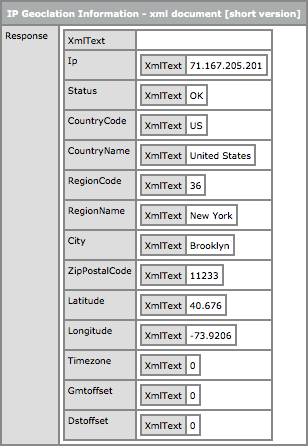
As you can see, the response contains information about the street address and the latitude / longitude values. By default, the API returns data in XML format. If you wanted to get the response back as a JSON-encoded value, all you would have to do is add the following URL parameter to the API call:
output=json
While the above demo geocoded a single IP address, the IPInfoDB API provides a resource that allows us to geocode up to 25 IP address at a time. By using "ip_query2.php" instead of "ip_query.php", we can pass our IP address collection in as a comma-delimited list of values.
<!---
	Create an array to hold our IP address locations. The IP Info DB
	can handle up to 25 IP address look-ups at any one time.
--->
<cfset ipAddresses = [] />

<!---
	Let's generate 25 random IP addresses (not sure if these will
	all be valid).
--->
<cfloop
	index="i"
	from="1"
	to="25"
	step="1">

	<!--- We'll randomly generate the last two octets. --->
	<cfset arrayAppend(
		ipAddresses,
		"71.167.#randRange( 1, 255 )#.#randRange( 1, 255 )#"
		) />

</cfloop>


<!---
	Loop up the location of all 25 IP address. When we do this, we
	are going to use a different API (notice the "2" at the end of
	the script name).

	NOTE: We are explicitly turning OFF the use of timezone since it
	requires the public API to make two more queries on their end.
	We are trying to be kind and let them do as little work as
	needed since we don't need timezone info for the demo.
--->
<cfhttp
	result="ipRequest"
	url="http://ipinfodb.com/ip_query2.php?ip=#arrayToList( ipAddresses )#&timezone=false"
	method="get"
	/>

<!--- Check to make sure the result is good. --->
<cfif reFind( "20\d", ipRequest.statusCode )>

	<!--- Parse the XML response. --->
	<cfset ipInfo = xmlParse( ipRequest.fileContent ) />

	<!--- Output the IP geolocation information. --->
	<cfdump
		var="#ipInfo#"
		label="IP Geoclation Information"
		/>

</cfif>
In this demo, we are building an array of 25 randomly generated IP addresses. Then, we invoke the API, passing in all 25 IP addresses as a single list. In this example, I have included the API parameter, "timezone=false". This removes the timezone information from the response; but, it also puts less stress on the API and since it's a free service, we're trying to be nice.
When you batch-geocode the IP addresses, the XML response contains a collection of Location nodes:
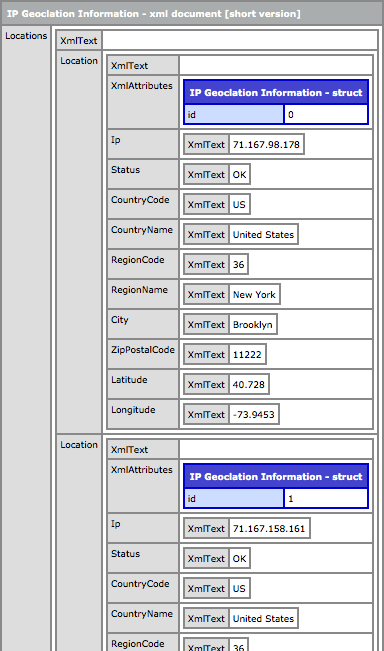
Now that we see how to geocode IP addresses using ColdFusion and IPInfoDB, let's bring Google Maps into this sexy little menage-a-trois. Once we have obtained the latitude and longitude for a given IP address, we should be able to easily place a Marker for it on an existing Google map. In the following demo, I'm going to both geocode and map our 25 randomly generated IP addresses.
<!---
	Create an array to hold our IP address locations. The IP Info DB
	can handle up to 25 IP address look-ups at any one time.
--->
<cfset ipAddresses = [] />

<!---
	Let's generate 25 random IP addresses (not sure if these will
	all be valid).
--->
<cfloop
	index="i"
	from="1"
	to="25"
	step="1">

	<!--- We'll randomly generate the last two octets. --->
	<cfset arrayAppend(
		ipAddresses,
		"71.167.#randRange( 1, 255 )#.#randRange( 1, 255 )#"
		) />

</cfloop>

<!---
	Loop up the location of all 25 IP address. When we do this, we
	are going to use a different API (notice the "2" at the end of
	the script name).

	NOTE: We are explicitly turning OFF the use of timezone since it
	requires the public API to make two more queries on their end.
	We are trying to be kind and let them do as little work as
	needed since we don't need timezone info for the demo.
--->
<cfhttp
	result="ipRequest"
	url="http://ipinfodb.com/ip_query2.php?ip=#arrayToList( ipAddresses )#&timezone=false"
	method="get"
	/>

<!--- Check to make sure the result is good. --->
<cfif !reFind( "20\d", ipRequest.statusCode )>

	<!--- Something went wrong, so just exit out. --->
	IP Geolocation Failed
	<cfabort/ >

</cfif>


<!---
	If we made it this far, then we we know our IP geolocation
	request has succeeded. Parse the XML into a ColdFusion XML
	document.
--->
<cfset ipInfo = xmlParse( ipRequest.fileContent ) />

<!---
	Query the XML document for locations. This will return an
	array of Location XML nodes.
--->
<cfset locations = xmlSearch( ipInfo, "//Location" ) />


<!--- ----------------------------------------------------- --->
<!--- ----------------------------------------------------- --->


<cfoutput>

	<!DOCTYPE html>
	<html>
	<head>
		<title>Geocoding IP Address using IP Info DB</title>

		<style type="text/css">

			html,
			body {
				height: 100% ;
				margin: 0px 0px 0px 0px ;
				overflow: hidden ;
				padding: 0px 0px 0px 0px ;
				width: 100% ;
				}

			div.mapContainer {
				height: 100% ;
				width: 100% ;
				}

		</style>
		<!--- Include jQuery and Google Map scripts. --->
		<script type="text/javascript" src="http://ajax.googleapis.com/ajax/libs/jquery/1.4.2/jquery.min.js"></script>
		<script type="text/javascript" src="http://maps.google.com/maps/api/js?sensor=false"></script>
	</head>
	<body>


		<div class="mapContainer">
			<!-- This is where Google map will go. --->
		</div>


		<!---
			Now that we have defined our map container, we should be
			able to immediately load our Google Map.
		--->
		<script type="text/javascript">

			// Get the map container node.
			var mapContainer = $( "div.mapContainer" );

			// Create the new Goole map controller using our
			// map (pass in the actual DOM object). Center it
			// above the first Geolocated IP address.
			map = new google.maps.Map(
				mapContainer[ 0 ],
				{
					zoom: 9,
					center: new google.maps.LatLng(
						#locations[ 1 ].Latitude.xmlText#,
						#locations[ 1 ].Longitude.xmlText#
					),
					mapTypeId: google.maps.MapTypeId.ROADMAP
				}
			);

			// Loop over the geolocated-IP addresses and create
			// markers for each of them.
			<cfloop
				index="location"
				array="#locations#">

				new google.maps.Marker({
					map: map,
					position: new google.maps.LatLng(
						#location.Latitude.xmlText#,
						#location.Longitude.xmlText#
					),
					title: "Location #location.xmlAttributes.id#"
				});

			</cfloop>

		</script>

	</body>
	</html>

</cfoutput>
Once we have the latitude and longitude information for our IP addresses, Google map Markers can be easily created and applied with google.maps.LatLng() instances. Running the above code gives us the following Google map output:
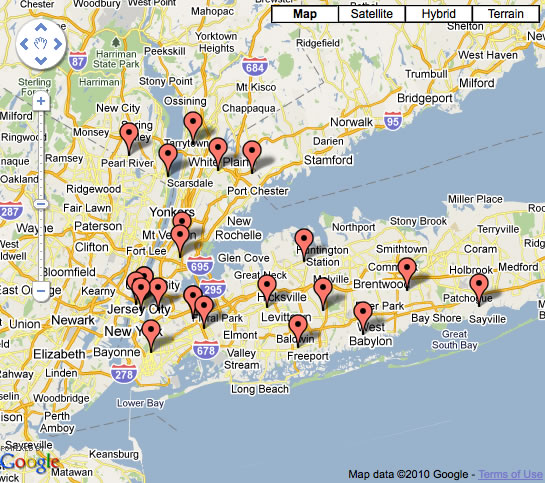
Using randomly-generated data, this is not so interesting; but, if you can imagine gathering IP addresses from ColdFusion web application users, suddenly this map seems much more exciting.
As you can see, geocoding IP addresses in ColdFusion is quite easy when you use the IPInfoDB API. The API is free, so use it with care. The site recommends that you cache IP addresses locally or in the user's cookies so you don't have to query their servers unless necessary.
Want to use code from this post? Check out the license.

Reader Comments
Wow . . . I can see how useful this could be. So, say you have an user logging in to check for stores selling a certain product within 50 miles, this would come in handy? Or am I missing something obvious?
Nice post, Ben. I've been doing a lot of playing around with geolocation services too. Two other free services I've found are www.ipgp.net and www.geoplugin.com
@Lola,
I think it would definitely be good to, at the very least, default to some sort of search parameters.
@Tony,
Oh cool, I haven't seen those; I'll have to check them out. A cursory glance and these look pretty good. Have you found one of them to be a better choice than the other?
i think you can speed things up considerably using the original db (from maxmind) as a local binary file (don't bother w/the sql database approach, it's never as fast as the binary): http://www.maxmind.com/app/geolitecity
Hmm...well it looks like ipgp.net is now a subscription service (although the api which used to be published publicly on the site still works fine for me). I'd say IPInfoDB is better, though. GeoPlugin is has some nifty tools like currency geolocation and a currency conversion tool. They also have a JavaScript web service in addition to the obligatory XML and JSON web services. Also, if you register with them they have analytics tools which they claim compare favorably with Google (I haven't tried them yet myself).
This is really a great and interesting app...very useful..
thanks a lot for the stuff and ur's explanation
Good stuff! A few months ago we started geocoding visitors for our online church services to show where everyone is watching from. We're using onSessionEnd to remove the visitors marker when they leave. Pretty cool to see markers appear and disappear. We went with Maxmind's web API. Not free but it's really inexpensive. If it's Sunday you can see it in action: http://faithpromise.org/icampus or there's a screenshot here: http://kyle.fm/s/f9
On a side note, you gotta love version 3 of Google Maps. Just pure awesomeness!
THANK YOU Ben, really nice service, hopefully it stay free.
About 2 years ago used http://www.whois-api.com for similar purpose with the function here: http://blog.1smartsolution.com/index.cfm/action:posts.entry/id:176/Getting-GEO-IP-Information
Wow Ben, IPinfoDB's a pretty good find. I'm curious how they make money because I'd bet they're handling a ton of traffic.
It's nice they support XML and JSON. XML's pretty standard in a lot of languages, but Python's got almost native support for JSON.
Great post Ben. I've been using IPInfoDB for a while. I do want to warn that the lookup can be highly inaccurate at times. IPInfoDB reports my alocation as Wichita, Kansas. That's about 2,000 miles off. The system is not updated regularly.
That being said, I very much like the service and it's very reliable uptime-wise.
Also, I highly recommend if you use the service to consider donating a few bucks to them. The system is operated from donations. I am certain they would appreciate a once a year donation of $20.
@Paul,
Very interesting; if I am understanding the instructions correctly, you actually interact directly with their DAT file using some sort of API rather than hitting a database? Very cool.
@CF Fan, @Misha,
Glad you liked :)
@Brad,
Very cool. I like the idea of keeping the markers there only for session duration. Nice realtime feedback about the general church community.
@Ed,
Cool stuff - looks like there were even more options than I found on Google.
@Mike,
Yeah, I actually would have gone JSON, but between you and me, I didn't see the JSON option until *after* I had coded the demo :) ColdFusion works quite nice with both XML and JSON, but ultimately, JSON gets parsed into native ColdFusion objects... as I assume it does in Python as well.
As far as how they make money, no idea!
@TJ,
Maybe you were using the API that was only accurate to "planet"?? ;) I guess there are simply limitations on the mapping between IP and location. Take something like my iPhone - it has a static IP (I believe). I have to image that will always be the same no matter where I actually am in the world.
Good to hear that their goal of 99.99% uptime seems to be working out.
As far as donations, I'd be more than happy to help out. If I get value, I have no problem giving value.
Ben, I believe the issue is how often the database is updated. For instance, when I first started using IPInfoDB my location was correct. In the last 5 months, it changed to Wichita. Other providers showed the same location, but within a week it was corrected. IPInfoDB's remains the same.Essentially, my code is the same as yours and I am using a static IP, so I can only assume its the frequency of the database updates.
@TJ,
I wonder why it would start out accurate and then become less accurate. I guess I am wrongly assuming that IP-location mappings don't change (they only become more in number). The IPInfoDB databases look like they get updated monthly. I guess where ever they get their updates from also has the problem also.
@Ben,
yes. that's how we did our geolocator:
http://javainetlocator.sourceforge.net/
but it's woefully out-of-date, nigel's been flitting round the world & hasn't updated it it quite some time.
Ben, I think as the routing for an IP changes, those sources get updated. In my case, this change happened about the same time that Comcast overhauled the network here in Sacramento. I've seen changes in my traceroutes, and guessed that the routing was optimized over higher bandwidth routes. This is all just theory, of course.
IPInfoDB thinks I'm 200 miles away which is the other end of the country! I'm in England. What it located was my ISP's HQ. If I can ever find a geoIP db that works very well in the UK (I've been looking for ages) I'd love to offer visitors a localised home page when they visit one of my sites.
For those visitors where the geoIP db gets it very wrong and shows them info from a location 50+ miles away then they will be scratching their head, especially if they don't recognise the location. Perhaps it's better to prompt everyone for a post/zip code.
@PaulH,
The binary approach looks cool. I'm curious to see what API they provide.
@TJ, @Gary,
Yeah, I would never use this approach the only way to do things. Rather, as Gary is saying, I'd just use it as a way to potentially default a value (such as zip code) that the user could override whenever they need to.
Hi ! It seems that infodb is down for some reason. Does anybody has the november release of ipinfodb_one_table_full.sql.bz2 or an good mirror ?!
ipinfodb now required free registration to use service.
Correct code will be
<cfhttp method="get" url="http://api.ipinfodb.com/v2/ip_query.php" resolveurl="no" timeout="15">
<cfhttpparam type="formfield" name="ip" value="#ip#">
<cfhttpparam type="formfield" name="key" value="[your key]">
</cfhttp>
@George,
Thanks for the heads up. I have some IPInfoDB code commented out. I can only imagine that when I uncommented it, it would have taken me a LONG time to figure out that their API had changed (especially since it happens inside an asynchronous CFThread). Good catch.
They changed again
http://ipinfodb.com/ip_location_api.php
Do you happen to have an updated version of this article for V3? I cannot seem to get it to work.
An error occured while Parsing an XML document.
Content is not allowed in prolog.
The error occurred in \\XXXXXXstats\charts\map.cfm: line 18
16 :
17 : <!--- Parse the XML response. --->
18 : <cfset ipInfo = xmlParse( ipRequest.fileContent ) />
19 :
20 : <!--- Output the IP geolocation information. --->
It seems that ipinfodb no longer provides download of the database. Do you know any other source where we can download a reliable ip->location database?
Thanks
Jeetu Porwal
@Porwal: Maxmind, Ip2location lite come to mind - they both have lite versions of their databasese for both IPV4 and IPV6 address ranges.