An Example Of Overloaded Functions With Very Different Sub-Function Implementations
A few days ago, I blogged about overloading Javascript functions with a sub-function approach. In that post, I demonstrated that branching logic could be factored-out into the core function in such a way that the individual sub-functions could execute with a very narrow set of concerns. Such a separation might seem overkill when the difference in arguments is not terribly influential. But, sometimes, a difference in invocation arguments can lead to a completely different execution. I wanted to take a quick moment to consider such a scenario in order to look at why separating branching logic is important.
I recently demonstrated how to use jQuery's animate() method to power easing-based iteration. Now, I want to take that concept and extend it to use argument-based branching logic in which the "duration" argument of the ease() method becomes optional. In this overloaded method signature, the duration-based easing will use the animate() implementation (as it did before) while the non-duration-based iteration will use a standard FOR-loop.
<!DOCTYPE html>
<html>
<head>
	<title>Overloading The Ease Method Based On Arguments</title>
	<script type="text/javascript" src="./jquery-1.4.2.js"></script>
	<script type="text/javascript">

		// I am the easing iteration funciton. This is built on top
		// of the core animate function so that it can leverage the
		// built-in timer optimization.
		jQuery.ease = function( start, end, duration, easing, callback ){

			// Check to see how many arguments we have. If we only
			// have four, then we are using standard iteration. If
			// we have five, we are using duration-based iteration.
			if (arguments.length == 4){

				// Standard iteration.
				return(
					jQuery.ease.iterate.apply( this, arguments )
				);

			} else {

				// Duration-based iteration.
				return(
					jQuery.ease.iterateWithDuration.apply( this, arguments )
				);

			}
		};


		// I am the standard iteration method for easing.
		// Essentially, I am just a FOR-LOOP with a given
		// callback to execute per iteration.
		jQuery.ease.iterate = function(
			start,
			end,
			easing,
			callback
			){

			// Keep track of the iterations.
			var stepIndex = 0;

			// Use the difference between the start and end values
			// in order to mimic duration. We are going to assume
			// that the the FOR-Loop we are using has a +=1 nature.
			var duration = Math.max(
				Math.abs( end - start ),
				1
			);

			// Keep looping until the iteration index equals the
			// end index.
			for (var i = start ; i != end ; true ){

				// Execute the callback for this iteration.
				callback(
					i,
					stepIndex++,
					start,
					end
				);

				// Update the index value for our easing.
				i = jQuery.easing[ easing ](
					(stepIndex / duration),
					stepIndex,
					start,
					(end - start),
					duration
				);

			}

			// Execute the callback once for end value (which would
			// not have executed in the FOR-LOOP).
			callback( i, stepIndex, start, end );
		};


		// I am the duration-based iteration method for easing.
		// I use jQuery's animate() method to power the easing
		// over the given time frame.
		jQuery.ease.iterateWithDuration = function(
			start,
			end,
			duration,
			easing,
			callback
			){

			// Create a jQuery collection containing the one element
			// that we will be animating internally.
			var easer = $( "<div>" );

			// Keep track of the iterations.
			var stepIndex = 0;

			// Set the start index of the easer.
			easer.css( "easingIndex", start );

			// Animate the easing index to the final value. For each
			// step of the animation, we are going to pass the
			// current step value off to the callback.
			easer.animate(
				{
					easingIndex: end
				},
				{
					easing: easing,
					duration: duration,
					step: function( index ){
						// Invoke the callback for each step.
						callback(
							index,
							stepIndex++,
							start,
							end
						);
					}
				}
			);
		};


		// -------------------------------------------------- //
		// -------------------------------------------------- //


		// When the DOM is ready, init the scripts.
		$(function(){

			// Get a reference to the body tag.
			var body = $( "body" );

			// Get a reference to both lists.
			var durationList = $( "#durationList" );
			var iterateList = $( "#iterateList" );


			// Iterate withOUT druation.
			//
			// NOTE: We are putting the non-duration iteration first
			// because it is processor intensive and will mess up
			// the animation-based duration (making it less smooth).
			$.ease(
				1,
				100,
				"swing",
				function( i ){
					// Create the list element for this iteration.
					var listItem = $(
						"<li />",
						{
							text: i,
							css: {
								backgroundColor: "#CC0000",
								color: "#FFFFFF",
								width: ((i * 10) + "px")
							}
						}
					);

					// Add the list item to the list.
					iterateList.append( listItem );
				}
			);


			// Iterate with druation.
			$.ease(
				1,
				1000,
				1300,
				"swing",
				function( i ){
					// Create the list element for this iteration.
					var listItem = $(
						"<li />",
						{
							text: i,
							css: {
								backgroundColor: "#CC0000",
								color: "#FFFFFF",
								width: (i + "px")
							}
						}
					);

					// Add the list item to the list.
					durationList.append( listItem );
				}
			);

		});

	</script>
</head>
<body>

	<h1>
		Overloading The Ease Method Based On Arguments
	</h1>


	<h2>
		Easing With Duration (Animation)
	</h2>

	<ol id="durationList">
		<!-- To be populated via easing. -->
	</ol>


	<h2>
		Easing Without Duration
	</h2>

	<ol id="iterateList">
		<!-- To be populated via easing. -->
	</ol>

</body>
</html>
As you can see in the above code, I am using both forms of easing-based iteration to build an Ordered List (OL). Each list item in the ordered list is set to a width that is proportional to the index of the overall iteration. When we run this code, we get the following page output:
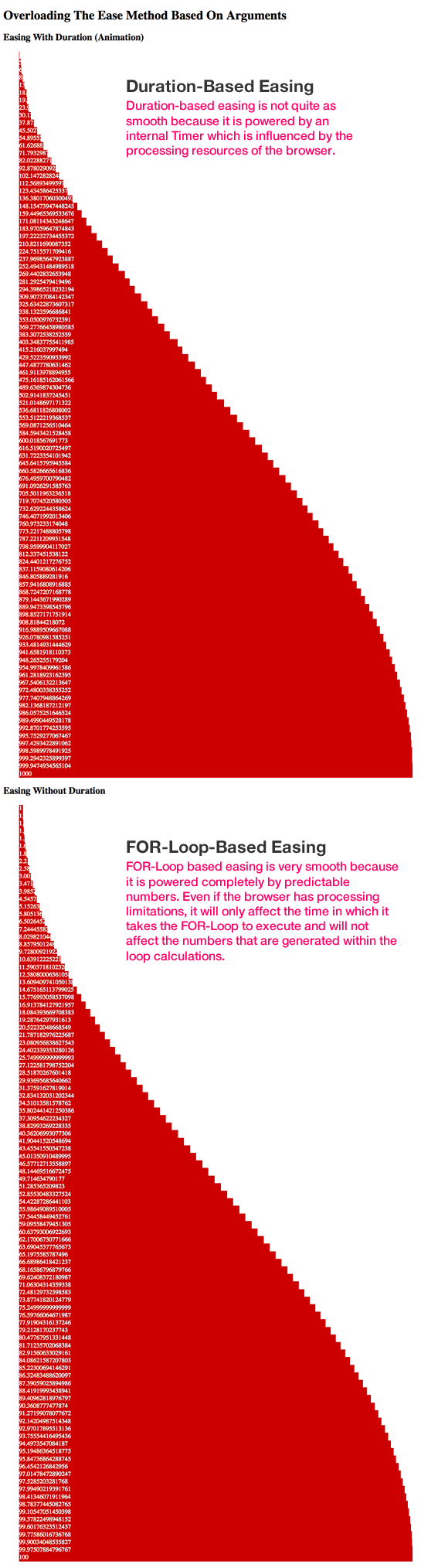
The difference between these two approaches (duration and non-duration) is rather substantial; one executes over a given time period (duration) whereas the other executes immediately. This behavioral difference requires a completely different implementation behind the two different invocations. Because of the difference of implementation, it is critical that the branching logic be factored-out of the primary execution function. If it were not, the primary execution function - ease() - would become large and unmaintainable.
I'm sure it's easy to look at this example and argue that these two different implementations shouldn't be two branches of a single method - that they should actually be two entirely different methods (ie. ease() and easeOverDuration()). That might be true; but, this post isn't really about easing - it's a case-in-point of how factoring-out branching logic based on arguments creates clean, cohesive functions with narrow execution concerns.
Want to use code from this post? Check out the license.

Reader Comments
Why not wrap it:
Function = function(){
}
Function.prototype = {
implementations: []
, call: function () {
if (typeof this.implementations[arguments.length] == "function")
{
this.implementations[arguments.length].apply ( null, arguments );
}
}
}
And then it could be set up with:
easing = new Function();
easing.implementations = [ null, null, null, iterate, iterateWithDuration ];
and called with:
easing.call( "arg1", "arg2", "arg3" );
or
easing.call( "arg1", "arg2", "arg3", "arg4" );
@Nelle,
You could do it that way; ultimately, we're both doing the same thing - factoring out the branching logic such that the "worker" functions can have a very narrow set of concerns. In either case, I think we're on the right track.