
Using jQuery To Bind And Trigger Event Handlers On Detached DOM Nodes
Often times, we use jQuery to bind event handlers to DOM nodes that are children of the current document tree. When we do this, jQuery stores the event handlers in the given node's "events" collection. These bindings remain in place until they are explicitly unbound or until the DOM nodes are removed from the document (NOTE: Using .detach() does not unbind event handlers). Because of this fact, I think it is tempting to believe that detached DOM nodes can't react to events; but, in fact, the opposite is true - jQuery can both bind and triggered events on nodes that are not part of the currently rendered document.
To demonstrate this, I am going to create a free-standing DOM node within my Javascript. Then, I am going to bind a custom event handler to it and trigger the bound event programmatically.
<!DOCTYPE html>
<html>
<head>
	<title>jQuery Eventing Binding On Detached DOM Nodes</title>
	<script type="text/javascript" src="./jquery-1.4.2.js"></script>
	<script type="text/javascript">

		// Create a DOM node; note that this DOM node will not be
		// part of any DOM tree - it is free standing.
		var freeNode = $( "<div />" );

		// Bind a custom event to the free-standing node. We are
		// attaching additional information to this event binding
		// to test the various aspects of event binding.
		freeNode.bind(
			"ping",
			{
				isAttached: false
			},
			function( event, timeLine ){
				console.log( "Triggered: ", arguments );
			}
		);


		// -------------------------------------------------- //
		// -------------------------------------------------- //


		// Before we try to use the event bindings, let's see if
		// we can see the attached event handlers.
		console.log( freeNode.data( "events" ) );

		// Now that we have our bound event, let's try to trigger
		// the custom event on our free-floating DOM node.
		freeNode.trigger( "ping", [ "preRemove" ] );

		// Now, just for a sanity check, let's attach it to the DOM
		// tree and then remove it -- the expected behavior is that
		// the event binding will be removed.
		freeNode
			.appendTo( "body" )
			.remove()
		;

		// Now, let's try to trigger the event on the removed node.
		freeNode.trigger( "ping", [ "postRemove" ] );

		// As a final test, just log the current event bindings.
		console.log( freeNode.data( "events" ) );

	</script>
</head>
<body>
	<!-- Intentionally left blank. -->
</body>
</html>
As you can see, we are creating a detached DIV node. Then, we are binding the custom event, "ping," to that node with some bind-time data. Once the event handler is bound, I am then using jQuery to programmatically trigger the event, all while it is detached from the document.
As a sort of control-case, I am also attaching and removing the node to and from the Body element in order to confirm that remove() still clears all bound data (including the "events" collection). When I run the above code, I get the following console output:
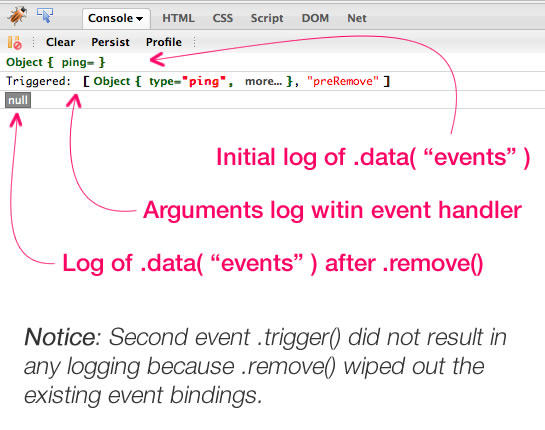
As you can see, both the event binding and the event triggering executed successfully while our DIV remained detached from the current document tree. And, just as we have seen previously, attaching and then detaching the DIV resulted in a loss of event binding.
It might seem odd to care about event binding outside the context of the current document tree; but, I have some ideas that I want to play with that leverage this very behavior. More to come on that later.
Want to use code from this post? Check out the license.

Reader Comments
very cool, i knew this was normal, but never really thought of using it for something useful, you got me thinking tho! look forward to seeing what you come up with!
You have me a little curious as to what benefits having an element not attached to the DOM will bring too.
My guess is, you're going to create a div and attach web socket or web worker events to it, so that the div itself can interactively build its own contents, prior to attaching itself to the DOM to display its contents.
I'll bet that kind of encapsulation appeals to you. :-)
@Steve,
Interesting idea with the WebSockets.
@All,
Here's where I was going with that - using jQuery's native event architecture to power publication/subscribe (pub/sub) functionality within a Javascript application's domain model:
www.bennadel.com/blog/2000-Powering-Publish-And-Subscribe-Functionality-With-Native-jQuery-Event-Management.htm