
Sometimes, people ask me how to handle session management within an application that makes AJAX requests. A question like this can mean many different things; but often times, after a little discussion, I discover that this question is based on a fundamental misunderstanding of what an AJAX request actually is. Because we are so used to the request-response life cycle, there is something almost magical about an AJAX request that runs in parallel to the page processing; heck, I use them all the time and I still get a jolt of delight at seeing them work. In reality, however, there is nothing magical about them; in fact, they work exactly like every other HTTP request.
Because HTTP is an inherently stateless protocol, we generally rely on cookies to maintain the state of a user's session across multiple HTTP requests. However, since there is still a bit of mystery surrounding AJAX requests, people are sometimes not sure as to whether or not cookies play nicely with AJAX. But, once you accept the fact that an AJAX request is an HTTP request, it becomes a no-brainer that cookies get sent back and forth in the AJAX request-response headers.
To demonstrate this functionality, I have put together a little ColdFusion demo that executes an AJAX request and outputs the cookies that the AJAX request posted to the server. And, to show that cookies can be both send and set, I am also generating a new cookie with each AJAX request.
I have tested this demo in the following browsers:
- Firefox
- Chrome
- Safari
- Opera
- IE 6,7,8
Here is the server-side page that is responding to the incoming AJAX request:
Get.cfm (AJAX End Point)
<!---
	Create a response that outputs all of the cookies currently
	passed in from the AJAX request. In ColdFusion, the cookie
	collection is populated by the request headers.
--->
<cfsavecontent variable="responseText">
	<cfoutput>

		<h3>
			Cookies ( as of #timeFormat( now(), "hh:mm:ss" )# )
		</h3>

		<ul>
			<!--- Loop over the cookie collection. --->
			<cfloop
				item="key"
				collection="#cookie#">

				<!--- Only output cookies relevant to this test. --->
				<cfif reFindNoCase( "^rand", key )>

					<li>
						#key# : #cookie[ key ]#
					</li>

				</cfif>

			</cfloop>
		</ul>

	</cfoutput>
</cfsavecontent>


<!---
	Now that we've created the cookie output, let's create a random
	cookie to set in the current AJAX request. This will get sent
	back to the client as Set-Cookie header.
--->
<cfcookie
	name="rand#randRange( 111, 999 )#"
	value="Woot!"
	/>


<!--- Return the HTML response to the client. --->
<cfcontent
	type="text/html"
	variable="#toBinary( toBase64( responseText ) )#"
	/>
As you can see, this ColdFusion code is simply echoing back (in HTML format) the cookie collection that the AJAX request has posted. And, to demonstrate that cookies can also be set from within an AJAX request, I am generating a new cookie with the CFCookie tag.
Here is the test HTML page that is making the AJAX request:
<!DOCTYPE html>
<html>
<head>
	<title>AJAX And Cookies</title>
	<script type="text/javascript">

		// I took this right out of the jQuery source. It creates a
		// cross-browser way of creating XHR request objects.
		var xhr = (
			(
				window.XMLHttpRequest &&
				(window.location.protocol !== "file:" || !window.ActiveXObject)
			) ?
			function() {
				return new window.XMLHttpRequest();
			} :
			function() {
				try {
					return new window.ActiveXObject("Microsoft.XMLHTTP");
				} catch(e) {}
			}
		);


		// I test the AJAX request for cookie transporation.
		function testAjax(){
			// Create a new XHR request object.
			var request = xhr();

			// Open the AJAX connection.
			request.open(
				"GET",
				("./get.cfm?_=" + (new Date()).getTime()),
				false
			);

			// Send the request. Since this request is being made
			// *Synchronously*, we don't have to keep a ready-state
			// change handler.
			request.send();

			// Get a handle on the output node.
			var output = document.getElementById( "output" );

			// Append output HTML.
			output.innerHTML += request.responseText;
		}

	</script>
</head>
<body>

	<h1>
		AJAX And Cookies
	</h1>

	<div id="output">
		<!-- To be populated with AJAX. -->
	</div>

	<p id="tools">
		<a
			href="#tools"
			onclick="testAjax();"
			>Test AJAX Request</a>
	</p>

</body>
</html>
As you can see, all we're doing here is making a AJAX request and appending the HTML response to the page. In this way, we can see how the collection of cookies gets mutated over time.
NOTE: I am making a synchronous request, rather than an asynchronous request, such that I don't have to worry about a ReadyState change handler.
After clicking the "Test AJAX Request" link a few times, here is the page output that I get:
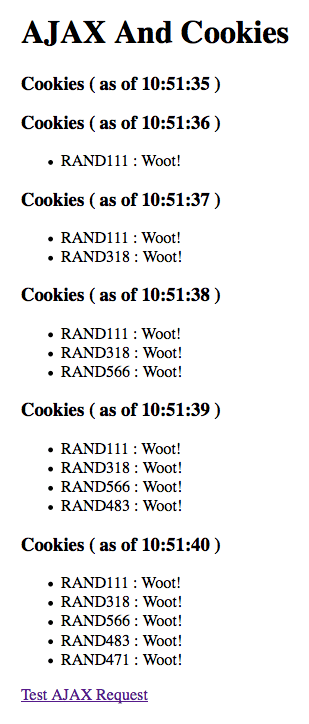
As you can see, the collection of cookies is being augmented with every single AJAX request. This clearly demonstrates that AJAX requests both send the existing cookie collection and correctly respond to Set-Cookie headers within the AJAX response.
I believe that there are ways to make cookies explicitly unavailable for AJAX requests; I think IE has a proprietary "HTTPOnly" attribute or something - I know very little about that. But, other than that and a few IFrame bugs, I hope this demonstration makes people feel a little more comfortable using session management in the context of AJAX requests. Just remember - AJAX requests are HTTP requests.

Reader Comments
Ben,
Good post. Yeah a lot of use take this for granted and already know it, but when you are on a team which is new to AJAX these type of articles are great.
Also could see your code being adapted to a nice testing feature (when firebug or the like not available), so double nice post :)
@Ben: Of course, the most important cookies of all are JSessionId or CFID and CFToken. But they don't do any good unless the AJAX callback does a cfapplication with the correct name attribute to restore the session scope. When people ask you how to handle session management, they may have tried and failed due to that other side of the coin. Just a thought.
cfapplication whaaaaaaaaatttt?
* alarm sounds *
@Kevin,
Thanks my man. And, as much as I was pretty sure it worked this way - I definitely did some good cross-browser testing to make sure I wasn't crazy :)
@Steve,
That's a good point - session tokens only work well if you are in the right application name space. I've seen code from time to time where the name of the application was dynamic and actually changed on every page request. It's clearly a bug in the code, but the person doing this had no idea what it was happening.
@David,
Ha ha :P
When people ask you how to handle session management, they may have tried and failed due to that other side of the coin. Just a thought.Thanks for sharing this blog with us.
@Newquay,
You definitely have a good point. I assume that is probably what is happening some of the time; but, it's good to cover all the bases.
Hi ben, nice article. But is there a way to know which all cookies are being set from the javascript? because response.getResponseHeader("Set-Cookie") returns null.