
The other day, I blogged about sending SMS text messages to Twilio and responding to them with ColdFusion. Today, I'm going to look into sending SMS text messages from Twilio to a mobile phone using ColdFusion. This happens to be a super simple task; but, there is one big caveat that you need to know: you can only send SMS text messages from one of your rented Twilio phone numbers. For security and spamming reasons, Twilio does not want you to "spoof" other people's cell phone numbers. As such, they only allow your "From" number to be one designated by Twilio.
If you have no problem with that detail, the actual sending of the SMS text message from ColdFusion requires nothing more than a simple CFHTTP POST. When sending the SMS text message, you have to POST your information to Twilio's SMS REST resource:
http://api.twilio.com/2008-08-01/Accounts/{SID}/SMS/Messages
In this case, part of the RESTful SMS resource is defined by your username (account number / SID). Both your username and your password (Auth Token) can be obtained from your Twilio dashboard:
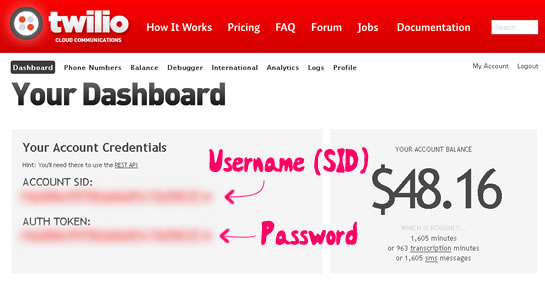
When posting to the Twilio REST web service, all of your HTTP requests must be authenticated. This means that you have to pass your username (SID) and password (Auth Token) as credentials along with every CFHTTP request. The requests can be done over either HTTP or HTTPS. Everything in Twilio seems to be case sensitive; as such, all of your form field names posted via CFHTTPParam tags need to be in upper-camel-case. If not, Twilio will not see them in the post data.
That's pretty much all you need to know, so let's look at some ColdFusion code:
<!---
	Set the Twilio Accound credentials - this will be needed to
	make HTTP posts to the Twilio REST web service. Your username is
	your "Account SID" and your password is your "Auth Token" which
	can be obtained on the dashboard.
--->
<cfset twilioUsername = "********************************" />
<cfset twilioPassword = "********************************" />

<!---
	Set the outgoing phone number. For security / spamming reasons,
	this FROM number must be one of the numbers you rented from
	the Twilio service. Otherwise, you'd be able to spoof other
	people's phone numbers.
--->
<cfset twilioFrom = "917-791-2120" />

<!---
	Define the Twilio SMS REST resource. This can be in either
	plain HTTP or Secure HTTPS (the extra security is up to you).
--->
<cfset twilioSMSResource = (
	"http://api.twilio.com/2008-08-01" &
	"/Accounts/#twilioUsername#/SMS/Messages"
	) />


<!--- ----------------------------------------------------- --->
<!--- ----------------------------------------------------- --->


<!--- Param the form values. --->
<cfparam name="form.to" type="string" default="" />
<cfparam name="form.message" type="string" default="" />


<!---
	Check to see if we have enough information to send out the
	SMS text message. Twilio will accept phone numbers with any kind
	of formatting (including or excluding the optional +1 for US
	phone numbers). But, for our purposes, we are going to only
	accept 10-digit phone numbers.
--->
<cfif (
	reFind( "^\d{10}$", form.to ) &&
	len( form.message )
	)>

	<!---
		Post our outgoing SMS text message request to the Twilio
		SMS REST resource.

		NOTE: The Form field names ***ARE*** case SENSITIVE. They
		must all be in initial-camel-case according to the
		documentation. If they are not, the REST web service will
		not see them in the FORM post.

		NOTE: By default, the Twilio response will be an XML packet.
		You can create a JSON response by appending ".json" to the
		Twilio resource URL.
	--->
	<cfhttp
		result="post"
		method="post"
		url="#twilioSMSResource#"
		username="#twilioUsername#"
		password="#twilioPassword#">

		<!--- Post the FROM number. --->
		<cfhttpparam
			type="formfield"
			name="From"
			value="#twilioFrom#"
			/>

		<!---
			Post the TO number. This is going to be recipient of
			our outgoing text message.
		--->
		<cfhttpparam
			type="formfield"
			name="To"
			value="#form.to#"
			/>

		<!--- Post the SMS text message body. --->
		<cfhttpparam
			type="formfield"
			name="Body"
			value="#form.message#"
			/>

		<!---
			Post the callback URL for the Twilio to use once the SMS
			message is sent. When you post an SMS request, it gets
			queued on the Twilio servers. Once it gets processed,
			this URL (StatusCallback) will be POSTed a resposne.
		--->
		<cfhttpparam
			type="formfield"
			name="StatusCallback"
			value="http://www.bennadel.com/......./callback.cfm"
			/>

	</cfhttp>


	<!---
		The CFHTTP response should be returning a 201 status code.
		This indicates that the request was successful and that the
		SMS Message was created. A 201 status code includes a
		"location" for said SMS text message resource in the response
		header.

		[CFHTTP Response].responseHeader.location

		Example:
		/2008-08-01/Accounts/{SID}/SMS/Messages/{NEW-SMS-RECORD-ID}

		This is the same as the response we got back in the
		fileContent, however its content will be updated once the
		SMS request has been fully processed.
	--->


	<!--- Redirect the user back to the form page. --->
	<cflocation
		url="#cgi.script_name#?success"
		addtoken="false"
		/>

</cfif>


<!--- ----------------------------------------------------- --->
<!--- ----------------------------------------------------- --->


<cfoutput>

	<!DOCTYPE HTML >
	<html>
	<head>
		<title>Sending SMS Text Messages With Twilio And ColdFusion</title>
	</head>
	<body>

		<h1>
			Sending SMS Text Messages With Twilio And ColdFusion
		</h1>

		<!--- Check to see if we have the success flag. --->
		<cfif structKeyExists( url, "success" )>

			<p>
				<strong>Your SMS text message has been sent!</strong>
			</p>

		</cfif>

		<form method="post" action="#cgi.script_name#">

			<p>
				From:
				<strong>Twilio</strong> -
				<em>(rented Phone Number)</em>.
			</p>

			<p>
				To:<br />
				<input type="text" name="to" size="20" />
			</p>

			<p>
				SMS Text Message:<br />
				<input type="text" name="message" size="70" maxlength="140" />
			</p>

			<p>
				<input type="submit" value="Send SMS Message" />
			</p>

		</form>

	</body>
	</html>

</cfoutput>
When you post to the Twilio SMS resource, you should get back a "201 Created" status code. This indicates that your SMS record has been successfully created on the Twilio server. The fileContent of the CFHTTP response will contain the details of that newly created SMS record:
<?xml version="1.0"?>
<TwilioResponse>
	<SMSMessage>
		<Sid>SM8b4445c73dbfab696769d5217ac706a6</Sid>
		<DateCreated>Thu, 15 Jul 2010 16:54:09 -0700</DateCreated>
		<DateUpdated>Thu, 15 Jul 2010 16:54:09 -0700</DateUpdated>
		<DateSent/>
		<AccountSid>*********************************</AccountSid>
		<To>9175557281</To>
		<From>9177912120</From>
		<Body>Hey my man - what's going on?</Body>
		<Status>queued</Status>
		<Flags>4</Flags>
		<Price/>
	</SMSMessage>
</TwilioResponse>
As you can see, the "status" node of the XML response indicates that the SMS message has been queued. If you want to know when your SMS message has been fully processed (sent to the recipient), you can provide an optional StatusCallback URL in your CFHTTP post. If provided, Twilio will post the following FORM data to your callback URL once the SMS text message has been sent:
- ACCOUNTSID *********************************
- FROM 9177912120
- SMSSID SM8b4445c73dbfab696769d5217ac706a6
- SMSSTATUS sent
- TO 9175557281
As you can see here, the new "status" value indicates that the message has been sent to the targeted mobile device.
By default, all Twilio REST responses are returned as XML packets. You can, however, change the return format by appending various file extensions to the resource URL. At this time, three additional formats are supported:
- .csv - Comma-separated values.
- .json - Javascript Object Notation.
- .html - Standard web page markup.
This allows you to work with whatever data format you feel most comfortable. If you use the .html file extension, Twilio returns valid XHTML source code that you can output directly to the browser.
If your targeted mobile phone user tries to respond to your outgoing SMS text message, Twilio will simply use the SMS end point that you have defined in your Phone number configuration.
That's all there is to it. Twilio makes sending SMS text messages with ColdFusion just as easy as it does receiving SMS text messages. But, to be completely honest, I am little bummed that I have to use a Twilio phone number as my outgoing mobile number. I completely understand why this restriction would exist; but, it would be cool is if I could create a list of "verified" outgoing SMS phone numbers from within my dashboard. This concept exists for outgoing Twilio calls (Caller ID), but not exist for SMS text messages. Perhaps this is a feature that they will be adding in the future?

Reader Comments
Great post. It seems odd to pass your username and password plain text in the http request using http. Why would you ever want to use http?
@Justin,
You're asking as to why I would use HTTP vs. HTTPS? Good question. I had started out with HTTPS. The only reason I think I switched over to HTTP was simply to see if the request would work. I just neglected to switch back to httpS afterward.
Cool. Have yourself a good weekend getting married, becoming a warrior, mastering jQuery, working out, becoming selfless or whatever else it is that you're doing.
@Justin,
Ha ha ha, thanks - you have a great weekend as well.
hello bro, I've downloaded it and now trying on my localhost.. :)
thx for sharing..
hope we can be a friend.. :D
This is great. Thanks for taking the time to explain. There is an interesting problem. Everything works if you send a single word or string without a space; however if you send a sentence the text does not get processed by twilio. i.e Message = "Test" or "Help" works perfectly within the code, if you send "Help Me" or any other sentence construct it does not process. Any thoughts?
Matt,
I solved the issue where spaces in the message body were breaking things by simply adding charset="utf-8" to the cfhttp code as follows:
I also updated the URL in the SMSResource to the newer API as follows:
Hope this helps!
Hi Sir Ben, i was about to incorporate this idea to my thesis study, how can i buy twilio phone numbers here in the philippines... i was creating enrollment system with sms technology, students will receive text messages at the end of every semester containing their final grades... Thank you for your kindness..
respectfully yours,
sam
This works for a single text message, but what about if you want to send it to multiple numbers store in a database table?
I tried querying my db table with the store numbers and wrapping the <cfhttp> tag with the cfoutput query like this but nothing happens upon executing the page.
<cfoutput query="staff">
<cfhttp
result="post"
method="post"
url="#twilioSMSResource#"
username="#twilioUsername#"
password="#twilioPassword#">
.....
</cfoutput>
This is great stuff Ben, but like Omar, I was having some trouble with sending out a mass message to a database of cell numbers (ie - people signed up to receive a text when a ballgame is cancelled).
#1. If you're not using the statuscallback, don't use it... it's optional anyhow. If you're using an invalid statuscallback and you're cflooping through a query you'll send all your texts to the same person because your callback is trying to do it's job and can't. I honestly don't need to know if a text was or was not received, so I just put the site's domin in that field as a default value... not a good idea; remove the field altogether. For more info on sending SMS:
https://www.twilio.com/docs/api/rest/sending-sms
#2. For some odd reason, cflooping over a query for each RESTful cfhttp takes a long time... like my submission was timing out after 43 texts. I have over 100 in the database so this was a problem. Overriding the default timeout value as such:
fixed my problem. And although the client still hangs/loads while it completes the task, at least it's sending everyone the text. I just wish there was a way around this... like including all the phone numbers you want to send the same message to in the same RESTful post to Twilio. If there's a way to do this I've yet to figure it out. Bear in mind that Twilio also does not simultaneously send out texts. The numbers will enter a queue and send out at a maximum pace of 1 per second, which is perfectly fine for what I'm using it for.
Also, just wanted to point out something to save anyone else from trying:
A comma delimited list does NOT work when sending mass texts. you will need to loop through each request, one by one:
Hi Ben,
I've been using a version of your code to send SMS text messages for an onboarding app I built for our HR department (using CF and Twilio), and it's been working amazingly well - thank you!!
I'm now trying to use Twilio to send text to phone - the gist is, I need to send a 7-digit code from my web app to an employee's desk phone, using Twilio voice. I'm not having much luck with the sparse documentation on the Twilio side, and am wondering if you've had any experience you might be willing to share on this.
Thanks for all you do!
Ohmygosh, I got it! Will share if anyone requests. Ben, love your autoreply to this post. :)
Thank you, Ben, for this information, and for being in every google listing of every search query I have ever made about ColdFusion. No matter what CF problem I am trying to solve, I find that, not only have you already solved it, you've made a post to show other people how to do it.
You are my ColdFusion hero.
Thank you.