
Sending And Receiving SMS Text Messages With Twilio And ColdFusion
About a year ago, Aaron Foss of Alegean came to the New York ColdFusion User Group to present on TextMarks - a free, shared short code service that allowed us to programmatically integrate SMS text messaging into our ColdFusion applications. Last night, Aaron Foss descended upon the NYCFUG once again and blew my mind 10-times over with his demonstration of Twilio. Twilio, like TextMarks, provides a web-service API that allows us to build mobile functionality on top of our existing ColdFusion applications. But, not only does it allow for SMS integration - it allows for all kinds of robust voice communication, including text-to-speach, MP3 playing, voice recording, options menuing, and on-the-fly conference calling. And, not only does it provide this large feature set, it makes it available using the most simple XML-based language - TwiML.
After Aaron's presentation, I was so jazzed up about this Twilio service, I had to come back to the office and immediately start playing with it. Twilio offers a developer sandbox that you can use for free; but, I wanted the full fidelity experience. This required me to upgrade to a standard account and "rent" a phone number. The initial upgrade cost is $20. After that, it's a pay-as-you-go service - 3 cents per SMS text message or Voice minute. The phone number rental is one dollar ($1) a month, works internationally, and can be either a standard number or a 1800 number (toll free numbers are $2/month).
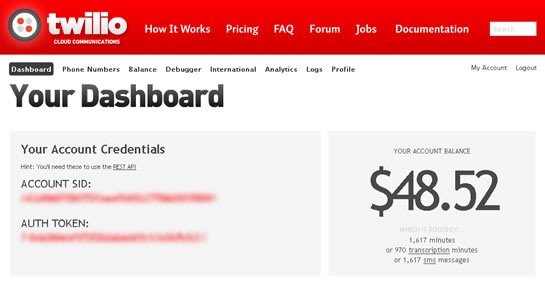
When you sign up for a Twilio account, they give you a $30 credit which is why my account balance is close to $50 after my initial upgrade.
Once you have your Twilio account and your rented phone number, you have to provide end points for the Voice and SMS interfaces. An end point is simply a public URL that returns a TwiML XML document with Twilio action commands. In our case, the end point is a ColdFusion file that returns a "text/xml" content variable.
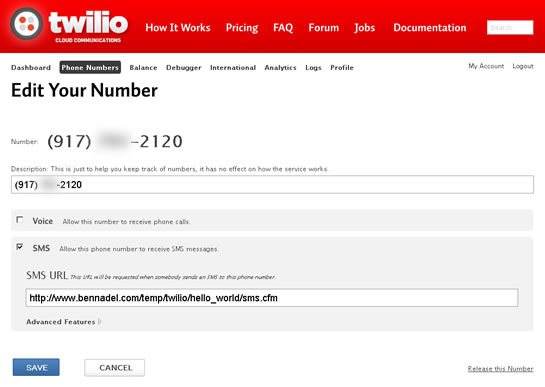
Unlike TextMarks, which required the manual creation of cookies for session management, the Twilio Proxy service is fully cookie compatible. Not only does it allow for cookies, it keeps unique cookies for every From-To phone number combination. These cookies adhere to their defined expiration dates; however, all cookies will automatically expire after four hours of inactivity between the given two phone numbers. Twilio also adheres to general expiration headers on GET HTTP requests - but that is beyond the scope of this blog post.
When the Twilio Proxy service hits your end point (ColdFusion file), it passes a bunch of information with along the HTTP request. I took a look at the CGI, Headers, and FORM data collections and here is some of the more interesting information that Twilio makes available:
CGI
- HTTP_COOKIE $Version=0; CFID=55846170; CFTOKEN=64846202;
- HTTP_USER_AGENT TwilioProxy/0.7
- REQUEST_METHOD POST
HTTP Headers
- X-Twilio-Accountsid ***************************
- X-Twilio-Apiversion 2008-08-01
- X-Twilio-From 9175557281
- X-Twilio-Fromcity BROOKLYN
- X-Twilio-Fromcountry US
- X-Twilio-Fromstate NY
- X-Twilio-Fromzip 11229
- X-Twilio-Signature liF21IlFi/vj7R4XgOXmmLgA8NE=
- X-Twilio-Smsmessagesid SMdc81be50c465f49e1d448a9280a2d1e6
- X-Twilio-Smssid SMdc81be50c465f49e1d448a9280a2d1e6
- X-Twilio-To 9175552120
- X-Twilio-Tocity NEW YORK
- X-Twilio-Tocountry US
- X-Twilio-Tostate NY
- X-Twilio-Tozip 10010
FORM
- ACCOUNTSID ***************************
- APIVERSION 2008-08-01
- BODY Come on!
- FROM 9175557281
- FROMCITY BROOKLYN
- FROMCOUNTRY US
- FROMSTATE NY
- FROMZIP 11229
- SMSMESSAGESID SMdc81be50c465f49e1d448a9280a2d1e6
- SMSSID SMdc81be50c465f49e1d448a9280a2d1e6
- SMSSTATUS received
- TO 9175552120
- TOCITY NEW YORK
- TOCOUNTRY US
- TOSTATE NY
- TOZIP 10010
As you can see, the Twilio proxy passes along a host of information about the FROM and TO phone numbers. It didn't quite get my FROM address information correct - I don't live in Brooklyn; but, it's pretty darn close to being accurate. When someone posts an SMS text message to your Twilio phone number, the content of the text message appears in the BODY field of the FORM post. Twilio supports both GET and POST requests; but, it uses POST by default.
When it comes to responding to an incoming SMS text message, you have to return a TwiML XML document. The SMS action verbs that can appear in said TwiML document are super simple:
<Sms> - The text to return in the response SMS text message.
<Redirect> - A new URL to which the Twilio Proxy client will be forwarded. This new URL must also return a TwiML XML document.
Ok, now that you have a sense of what kind of SMS text message support Twilio provides (and I've only just scratched the surface), let's take a look at some ColdFusion code in our SMS end point. In the following "Hello World" example, I've created a simple, session-based ColdFusion state machine. When a user sends an SMS text message to my Twilio phone number, my ColdFusion end point prompts the user for their name. It will then continue to prompt the user until the user responds with a single-word name. Once the ColdFusion end point has the user's name, it will then respond with a goofy message for any subsequent SMS text messages that the user submits.
Here is my ColdFusion application file that configures my SMS end point:
Application.cfc
<cfcomponent
	output="false"
	hint="I define the application settings and event handlers.">

	<!--- Define the application settings. --->
	<cfset this.name = hash( getCurrentTemplatePath() ) />
	<cfset this.applicationTimeout = createTimeSpan( 0, 1, 0, 0 ) />

	<!---
		Because Twilio allows cookies to be stored for unique
		conversations between a To/From number, we can use
		standard session management for SMS communication as if
		we were communication with a standard browser.
	--->
	<cfset this.sessionManagement = true />
	<cfset this.sessionTimeout = createTimeSpan( 0, 0, 10, 0 ) />

	<!--- Define the request settings. --->
	<cfsetting
		requesttimeout="10"
		showdebugoutput="false"
		/>


	<cffunction
		name="onSessionStart"
		access="public"
		returntype="void"
		output="false"
		hint="I initialize the session.">

		<!--- Set up the session properties. --->
		<cfset session.nameRequested = false />
		<cfset session.userName = "" />

		<!--- Return out. --->
		<cfreturn />
	</cffunction>

</cfcomponent>
As you can see, there's nothing special going on here; since the Twilio Proxy client presents itself as a compliant web browser, we can use ColdFusion session management just the same as we would in a typical ColdFusion web application.
Once we have our session management enabled, our ColdFusion end point is nothing more than a few CFIF/CFELSEIF statements:
Sms.cfm (SMS End Point for Twilio)
<!---
	The following is a super simple state-machine for the user's
	session. The logic for it goes like this:

	1. User makes contact.
	2. Server prompts user for name.
	3. User responds with name.
	4. Server parses name.
	4b. If name is BAD, reset session, return to #2.
	5. Server greets user by name.
	6. User response with arbitrary text.
	7. Server responds with goofy message.
	8. Goto #6.

--->


<!--- Check to see if we have asked for the user's name yet. --->
<cfif !session.nameRequested>


	<!---
		Since we have not prompted the user for the name, then
		send a simple prompt for the first name.
	--->
	<cfsavecontent variable="response">

		<?xml version="1.0" encoding="UTF-8"?>
		<Response>
			<Sms>Hey my man, what's your name?</Sms>
		</Response>

	</cfsavecontent>

	<!---
		Flag the first name as requested so we don't end up doing
		that again within this "converation" (the four hours of
		inactivity between our To/From number).
	--->
	<cfset session.nameRequested = true />


<!---
	Check to see if the User's name is defined. If it is not,
	then we need to ask the user for their name until we get
	a single-word response.
--->
<cfelseif !len( session.userName )>


	<!---
		At this point, we prompted the user from their name, but
		have not gotten it back yet. We are looking for a single
		word to be defined in the BODY field of the form post.
	--->
	<cfif reFind( "^\w+$", form.body )>

		<!---
			Excellent! The user gave us their name. Let's store
			it in the session.
		--->
		<cfset session.userName = form.body />

		<!---
			Return a simple greeting. Since we are creating XML
			response, it is important that escape any non-XML-safe
			characters.

			NOTE: Our business logic at this point wouldn't allow
			for non-XML-safe characters; but, better safe than sorry.
		--->
		<cfsavecontent variable="response">
			<cfoutput>

				<?xml version="1.0" encoding="UTF-8"?>
				<Response>
					<Sms>Hello, #xmlFormat( session.userName )#!</Sms>
				</Response>

			</cfoutput>
		</cfsavecontent>

	<cfelse>

		<!---
			The user's response could be parsed. Try to get their
			name again. While we don't have to do this, let's just
			reset the session and redirect (to test out the
			Twilio features).
		--->
		<cfset session.nameRequested = false />

		<!---
			Send a response that redirects the Twilio client back
			to the first request (this script).
		--->
		<cfsavecontent variable="response">
			<cfoutput>

				<?xml version="1.0" encoding="UTF-8"?>
				<Response>
					<Redirect>
						#cgi.script_name#
					</Redirect>
				</Response>

			</cfoutput>
		</cfsavecontent>

	</cfif>


<cfelse>


	<!---
		At this point, we have the user's name, so let's just
		send a goofy response to complete the life cycle.
	--->
	<cfsavecontent variable="response">
		<cfoutput>

			<?xml version="1.0" encoding="UTF-8"?>
			<Response>
				<Sms>#xmlFormat( session.userName )#, you always saying crazy stuff like that!</Sms>
			</Response>

		</cfoutput>
	</cfsavecontent>


</cfif>


<!--- ----------------------------------------------------- --->
<!--- ----------------------------------------------------- --->


<!---
	Stream XML response to Twilio client. Make sure to TRIM
	the XML response such that it is valid XML.
--->
<cfcontent
	type="text/xml"
	variable="#toBinary( toBase64( trim( response ) ) )#"
	/>
As you can see, each request to our SMS end point must return a TwiML XML document. What's really cool, though, is that the <Redirect> command can forward the Twilio Proxy client to another URL in the middle of a request. To demonstrate that, if the user fails to properly report their name, I'm simply resetting their session and Redirect'ing back to the SMS end point (at which time, they will again be prompted for their name).
After I set this up, I went ahead and tested it, sending the message "Hello :)" from my iPhone to my Twilio phone number:

There you have it - worked like a charm with zero fenagling.
Twilio looks like a really powerful and exciting web service. I've just demonstrated how to respond to an incoming SMS text message; but, that only scratches the surface of what Twilio can actually do. I can't wait to start digging in deeper. I want to give a huge thanks to Aaron Foss for giving such a great presentation last night... and to Keri Mahoney for her crazy baking skills:

Yes, that is a cake with the Twilio logo on it! Badass!
Want to use code from this post? Check out the license.

Reader Comments
Ben,
I have an awesome idea for an SMS driven web application that I have been wanting to build for about a year but have been waiting for a post like this one and an SMS service like Twilio to get started.
Thank you good sir!
@Aaron,
Very cool my man. I'll be digging further into Twilio and posting about it; so, hopefully, we can get some good ideas bouncing around.
Looks good, I think i like this one better than textmate. The only thing, this kind of service can get expensive, any thoughts on gsm sim hosting or virtual number hosting where you don't get penalized for the number of text messages? i know they have hardware for sim cards but i couldn't find any hosting.
@Hatem,
If you want Free, you can certainly use a service like TextMarks; their service is free and has paid upgrades. They power the free service by putting ads at the bottom of your outgoing text messages.
Ben!
I am looking for similar functionality for my friend's training institute campaign. Requirement is monthly once system has to send 20 thousand sms. Please suggest me to do it in low/free cost.
As of now i am writing automation tool on python to do it with way2sms.com by reading contact numbers from excel sheet.
Thanks,
Raghuram Reddy Gottimukkula
Bangalore, India
Not really looking for free, just looking for GSM Sim hosting or virtual number that you can pay service on and have as many sms messages as possible. I'm sure there will be a monthly fee in such a service, but the ones that I have seen are all based overseas, none that i found in the u.s.
@Raghuram,
20,000 SMS text messages is a lot of messaging. I don't know what kind of advice to give you. Twilio, @ $.03 / message would still cost you $600 a month for so many messages. You can try something like TextMarks, as long as you don't mind the Ads at the bottom of the text messages.
I have not seen that way2sms before - I'll have to check it out.
@Hatem,
To be honest, I have no idea what GSM Sim hosting is :) Are you basically trying to programmatically interact with a *real* phone number?
Thanks for the additional post. Aaron sent me his preso. Gonna give this a whirl over the weekend and see about integrating into a demo we are giving next week.
@Kevin,
Awesome - have some fun with it; I know I have been :)
@Raguram,
You can try the following links where in they provide API's (chargeable) for us eo write our own SMS code viz.,
www.nanobytes.in
@Ben,
Will creating a COM object to read Excel and Send SMS lead to any crash?
@Naveen,
I can't see any specific reason a COM object would cause any crash.
@Ben,
I had a scenario in the past where I had 3 sheets full of data around 15000+ rows in each sheet. At that juncture, I was working on a Thin Client setup and my JRUN instance crashed after trying to execute the Code for around 15 minutes. But the same component works fine when used in a Application Server setup on a PC.
@Naveen,
That's simply a ton of data to read. In my experience, reading in large Excel files can easily run into a OutOfMemory problems. I typically find this happens more when writing out huge files. I am not sure what I would recommend.
If you can get to a point where reading in the records doesn't cause a problem, I would recommend breaking up the process into two passes - one that reads in the data, one that sends out the SMS text messages. But splitting it up into two separate page requests, you'll allow the garbage collection to take place and safe the machine.
This worked great. I am trying to put together a menu style response.
1 - Sales
2 - IT
3 - Finance
I know sms ideal for formatting. Does anyone know how I could have line breaks in my response?
@Frank,
From what I can remember, you need to actually include a line-break in your SMS text in order to have it rendered by the phone. I think this is the ASCII character 10... chr(10). Or just a line return in your code-file.
I am looking to figure out how to just receive messages to CF via SMS. If a users sends 'Hello World', how do you insert that into a database with the user id for that user. I am trying to understand more on how SMS can be used to send data to a user's account.
Hi Ben et al,
This all sounds wonderful except one thing - the comments I've read about Twilio performance not being good.
I've heard some horrible stories of VERY low throughput (like 10 SMS per minute).
No matter how easy the coding may be....bad throughput is a deal killer IMHO.
....and is this really that much better than using an aggregator? (from a coding standpoint)
Any comments (on or off list is fine).
Thanks Ben!
Farman
Thank you for this useful info. It works perfect however I'm trying to get it to work so that I can send an image not just text. Do you know how I could achieve this?
@Omar - Twilio doesn't support MMS yet so you're limited just to text.