
As I have been experimenting with HTML5's new features (SQLite, Cache Manifest, Offline Application Cache), I've started to build up a vision in my head of some very cool mobile web applications for my iPhone. In particular, I'm in love with the idea of creating a rich, offline web client for my Dig Deep Fitness web application. Ideally, I would like people to bookmark the Dig Deep Fitness application on their iPhone's home screen such that they could run the web application in "App Mode" or "Full Screen" mode. In order to help move people in that direction, I wanted to come up with a way to detect app mode usage and suggest (in a friendly way) that people should be using it.
On the iPhone (the only phone I can test with), there is a simple way to detect for full screen mode:
window.navigator.standalone
If you are using the web page in standard Safari mode, this value will be False. If you are using the web page in app mode (full screen mode), this value will be True. Keep in mind, however, that this Javascript value does not exist in browsers that do not support full screen mode. As such, when you test this value, you have to test both for the very existence of this property as well as for its truthiness:
if (
	("standalone" in window.navigator) &&
	!window.navigator.standalone
	){

	// .... code here ....
}
Now that we know how to detect for App Mode usage, we need a way to suggest to the user that App Mode is the preferred mode of interaction. To do this, I wanted to created a bottom-fixed banner on the window that suggested to the user, "Hey, you should really go Full Screen." The complication with this approach, however, is that the mobile Safari window is not a "window" in the sense that we understand from desktop usage. On the iPhone, the window is really a "view port"; and, this view port doesn't quite support fixed positioning in a way that matches our mental model. In the view port, a "fixed" element will start off in one place (the right place), but will move the moment the user tries to scroll or zoom the view port.
There are some very complex ways to accomplish fixed position elements on the iPhone; but, rather than work around the limitations of the iPhone, I decided just to intercept them. In the following code, you'll see that I am showing a bottom-fixed element if the user is not currently in App Mode. Then, I trap the user's touch events (touchStart and touchMove) and cancel them while the app note is being show. In this way, I don't have to worry about the quasi-fixed nature of the fixed position element. Of course, I don't want to prevent the user from interacting with the application; as such, after I capture the first touch events, I hide the "suggestion" and unbind the touch event handlers, allowing the user to return to normal interaction.
<!DOCTYPE HTML>
<html>
<head>
	<title>Detecting iPhone's App Mode (Full Screen Mode)</title>

	<!---
		By default, an iPhone web page running in App Mode will use
		the standard Safari browser to display the content. However,
		the following meta tag (content=yes) allows us to display web
		apps without the standard Safari chrome (full screen mode).

		NOTE: When you use this, you CANNOT change the URL of the
		page. If you do, the iPhone will switch over to the standard
		Safari app to allow for standard web page navigation.
	--->
	<meta
		name="apple-mobile-web-app-capable"
		content="yes"
		/>

	<!---
		Once we hide the standard Safari chrome, we can also affect
		the way the status bar displays at the very top. By default,
		it's that light gray color, but we can change it to be black
		or translucent.
	--->
	<meta
		name="apple-mobile-web-app-status-bar-style"
		content="black"
		/>

	<!---
		By default, the "width" of the view port is 980px. This
		gives the page a "zoomed out" feel. We can set this view port
		initial size to an explicit size or, in my case, to the width
		of the given device.
	--->
	<meta
		name="viewport"
		content="width=device-width"
		/>

	<style type="text/css">

		#appModeNote {
			background-color: #333333 ;
			border-top: 5px solid #000000 ;
			bottom: 0px ;
			color: #F0F0F0 ;
			display: none ;
			font-family: helvetica ;
			left: 0px ;
			padding: 10px 0px 10px 0px ;
			position: fixed ;
			text-align: center ;
			width: 100% ;
			}

		#appModeNote em {
			display: block ;
			font-size: 20px ;
			font-weight: bold ;
			line-height: 26px ;
			}

		#appModeNote span {
			display: block ;
			font-size: 14px ;
			line-height: 20px ;
			}

	</style>

	<script type="text/javascript" src="jquery-1.4.2.min.js"></script>
	<script type="text/javascript">

		// When the DOM is ready, init the scripts.
		$(function(){

			// Get a reference to the app mode note.
			var appModeNote = $( "#appModeNote" );

			// Get a reference to the body.
			var body = $( document.body );

			// Check to see if the window is running in app mode. If
			// it is not, then we want to show the app mode note and
			// bind some event listeners to the scroll.
			if (
				("standalone" in window.navigator) &&
				!window.navigator.standalone
				){

				// This user is running in a "full screen ready"
				// device, but is NOT using the full screen mode.
				// Show the note about full screen.
				appModeNote.show();

				// Now that we have shown the note, we want to bind
				// some special events to get rid of the note when
				// the user tries to interact with the application.
				//
				// We are going to bind the touchStart and touchMove
				// events such that when the user triggers these
				// events, we will hide the app mode note.
				//
				// Notice that we are using nameSpaced events. This
				// is to ensure that when we unbind the events (after
				// the app mode note is removed), we don't remove any
				// other critical event bindints.
				body.bind(
					"touchstart.appModeNote touchmove.appModeNote",
					function( event ){
						// Prevent the default events. We are doing
						// this both to bring the note to the users
						// attention... and because FIXED position
						// elements on the "view port" are not truly
						// fixed.
						event.preventDefault();

						// Unbind the current event handler such that
						// the user's next attempt to interact with
						// the screen is successful.
						body.unbind( "touchstart.appModeNote touchmove.appModeNote" );

						// Fade out the app mode, full screen note.
						appModeNote.fadeOut( 500 );
					}
				);

			}

		});

	</script>
</head>
<body>

	<h1>
		Detecting iPhone's App Mode (Full Screen Mode)
	</h1>

	<p>
		Hello, welcome to my mobile web application.
	</p>

	<!---
		This note is hidden by default; but, if the device can
		handle full screen app mode and is NOT using it, this
		note will be shown.
	--->
	<div id="appModeNote">
		<em>Go Full Screen!</em>
		<span>Use the "Add to Home Screen" Feature</span>
	</div>


	<!---
		To make the page scroll (to test the fixed position
		of the app note).
	--->
	<p>
		.<br />.<br />.<br />.<br />.<br />.<br />
		.<br />.<br />.<br />.<br />.<br />.<br />
		.<br />.<br />.<br />.<br />.<br />.<br />
		.<br />.<br />.<br />.<br />.<br />.<br />
		.<br />.<br />.<br />.<br />.<br />.<br />
	</p>

</body>
</html>
As you can see above, the "full screen suggestion" note is hidden by default. The note only gets shown if the user is both on a device that supports full screen mode and is not currently taking advantage of it. Furthermore, the touch-event handlers only get bound if the suggestion note is going to be shown. When I do bind and unbind the touch event handlers, I do so using the ".appModeNote" name space. This allows me to bind and unbind the specific functions without accidentally unbinding additional, unrelated touch event handlers.
NOTE: I am binding both the touchStart and touchMove event handlers simply because I am not too familiar with all the rules surrounding touch events and the order of operations. Most likely, I only have to bind to the touchStart event to get this to work.
Here is what the above page will look like when run in the standard Safari browser on the iPhone:
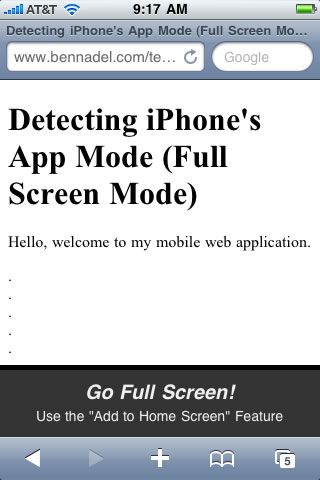
Notice the note at the bottom of the page. This note will fade away the moment the user tries to interact with the screen.
Here is what the above page will look like when run in app mode, or full screen mode:
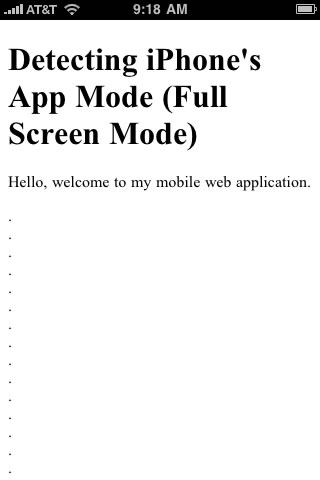
Notice that there is no note present. The user can interact with the web application as expected from the very start.
After playing around with this for a little while on my iPhone, I have found it to be a very pleasant, very non-intrusive way to persuade the user to go full screen. Furthermore, it seems to be the easiest way to handle temporarily fixed-position elements without having to worry about the limitations of the mobile window's "view port."

Reader Comments
Interesting article! I tried it on my website application and it worked great. But I noticed, after being in app mode, it seems there is no way to get back to the standard browser mode (ability to change the url, bookmark, etc). I guess the app needs to act just like an app and "pretend" that its not actually running in safari?
Good looks. You can reduce the detection to just
if (!!window.navigator.standalone) ...
If standalone is undefined, the !! basically casts it to a real boolean false. Then again, a conditional statement is fine with varying levels of falseness.. so you really dont need the !! at all. But for some reason I like it. :)
@Mark,
Yes, this is true. If you try to change the URL (such as by clicking on a link), it will actually break out into the standard Safari app (opening up a new window). I guess the idea is that you are supposed to be as much like an "app" as possible.
@Paul,
The thing I was concerned about with treating the property, in its entirety, as a truthy was that I thought I would get false-negatives in browsers that don't support full screen mode at all (such as FireFox). In that case, the property would be "undefined", not false. So, I suppose I could use the tripple comparator:
(window.navigator.standalone === false)
I'm just not used to using that operator.
Oh I see the logic you were hunting down.
yeah you could simplify with a threequals. True. :)
@Paul,
Then again, if I am targeting the iPhone, it almost seems silly to care about phones that are not compatible in the first places - seeing as I wouldn't necessarily be able to recover "gracefully". But, that's a whole other train of thought.
The topic is very good.
Hi,
new to web app development for iphone.
i want to create a simple web app that will display a single set of images. i got everything so far but.. with the caching and manifest correct, one problem is i am trying to make this accessible to online and offline. when using this meta tag
<meta name="apple-mobile-web-app-capable" content="yes">
online it will remove the URL address bar and navigation on the bottom.
offline it will not run "Cannot display TITLE because it is not connected online"
this is when i add my web app to homepage.
is there something i am doing wrong. i tried may that say it will do it but really it doesnt.
please help thank you
@Rob,
I've never seen that error before. Are you trying to programmatically (Javascript) change the Title of the document (ala document.title) or something?
very good thank you !!
Hi, Im trying to use this, copy/pasted it, but I cant seem to see the Go Full Screen Note to display.
I am glad I came across this post...as I need to do something very similar.
I have searched and searched and this seems to be the best solution...but wondering if there has been any advances that might make this technique need to be updated.
Very interesting article. Helped me a lot understanding the "full mode" in Iphone using the apple-mobile-web-app-capable parameter.
Still having some problems with my mobile web application. When using the home icon and the apple-mobile-web-app-capable parameter is set, when trying to use multitasking moving the application to background, the icon is moved to the background tray but when resuming the application hitting the icon, the application is launched from scratch.
Is it possible to use the window.navigator.standalone event to detect when an application goes in background?
Dudes the User Agent is different in full screen mode / browser mode. If you find "safari" in the UA it's the browser, if not it's the full screen mode... isn't it easier?
Hello Ben,
It's still not full screen, when I use you code.
How can I hide the blue footer(with buttons in it) in iPhone
Thank you very much!
Question:
Can you create an iPhone web application, and then have the app published to the app store.
Obviously there would be no app, it would just be a full screen view of the webpage - the limitations of web apps is that you can't monetize them easy, via the store!
Hi,
thx for this infos, it's working so far on my website, but as soon as I click on an article on my website, the "App" kicks me out of the full screen and switches to the normal Safari look.
What can I do that it won't switch to the normal view?
My site is http://www.sandrophoto.ch and you can test it with you iPhone, so that you might unterstand my problem a little bit better.
Thanks for any further informations!
Greez Sandro
The website ist based on WordPress with the WPTouch Plugin for Mobile Devices.
Hi,
I need to add this to my site, BUT, I don't want my site to work as standalone app. I need users to make use of safari functions.
How do I detect if the user has already added a link in HomeScreen (since it is opening in Safari and I haven't added "<meta name="apple-mobile-web-app-capable" content="yes" />").
So, if the user opens the page from homescreen, but not as standalone app, I don't want to display the message to add to homescreen.
Please help.
Thanks,
-ash
Nice article, very useful.
By the way, with some further research, I found this useful php script that allows you to detect any mode of application running.
It's from ( http://stackoverflow.com/questions/2738766/iphone-webapps-is-there-a-way-to-detect-how-it-was-loaded-home-screen-vs-safar ) and I hope that can help someone as it helps me.
Hi,
Recently I came across some great articles on your site.
The other day, I was discussing (www.bennadel.com/blog/1950-Detecting-iPhone-s-App-Mode-Full-Screen-Mode-For-Web-Applications.htm)with my colleagues and they suggested I submit an article of my own. Your site is just perfect for what I have written!
Would it be ok to submit the article? It is free of charge, of course!
Let me know what you think
Contact me at anelieivanova@gmail.com
Regards
Anele Ivanova
@LukyVj,
This is very handy… is there a way of catching the non-Safari browsers on iPhone (for example Chrome).
thanks!
@David - I don't think this is possible. Chrome (and I suspect all other non-safari iOS browsers), returns an identical user agent string as Safari. This makes some sense as every browser is actually Safari underneath w/ a different UI.
It's a great post. I have tried it and it's working. I want to try it like as on click any button got to full screen mode.
Very interesting article. Helped me a lot understanding the "full mode" in Iphone using the apple-mobile-web-app-capable parameter. By the way, with some further research, I found this useful php script that allows you to detect any mode of application running.
Marvelous post , i already start using it and its working on my web. Great job!!!
Great work, you certainly deserved it. Hope for more better results from your end.
rypacimarketingsolution.com