
Using Postmark To Track User Data Through Email Bounce Backs
Yesterday, I explored the use of the Postmark service to both send emails and track undelivered bounce backs in a ColdFusion web application. In that demo, all I did was make use of the user's email address to track the bounce back activity. In addition to standard email information, the Postmark service also allows us to define custom headers for the email message. Today, I wanted to see if I could use these custom headers as a way to track additional information about the user throughout the bounce back life cycle.
Before we get into this, I think I should start off by saying that you might not be able to fully rely on the integrity of the bounce back information. From what I have been told in passing, each email service handles bounce backs in their own way. Often times, the content of the original email is either truncated or fully excluded. We are going to be using custom headers to track information, but I do not believe that it is mandatory for all posted headers to be returned with the bounce back message. As such, I don't think this approach is guaranteed to work all the time.
That said, let's take a look at an example that does happen work. In the following code, I am going to make use of the Headers key in the email properties structure. The headers key allows us to post an array of name-value objects to the Postmark service. Each of these name-value objects will be turned into a custom header that gets delivered as part of the outgoing email message body.
<!---
	Define the outgoing email properties. We are going to be using
	CFHTTP post post the JSON (Javascript Object Notation) version
	of these propreties to the PostMark API.
--->
<cfset emailSettings = {
	to = "tricia@triciatacular.com",
	from = "ben+from@bennadel.com",
	subject = "PostMark Bounce Back Testing",
	htmlBody = "Hello, this is a custom header test.",
	headers = [
		{
			name = "X-Customer-ID",
			value = "C12345"
		}
		]
	} />

<!--- Post the email to the PostMark server. --->
<cfhttp
	result="post"
	method="post"
	url="http://api.postmarkapp.com/email">

	<!---
		Alert the server that the we can accept JSON as the type of
		data returned in the response.
	--->
	<cfhttpparam
		type="header"
		name="accept"
		value="application/json"
		/>

	<!---
		Alert the server that the email content will be serialized
		in the post body as JSON text.
	--->
	<cfhttpparam
		type="header"
		name="content-type"
		value="application/json"
		/>

	<!--- Define the API key to authorize post. --->
	<cfhttpparam
		type="header"
		name="X-Postmark-Server-Token"
		value="#request.apiKey#"
		/>

	<!---
		Post the serialized JSON email properties as the HTTP
		message body.
	--->
	<cfhttpparam
		type="body"
		value="#serializeJSON( emailSettings )#"
		/>

</cfhttp>
As you can see here, we are posting one custom header, "X-Customer-ID," that contains some unique ID that is significant to our application. The intent here is that if the email bounces back to Postmark, we'll be able to extract that customer ID from the bounce back message in order to more effectively track the user throughout the bounce back life cycle.
Right now, getting the custom headers from the bounce back source is not as easy as it could be. I have talked to the customer support at Postmark and they have indicated that they have plans to make this process easier; but for now, it takes a tiny bit of elbow grease.
Yesterday, I demonstrated how to use the bounce back API to gather bounce back information that looks like this:
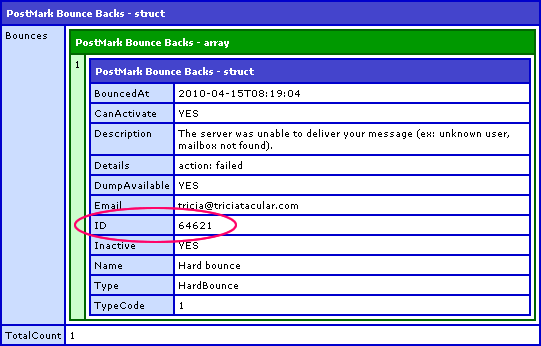
Other than the email address, this response doesn't give us too much information. What it does give us, however, is the unique ID of the bounce back message as assigned by the Postmark service. Using this ID, we can then make a subsequent API request to get an email "dump" for this bounce back. The dump gives the original raw source of the bounce back message body. From this message body, we can then try to extract our custom headers, assuming that they were returned in the bounce back data.
<!---
	Get the bounce-back information from the PostMark server. When
	doing this, we have a number of possible filters. For our use,
	we're just gonna filters on email LIKE'ness.
--->
<cfhttp
	result="get"
	method="get"
	url="http://api.postmarkapp.com/bounces">

	<!---
		Alert the server that the we can accept JSON as the type of
		data returned in the response.
	--->
	<cfhttpparam
		type="header"
		name="accept"
		value="application/json"
		/>

	<!--- Define the API key to authorize post. --->
	<cfhttpparam
		type="header"
		name="X-Postmark-Server-Token"
		value="#request.apiKey#"
		/>

	<!--- Pass in the email filter. --->
	<cfhttpparam
		type="url"
		name="emailFilter"
		value="tricia@triciatacular.com"
		/>

	<!---
		Pass in the number of bounce backs that we want to list
		(PostMark provides implicit pagination of all bounce-back
		records, starting with the most recent first).
	--->
	<cfhttpparam
		type="url"
		name="count"
		value="1"
		/>

	<!---
		Pass in the paging offset (which bounce back index will
		start the given page) - zero is the first page.
	--->
	<cfhttpparam
		type="url"
		name="offset"
		value="0"
		/>

</cfhttp>


<!---
	Deserialize the response JSON. This should give us a structure
	that contains the returned bounces plus the total number of
	bounces in the system (returned or otherwise) that match the
	given set of filtering criteria.
--->
<cfset response = deserializeJSON( toString( get.fileContent ) ) />

<!--- Output the bounce back response. --->
<cfdump
	var="#response#"
	label="PostMark Bounce Backs"
	/>

<br />
<br />


<!--- ----------------------------------------------------- --->
<!--- ----------------------------------------------------- --->


<!---
	Get the unique ID of the email from the bounce back data. This
	is an ID genreated by Postmark - it is not *our* ID value.
--->
<cfset bounceID = response.bounces[ 1 ].id />


<!---
	Now that we have the ID, we can get the full bounce-back
	dump - this is the raw source that Postmark recieved in the
	bounce back email.
--->
<cfhttp
	result="getDump"
	method="get"
	url="http://api.postmarkapp.com/bounces/#bounceID#/dump">

	<!---
		Alert the server that the we can accept JSON as the type of
		data returned in the response.
	--->
	<cfhttpparam
		type="header"
		name="accept"
		value="application/json"
		/>

	<!--- Define the API key. --->
	<cfhttpparam
		type="header"
		name="X-Postmark-Server-Token"
		value="#request.apiKey#"
		/>

</cfhttp>


<!---
	Postmark returns a JSON structure containing one key - BODY -
	which contains the raw source of the bounce back email. Let's
	deserialize this JOSN response.
--->
<cfset dumpResponse = deserializeJSON( getDump.fileContent ) />

<!--- Get the raw source of the bounce back email. --->
<cfset source = dumpResponse.body />


<!---
	The source is a raw string; so, what we need to do now is
	extract our custom header (X-Customer-ID) from the body.
--->
<cfset customHeader = reMatchNoCase(
	"X-Customer-ID[^\r\n]+",
	source
	) />

<!---
	Output the customer ID (we can think of this as a list
	delimitted by the colon and space characters. Our ID will be
	the last item in that list.
--->
<cfoutput>

	Customer ID: #listLast( customHeader[ 1 ], ": " )#

</cfoutput>
As you can see, after we get the initial bounce back response, we make a subsequent request to the "dump" web service:
http://api.postmarkapp.com/bounces/#bounceID#/dump
This call returns a JSON-serialized structure that contains a single key, Body. The body value contains the raw source of the bounce back message. Since email headers are defined one-per-line, we can use a simple regular expression to extract our "X-Customer-ID" key followed by any characters that are not the new line or carriage return characters. In doing so, we end up extracting the string value:
X-Customer-ID: C12345
This value can easily be thought of as a list delimited by the space and colon characters (or just the space character). Plucking the last "list item" off that string gives us the customer ID associated with the bounce back. And, in fact, when we run the above code, we get the following output:
Customer ID: C12345
As you can see, by posting a custom header with our original email message, it allows us to more thoroughly understand the bounce backs returned to the Postmark service. As I stated above, I am not completely sure that you can rely on the existence of all of the outgoing headers; but, if they are there, it definitely provides a powerful way to pass insightful meta data along with our system-generated emails.
Want to use code from this post? Check out the license.

Reader Comments
How did you come to know about Postmark?
@David,
We were looking at it to manage some newsletter stuff; as it turns out, it is explicitly not designed for newsletter usage (I think it might even be against their TOS). So while we didn't end up using it, it looked like something worth looking in to.
As far as where we found it originally? I am not sure - Clark sent me a link one day. I think maybe he saw it on TechCrunch or something.
In my highly skilled, technical opinion, I think "triciarific" would have sounded better. Ha ha...
Hey, did you know it's my birthday? ;)
Thanks fo this excellent video. I've only started adopting the Postmark service into my web applications. I'm just having trouble with the bounce dump 'Body" having new-line and carriage-return characters being displayed as "10" and "13". I'm not sure if Postmark is not returning the properly-encoded characters or if my receiving library, stock PHP 5.4 json_decode(), is doing some mis-conversion.