
Ask Ben: Blocking WSDL Access In A ColdFusion Application
Is there any way to hide the WSDL file generated from a CFC from being viewed on a browser? Evidently .NET allows you to modify the web.config to make this happen; was looking for an equivalent in CF. Thanks much.
First off, I have to say that I have no idea why you would want to do this, and I have to say I'm very curious. Perhaps you are trying to discourage SOAP-based access to a given component? Curiosity aside, however, there are a number of ways you could do this; if you want to stay outside of the ColdFusion application logic, you could create a URL rewriting rule that checks for the WSDL flag and blocks the request. But for my money, I like to keep things in-application as much as possible. As such, I'll show you how to use the ColdFusion application framework to block WSDL file access.
WSDL files (Web Services Description Language) are not web accessible in a ColdFusion application; they are automatically generated by the ColdFusion server and cached somewhere within the installation directory. To access a WSDL file, you must append the "WSDL" URL parameter to the location of the target component:
MyComponent.cfc?wsdl
At this point, ColdFusion will automatically retreive the cached WSDL file and serve it up as the XML response. While it does this automatically, it still obeys the rules of the ColdFusion application in which the request was made. As such, if we want to prevent the server from serving up the WSDL file, we simply have to tell the ColdFusion server not to process the request. Luckily, the ColdFusion application framework (Application.cfc) provides us with the onRequestStart() event handler which is exactly where this kind of request management should take place.
Application.cfc
<cfcomponent
	output="false"
	hint="I define the event settings and event handlers.">

	<!--- Define the application settings. --->
	<cfset this.name = hash( getCurrentTemplatePath() ) />
	<cfset this.applicationTimeout = createTimeSpan( 0, 0, 5, 0 ) />

	<!--- Define the request settings. --->
	<cfsetting
		requesttimeout="10"
		showdebugoutput="false"
		/>


	<cffunction
		name="onRequestStart"
		access="public"
		returntype="boolean"
		output="false"
		hint="I initialize the request.">

		<!---
			Check to see if the WSDL flag is present in the URL.
			If so, we can block it as we initialize the request.
		--->
		<cfif structKeyExists( url, "wsdl" )>

			<!---
				Set the header so that the client understands
				that the WSDL file was purposefuly denied. This
				part is not required, but it will provide less
				confusion if the end-user "believes" there should
				be a WSDL file available.
			--->
			<cfheader
				statuscode="403"
				statustext="Forbidden"
				/>

			<!---
				Return False - this will prevent the rest of the
				page from processing (ie. the requested template
				will not execute).
			--->
			<cfreturn false />

		</cfif>

		<!--- Return true to let page request process. --->
		<cfreturn true />
	</cffunction>

</cfcomponent>
The onRequestStart() event handler is the part of the ColdFusion application framework that allows us to manage all points of access to our application. By returning True or False from this event handler, we either grant or deny the processing of the current request respectively. As you can see in the above code, if the WSDL flag is present in the URL, our onRequestStart() event handler returns false. This effectively blocks the page from being processed.
Returning False from onRequestStart() simply prevents the rest of the request from being processed; it doesn't change anything else. As such, returning False still generates a "200 OK" status code response to the client. If a client is expecting a WSDL file to be there, this 200 response can be quite confusing. That's why, in the above code, we are explicitly setting a "403 Forbidden" response. This way, the client sees that the WSDL file has been explicitly blocked by the application, which will hopefully be less confusing.
To test this, I set up a page that performs a CFHTTP request to a WSDL file in the above application:
<!--- Define the URL of the WSDL file. --->
<cfset wsdlURL = (
	"http://" &
	cgi.server_name &
	getDirectoryFromPath( cgi.script_name ) &
	"Test.cfc?wsdl"
	) />

<!--- Attempt to get the WSDL file. --->
<cfhttp
	result="get"
	method="get"
	url="#wsdlUrl#"
	/>

<!--- Output the WSDL request response. --->
<cfdump
	var="#get#"
	label="CFHTTP WSDL Response"
	/>
When we run this code, we get the following CFDump output:
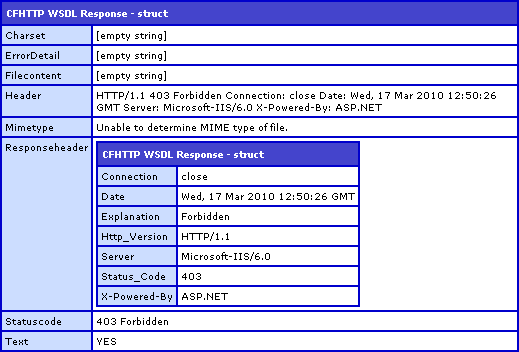
As you can see, the request comes back with a "403 Forbidden" response and an empty file content.
Like I said at the beginning, I am not sure why one would want to block WSDL file access; but, that said, I hope that this was helpful!
Want to use code from this post? Check out the license.

Reader Comments
Great solution and use of onRequestStart(). I agree, a straight block of the wsdl appears to contradict the purpose of developing a SOAP based web service interface (because it would also block the client.) However, if there was a way to extend your code to allow certain s/w clients in and the rest of the browser world out, I think that would be useful. It would make your components and methods less visible to the public.
I could see where this might come in handy to help lock down a remote proxy.
@Larry,
You can still make SOAP requests without a WSDL file; the WSDL file is only a sort of documentation. When you make the actual SOAP post, the WSDL file is not used. As such, you could theoretically use this approach to block people from the documentation - only allow those who already *know* how to call your SOAP requests.
If you make a web service SOAP call from Flex, it needs the WSDL file to figure out which methods are available and what parameters are needed. So, with Flex it downloads the WDSL file first from the server then it makes the SOAP method request.
@Larry,
I know next to *nothing* about FLEX, but that might only be true if you are using RemoteObjects? If you use a straight-up HTTP request, then it should probably be able to due it. Of course, at that point, you have to manually parse the XML that gets returned. The beauty of SOAP "wrappers" is that they take care of all the data conversion for you (most of the time).
Unfortunately it's required if using SOAP web services via Flex app. Here is a Flex snippet:
// this sets and downloads the wsdl doc from server
ws.wsdl = "http://www.xxxxx.com/ws/comp.cfc?wsdl";
ws.loadWSDL();
// event listener setup
ws.methodName.addEventListener(ResultEvent.RESULT,onResult);
ws.methodName.addEventListener(FaultEvent.FAULT, onFault);
// make the method request
// this makes the request to the server based on
// api described in the wdl file
ws.methodName.send(para1,para2);
@Larry,
Right, but you're still using a "wrapper" at that point. What I meant was that if you use something like "HTTPService", where (as with CFHTTP) you have to code it manually, it would work.
Of course, that's just for sake of argument. In reality, I am sure that would be a SUPER pain in the butt :)
You are correct. You can use HTTPservice RPC model instead and not worry about the wrapper. Not too much harder to do but not as extensible or fun!
I wonder if the Flex app could pass an arg after the wsdl and then have onRequestStart filter based on that?
ws.wsdl = "http://www.xxxxx.com/ws/comp.cfc?wsdl&x=letmethru";
<cfif structKeyExists( url, "wsdl" ) and not structKeyExists( url, "x")> should fix that
Ben, Robert great stuff that I can use. Thanks.
@Robert,
Thanks for jumping in on that one. @Larry, that should be exactly what you need.
@Ben
No worries. Happy to help.