
Using Base64 Canvas Data In jQuery To Create ColdFusion Images
Last week, I explored the HTML Canvas element for the first time. In that exploration, I created a "finger painting" demo for the iPhone that would post drawing commands to the server where the image would be re-created as a PNG in ColdFusion. That was a nice approach because it gave me some flexibility in how the ColdFusion image was created (using anti-aliasing and a thicker pen stroke). But, I wanted to see if there was a way to extract image data from the canvas without having to track every single drawing action performed by the user.
As it turns out, the HTML canvas element has a toDataURL( mimeType ) method. This method takes the current canvas display and returns a base64-encoded data URL of the pixel data for the given mime-type. This sounded like something that would play very nicely with ColdFusion's ImageReadBase64() method, which can create a new image object from a base64-encoded data URL.
Taking my iPhone drawing demo from last week, I refactored it to use the toDataURL() method. Now, rather than storing every single drawing command, I simply export the base64 image data and store it in a hidden form field before I post the form to the ColdFusion server.
<!DOCTYPE HTML>
<html>
<head>
	<title>iPhone Touch Events With jQuery</title>
	<meta
		name="viewport"
		content="width=device-width, user-scalable=no, initial-scale=1"
		/>
	<style type="text/css">

		body {
			margin: 5px 5px 5px 5px ;
			padding: 0px 0px 0px 0px ;
			}

		canvas {
			border: 1px solid #999999 ;
			-webkit-touch-callout: none ;
			-webkit-user-select: none ;
			}

		a {
			background-color: #CCCCCC ;
			border: 1px solid #999999 ;
			color: #333333 ;
			display: block ;
			height: 40px ;
			line-height: 40px ;
			text-align: center ;
			text-decoration: none ;
			}

	</style>
	<script type="text/javascript" src="jquery-1.4.2.min.js"></script>
	<script type="text/javascript">

		// When the window has loaded, scroll to the top of the
		// visible document.
		jQuery( window ).load(
			function(){

				// When scrolling the document, using a timeout to
				// create a slight delay seems to be necessary.
				// NOTE: For the iPhone, the window has a native
				// method, scrollTo().
				setTimeout(
					function(){
						window.scrollTo( 0, 0 );
					},
					50
				);

			}
		);


		// When The DOM loads, initialize the scripts.
		jQuery(function( $ ){

			// Get a refernce to the canvase.
			var canvas = $( "canvas" );

			// Get a reference to our form.
			var form = $( "form" );

			// Get a reference to our base64 image data input;
			// this is where we will need to save the encoded
			// image before we submit the form.
			var imageData = form.find( "input[ name = 'imageData' ]" );

			// Get a reference to the export link.
			var exportGraphic = $( "a" );

			// Get the rendering context for the canvas (curently,
			// 2D is the only one available). We will use this
			// rendering context to perform the actually drawing.
			var pen = canvas[ 0 ].getContext( "2d" );

			// Create a variable to hold the last point of contact
			// for the pen (so that we can draw FROM-TO lines).
			var lastPenPoint = null;

			// This is a flag to determine if we using an iPhone.
			// If not, we want to use the mouse commands, not the
			// the touch commands.
			var isIPhone = (new RegExp( "iPhone", "i" )).test(
				navigator.userAgent
			);


			// ---------------------------------------------- //
			// ---------------------------------------------- //


			// I take the event X,Y and translate it into a local
			// coordinate system for the canvas.
			var getCanvasLocalCoordinates = function( pageX, pageY ){
				// Get the position of the canvas.
				var position = canvas.offset();

				// Translate the X/Y to the canvas element.
				return({
					x: (pageX - position.left),
					y: (pageY - position.top)
				});
			};


			// I get appropriate event object based on the client
			// environment.
			var getTouchEvent = function( event ){
				// Check to see if we are in the iPhont. If so,
				// grab the native touch event. By its nature,
				// the iPhone tracks multiple touch points; but,
				// to keep this demo simple, just grab the first
				// available touch event.
				return(
					isIPhone ?
						window.event.targetTouches[ 0 ] :
						event
				);
			};


			// I handle the touch start event. With this event,
			// we will be starting a new line.
			var onTouchStart = function( event ){
				// Get the native touch event.
				var touch = getTouchEvent( event );

				// Get the local position of the touch event
				// (taking into account scrolling and offset).
				var localPosition = getCanvasLocalCoordinates(
					touch.pageX,
					touch.pageY
				);

				// Store the last pen point based on touch.
				lastPenPoint = {
					x: localPosition.x,
					y: localPosition.y
				};

				// Since we are starting a new line, let's move
				// the pen to the new point and beign a path.
				pen.beginPath();
				pen.moveTo( lastPenPoint.x, lastPenPoint.y );

				// Now that we have initiated a line, we need to
				// bind the touch/mouse event listeners.
				canvas.bind(
					(isIPhone ? "touchmove" : "mousemove"),
					onTouchMove
				);

				// Bind the touch/mouse end events so we know
				// when to end the line.
				canvas.bind(
					(isIPhone ? "touchend" : "mouseup"),
					onTouchEnd
				);
			};


			// I handle the touch move event. With this event, we
			// will be drawing a line from the previous point to
			// the current point.
			var onTouchMove = function( event ){
				// Get the native touch event.
				var touch = getTouchEvent( event );

				// Get the local position of the touch event
				// (taking into account scrolling and offset).
				var localPosition = getCanvasLocalCoordinates(
					touch.pageX,
					touch.pageY
				);

				// Store the last pen point based on touch.
				lastPenPoint = {
					x: localPosition.x,
					y: localPosition.y
				};

				// Draw a line from the last pen point to the
				// current touch point.
				pen.lineTo( lastPenPoint.x, lastPenPoint.y );

				// Render the line.
				pen.stroke();
			};


			// I handle the touch end event. Here, we are basically
			// just unbinding the move event listeners.
			var onTouchEnd = function( event ){
				// Unbind event listeners.
				canvas.unbind(
					(isIPhone ? "touchmove" : "mousemove")
				);

				// Unbind event listeners.
				canvas.unbind(
					(isIPhone ? "touchend" : "mouseup")
				);
			};


			// ---------------------------------------------- //
			// ---------------------------------------------- //


			// Bind the export link to simply submit the form.
			exportGraphic.click(
				function( event ){
					// Prevent the default behavior.
					event.preventDefault();

					// Get the bsae64 image data form the canvas.
					// This will be availble as a DATA URL in the
					// form of:
					//
					// data:image/png;base64,iVBORw0KGgog==
					//
					// ColdFusion should be able to use the data
					// URL complete with the headers.
					imageData.val(
						canvas[ 0 ].toDataURL( "image/png" )
					);

					// Submit the form.
					form.submit();
				}
			);


			// Bind the touch start event to the canvas. With
			// this event, we will be starting a new line. The
			// touch event is NOT part of the jQuery event object.
			// We have to get the Touch even from the native
			// window object.
			canvas.bind(
				(isIPhone ? "touchstart" : "mousedown"),
				function( event ){
					// Pass this event off to the primary event
					// handler.
					onTouchStart( event );

					// Return FALSE to prevent the default behavior
					// of the touch event (scroll / gesture) since
					// we only want this to perform a drawing
					// operation on the canvas.
					return( false );
				}
			);

		});

	</script>
</head>
<body>

	<!--- This is where we draw. --->
	<canvas
		id="canvas"
		width="308"
		height="358">
	</canvas>

	<!---
		This is the form that will post the drawing information
		back to the server.
	--->
	<form action="export.cfm" method="post">

		<!--- The base64 image data exported from canvas. --->
		<input type="hidden" name="imageData" value="" />

		<!--- This is the export feature. --->
		<a href="#">Export Graphic</a>

	</form>

</body>
</html>
As you can see, clicking on the "Export Graphic" button stores the base64 image data to the form field, "imageData". Because the base64 data contains all information about the image, including the height and width, I no longer need to post the canvas dimensions along with the form submission.
Once we post to the ColdFusion server, the code server-side has been greatly simplified; we are no longer re-creating the image step-by-step, we are simply creating an image object based on the submitted base64-encoded image data URL:
<!--- Param the base64 encoded image data value. --->
<cfparam name="form.imageData" type="string" default="" />

<!--- Create a new ColdFusion image with the given dimensions. --->
<cfset image = imageReadBase64( form.imageData ) />


<!---
	Now that we have drawn the image, write it to the browser
	as a PNG file.
--->
<!DOCTYPE HTML>
<html>
<head>
	<title>iPhone Touch Events With jQuery</title>
	<meta
		name="viewport"
		content="width=device-width, initial-scale=1"
		/>
</head>
<body>

	<h1>
		Your iPhone Touch Drawing
	</h1>

	<p>
		<cfimage
			action="writetobrowser"
			source="#image#"
			style="border: 1px solid ##999999 ;"
			/>
	</p>

	<p>
		<a href="./index.cfm">Draw Another Image</a>
	</p>

</body>
</html>
As you can see, the ColdFusion image is created with a single line of code - one call to imageReadBase64(). This is extremely simple; but, at the same time, as I mentioned above, we have much less flexibility as to how the image is rendered. In my previous experiment, the re-created ColdFusion image had "nicer" anti-aliasing and a thicker pen stroke. Of course, "nicer" is a highly subjective term.
Using this approach, the following drawing:
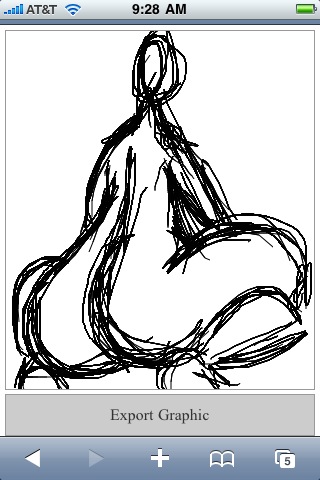
... gets exported and re-created as this:
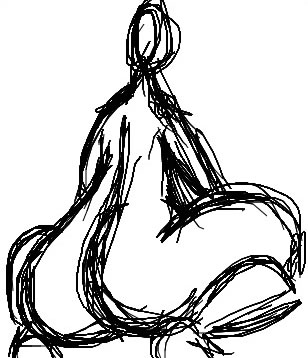
As you can see, the re-created ColdFusion image is a bit jagged in its lines.
The Canvas element is a lot of fun to play with; of course, keep in mind that the Canvas element is not yet supported by all the major browsers (think: IE). As such, it can only really be used in research and development - probably not as a mission-critical solution.
Want to use code from this post? Check out the license.

Reader Comments
FYI, I think for your iPhone UA check you also want to match "ipod" - that will then work with the ipod touch.
@Raymond,
Ah, good call! For some reason, I had it in my mind that iPhone would cover all the apple devices - clearly not thinking through that one very effectively :)
Have you seen this project? http://code.google.com/p/explorercanvas/ It brings the canvas element to IE. Haven't had a chance to try it yet, but seems promising.
@Ryan,
I have not seen that - thanks for posting it here. I'll be sure to check it out.
This is awesome. Is there a way to implement this on any other touchscreen device, Example BB Storm?
@Sanjay,
That's a good question, and one that I don't know the answer to. The canvas is a "new" HTML element, so theoretically, if the Storm supports it in the browser, it should work. The biggest question would be which kind of "event" to support. This currently supports Mouse and "Touch" events. I don't know how proprietary the "touch" events are, or if they are common to most mobile smart devices.
hum - that should work for signature capture
@Scott,
I've got an idea along those lines for a fun little project.
Everytime I see one of these iPhone-specific pages, I'm going to try to port it to my Nexus one.
The event object for Android is identical to a browser (specifically, event.pageX, event.pageY) so no code modification required to detect the events.
I added a new function:
var isAndroid = (new RegExp( "Android", "i")).test(navigator.userAgent);
var isTouch = (isIPhone || isAndroid);
onTouchStart should use isTouch in place of isIPhone. The duplicate unbind in onTouchEnd was not required for android and actually messed it up somewhat.
link: http://drewwells.net/demo/draw.html
Just seen a very similar concept here:
http://mrdoob.com/projects/harmony/
Which they say:
"As it works on webkit, he made sure it worked on the mobile Android and iPhone browsers. No multi-touch as yet, but the touch UI still makes a nice input mechanism."
Very cool stuff ... just need to find something to actually use it for :)
@Drew,
Oh cool - that's great to know; looks like the "touch" events are becoming standard for these mobile smart devices.
@Tom,
Yeah, I've seen Harmony come across on Twitter - really some stunning visuals! I especially love the way it seems to be cognizant of where existing lines are (and works with them).
This does not work on the Android Nexus because it does not support the todataURL function.
Does anyone have a work around for this?
Cheers
Guysa
Wondering how to do the server-side part in PHP or Ruby or Python?
@Josh,
Can't help you on that, sorry. ColdFusion makes working with images pretty easy, but I wouldn't know how to handle that in other languages.
@ben,
This is a great script. I'm close to getting it working on my end here but being that I am a complete novice, I am hitting a wall.
Clicking on the EXPORT link doesn't fire the JavaScript event. I have the variable declared that references the link, but I notice the link has no name or ID.
Is this by design?
In the form:
Thanks.
-Brian
Ben...
You ALWAYS save me time. Yes, ALWAYS!
Thanks for another great starter point.
I am working with JCANVAS which helps manipulate html5 canvas using cool query syntax ( http://calebevans.me/projects/jcanvas/ ) but am running into a problem when posting the canvas content for cold fusion to save/read as a base64 image...
apparently there is something wrong with the base64 that is done with testCanvas.toDataURL("image/png"); because cold fusion is unable to read the submitted content as an image and keeps dumping a weird error "codecLib error" (An exception occurred while trying to read the image.)
Has anybody faced this before or worked around it? any tips? how can i troubleshoot a string to see if it's properly structured as a base64 image?
Thanks!