jQuery Mouse Events: PageX/Y vs. ClientX/Y
When I first starting playing with jQuery events, a lot of what I learned about the jQuery Event object was through trial and error. While I could be remembering incorrectly, I used to find that the jQuery documentation was good at describing the event handlers, but not so good at describing the event object; as such, while I knew that the jQuery event object was a standardized event object, I was never 100% sure which parts of it I was supposed to be using.
Through my trial and error, I started to use the clientX and clientY mouse coordinates in the jQuery event object. These coordinates gave me the X and Y offset of the mouse relative to the top-left corner of the browser's view port. As I was reading the jQuery 1.4 Reference Guide by Karl Swedberg and Jonathan Chaffer, however, I saw that they often referred to the pageX and pageY coordinates. After checking the updated jQuery documentation, I saw that these were the coordinates standardized by jQuery; and, I saw that they gave me the X and Y offset of the mouse relative to the entire document (not just the view port).
To see the difference between these two coordinate systems, I set up a page that would log mouse click events against a visible coordinate grid.
<!DOCTYPE HTML>
<html>
<head>
	<title>jQuery Mouse Events: ClientX vs. PageX</title>
	<style type="text/css">

		div.grid {
			border: 1px solid #CCCCCC ;
			cursor: pointer ;
			font: 10px verdana ;
			height: 99px ;
			position: absolute ;
			width: 99px ;
			z-index: 100 ;
			}

	</style>
	<script type="text/javascript" src="jquery-1.4.2.js"></script>
	<script type="text/javascript">

		// I draw the grid on the document.
		function createGrid(){
			var body = $( "body" );

			// Draw the X axis.
			for (var x = 0 ; x <= 2000 ; x += 100){

				// Draw the Y axis.
				for (var y = 0 ; y <= 2000 ; y += 100){

					$( "<div class='grid'></div>" )
						.appendTo( body )
						.css({
							left: (x + "px"),
							top: (y + "px")
						})
						.text( x + "," + y )
					;

				}

			}
		};


		// When the DOM is ready, initialize the scripts.
		jQuery(function( $ ){

			// Create the grid for coordinate affordance.
			createGrid();

			// Bind the mouse event to the document so that we
			// can see what kind of coordinates we have to play
			// with.
			$( document ).click(
				function( event ){

					// Client variables.
					console.log(
						"clientX/Y: " +
						event.clientX + ", " +
						event.clientY
					);

					// Page variables. NOTE: These are the ones
					// that are officially supported by the
					// jQuery Event object.
					console.log(
						"pageX/Y: " +
						event.pageX + ", " +
						event.pageY
					);

					// Hrule.
					console.log( "......" );

				}
			);

		});

	</script>
</head>
<body>
	<!-- Nothing needed here. -->
</body>
</html>
As you can see, I create a 2000 x 2000 pixel grid that will give me both horizontal and vertical scrolling. And, when I scroll both right and down, and then click on the document, I get the following console output:
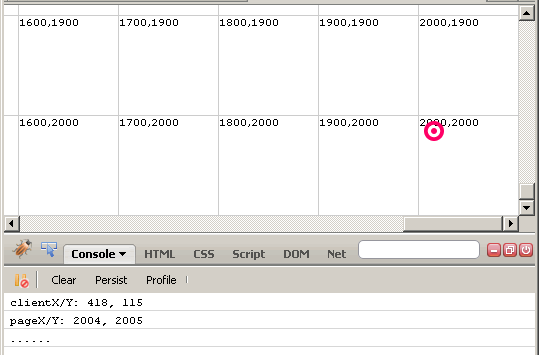
As you can see, the clientX and clientY coordinates give me the mouse position relative to the view port, regardless of the scroll of the document. The pageX and pageY coordinates, on the other hand, give me the mouse position relative to the top, left of the entire document, again regardless of the scrolling.
Which mouse event coordinates you should be using is not really a question for debate - the pageX and pageY coordinates are the ones that have been standardized by jQuery. In order to keep your code as cross-browser compatible as possible, you should rely on pageX and pageY. It is unfortunate that I did not know about this until just recently - I am quite sure that I have posted a lot of code that accidentally relied on the proprietary event properties, clientX and clientY.
Want to use code from this post? Check out the license.

Reader Comments
Thanks a lot for this post! Good that you took notice of it : this will be helpful for my map browser.
@Philippe,
The standardization of the jQuery event object is nice... especially when you finally know what the standard actually is ;)
I've been trying to find a way to determine the X/Y mouse coordinates in relation to a given element. That way I could tell if my mouse is the left 50% of a given <div>, or the top 33% of a given image and show/hide things appropriately.
Is there a way to extrapolate the pageX/Y into coords related to a certain element.
@Scott,
For something like that, I would use the offset() of the given element in conjunction with the pageX/pageY.
I use this approach a lot, but have not pointed it out specifically. I'll write up a quick post and paste a link here.
@Scott,
Take a look at this exploration:
www.bennadel.com/blog/1871-Translating-Global-jQuery-Event-Coordinates-To-A-Local-Context.htm
Very good article. Opened up my mind to many cool possibilities.
Thanks, I want to try this on the map.
@Peter,
Glad you like it. Drop another comment if you come up with some cool ways to use this.
thanks a lot,
Very useful. I've been using pageX/pageY as this is what I learnt initially, so I guess thats a bonus!
On the other hand, I do see some benefits of having both values, as it can often be useful to know *where* in the page the visitors browser is viewing. I wouldn't necessarily ignore clientX/clientY usage because, for the right task, namely some fancy jQuery-based animation, this is exactly what is needed.
Am I wrong to suggest this?
I think advanced jQuery visuals on sites would probably rely on a mixture of client/page/X/Y along with offset() and many other jQuery blessings.
@Rhys,
I think both sets of values definitely have their place. The big question is - can you rely on the clientX/clientY to always be there? The beauty of the jQuery library is that it standardizes what is available in the event object; according to the docs, they promise to supply the pageX/pageY, not the clientX/clientY. So, while I have used it without problem, I am not sure that means that it will always hold the values you expect.
The Compatibility information listed at http://www.quirksmode.org/dom/w3c_cssom.html
infact shows clientX,clientY to be the one consistent on most browsers. So it should be safe using clientX,clientY right ?
@Jitendra,
I am not sure how to best answer that. Even if it is most consistent, we are using a library that standardizes on a given set of properties. I think , if we use the library (jQuery), then we need to depend more on what they standardize on. But, as I said in the blog post, I was using the wrong ones for a while without any problem... so it appears to be quite safe by coincidence.
hi, thank you for the good article.
if I have <div style="height:600px;width:800px;overflow:auto;"> with 2 scollbars. How to determine mouse position. if I scroll down/right, the pageX/pageY show same numbers.
@rick,
after google search, scrollTop() is what I want. :-)
I've been a bit confused about this. Every bit of documentation I can find seems to say to use pageX/pageY. However, that always returns 0 for me in my jQuery on an iPhone. After some digging, I came across this page:
https://github.com/jquery/jquery-mobile/issues/734
which has some sample code with this comment in it:
// (in iOS event.pageX and event.pageY are always 0 )
which seems to back up my conclusion. I don't know if this is a failing of mobile safari or of jQuery, but it seems that pageX and pageY isn't usable on iOS.
Thank you Ben Nadal for providing us a useful knowledge, but I have some concerns about using the PageX,Y as a standard relative.
I mean that if I have to show something relative to viewport and also under the mouse hover (mouse position relative to view ports' x and y-axis), In that case how can I find the mouse position relative to viewport, if I use e.pageY then it will return me the coordinate related to the full browser?
Thanks,
Hussain
good one.....
Thanks buddy. I landed on the right page to find out the difference between client and page arguments of mousemove method. This is helpful to many. The point is revealed in detail...GREAT!
Hey Ben,
I am trying to modify the Method Draw application developed by MacKay.
Its using jQuery as its library and i am completely baffled with a problem for some time now. You do seem to somehow explained a solution to my problem here.
I want to track the mouse coordinates relative to the viewbox(the canvas) in this application using jquery and display this coordinates on a label that follows the mouse cursor. I want this to happen each time the user hovers over the viewbox(the canvas). I dont want the coordinates to be displayed when the user clicks on the canvas but rather when the user hovers over the canvas.
You think that would be possible using the solutions you described above?
Sorry forgot a link to the applicaton here. Here it is. editor.method.ac
Excellent! First explanation that is straightforward and does not just copy the definitions from other sites!
Does anyone know why jQuery doesn't give us pageX, PageY on dragover events, at least in Chrome? The original event has a clientX and clientY.
Ben, Great post as usual. I do want to understand this comment better.
You say, "Which mouse event coordinates you should be using is not really a question for debate - the pageX and pageY coordinates are the ones that have been standardized by jQuery. In order to keep your code as cross-browser compatible as possible, you should rely on pageX and pageY. "
It seems to me you suggest *not* to use
and instead use
because it is the jQuery "standard." Wouldn't the application determine which to use?
In one app, the mouse-down/drag/up events are used to draw a lasso. I found the lasso gets screwy if the page is zoomed, in which case the client values are correct and the page ones are not.
Since
has been around since DOM2 and should be ubiquitous across the browsers, the question is not what is jQuery's standard but what is appropriate for the application (including browser support).
Or am I missing something?
Follow up: on closer investigation the client and page values are consistently the same (at least in Chrome). The zoom issue I described is still not 100% clear to me. But I changed the lasso positioning to fixed and removed the calculation to adjust for any page offset positioning of the view container and that seems to have better results. So my comment about the zooming may not be valid.
I created a fiddle to track how positioning elements to the mousemove coordinates respond as part of my investigation. http://jsfiddle.net/javadoug/ReKLu/
At last: I figured out what the zoom issue was! It was an app issue which directly involved page vs. client values. Here's the rub: if you are using a fixed layout you need to use client x/y values if you want the element to follow the mouse independent of the page. If you are using an absolute/relative positioned layout you need to use page x/y values if you want elements to offset based on the page position, scroll, etc. My app uses both, hence my confusion. Phew.
Thank you very much,
also e.pagex get a different result between browser!