
ColdFusion CFThread Tag Body Executes As A Function Call
A few years ago at CFUNITED, I was talking to Rupesh Kumar about the new CFThread features he built into ColdFusion 8. In the conversation (which may have been a presentation), Rupesh mentioned that the CFThread tag body actually executes as a function call. At the time, I didn't put much thought into that; but, with ColdFusion 9's new implicit LOCAL scope for function execution, I thought it might be time to play around a bit.
After trying a few CFDump and CFSet calls, I was quickly able to confirm that CFThread does, in fact, execute as a function call, complete with an arguments scope and the implicit local scope. Here is the test code that I ran:
<!--- Launch a parallel thread. --->
<cfthread
	name="localTest"
	action="run"
	girl="Tricia">

	<!---
		The GIRL attribute is actually passed as part of the
		Attributes collection.
	--->
	<cfset thread.attributesGirl = attributes.girl />

	<!---
		The Attributes collection is actually passed as an
		argument to this thread Function. As such, we can access
		it via the arguments.
	--->
	<cfset thread.argumentsGirl = arguments.attributes.girl />

	<!---
		Both the attributes are arguments are actually part of
		the implicit LOCAL scope now part of the ColdFusion
		scope collection.
	--->
	<cfset thread.localGirl = local.attributes.girl />

	<!---
		Because this is actually a function call, we can use
		the new CF9 function to get the hidden name of the
		thread function.
	--->
	<cfset thread.calledName = getFunctionCalledName() />

</cfthread>


<!--- Join the thread so we can examine it. --->
<cfthread action="join" />


<!--- Output the thread object. --->
<cfdump
	var="#cfthread.localTest#"
	label="Thread Local"
	/>
As you can see, I am testing the existence and functionality of the attributes scope, arguments scope, and local scope as well as the use of ColdFusion 9's new method, getFunctionCalledName(). When running the code above and rejoining the thread, we get the following CFDump output (I have hidden the irrelevant properties):
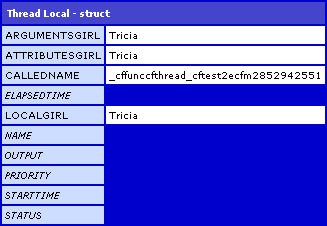
As you can see, I was able to access the name, "Tricia," using the attributes, arguments, and local scopes.
This seems like one of this things that is interesting, but entirely not useful in any practical sense. Even knowing this, I don't think there is any way in which I would change the way I currently code my CFThread tags. Even the use of the local scope appears to be unnecessary - non-scoped values are automatically placed into the implicit local scope whether or not the VAR keyword is used during variable definition. Actually, that's probably the most interesting part of this exploration - in a standard function, non-var'd variables are placed, by default, into the page's Variables scope, not the function local scope; so, in this respect, CFThread functions behave different that standard ColdFusion functions.
Want to use code from this post? Check out the license.

Reader Comments
Makes sense -- multithreading in most operating system-level programming languages (C, Perl, etc) is generally done with functions:
Perl: new Thread \&subroutine;
C++ with pthreads: pthread_create(info, attr, function, funargs);
Some languages want you to create an entirely new class just for the thread. Java's built-in threading (java.lang.thread) is one example of this, as are Python and the Boost library for C++.
Java:
class MyThread extends Thread { ... }
MyThread thread = new MyThread(args);
thread.start();
You can see from the Java example, even though it's an entire class, you still pass in arguments just like you would a regular function (albeit in the ctor).
But ... to get around the fact that you can write non-OO CF code and still use threads, I'd imagine that the internals for cfthread work like so:
1. Parser/compiler sees a cfthread and:
a. Silently bundles it inside a function wrapper, with arguments for the current page context, etc.
b. Inserts a stub class that takes, as an argument, the unique name of the wrapped function. This stub class extends Thread or implements Runnable (another way to do threads in Java, but very similar).
2. The JVM hits the stub class and runs it as a thread, which in turn calls out to the wrapped CF code, giving it a page context, etc. This stub could also be the watchdog function that will kill a thread if it hits its timeout, or if you pause or stop the thread, etc.
It's total speculation, and they could have gone in an entirely different direction, but that's how it works in my head.
@Rick,
Sounds cool - you have a much more diverse programming background that me, so I will just take that as fact. The one thing that seems to be special about the Thread functions is that the "non-scoped" default memory space is the Local scope, where as in the rest of ColdFusion, it is the Variables scope. Unless, of course, they are some how invoking the method with the "local" scope being its bound-scope as well.
I am not sure how the thread has access to the Variables scope, however; it is not being passed as part of the arguments collection. The whole binding behind threads is very fascinating.