jQuery forEach() Experiment For Branch-Wise Implicit Iteration
This morning, in my post about the jQuery plugin, closestParents(), Dan G. Switzer, II had mentioned that it would be cool to have a forEach() construct in jQuery the way there are in other functional programming languages. I had never heard of forEach() before, but from what I gathered, it would allow jQuery to perform its implicit iteration in a branch-wise manner, rather than across the entire collection. In this way, jQuery's pseudo selectors like, ":first", could be executed per branch rather than on the resultant collection.
I thought this was an interesting concept, so I tried playing around with it. What I did was create a forEach() plugin which ends up returning a ForEach class instance, rather than the expected jQuery collection. This ForEach instance then "intercepts" method calls to the target jQuery collection and applies those method calls to each node individually, rather than to the collection as a whole. To get back to the original jQuery collection, the ForEach class has an endEach() method which returns the initializing collection (very much in the same way end() moves back up the jQuery stack).
To see this in action, take a look at the following demo which is a refactoring of my previous post:
<!DOCTYPE HTML>
<html>
<head>
	<title>jQuery ForEach() Experiment</title>
	<style type="text/css">

		div {
			border: 1px solid #E0E0E0 ;
			padding: 10px 10px 10px 10px ;
			}

		div.parent {
			border-color: #CC0000 ;
			}

	</style>
	<script type="text/javascript" src="jquery-1.4.1.js"></script>
	<script type="text/javascript">

		// Create a self-executing function to encapsulate teh
		// definition of the ForEach class and forEach plugin.
		(function( $ ){

			// I am the ForEach class definition.
			function ForEach( collection ){
				var self = this;

				// I am the original collection. This is what will
				// be returned when the forEach() is ended.
				this.collection = collection;

				// I am the separation of each branch of the
				// original collection. Each element is a jQuery
				// collection unto itself (based on a single node).
				this.branches = [];

				// Using the original collection, populate the
				// branches array with jQuery objects.
				this.collection.each(
					function( index, node ){

						// Turn each node into its own branch.
						self.branches.push( $( node ) );

					}
				);
			};

			// I am the prototype of the ForEach class.
			ForEach.prototype = {

				// I take the given method and arguments and
				// apply them to each branch of the colleciton
				// individually
				doEach: function( methodName, parameters ){
					var self = this;

					// Loop over each branch.
					$.each(
						this.branches,
						function( index, branch ){
							// Apply the given jQuery method to
							// the current branch.
							var result = $.fn[ methodName ].apply(
								branch,
								parameters
							);

							// Check to see if we want to store
							// the results back into the branch
							// (for subsequent iterations). We only
							// want to do this if the result was
							// another jQuery collection.
							if (
								(typeof( result ) == "object") &&
								("jquery" in result)
								){

								// Store the resultant collection.
								self.branches[ index ] = result;

							}
						}
					);

					// Return the ForEach instance.
					return( this );
				},


				// I end the ForEach() iteration, returning the
				// original jQuery collection back to the user.
				endEach: function( returnNewCollection ){
					// Check to see if the user want to return a
					// new, merged collection.
					if (returnNewCollection){

						// Create a new collection based on the
						//combination of all teh current branches.
						return(
							this.collection.pushStack(
								$.map(
									this.branches,
									function( branch ){
										return( branch.get() )
									}
								),
								"forEach",
								""
							)
						);

					} else {

						// The user just wants the original
						// collection back.
						return( this.collection );

					}
				}

			};


			// Add the override classes to the ForEach prototype.
			$.each(
				[
					"addClass",
					"end",
					"parent",
					"parents"
				],
				function( index, methodName ){

					// Route the intercepted method call through
					// the doEach() method.
					ForEach.prototype[ methodName ] = function(){
						return( this.doEach( methodName, arguments ) );
					};

				}
			);


			// ---------------------------------------------- //
			// ---------------------------------------------- //


			// Define the actual jQuery plugin. This wlil return
			// a new instance of the ForEach class.
			$.fn.forEach = function(){
				return( new ForEach( this ) );
			}

		})( jQuery );


		// -------------------------------------------------- //
		// -------------------------------------------------- //


		// When the DOM is ready, initialize the scripts.
		jQuery(function( $ ){

			$( "a" )
				.forEach()
					.parents( "div:first" )
						.addClass( "parent" )
					.end()
				.endEach()
				.css( "font-weight", "bold" )
			;

		});

	</script>
</head>
<body>

	<h1>
		jQuery ForEach() Experiment
	</h1>

	<div>
		<div>
			<span>
				<a href="##">Some Link</a>
			</span>
		</div>
	</div>

	<br />

	<div>
		<div>
			<span>
				<a href="##">Some Link</a>
			</span>
		</div>
	</div>

</body>
</html>
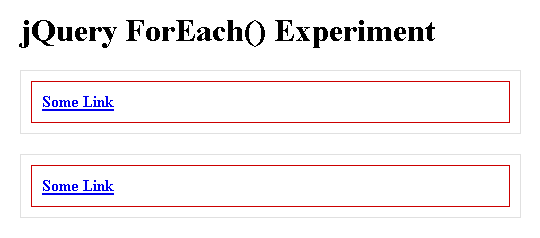
As you can see, once I have my link collection, I am calling the forEach() plugin to enter the forEach-mode of traversal. At that point, my subsequent calls to parents() and addClass() get applied to each individual link, rather than to the link collection as a whole. That is what enables the, ":first", pseudo selector to target all of the intended Div ancestors (one per link branch). To get out of the forEach mode, I call endEach() which, in this case, simply returns the original link collection.
When we run this code, we get the following output:
This was just a proof of concept, so I am manually listing the methods that I want to "intercept." However, if you wanted to, you could probably loop over the methods in the jQuery.fn object and programmatically add them to the ForEach prototype. I am not sure if this is exactly what Dan had in mind, but I thought this was an interesting experiment; I could definitely see something like this being very useful in outlier situations.
Want to use code from this post? Check out the license.

Reader Comments
Interesting approach changing the chain to an object. You could copy all of the jQuery functions as methods using:
var fn = [];
for( var k in $.fn ){
if( typeof $.fn[k] == "function" ) fn.push(k);
}
// Add the override classes to the ForEach prototype.
$.each(
fn,
function( index, methodName ){
// Route the intercepted method call through
// the doEach() method.
ForEach.prototype[ methodName ] = function(){
return( this.doEach( methodName, arguments ) );
};
}
);
However, you'd potentially run into issues with plug-ins not being detected if they're loaded after the forEach() initializes. You'd also be do a fair amount of dynamic evaluation--which I'm not sure if the overall payoff is worth.
@Dan,
Yeah, good point on the plugins loaded after the forEach() was loaded. Not sure if there is a way to handle that.
As far as the dynamic evaluation, it shouldn't be too bad because the methods are routed in the ForEach prototype, which is only set up once (when the plugin script is loaded). Once that is in place, the ForEach class definition should be static.
Anyway, thanks for putting this on my radar - it was definitely a very interesting thought experiment.
This website is the best place for me to learn, period. :)
@Sereal,
Wow - what a super flattering thing to say :) I really appreciate that! I'm so happy that this stuff is providing value for you.