Selecting The Closest Parent On Multiple Nodes With The jQuery Plugin ClosestParents()
Every now and then, I have a situation where I have a given set of nodes and I need to get particular ancestors of those nodes. jQuery currently provides three ways of accessing ancestors of a given collection: parent(), parents(), and parentsUntil(). Parent() gets the direct parent of each element in your collection; parents() gets all the ancestors of each element in your collection; and, parentsUntil() does the same things as parents(), except for that it will stop when it matches the given selector. In most cases, one of these traversal methods usually gets the job done; but sometimes, none of them quite does what I need.
Sometimes, I'm faced with a situation where I need to get some of the ancestors a given collection, but not all of them. In cases like this, parent() typically doesn't work because I'm not looking for the direct parent; and parents() doesn't work either because I'm not looking to get all the ancestors. When I first came across this scenario, I tried using one of the pseudo selectors, ":first"; but, as you'll see in the following demo, ":first" works on the final collection and not on the individual paths of traversal:
<!DOCTYPE HTML>
<html>
<head>
	<title>jQuery Parents</title>
	<style type="text/css">

		div {
			border: 1px solid #E0E0E0 ;
			padding: 10px 10px 10px 10px ;
			}

		div.parent {
			border-color: #CC0000 ;
			}

	</style>
	<script type="text/javascript" src="jquery-1.4.1.js"></script>
	<script type="text/javascript">

		// When the DOM is ready, initialize script.
		jQuery(function( $ ){

			// Get the first DIV parent of the links.
			$( "a" ).parents( "div:first" ).addClass( "parent" );

		});

	</script>
</head>
<body>

	<h1>
		jQuery Parents
	</h1>

	<div>
		<div>
			<span>
				<a href="##">Some Link</a>
			</span>
		</div>
	</div>

	<br />

	<div>
		<div>
			<span>
				<a href="##">Some Link</a>
			</span>
		</div>
	</div>

</body>
</html>
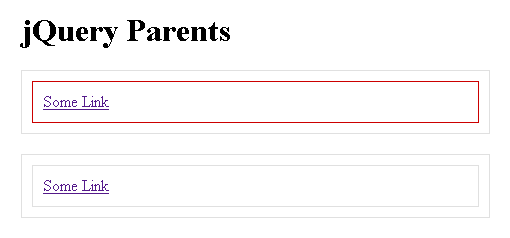
As you can see here, given a collection of anchor tags, my intent is to get the first DIV ancestor of each node. Parent() wouldn't work since the direct parent of each anchor is the Span. And, parents() won't work since it will return multiple Div tags for each anchor. I'm attempting to use the ":first" pseudo selector, but as you can see below, this works on the final collection, not on the traversal:
Really, what I want is the kind of functionality that the closest() method provides. Of course, the closest() method can't work here for two reasons: one, it only works on the first element in the given collection; and two, it might end up selecting the base element, not an ancestor. As such, I created a jQuery plugin that merges the two concepts into one: closestParents(). This traversal plugin will act just like the parents() method, only it will return the closest ancestor in each traversal path, rather than every selector-matching ancestor. To see this in action, let's refactor the example from above:
<!DOCTYPE HTML>
<html>
<head>
	<title>jQuery Closest Parents</title>
	<style type="text/css">

		div {
			border: 1px solid #E0E0E0 ;
			padding: 10px 10px 10px 10px ;
			}

		div.parent {
			border-color: #CC0000 ;
			}

	</style>
	<script type="text/javascript" src="jquery-1.4.1.js"></script>
	<script type="text/javascript">

		// I select the first ancestor that matches the given
		// selector for each element in the collection.
		jQuery.fn.closestParents = function( selector ){
			var result = jQuery( [] );

			// Check to see if there is a selector. If not, then
			// we're just gonna return the parent() call.
			if (!selector){

				// Since there is no selector, the user simply
				// wants to return the first immediate parent
				// of each element.
				return( this.parent() );

			}

			// Loop over each element in this collection.
			this.each(
				function( index, node ){
					// For each node, we are going to get all the
					// parents that match the given selector; but
					// then, we're only going to add the first
					// one to the ongoing collection.
					result = result.add(
						jQuery( node ).parents( selector ).first()
					);
				}
			);

			// Return the new collection, pushing it onto the
			// stack (such that end() can be used to return to
			// the original collection).
			return(
				this.pushStack(
					result,
					"closestParents",
					selector
				)
			);
		};


		// -------------------------------------------------- //
		// -------------------------------------------------- //


		// When the DOM is ready, initialize script.
		jQuery(function( $ ){

			// Get the first DIV parent of the links.
			$( "a" ).closestParents( "div" ).addClass( "parent" );

		});

	</script>
</head>
<body>

	<h1>
		jQuery Closest Parents
	</h1>

	<div>
		<div>
			<span>
				<a href="##">Some Link</a>
			</span>
		</div>
	</div>

	<br />

	<div>
		<div>
			<span>
				<a href="##">Some Link</a>
			</span>
		</div>
	</div>

</body>
</html>
As you can see here, my closestParents() jQuery plugin builds on top of the parents() method. Only, it calls the parents() method for each node individually, rather than for the base collection as a whole. In doing it this way, I am able to make use of the first() filtering method to ultimately gather the closest ancestor within each DOM branch. And, when we take this approach, we get the following output:
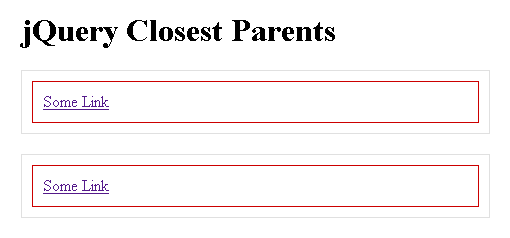
As you can see, based on the anchor tags, the closestParents() plugin gives us access to the closest Div ancestors only.
Sure, I could have accomplished the same thing by adding a unique class to the target ancestors and using the parents() method. But, depending on the situation, I might not want to, or be able to modify the HTML. jQuery is really powerful out of the box; but, part of what makes it so powerful is that it is quite easy to extend in the situations where it doesn't quite get the job done.
Want to use code from this post? Check out the license.

Reader Comments
What a great idea. This needed to be done!
Hey Ben, instead of:
result = result.add( jQuery( node ).parents( selector ).first() );
Why not do:
result = result.add( jQuery( node ).closest( selector ) );
@Kristopher,
Thanks my man.
@Cowboy,
My only concern with using closest() was that it *might* end up selecting the current node, not an actual ancestor. That's the only thing holding me back.
Gotcha, makes sense!
@Cowboy,
Although, it might be more economical to leverage the closest() method in this way:
result = result.add(
jQuery( node ).parent().closest( selector )
);
In my approach, jQuery still collects all of the ancestors before filtering; using parent+closest might prevent superfluous gathering... of course, I'm not 100% sure how the closest method actually works. You have any insight on that?
While the plug-in certain works, you could have done the same thing with:
$( "a" ).each(function (){
$(this).parents( "div:first" ).addClass( "parent" );
});
This would have given you the same result.
What would be nice is of there was a forEach() method, then you could have done something more generic like:
$( "a" ).forEach().parents( "div:first" ).addClass( "parent" );
@Ben, I haven't done any testing, but I'm sure that:
jQuery( node ).parent().closest( selector )
will be faster than:
jQuery( node ).parents( selector ).first()
because while .parents() collects *all* parent elements, traversing all the way up the hierarchy before filtering its results with .first(), parent() just looks at node.parentNode and then .closest() only traverses up until it encounters the first match.
@Dan,
The forEach() is an interesting idea; is this a construct that exists in other functional programming languages?
@Cowboy,
Yeah, that sounds good to me.
@Ben:
The forEach() was really a hypothetical concept for jQuery (and yes, other languages have the concept.)
Due to how jQuery handles chaining (well, really how JS handles it) it's not possible. The problem is you'd have awareness of the rest of the chain--which you don't have. That's the reason they implemented the each() method the way they did.
@Dan,
Yeah, I suppose you would need a way to get back "out" of the forEach() mode. Although, I suppose that would be possible in the same way that end() moves back up the stack.
@Ben:
The end() just restores the jQuery array stack. The problem is you have no way of re-running the actual execution chain--which is what you'd need to do.
@Dan,
Sorry, I didn't mean to imply that end() would work; I was just saying that *something* could be done, perhaps in that sort of vein.
@Dan,
I tried experimenting with this idea. I am not sure if I followed you exactly, but I found this fun and actually kind of useful:
www.bennadel.com/blog/1852-jQuery-forEach-Experiment-For-Branch-Wise-Implicit-Iteration.htm
Thanks a lot Ben !!
I came across the same scenarios u depicted and I've been at it for hours now.. hopes this works.. I really want to go to bed. thanx man
@Pk,
Good luck! I hope this helps get you there.
This is an awesome plugin, just what I needed and saved me having to perform some major DOM manipulation.
Keep it up!