
The other day, Matt Olson left a comment on my jQuery and ColdFusion rating system post that the jQuery script I had was not working in Internet Explorer (IE). I confirmed this on my local copy and eventually narrowed it down to a discrepancy in the way IE can access the contents of a non-Javascript Script tag. Originally, I had been using the text() method to extract the Script contents, which worked fine in FireFox. In IE, however, I had to switch over to the html() method.
After this discovery, I figured I would run the various jQuery script-content-access methods in IE and FireFox to see what else I might discover. Here is the test code that I ran:
<!DOCTYPE HTML>
<html>
<head>
	<title>jQuery: Scripts Tags And Text(), HTML(), and Contents()</title>
	<script type="text/javascript" src="jquery-1.4.js"></script>
	<script type="text/javascript">

		// When the DOM is ready, init scripts.
		jQuery(function( $ ){

			// Get a reference to our Script tag.
			var script = $( "#data" );

			// Get a reference to our output tags.
			var textOutput = $( "#text-output" );
			var htmlOutput = $( "#html-output" );
			var contentsTextOutput = $( "#contents-text-output" );
			var contentsHtmlOutput = $( "#contents-html-output" );

			// Use the various approachs to output the contents
			// of the Script tag to the document.

			// Text.
			textOutput.text( script.text() );

			// Html.
			htmlOutput.text( script.html() );

			// Contents - Text.
			contentsTextOutput.text( script.contents().text() );

			// Contents - Html.
			contentsHtmlOutput.text( script.contents().html() );

		});

	</script>
</head>
<body>

	<h1>
		jQuery: Scripts Tags And Text(), HTML(), and Contents()
	</h1>

	<script id="data" type="application/x-json">
		{script-content}
	</script>

	<!-- This is where the contents of script will be output. -->
	<p>
		TEXT: <span id="text-output"> ... </span>
	</p>

	<p>
		HTML: <span id="html-output"> ... </span>
	</p>

	<p>
		CONTENTS (TEXT): <span id="contents-text-output"> ... </span>
	</p>

	<p>
		CONTENTS (HTML): <span id="contents-html-output"> ... </span>
	</p>

</body>
</html>
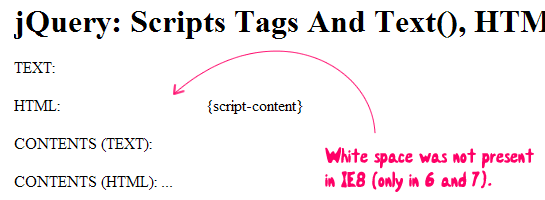
As you can see, I have a Script tag with some non-Javascript content. Then, I use the various methods - text(), html() and contents() - to try an access that content and output it to the screen. I tested this on IE6, IE7, IE8, FireFox, Safari, and Chrome. The non-IE browsers were all the same. The IE browsers were all the same which one minor exception: IE6 and IE7 added additional white space that IE8 did not.
IE Browsers (IE6, IE7, ~IE8)
Non-IE Browsers (FireFox, Safari, Chrome)
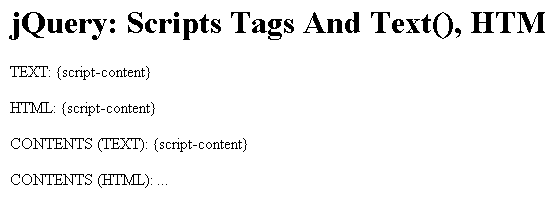
As you can see, IE was only able to access the Script tag contents using the html() method. All non-IE browsers, on the other hand, were able to use text(), html(), and contents(). None of the browsers, however, were able to access the content using contents().html(). This is not a limitation of the browser or jQuery, but rather a byproduct of the fact that there are no non-text DOM nodes contained within the Script tag.
I cannot figure out why there is extra white space in the IE-based output when it grabs the content via html(). It's as if it is rendering the content using a PRE tag or something (minus the line breaks). That must just be a bug - one that has been fixed in IE8.
All in all, it looks like the html() method is the only cross-browser safe way to access the contents of a Script tag. That's good to know, especially since Script tags act as a very convenient container for HTML templates.

Reader Comments
Thank for this post
@Jeune,
I'm glad you found this helpful.
Thanks for the informative post!
I'm looking into using mustache.js to do client side templated html using the script tag to hold the templates, and I would like to keep the templates in a separate HTML file and load that in the script tag through the src attribute, but that does not seem to work. I'm getting to think this is not possible; have you tried to embed HTML templates from a separate file using the script tag, or have other suggestions to achieve this?
Thanks for your tests. I was really wondering why I couldn´t get my script-content with .text() in IE. Now with .html() it´s working fine in all tested browsers.
Is it possible to access the json content in the case of a remote src url, as in <script id="data" type="application/x-json" src="<some feed url>">? I can't quite get such a thing to work and was hoping to find a way around xss restrictions...
@Sam: Why don't you use Ajax to read the feed?
@Jan I don't believe you can access a feed that isn't in the same domain as the page you're on via jQuery.get(). I ended up using JSONP with yahoo pipes, using document.write("<script ....>") and then as a url parameter I indicate the javascript function to pass the data to once the script loads the data. Handy way to get around XSS issues since there's no equivalent of Flash's crossdomain.xml (or is there?)
How about using a local Ajax-Call to a php file, which reads the remote feed for you? I think something like this should be possible if allow_url_fopen is true in your php.ini.
http://de.php.net/manual/en/filesystem.configuration.php#ini.allow-url-fopen
http://de.php.net/manual/en/function.file-get-contents.php
This is still an issue 2 years later. jQuery is supposed to remediate these cross browser issues, no? I have been unable to find any statement from the jQuery team calling this behavior "by design" or anything else. I wonder what they have to say about it.
$("textarea").html(test) . here "test" is a html content. here .html is not working fine in firefox.. it is working fine in IE. what what issue here issue. In firefox all the time it is considering as text not as html..? could you provide the solution.