Learning jQuery 1.4: Remove() vs. Detach()
A few years ago, I found out that using the jQuery methods, empty() and remove(), would unbind any existing event handlers on the given nodes in an attempt to prevent memory leaks. As I was reading up on the changes implemented in jQuery 1.4, however, I found out that the remove() method would also erase any data associated with the given node (data that had been originally set using the data() method). This was news to me; but, it wasn't a new feature added in jQuery 1.4 - the new feature I was reading about was detach(). The detach() method does the same thing as remove(), only it doesn't alter any of the data()-bound node information. In other words, all associated data and event bindings remain associated to the given node even after it is removed from the DOM (document object model).
To see this in action, I have created a page with two links. Both of these links will be removed from the DOM and then subsequently reattached. One will be removed using jQuery's remove() method and the other one will be removed using jQuery's new detach() method. Additionally, a live-click event handler will be attached to both links such that a data-point associated to the given node - nickname - can be logged to the console. In this way, we can see how both event bindings and data bindings are affected by each node-removal technique.
<!DOCTYPE HTML>
<html>
<head>
<title>jQuery 1.4: Remove() vs. Detach()</title>
<script type="text/javascript" src="jquery-1.4.js"></script>
<script type="text/javascript">
// When the DOM is ready, initialize scripts.
jQuery(function( $ ){
// Set up a live click event on the links on this
// page so we can alert the data of a link even
// if it's event handler has been removed.
$( "a" ).live(
"click",
function(){
var trigger = $( this );
// Log the nickname.
console.log(
trigger.attr( "class" ),
" : ",
trigger.data( "nickname" )
);
}
);
// Get a reference to the links.
var removeMe = $( "a.remove" );
var detachMe = $( "a.detach" );
// Give each link a nickname so that we can see how
// the data is affected after each remove / detach.
removeMe.data( "nickname", "Big Sexy" );
detachMe.data( "nickname", "Hot Stuff" );
// Get a continer reference.
var container = $( "p" );
// Bind click event handlers.
removeMe.click(
function(){
console.log( "RemoveMe... removed" );
// Remove element using REMOVE method.
removeMe.remove();
// Re-attach to the document in after a
// short delay.
setTimeout(
function(){
container.prepend( removeMe );
},
1000
);
}
);
// Bind click event handlers.
detachMe.click(
function(){
console.log( "DetachMe... detached" );
// Remove element using DETACH method.
detachMe.detach();
// Re-attach to the document in after a
// short delay.
setTimeout(
function(){
container.append( detachMe );
},
1000
);
}
);
});
</script>
</head>
<body>
<h1>
jQuery 1.4: Remove() vs. Detach()
</h1>
<p>
<a href="#" class="remove">Remove Me</a>
|
<a href="#" class="detach">Detach Me</a>
</p>
</body>
</html>
To demonstrate this, I am going to click on the "Remove Me" link three times in a row; then, I'm going to click on the "Detach Me" link three times in a row. After doing that, here is what we get:
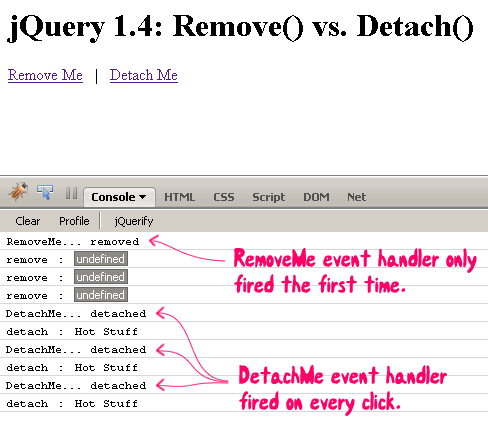
As you can see, the "Remove Me" click event handler fired only once. After that, not only did the click event handler stop working, the data associated with the node - nickname - became undefined. This is because the remove() method removes all data associated to the given node, including event bindings. On the other hand, the "Detach Me" click event handler fired every time; and, its "nickname" remained defined. This is because the new detach() method does not alter the node data when it is removed from the DOM.
jQuery's new detach() method seems very cool; however, I'm trying to think about why I have not needed it in the past. I think my reliance on hide/show techniques in conjunction with event delegation (whether through live() or other means) has really given me most of what I used to want to get out of remove(). Now that we have detach(), however, it will be interesting to see if and how I start thinking differently about problems.
Want to use code from this post? Check out the license.

Reader Comments
Thanks for posting this one with explaining everything in a video! Thats definately very very helpful. Thanks for that
Hans
smart sample code and well explained! thanks :)
Thanks guys - glad you found this useful.
just came across this blog. I liked it. :)
Yup that's correct most of the time we just use .hide() if we want to remove an object.
wanted to comment on the post, that I liked that fact you have a good writeup with explanation, and code samples. I really hate watching videos and screencasts, but I know others might like it. I think its cool you provided both.
@Cease,
Thanks. I try to make the videos only as a "supplement" to the writing of the post. It sounds like that is a best-of-both worlds approach, especially as there are people, like yourself, who are not crazy about videos.
Great Video, thank you!The detach implementation takes advantage of the remove using a keepData flag under the hood:)
Correct me if I'm wrong, but the way I understand it is that if you want remove an element from the DOM in order to manipulate it (say you want to change all the values in a certain column. Doing that while the table is still on the DOM is a very expensive step. Thus, you would remove the table from the DOM, manipulate it in whichever way you see fit, and then reinsert it into the DOM), in which case simple show()/hide() wouldn't do. So, up until now you had to remove() it, manipulate it, and then maybe append(), or whatever. But then you lose all of you data associated with it. But now, in jQuery 1.4, you could just use detach()...
Just my way of understanding it. I might be wrong....
@Doug,
Thanks - good to know about the keepData flag.
@Joe,
Yes, that's entirely accurate. If you are going to be making a lot of DOM changes, it is recommended for performance that you remove it from the DOM, make those changes, and then re-attach it to the DOM. With detach(), that is now much easier (if you are mutating an object with lots of data and event bindings).
Hi Ben, thanks for the great info. Found this blog after googling the strange problem I was having with my dom elements when removed and re-added.
Was it just me or does the jQuery documentation on $.data() and $.remove() not mention this fact about the removal of events and custom data...? I felt not.
@Ali,
Yeah, the whole data thing really confused me at first. I think ultimately what is happening is that events are being detached as a byproduct of the data detachment. As I found out a while back, jQuery actually stores its events in the data() association with an "events" key:
www.bennadel.com/blog/1727-Viewing-jQuery-DOM-Event-Bindings-With-FireBug.htm
So, it must be that when a node is remove()'d from the DOM, it flushes the data... part of which is the event binding.
A lot of time if you are building up a page, you need the item to be in the DOM so you can correctly size things. So you cannot remove it from the DOM while you're working on it in that situation.
However I have found that for a complex browser app, things like animations, etc., are much snappier if you keep most of the elements out of the DOM until they are needed. E.g., if you have a page-by-page app and you scroll them from side to side (like in a mobile application), it will go much faster if you only have the current page in the DOM and just add the page you're scrolling to when you're doing the animation.
Even display: none doesn't seem to solve that problem.
So detach() is great in that scenario. Except now I am worried about memory leaks.
If I detach a bunch of elements() can I still call remove on the element to have all its data removed? What does remove() do if the item is not in the DOM? I am hoping it still looks in the data to flush everything from there. I am concerned because my app is growing precipitously at the moment and I am not sure why. Closing the window, even, does not seem to help.