
The other day, on my blog post about creating custom jQuery selectors, Scott Smith mentioned to me that he was having some performance issues with a custom selector. Specifically, he mentioned that in some experimentation, he noticed that his custom selector was being run against more nodes than he expected. Until then, I had never really thought deeply about how a custom jQuery selector was actually executed, so I figured I'd do some experimentation of my own.
In the following code, I have a Span element wrapped in a series of nested Div elements. Two of the outer-most Div elements have the class, "parent":
<div class="parent">
	<div class="parent">
		<div>
			<span>Here is some inner text.</span>
		</div>
	</div>
</div>
When I run the code (below), I'm going to locate the Span element; then, I'm going to call the parents() method on it, using the following selector:
div.foo:testSelctor.bar
Notice that we are running 4 tests on each node returned by parents():
- Test for the Div tag.
- Test for the class, ".foo".
- Test for the custom jQuery selector, ":testSelector".
- Test for the class, ".bar".
The custom jQuery selector, ":testSelector," simply logs its invocation arguments to the console such that we can see where in the process it is being called.
Now that you have an idea of what I'm planning to do, let's take a look at the actual code:
<!DOCTYPE HTML>
<html>
<head>
	<title>jQuery Custom Selector Execution Exploration</title>
	<style type="text/css">

		div {
			border: 1px solid #CCCCCC ;
			padding: 10px 10px 10px 10px ;
			}

		div.parent {
			border-color: gold ;
			}

	</style>
	<script type="text/javascript" src="jquery-1.4.js"></script>
	<script type="text/javascript">

		// This simply outputs the arguments passed to the
		// selector for debugging purposes.
		jQuery.expr[ ":" ].testSelector = function(
			node,
			index,
			properties,
			collection
			){
			// Output the custom selector arguments.
			console.log( node, index, collection );
			return( true );
		};


		// When the DOM is ready, initialize.
		jQuery(function( $ ){

			// Get all of the spans.
			var spans = $( "span" );

			// Get all the parent divs with the class "parent".
			//
			// NOTE: This selector is using a custom selector
			// sandwiched bewteen two CLASS selectors.
			var parents = spans.parents(
				"div" +
					".foo" +
						":testSelector" +
							".bar"
				);

			// Add a red, thick border.
			parents.css( "border", "2px solid red" );

			// Output the parents.
			console.log( ".... parents ...." );
			console.log( parents );
		});

	</script>
</head>
<body>

	<h1>
		jQuery Custom Selector Execution Exploration
	</h1>

	<div class="parent">
		<div class="parent">
			<div>
				<span>Here is some inner text.</span>
			</div>
		</div>
	</div>

</body>
</html>
As you can see, the ":testSelector" custom jQuery selector simply outputs the node being examined, its index, and the collection from which it came. When we run this code, here is what FireBug is telling me:
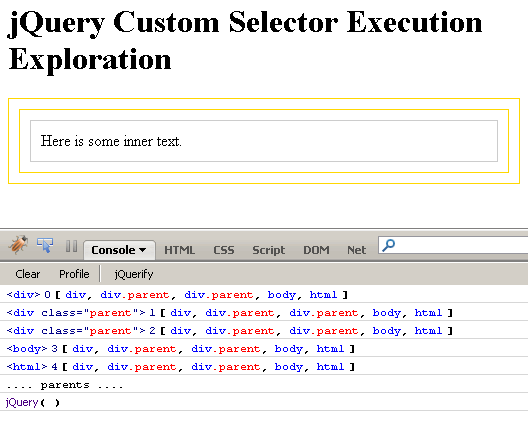
This is very interesting! Look at the nodes in the collection being examined by the custom selector:
- div
- div.parent
- div.parent
- body
- html
This completely changes the way I thought selectors were executed. I understand that Sizzle runs tree traversal in reverse; however, as my tests are all on the same node, I figured that would not matter. Of course, this has nothing to do with forward vs. reverse selecting - this has to do with progressive collection trimming. It appears that each selector execution does not perform any progressive collection trimming; meaning, neither the "div" selector, nor the ".foo" selector, nor the ".bar" selector had any pre-trimming affect on the node collection before it was passed into the testSelector custom jQuery selector method.
This is fascinating! As far as ".foo", ".bar", and ":testSelector" go, I figured I might not be able to count on order; but, I was almost certain that the "Div" tag selector would have done at least some pre-trimming of the collection. After all, I thought Sizzle used the getElementsByTagName() method.
Of course, it's not quite that straightforward! This exploration used the parents() method; if I were to replace the above use of parents() with any of the following direct jQuery selections:
- $( "div.foo:testSelector.bar" );
- $( "div.foo:testSelector" );
- $( ".foo:testSelector" );
... then, the ":testSelector" method would never get executed. As it turns out, when you do direct selections, jQuery does perform progressive trimming of the target node collection. I assume it does this using variations of getElementsByTagName(), getElementsByClassName(), and whatever new query methods browsers now support, before the node collection is passed off to (or rather, not off to) ":testSelector."
Ultimately, it doesn't really matter how the node collections get trimmed, since undesired nodes will be removed one way or another based on your selector; but, it's something that I have never thought deeply about before, and it's interesting to see how selector behavior changes (behind the scenes) based on the context of the selection.

Reader Comments
Ben:
We do a weekly showcase of any new, interesting stuff to show our group. This week I will be doing a modified presentation of the information in this post (as well as turning some folks on to your site :) This is great stuff and really important when you are going for performant code. Thanks for delving into this topic (:
@Kristopher,
My pleasure. jQuery is really fascinating stuff and I'm constantly discovering more ways to use it. I hope your presentation goes well.
Hi Ben,
How to get the jQuerify button in FireBug?
@Ngoc,
I am not sure what you mean? I don't know what "jQuerify button" is.
@Ben,
In the above screenshot (www.bennadel.com/resources/uploads/jquery_custom_selector_execution.gif), in FireBug, there's a button "jQuerify" beside button Clear and Profile, how to get it?
Thank you.
@Ngoc,
Hmm, funky. I never noticed that before. I am not even sure what it does.