
ColdFusion 9 Script-Based Method Definitions Work Inside CFScript
I know this might seem like a no-brainer but, I was not 100% sure if ColdFusion 9's new script-based implementation of functions would work the same inside CFScript as they do inside of a completely script-based Component. I had no reason to think that this wouldn't work, but I just wanted to see it for myself. To test, I created a ColdFusion component, Greeting.cfc, using the standard CFComponent tags; then, I defined a method within it, sayHello(), using CFScript:
<cfcomponent
	output="false"
	hint="I am a testing component - hello world style.">

	<cfscript>

		/**
		* @access public
		* @returnType string
		* @output false
		* @hint I say hello to the given name.
		**/
		function sayHello(
			required string name = "my man"
			){

			return( "Hello #arguments.name#" );
		}

	</cfscript>

</cfcomponent>
While the Component itself uses the CFComponent tags, the method uses the new script-based definitions, complete with JavaDoc-style attributes. I then created an instance of this CFC and invoked the given method:
<!--- Create a new greeting instance. --->
<cfset greeting = new Greeting() />

<!--- Output method call. --->
Greeting: #greeting.sayHello( "Sarah" )#

<br />
<br />

<!--- Output meta data. --->
<cfdump
	var="#getMetaData( greeting ).functions#"
	label="Function meta data."
	/>
When I ran the above code, I got the following output:
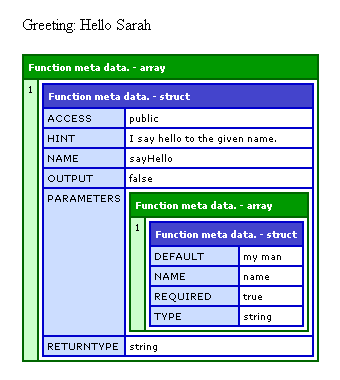
As you can see, not only did the method work as expected, but the MetaData of the component functions reveals to us that the JavaDoc-style attributes were implemented properly.
Again, I had no real reason to think that this wouldn't work; but, since the CFScript side of the language is starting to get *almost* as beefy as the Tag-based side, I just wanted to make sure they would play nicely together.
Want to use code from this post? Check out the license.

Reader Comments
As much as I am in love with CFSCRIPT, using JavaDoc for defining function attributes gives me the willies! Just doesn't seem right. The whole "Doc" part of "JavaDoc" feels violated. :)
Ben,
Is there a GOOD reference on CFScript anywhere?
Adam - Just to be clear you *don't* need to use the javadoc syntax. You can define component, parameter and function level attributes using both inline and javadoc syntax.
@Brian,
I have a pretty decent run down here:
www.bennadel.com/blog/1662-Learning-ColdFusion-9-CFScript-Updates-For-ColdFusion-Components.htm
And biggest Dan Vega has a very good one here (for Application.cfc):
http://www.danvega.org/blog/index.cfm/2009/12/13/ColdFusion9-Application-cfc-script-reference
@Dan, oh yes, I use the actual function syntax. I raise a concern of showing the JavaDoc syntax for defining a function only cause I feel its use is tenuous. If you accidentally mistype something in the JavaDoc syntax, does CF throw an exception, or happily ignore it?
99% sure it just ignores it, but then again I never make a mistake so It does not affect me ;) ha
@Dan hehe, then my concern is clearly unfounded! ;)
Admitting that I know little about JavaDoc, but does it carry through to documenting the component when the component is called from URL?
Typically, I don't like the Javadoc style notation. For things like like the Component and the Property tag, I use inline attributes.
My problem with the Function is that it has inline attributes both BEFORE and AFTER the method signature... which is kind of junky.
I love the JSDoc syntax personally. In JavaScript, using /*! styled comment for the file description and the /** styled comment for the class and method descriptions feels right after a while, Aptana's editor bolds the @attributes and it is really readable an super easy to edit, I hated the thought of not using FuseDoc style any more but now I love JSDoc/JavaDoc/CFScriptDoc format :)
The biggest problems are not being able to use the data type requirement with dots and that the @attributes are not stored very well, the output just doesn't look right when you dump a getMetaData to me since I like to include the data types as part of the comment block, I have found one way around it. I use:
@param {MachII.framework.Event}event I am the Mach II Event object.
That gives an attribute of "@param {MachII.framework.Event}event" which equals "I am the Mach II Event object." that I can process and split up if needed. With any luck I can figure out a way to colour code the @attributes and {dataTypes} like Aptana JSDocs do and then I will be even happier :)
@Brian
no it doesn't all carry through to the documentation system from what I have found, I guess there's more for Adobe to do on it still, hopefully it will work better in CF10.
@Marcel,
That's cool to know that Aptana knows how to intelligently use the JavaDoc style comments. That's what a good IDE is all about.
I am not sure what you mean about the Dump output of the objects with comment-style meta data? The CFDump in my blog post looks good?
@Ben
I just meant when you want to have pathed objects like MachII.framework.Event, you can't currently so using the param syntax found in JSDocs is just a quick way to document your function and have all the information there.
The not looking right part was in relation to attributes you store not the parameters, in the documentation I found the example of:
/**
*@hint "this is a hint for component"
*/
Doing so produces a dump containing both:
hint="this is a hint for component"
and
hint "this=is a hint for component"
But using quotes in other attributes gets messier and only gives the second mistaken variant if it isn't a predefined CF attribute, so I think that's a documentation error about documentation :)
The Aptana JSDocs prefix any new line with the appropriate whitespace and asterisk, so unlike in CFBuilder you don't need to hit enter > asterisk > space before you want to type on the next line, it is great, I hope Adobe fix it for the next beta. And I hope that comes soon I love doing JSDoc styled documentation done right! :)
@Marcel,
Oh that is bizarre. I quickly learned that using quotes was not going to work. The double-dump you are getting is very strange. I see what you're talking about now.