
Making SOAP Web Service Requests With ColdFusion And CFHTTP
I get a large number of people asking me how to make SOAP web service requests using ColdFusion features like CFInvoke and CreateObject( "webservice" ). Typically, these methods works just as advertised, encapsulating SOAP requests (and responses) in a clean, easy to use ColdFusion wrapper. Of course, that's not the cases that these people are asking me about; typically, people want to know how to get CFInvoke or CreateObject() to work with a particularly complicated API.
There's no doubt that ColdFusion has some excellent (if only slightly outdated) SOAP functionality. But when things get too complicated, I find it's often easier to execute and maintain SOAP requests when you drop down into the raw XML and manual HTTP post. This kind of SOAP handling gives you complete control over all aspects of both the request and the response and leaves no mystery as to how data types should be translated.
To demonstrate this, let me walk through a SOAP request to Campaign Monitor's newsletter subscription API. Given any WSDL file, you should be able to figure out (with some determination) what kind of SOAP request a particular method call is expecting. Depending on the complexity of the given WSDL file, this could be a simple task or a total nightmare. Luckily, most professional APIs provide solid documentation complete with sample XML request and response values. The following screenshot is taken directly off of the Campaign Monitor API url and is typical (in nature) of the kind of documentation I have found with many API providers:
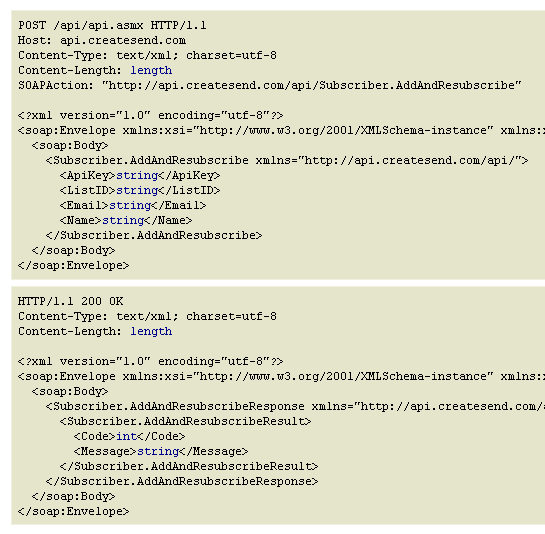
As you can see, the first XML document is a sample of the SOAP request you need to make; the second XML document is a sample of the SOAP response you will get. In addition to the XML, the API documentation also defines the SOAPAction that must be included with the request - take note of this as it will become a required Header value in our CFHTTP post.
Once we have this documentation in hand, all we have to do is formulate our own XML document and post it to the API using ColdFusion's CFHTTP and CFHTTPParam tags:
<!---
	We are going to subscribe to Campaing Monitor using the
	AddAndResubscribe actions. This is a SOAP-based method that
	requires the following XML body.
--->
<cfsavecontent variable="soapBody">
	<cfoutput>

		<?xml version="1.0" encoding="utf-8"?>
		<soap:Envelope
			xmlns:xsi="http://www.w3.org/2001/XMLSchema-instance"
			xmlns:xsd="http://www.w3.org/2001/XMLSchema"
			xmlns:soap="http://schemas.xmlsoap.org/soap/envelope/">

			<soap:Body>

				<Subscriber.AddAndResubscribe
					xmlns="http://api.createsend.com/api/">

					<ApiKey>#campaignMonitorKey#</ApiKey>
					<ListID>#campaignMonitorList#</ListID>
					<Email>kim@sweet-n-sassy.com</Email>
					<Name></Name>

				</Subscriber.AddAndResubscribe>

			</soap:Body>

		</soap:Envelope>

	</cfoutput>
</cfsavecontent>


<!---
	Now that we have our SOAP body defined, we need to post it as
	a SOAP request to the Campaign Monitor website. Notice that
	when I POST the SOAP request, I am NOT required to append the
	"WSDL" flag to the target URL (this is only required when you
	actually want to get the web service definition).
--->
<cfhttp
	url="http://api.createsend.com/api/api.asmx"
	method="post"
	result="httpResponse">

	<!---
		Most SOAP action require some sort of SOAP Action header
		to be used.
	--->
	<cfhttpparam
		type="header"
		name="SOAPAction"
		value="http://api.createsend.com/api/Subscriber.AddAndResubscribe"
		/>

	<!---
		I typically use this header because CHTTP cannot handle
		GZIP encoding. This "no-compression" directive tells the
		server not to pass back GZIPed content.
	--->
	<cfhttpparam
		type="header"
		name="accept-encoding"
		value="no-compression"
		/>

	<!---
		When posting the SOAP body, I use the CFHTTPParam type of
		XML. This does two things: it posts the XML as a the BODY
		and sets the mime-type to be XML.

		NOTE: Be sure to Trim() your XML since XML data cannot be
		parsed with leading whitespace.
	--->
	<cfhttpparam
		type="xml"
		value="#trim( soapBody )#"
		/>

</cfhttp>


<!---
	When the HTTP response comes back, our SOAP response will be
	in the FileContent atribute. SOAP always returns valid XML,
	even if there was an error (assuming the error was NOT in the
	communication, but rather in the data).
--->
<cfif find( "200", httpResponse.statusCode )>

	<!--- Parse the XML SOAP response. --->
	<cfset soapResponse = xmlParse( httpResponse.fileContent ) />

	<!---
		Query for the response nodes using XPath. Because the
		SOAP XML document has name spaces, querying the document
		becomes a little funky. Rather than accessing the node
		name directly, we have to use its local-name().
	--->
	<cfset responseNodes = xmlSearch(
		soapResponse,
		"//*[ local-name() = 'Subscriber.AddAndResubscribeResult' ]"
		) />

	<!---
		Once we have the response node, we can use our typical
		ColdFusion struct-style XML node access.
	--->
	<cfoutput>

		Code: #responseNodes[ 1 ].Code.xmlText#
		<br />
		Success: #responseNodes[ 1 ].Message.xmlText#

	</cfoutput>

</cfif>
Here, we are defining our SOAP request in the content buffer, soapBody. This XML variable is then posted to the Campaign Monitor API using CFHTTP. Notice that when I post to the API, I am not using the "WSDL" URL flag; this is only needed when we actually want to retrieve the web service definition (as is typically required by the ColdFusion SOAP wrappers). Since we are posting the raw XML, no additional web service definition is required.
The SOAPAction value that I mentioned before is now being included as a Header value using ColdFusion's CFHTTPParam tag. If you look at the previous screenshot of the API sample, you will notice that the SOAPAction value is surrounded by double quotes. While this is not required for the Campaign Monitor API, I am pretty sure that I remember running into a few situations where adding the quotes to the SOAPAction was critical:
<cfhttpparam type="header" name="SOAPAction" value="""....""" />
Notice the extra, escaped double quotes in the Value attribute.
Once we have posted the SOAP XML, we need to handle the SOAP response. Assuming that the response was formed well (valid XML) and that the target server was available, your SOAP request should always come back with a 200 response code, regardless of its execution success; any errors within the API request will be defined in the result nodes of the response. While I am not 100% sure that all SOAP APIs act this way, I have never found one to deviate.
When the SOAP response comes back, it should look something like this:
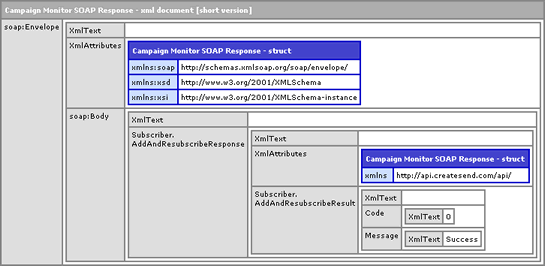
As a final caveat, because the SOAP XML response has name-spaced nodes, querying the document becomes a bit more complicated; rather than using standard node names in your XPATH, you have to query for "*" (any node) and check its local-name(). I don't care for this approach, but it seems to be the easiest way to deal with name spaces.
When we run the above code, we get the following output:
Code: 0
Success: Success
As you can see, we were able to post the SOAP XML and parse its response without any problems.
ColdFusion provides some really great SOAP functionality; API wrappers like CFInvoke and CreateObject( "webservice" ) allow for seamless integration of SOAP web service requests into your ColdFusion code. When APIs get more complicated, however, these wrappers start to break down. Luckily, in times like that, ColdFusion also makes it easy for us to drop down into the raw XML and make manual SOAP HTTP requests. And, if you encapsulate all of this into a ColdFusion component, you end up, once again, with a nice API wrapper.
Want to use code from this post? Check out the license.

Reader Comments
I've found this often only way to invoke "complex" web services. They don't really have to be that complex - typically .NET ones just don't work well with Axis that is doing heavy lifting in ColdFusion.
In my opinion easiest way to figure out required XML is to use SoapUI (http://www.soapui.org/) to make a call to the web service and route request trough TCP Monitor (part of Axis and as such already installed with ColdFusion).
Here's shortcut that I usually use to start TCP Monitor (I've downloaded latest version of Axis)
C:\jdk1.5.0_08\bin\java.exe -cp "C:\Program Files\axis-1_4\lib\axis.jar" org.apache.axis.utils.tcpmon 12345
Hope this helps.
Tero
@Tero,
I agree, regarding the low complexity of an API that necessitates XML. Generally, I only use XML. I almost never even check to see if the ColdFusion wrappers work; to me, the XML just seems more straightforward.
I'll have to check out the SoapUI stuff.
Do you take a similar approach for publishing (as opposed to calling) web services in CF? I've pretty much come to the same conclusion that you have-- CF lets you customize a lot of things, but more often then not, not quite enough to get things actually working. We have a running joke around here that SOAP stands for SOrry Ass Protocol.
@Arthur,
If you want to publish SOAP web services in ColdFusion, it is just about the easiest thing every. All you have to do is create a CFC with "remote" access methods (it's an attribute on the CFFunction tag). That will automatically make the cfc/method a SOAP web service; CF will create the stub files for you and provide the WSDL files at request with the "?wsdl" flag.
@Ben Nadel,
Yes, that is exactly how I'm doing it. My point is that it's very difficult to customize things when you do it at that way, just like when doing an outgoing SOAP call. For this particular web service, I'm trying to conform to an incoming SOAP call (from a .NET platform) that was already pre-established, it's 95% working, but just hard to get one little part of it working... I have the urge to just go in tweak the SOAP xml going over the wire, but there is no easy way to do that. I saw your other related post where you are doing just that for an image watermark-- interesting stuff.
@Arthur,
If you are working with an existing request format, you might want to just expose a CFM file as a remote web service (there's nothing technically different from a standard web page). Basically, you're gonna create a page that returns XML content rather than HTML content. The tricky thing there is that you have to manually form a SOAP XML response packet. Of course, since that is a standard, you can look it up for examples.
That's sucks though, that you have to conform to someone else's request given that *you* are the one exposing the web service :)
I'm currently trying to access a web service using the method outlined above, the service uses HTTP compression so is causing problems.
I'm including the http param:
<cfhttpparam
type="header"
name="accept-encoding"
value="no-compression"
/>
but I'm still not having any luck. When I look at the headers that are being sent (by posting to a script on my own server and looking at the CGI vars) I can see CF is adding its own list to the header.
HTTP_ACCEPT_ENCODING=no-compression, deflate, gzip, x-gzip, compress, x-compress
I presume the web service I am accessing are looking for the presence of gzip, as opposed to the presence of no-compression.
Any ideas how I can get CF to stop adding a list of encodings it doesn't support?
Thanks
Dave
I'm having a similar problem to Arthur - Our webservice is basically a listener there to receive results back from a 3rd Party supplier
I successfully created the calls & dealt with the responses to create the order using the code you supplied but the response is just an acknowledgement that the order has been received - The actual results come back asynch - Hence the listener
If I send the response XML from my test harness - the code works exactly as I'm expecting - It falls over when it hits a db call but thats fine as it's only test data - It does however read and parse the XML correctly however when it's sent directly from the supplier using their C# setup it falls over at the point where I'm trying to do a read (to dump out a copy of the response to the local file system before processing) on the XML document that's been sent
We don't receive any errors in our exception log but the calling service gets an error
ErrorMessage=Unable to send API Result to EPSL:
faultstring=coldfusion.xml.rpc.CFCInvocationException:
[coldfusion.runtime.CfJspPage$ArrayBoundException : The element at position 1 cannot be
found.];detail=*coldfusion.xml.rpc.CFCInvocationException:
[coldfusion.runtime.CfJspPage$ArrayBoundException : The element at position 1 cannot be found.]
at
coldfusion.xml.rpc.CFComponentSkeleton.__createCFCInvocationExceptio
n(CFComponentSkeleton.java:723)
at
coldfusion.xml.rpc.CFComponentSkeleton.__invoke(CFComponentSkeleto
n.java:670)
at
sol.SolServiceListener.SolReceiveResult(........
This is a very weird error and is the only thing standing in our way to getting the whole thing working - we've tested the rest of the system - just as usual a weird integration problem!
@David,
Hmmm, I was not aware that ColdFusion was adding additional headers on top of the accept-encoding that you were sending. I am not sure I have any better advice. What kind of error are you getting? Typically, in my experience, the GZIP encoding issue returns a Failure to Connect or some sort of mime-type issue. Is that what you were getting?
@Jo,
Is the calling server a ColdFusion server? Or just the one hosting the web service? This error is clearly ColdFusion-based, so I was hoping that might help us narrow it down.
That's right Ben, it was the failure to connect issue.
I resolved it in the end by purchasing the CFXHTTP5 tag - that allowed me to control exactly which headers were being sent.
Hi Ben,
The calling server is a C# one sending the XML in a SOAP envelope - My webservice at the other end working as the listener is Coldfusion - We've done a bit more investigation and found that the underlying object that Coldfusion uses for the XML is a org.apache.xerces.dom.DeferredDocumentImpl -
This works fine when I use my test harness (which is my local dev Coldfusion server) but when the remote system sends the SOAP envelope - Coldfusion doesn't seem to be able to read it correctly and returns a seemingly null object
I've tried making use of the underlying java methods but they return null and I've tried getting the toString() of the object and parsing that but that is empty as well
The only real clue I have that might help is the WSDL supplied to us by the supplier
In my Coldfusion generated wsdl - the object is being defined as
<element name="SOL_Result" type="apachesoap:Document"/>
whereas in the suppliers original wsdl - it is defined as
<xs:element name="SOL_Result" type="tns:TSOL_Result" nillable="true" minOccurs="1" maxOccurs="1" />
I don't know how to deal with this object difference - It's obviously significant - I don't know (because I've only just asked the question)whether they send the result out as an XML string or as this pre-defined object
I'm going to run WSDL2Java and get a copy of the equivalent Java TSOL_Result object and see if that makes any difference
I've actually now managed to get something working with the supplier WSDL - the service accepts calls to it - However the object created from the SOAP envelope sent is still empty - I'm not sure Coldfusion actually likes the suppliers WSDL as it has alot of complex type definitions in it
I'm completely at a standstill as how to progress with this - It is usually just so easy with Coldfusion but when it doesn't work boy doesn't it work big time!
@David,
I wish I knew more about what was going wrong; in the past, the accept encoding trick has always worked for me. Good to know that at least something was able to fix it on your end.
@Jo,
That's super irritating. With SOAP, I typically create the requests via CFSaveContent and CFHTTP. However, I am not sure that I've ever actually manually created a SOAP response; as such, letting ColdFusion handle that would be the easiest approach. And, when that's not working, that's super frustrating. I wish I had a better suggestion (other than to add to the complaining).
@Jo,
I eventually got mine working by writing a "proxy" in coldfusion that forwards to the real SOAP service (since CF doesn't let you expose a lot of the guts of it.) That way I can monkey with the XML any way I please, on the way in and out. It was a pain, but ultimately I got everything working by doing that...
Thanks Arthur - Thats more or less the conclusion I'd come to - I'm currently writing in Java natively which I'm actually rather enjoying because my background is Java
My colleague found an interesting article about the possible problem - It's to do with needing to flatten the WSDL so that Coldfusion and other languages can deal with the stuff generated out of WCF
http://weblogs.thinktecture.com/cweyer/2007/05/improving-wcf-interoperability-flattening-your-wsdl.html
What happened to Webservices & XML being the definitive method of communication across disparate systems!
cfhttp response is located in it's FileContent property ????
You can't imagine how many times I had to work with cfinvoke and it's complex responses and their weird classes deserialization because I did not know this !!!
Thank you Ben!
@Dmitry,
No problem my man. You should be able to just parse the SOAP response into XML and be able to access all the nodes that way. The only thing you have to be careful of is the namespaces which require you to use some funky xmlSearch() XPath (local-name()).
I finally got to the bottom of my problem - the fact was that the WSDL was full of complex types that Axis didn't like - I should have been able to receive it as a struct but that just didn't work so it had to stay as an XML input
So what we ended up having to do and its blindingly obvious once you know! Is the following
<cfset soapreq = GetSOAPRequest()>
<cfset soapResponse=XmlParse(soapreq)>
This can then be accessed using the XPath expression
<cfset responseNodes = xmlSearch( soapResponse,"//*[ local-name()='SOL_Result']" )/>
And off you go! Days of scratching your head already solved by a little used Coldfusion tag!
Just need to add - we still did have to get the external service to clean up their WSDL and flatten it as per the article I posted before
@Jo,
Glad you got it working. I've never had a lot of luck using the SOAP methods (getSOAPRequest(), getSOAPResponse(), isSOAPRequest(), etc.) in ColdFUsion. I just never seem to want to use them in the right place. It's like you can only use them IF you are already using SOAP wrappers. But, it seems like they would be most useful when you are not using SOAP already... maybe I just don't really understand what they are supposed to be used for.
@Ben,
Using soap is pretty simple when working with Java objects:
<cfset objServerXMLHttp.open("POST", "https://www.somehost.com/ReceiveXML.asp", False) />
<cfset objServerXMLHttp.setRequestHeader("Content-Type", "text/xml; charset=utf-8") />
<cfset objServerXMLHttp.setRequestHeader("SOAPAction", "https://www.somehost.com/ReceiveXML.asp") />
<cfset objServerXMLHttp.send("#myXMLrequest#") />
<cfset objDOM = objServerXMLHttp.responseXML />
<cfset lv_xml = xmlparse(objDom.xml) />
@Dmitry,
I'll have to take a look at that. Typically, I just use CFHTTP, but I check out more Java-based approaches.
Thank you for this Ben, it worked like a charm!
@Jason,
Awesome my man! Glad to help. SOAP is definitely a funky beast to harness sometimes.
Hi Ben just wondering if you had an luck getting this request with the more complex Campaign Monitor requests that require SOAP such as passing custom fields.
This particular method is the similar to the one used in your example however it also allows an array of custom fields to be passed through.
http://www.campaignmonitor.com/api/method/subscriber-add-and-resubscribe-with-custom-fields/
I had the previous non custom fields SOAP request working fine, but it seems even with half a dozen cfhttparam headers I can't get this to be accepted and continue to get Bad Request responses and Unable to determine Mime Type?
Code I am using is as follows:
<cfhttp url="http://api.createsend.com/api/api.asmx" method="post" result="httpResponse">
<cfhttpparam type="header" name="content-type" value="text/xml">
<cfhttpparam type="header" name="SOAPAction" value="http://api.createsend.com/api/Subscriber.AddAndResubscribeWithCustomFields">
<cfhttpparam type="header" name="content-length" value="#len(arguments.soapxml)#">
<cfhttpparam type="header" name="charset" value="utf-8">
<cfhttpparam type="header" name="Accept-Encoding" value="*" />
<cfhttpparam type="Header" name="TE" value="deflate;q=0">
<cfhttpparam type="xml" value="#arguments.soapxml#">
</cfhttp
Cheers
Phil
@Phil,
That's actually the SOAP action we use a lot in our apps - the resubscribe with custom fields. Let me ask you something - are you using CF7 by any chance? I've had very odd CF7 behaviors with making SOAP requests where like 100 requests will work and then suddenly, out of nowhere, I'll start getting crazy errors like, "Body cannot be empty" for the rest of the page request. Same code works perfectly in CF8 and CF9.
I have an xsd used to validate an xml before calling a service. The xml seems to give result for the webservice call only if soap tags(header and other tags) are provided. Since the given xsd doesn't contain the soap values, the validation will fail. Can i modify the XSD dynamically by adding the soap tags to it before validating the xml with it?Any help is appreciated.
@Jasmine,
How do you handle the invalid XML if it does not validate? I am just asking because I am trying to understand your workflow. I guess what I'm asking is, why do you every have invalid XML? And, if you do, what is the benefit of validating vs. just handling web service invocation errors?
Awesome, this is exactly what i was needing!! am loving campaign monitor too. thanks ben. another great article.
@Mike,
Yeah, quality stuff, right. I've been very happy with their service. They also have a great feature where you can test the look/feel of your outgoing newlsetters in like 20 different mail clients. It costs like $5 per test, but well worth it if you have some mission critical stuff.
I am curious to know if there is a proper way to handle a lack of any cfhttp reply?
We recently moved to cfhttp SOAP for a payment system (thank you for this great article) and they require us to code for a secondary gateway that "should" ONLY be used if the primary is down.
When I inquired if a 200 reply was considered their valid reply, I was informed that any reply from them had to be handled on my end, and the failover should only work on a lack of reply.
I'll be honest, I'm pretty sure I've not done this before. Would that not be generally a cfhttp timeout?
Is there a way to capture this and work on it?
I currently encapsulate my cfhttp SOAP request and reply in a cftry, and then handle any responses I don't like.
Frank
@Frank,
Yeah, that would be a timeout issue. I am not sure what the timeout is by default - I don't think there is one - it will just hang (and then probably the page will timeout if it every returned).
It sounds like you are on the right track: put the first CFHTTP in a CFTry with a meaningful timeout and then in the CFCatch, you can perform your failover CFHTTP.
@Frank,
You can try something like this:
<cfhttp timeout="1" url="http://www.slow-host.com/">
<cfif CFHTTP.statuscode is "408 Request Time-out">
Timeout
<cfelse>
<cfdump var="#CFHTTP#">
</cfif>
Or you could use throwonerror="true". Unfortunately that doesn't return specific type for timeout so I guess I'd actually use my example instead.
That works with CF7, I wouldn't be surprised if that would be different for other versions.
Tero
@Ben Nadel,
OK, and that's what I suspected.
My understanding is, it is an instant transaction. I send, you reply. If you fail to reply, I wait until I die. However, during this waiting time, I assume ColdFusion keeps the connection open waiting for a response.
Now, unless I misunderstood, if there is no way to timeout a cfhttp request before the page times out, then my only option is for the page to try and capture its own page time out and deal with that. Is that possible?
@Tero Pikala,
Ug, wow how did I miss that? The 408 reply I mean.
I considered a cfhttp timeout. As you pointed out, if I force a timeout on cfhttp, it has to be before the script times out but after their page times out. Otherwise I run the risk (rare as it may be) to timeout on my end, then get a reply on their end, and miss it.
:)
Let me run a test request to see if it will trigger a 408 reply. Hopefully.
Thanks!
@Frank,
I think there is a certain amount of "reasonable performance" assumption you can make when dealing with a system. If you connect to a 3rd party API that is supposed to be fast, you shouldn't have to give them a 10 minute timeout period (that's simply not reasonable performance). Giving them a buffer is, however, good. You can use CFSetting to give your processing page a timeout and then give the CFHTTP timeout a smaller value than that (to ensure you have time to react).
// 3 minute page timeout.
<cfsetting requesttimeout="#(3 * 60)#" />
// 2 minute CFHTTP timeout.
<cfhttp timeout="#(2 * 60)#" />
If you think you're gonna need more time than that, then it really becomes a game of chicken, to some degree (who can wait longer).
Hi Ben,
Sorry for the late reply all the responses were going into my Junk and i just noticed! gah.
Ok I'm actually using CF8 but the issue wasn't related to the SOAP request structure at all, but poor response by Campaign Monitor. Basically i had sent my SOAP request along with the custom fields and was getting a HTTP 400, Invalid Mime Type error. After a bit of Trial and error it seemed to work fine with the custom fields array removed so the issue was with the custom fields. I had all white space trimmed and followed the documentation on the format with square brackets but what i didn't realise was that if you are sending a custom field that contains multiple options (multi select or checkbox), then you need to append a colon onto the field name you are passing or it throws a HTTP 400??? For example I had [ChestExercises] and it wanted to see [ChestExercises:]
So my custom fields would be as follows for a sample with 1 standard custom field and a multi-select custom field:
<CustomFields>
<SubscriberCustomField>
<Key>[WorkoutDate]</Key>
<Value>2010-05-08</Value>
</SubscriberCustomField>
<SubscriberCustomField>
<Key>[ChestExercises:]</Key>
<Value>Bench Press</Value>
</SubscriberCustomField>
<SubscriberCustomField>
<Key>[ChestExercises:]</Key>
<Value>Dumbbell Flyes</Value>
</SubscriberCustomField>
<SubscriberCustomField>
<Key>[ChestExercises:]</Key>
<Value>Dips</Value>
</SubscriberCustomField>
</CustomFields>
Hope that helps anyone who runs into the same issue.
Cheers
Phil
@Phil,
I have only sent simple, single custom values so I have not run into this before; thanks for posting the follow-up - I am sure this will come in handy!
Going crAZY oVER here. I am working on a app that is Mad dependent on web services. I am using the cfhttp technique which makes forming my request real easy :).
I am building a wizard that hits several differents services using cfhttp. If a user goes through the wizard quickly I get the "Connection Failure" error. In the error details the value is "Connection Reset".
<cfhttp url="#SecretServiceShh.asmx?wsdl#" method="POST" resolveurl="yes" useragent="#cgi.HTTP_USER_AGENT#" charset="utf-8" result="httpResponse" >
<cfhttpparam type="Header" name="Accept-Encoding" value="deflate;q=0">
<cfhttpparam type="Header" name="TE" value="deflate;q=0">
<cfhttpparam type="header" name="charset" value="utf-8">
<cfhttpparam type="header" name="content-type" value="application/xml; charset=utf-8">
<cfhttpparam type="header" name="content-length" value="#len(trim(soapRequest))#">
<cfhttpparam type="xml" name="body" value="#trim(soapRequest)#">
</cfhttp>
Any help would be appreciated.
Thx,
MC Layaway
@MC,
I've never run into that situation before. Now, when you say that someone moves through the form quickly, are you saying your making like a CFHTTP every minute? Or are we talking like every 10 seconds? I wonder if there is some throttling being put in place somewhere.
In my testing its like every 10 seconds as I go through and test the wizard. In my testing I found also that request never hits my service or server. What is the common use for this technique. I really just want to send over complextypes to a .net webservice. any suggestions on best practices for this.
Thanks for the help Homey,
MC Layaway Fo Life;)
@MC,
This is typically how I send complex data to a .NET web service. I've run into various problems having to do with compression or special SLL certificates; but, those always fail on every request. I have no idea why some requests would work and some would fail.
I am stumped.
Ben,
I can't thank you enough for saving my bacon tonight! Client posted a number of ways to access their web services (SOAP, C#, VB.NET, Java, and .... csv?) and I am not versed in any of those (csv would have been okay, but they force a download to a spreadsheet instead of giving me the values to use)!
Then, Ta Da! Along comes Ben with his exquisitely simple approach.
Bravo. Thanks.
RLS
@Randy,
Awesome! I'm so glad this could help. ColdFusion does provide SOAP wrappers; but, I find the raw XML and CFHTTP to be so much easier to use in most cases. Glad you got things sorted out.
Hello Ben,
I have a component that works great in ColdFusion using <cfinvoke> Now I need to call it from .Net but I can't get the wsdl when I typed this: http://localhost/createDataSources.cfc?wsdl all I get is a blank page.
I am using Coldfusion 7, do you know if this a configuration problem? if so what changes do I need to make?
Here is part of my function so you can see that I am using access="remote":
<cffunction name="createDatasources" returntype="string" output="no" access="remote" >
Thank you,
Juan
@Juan,
Are you saying that calling the createDataSources.cfc from ColdFusion works fine; but, calling the same CFC from .NET does not? Are you using the onRequest() event handler in Application.cfc? Try looking at your ColdFusion logs to see if there is an error taking place.
When you make a request for the WSDL file, the FORM scope doesn't exist. If you have any references to the FORM scope in the onRequestStart() event handler, this will cause an error.
@Ben,
After I moved the component createDataSources.cfc to "C:\Inetpub\wwwroot\cfide" it worked. Now I am able to open the wsdl and to include it in ASP.NET.
Thank you.
@Juan,
I'm glad you got it working.
Hello Ben,
By reading your blog, I understand that CF will always look for 200 OK response.
I get my soap response using a soapUI tool like the below. Same thing does not happen in CF. CF throws an application exception giving a message 500 Internal Server Error. Should I handle this on the service to wrap the error message into the object? CF has no way to by pass the 500 error and parse the cfhttp.filecontent
HTTP/1.1 500 Internal Server Error
Server: Resin/4.0.1
Accept: text/xml, text/html, image/gif, image/jpeg, *; q=.2, */*; q=.2
SOAPAction: ""
Content-Type: text/xml; charset=utf-8
Content-Length: 589
Date: Tue, 12 Oct 2010 23:48:38 GMT
<SOAP-ENV:Envelope xmlns:SOAP-ENV="http://schemas.xmlsoap.org/soap/envelope/"><SOAP-ENV:Header/><SOAP-ENV:Body><SOAP-ENV:Fault><faultcode>SOAP-ENV:Server</faultcode><faultstring xml:lang="en">PreparedStatementCallback; SQL [select * from blah blah...]; Conversion failed when converting from a character string to uniqueidentifier.; nested exception is java.sql.SQLException: Conversion failed when converting from a character string to uniqueidentifier.</faultstring></SOAP-ENV:Fault></SOAP-ENV:Body></SOAP-ENV:Envelope>
Brilliant! This is the best way to connect to SAP webservices. Thanks!
@Anil,
That's an interesting looking error. It looks like you might be trying to convert a remote data type to a ColdFusion query object or something? Have you figured it out (I know this comment is a bit old)?
@Mike,
Glad you like it! This is the only way I approach SOAP APIs these days :)
Spent *hours* figuring out why my header param for SOAPAction didn't get passed through. Finally figured it out: you have to pass it in quotes. So in CF that would be:
Now it works like a charm. Just in case someone runs into the same problem.
A very nice program for figuring out how to get your SOAP requests right is soapUI - http://www.soapui.org
I downloaded the Pro trial, but there is also a free version. Not sure what the latter can do though.
Cheers - Lomeos
@Bart,
Yeah, it's interesting you mention that. In my code example, I am not using the double-quotes; but, if you look toward the end of the blog post, you'll see that I mention that some web services apparently need this to quoted as a value. I am not sure why there is a discrepancy between different sites. I used to always double-quote the value (after hours of debugging like yourself). Probably best to just always do it. Sorry for giving a somewhat misleading demo code :)
Thanks Ben,
Once again another wonderfully crafted blog post.
I had started with this blog post http://tjordahl.blogspot.com/2008/07/special-axis-types-and-coldfusion.html
But looking at the SOAP request it seems to me to be easy enough to manually create. But I was not sure what to do next.
This was the missing key for me.
Love your work!
Hi Ben
Thanks for the great post.
I am trying to work through the cfhttp method mentioned above with a clients web service and I am struggling.
I keep getting errors.
Is there anyone here who may be able to assist with my code?
I do have a budget... so if it takes longer than a few minutes, any assistance can be billable.
I just feel like im in a bit of a rut and my deadline is really tight.
Thanks in advance.
not so much for those of us who landed here (as I frequently do) looking for our daily dosage of Ben Nadel wisdom, but more for those looking for a quick way to parse out .NET web service results, have a look at this here
http://coldfusion.sys-con.com/node/47199
The problem with publishing CF web services to be consumed by anything other than CF is that it generates an awful SOAP responses.
Instead of
<element1>
<element2>
<param1>value</param1>
<param2>value</param2>
</element>
</element1>
you get something like
<element attribute1="value" attribute2="value" attribute3="value">
and it is quite a PITA for anyone else to work with.
Try using SOAPUI on your own CF web services and you will see what I mean.
Thanks for another valuable post Ben!
I am consuming a web service using your described method utilizing cfhttp. Sadly this web service also requires that I maintain session state. Is it possible to set a header that mimics: setMaintainSession(true).
Thanks
Thanks Ben for this post, was doing some work with the eBay API and this helped me get over the hump! You Rock!
Thanks Ben for the insights on this slippery slope.
The parsing of returned XML elements with xmlSearch using local-name() really saved me from a grisly death by headache!
:)
Hey Ben,
I can't tell you how many times I reference your blog for help and more often than not your posts are extremely helpful. Thank you for that! I came across this entry as I was debugging a web service call that I was making. I would like to get your input on something that I found.
First of all my issue, when I made the web service call using cfinvoke I was returned an object with available methods (found this by using cfdump). Accessing those methods (cfoutput) simply returned what looked like a memory reference, something like "com.domain.www.SomeService.StatusType@cb826c87". What I have found is that you can get to the actual values of the SOAP response by referencing those get functions that are returned in the cfdump. I was seeing that memory reference because the returned value was a complex type. As I kept cfdump'ing those get functions I finally got to the simple types that I could access directly. So you can use something like "returnVariableName.getStatus().getStatusCode()" to get the actual data values.
This seems like a huge breakthrough to me although I am sure it is not. I just have not found any articles online speaking to this method of getting the data. Every article I found mentions using cfhttp and parsing the XML to get the data; which obviously works. Since there is such a lack of information out there on this method I am wondering if I am missing something. It sure seems easier to call the get methods instead of traversing the XML. Do you have any insight on this?
Once again, Ben Nadel's code and blog making my life easier!
Thank you so much, Ben, for this information. It helped me work past a probem that has been plaguing me for days! I needed to get the Values for given Keys out of 100s of nodes structured just like this:
You mention "our typical ColdFusion struct-style XML node access," but to somebody new, it is not all that typical! I had never worked with XML before last week; each time I encountered a new problem, it was your blog that more often than not provided the answer or pointed me in the right direction.
It really says something about your willingness and ability to help others when a post from years ago still generates useful responses. So again -- THANK YOU!
@Miguel --
I think I am in the same boat as you. I was able to access high-level info using
and similar. I get all of the login info that way; I would then craft a SOAP envelope as follows:
I then post the SOAP (soapBody) to the web service using Ben's method:
And finally parse the result into something I can work with:
As far as calling get methods rather than traversing the XML, I agree, it definitely does seem easier. But at some point you'll most likely drill down to a method that returns a bunch of identically named elements as an array of arrays. At which point, calling methods and looping through to find the value of some given key begins to break down.
That approach might also not work so well if for whatever reason, you cannot use cfinvoke.
Just wanted to say thanks for this, Ben. Not only did it work, it worked the first try!
Hi Ben
I am attempting to use the NetSuite Webservice API's ssoLogin functionality to maintain a session with cookies' returned from ssoLogin. I have all the code setup and working with raw xml and cfhttp and was attempting to use your smooth CFHTTPSession component to maintain the cookies.,
I receive a session timeout error every time. Working with a NS tech, they said the problem is that the cookies are not being sent on one row and that I need to use the Axis SetMaintainSession(true) to properly collect and regurgitate the cookies on each request. The problem is we have already written everything (all lookups, adds, deletes, etc the functionality to do things in NS) as XMl and have it all working with your cfhttp component, but only if we pass the credentials in every soap.header, not using the ssoLogin with the cookies.
The question is if there is a way to modify your cfc to somehow invoke the setMaintainSession and use the apache methods to pass the cookies rather than the cfhttp param so that we do not have to rewrite all of our code and use the wsdl stubs from the netsuite api.
Hope that makes sense and you can shed some light on this one for me.
Thanks so much,
Matt
Simply ... THANK YOU!!!!!!!
Hi Ben
Just an fyi. I ended up building a new CFC using the org.apache.http.impl.client.DefaultHttpClient with javaloader to maintain the session as the cookies are handled on the back end while posting multiple different requests back and forth with the NetSuite API. This has allowed us to use the API without having to make a stub of their ginormous wsdl. If anyone ever needs help with it we hope to put a cfc on riaforge at some point to help others who feel as helpless as we did.
Peace
Matt
I want to generate empty requests and responses conforming to a given WSDL using web method and End Point URL dynamically in the code. Is there any way regarding this???
I have followed the setup in this article and I think I almost there. I am having a problem though and have not been able to solve it.
When I cfdump #soapresponse# I am getting all the right data coming back from the SOAP request. I am having a hard time though breaking the data apart and outputting each individual field by itself.
Here is a screenshot of the dump:
http://xbligs.com/xb/images/screen.jpg
I am trying to just output the service tag xmltext but it is erroring out when I do it.
When I run:
Service Tag: #responseNodes[1].ServiceTag.xmlText#
I get the following error:
Element SERVICETAG.XMLTEXT is undefined in a Java object of type class coldfusion.xml.XmlNodeMap referenced as ''
Any ideas on what this means or how to get by this?
@spacerobot,
Unbelievable. I figured it out! I was doing the xmlsearch to the wrong spot in the file.
What if I want to show the nodes or values of the id? Here's a part of the code:
Trying this can't solve it:
From your post: "Assuming that the response was formed well (valid XML) and that the target server was available, your SOAP request should always come back with a 200 response code, regardless of its execution success; any errors within the API request will be defined in the result nodes of the response. While I am not 100% sure that all SOAP APIs act this way, I have never found one to deviate."
I am working with an API that does not follow this rule. I am getting an access denied error (still working with the sys-admin on that), and the error DOES come back as a SOAP reponse in the filecontent variable...however, I am getting a 500 response code instead of 200.
We have been using this method for a long time to invoke complex web services from PeopleSoft.
Basically we do invoke the first method thru cfhttp to create the request-- and the second cfhttp to use that request number to get the details/result of the web first call. This is how PeopleSoft works when you publish a Component Interface as a web service. This has been working for such a long time on CF9.
Anyhow, recently, we are testing our web service calls on CF10. There is an additional 4-5 sec delay when we call these two cfhttp in consequently on CF10. If we split the cfhttp calls into two different requests (assuming that we have the request number necessary for the second call) both individually takes less than .5 sec. which is like how it used to be.
But when they are called consequently, first cfhhtp call takes less than .5 sec while the second takes as much as 5 or 6 seconds.
Any idea what is going on? extra sleep time between those two calls?
Thanks in advance for any pointers.
-K
@Kivanc,
Did u sort that issue out?
I'll be doing something similar shortly for a new client. Would you mind sharing a snippet that consumes a PeopleSoft service? chinabuy01@yahoo.com
Hi Ben
What if a website uses HTTPS as webservice?
I got this error when I try to connect a HTTPS site:
ErrorDetail I/O Exception: peer not authenticated
Filecontent Connection Failure
I can access that site var SOAPUI tool.
And here is my code:
<cfhttp url="#urlAPI#" method="post" result="response" throwOnError="false">
<cfhttpparam type="header" name="SOAPAction" value="http://www.regonline.com/api/GetRegistrationsForEvent"/>
<cfhttpparam type="header" name="accept-encoding" value="no-compression"/>
<cfhttpparam type="xml" value="#Trim(soapBody)#"/>
</cfhttp>
Hope you can help me.
Ben, you once again saved my bacon at work. Thank you, thank you, thank you!
I know this is an OLD post, but after fighting my way through a SOAP response, I found this LIFESAVER of a cfc and thought I would share. It converts XML to a CF Object, in my case structs of structs of arrays of structs....ad nauseum. Hope this helps someone out as much as it helped me.
http://www.anujgakhar.com/2007/11/05/coldfusion-xml-to-struct/
Now, where did I put that aspirin?
M
Hello,
could anybody help me with my SOAP-call-problem? Whatever I post to the billsafe-API I get back the API itself. I've tried everything and have no more ideas.. Problem is described here:
https://forums.adobe.com/thread/1541502
and here: https://forums.adobe.com/message/6622645#6622645
Thank you
Sebastian