Building Custom jQuery Event Types: Hesitate Event
If you've worked with jQuery for a while, you've probably bound event handlers to DOM elements. And, if you've done that, you may have also bound and triggered handlers to event types that aren't natively supported by the browser (ex. "drag", "drop"). This kind of seamless event management is, without a doubt, a huge part of what makes jQuery so powerful; but event binding is only part of it. In the jQuery Cookbook, Ariel Flesler explains that beyond binding to custom events, you can actually create custom events that will be triggered implicitly by the jQuery library.
I have seen this a few times before, but was never really able to wrap my head around it. With Ariel's tutorial in hand, however, I felt determined to try and play with this concept myself. As an experiment, I wanted to see if I could create a "hesitate" event type. The idea behind "hesitate" is that it would fire if the user moused over a given element and then remained over the element - without clicking - for a certain duration. The idea being that they intend to click the element, but they are hesitating to act upon that intent.
Before we get into the internals of the custom event type creation, let's take a look at the code that uses it. In the following demo, I am going to bind to the "hesitate" event on some image thumbnail links. If the user hesitates to click a thumbnail, I am going to increase the size of that thumbnail in an attempt to entice them to click it. As you will see below, the calling code can bind to our custom event type, "hesitate", just as it could to any other event type, native or otherwise.
<!DOCTYPE HTML>
<html>
<head>
	<title>Building A Custom jQuery Event Type: Hesitate</title>
	<style type="text/css">

		a {
			float: left ;
			margin-right: 15px ;
			}

	</style>
	<script type="text/javascript" src="jquery-1.4a1.js"></script>
	<script type="text/javascript" src="jquery.event.hesitate.js"></script>
	<script type="text/javascript">

		// Override the Hesitate event duration.
		// Set it to be 1 second (1000 milliseconds).
		jQuery.event.special.hesitate.duration = 1000;


		// When the DOM is ready, interact.
		jQuery(function( $ ){

			// Gather the links.
			var links = $( "a:has( > img )" );

			// Set HREF and bind "hesitate" event.
			links
				.attr( "href", "javascript:void( 0 )" )
				.bind(
					"hesitate",
					function(){
						// If the user has hesitated over this
						// link, then entise them by enlarging
						// the nested image.
						$( this )
							.children()
								.stop()
								.animate(
									{
										width: 200
									},
									{
										duration: 1000
									}
								)
						;
					}
				)
				.bind(
					"mouseout",
					function(){
						$( this )
							.children()
								.stop()
								.animate(
									{
										width: 100
									},
									{
										duration: 200
									}
								)
						;
					}
				)
			;

		});

	</script>
</head>
<body>

	<h1>
		Building A Custom jQuery Event Type: Hesitate
	</h1>

	<p>
		<a href="##"><img src="girl.jpg" width="100" /></a>
		<a href="##"><img src="girl.jpg" width="100" /></a>
		<a href="##"><img src="girl.jpg" width="100" /></a>
	</p>

</body>
</html>
The first thing I am doing here is overriding the "duration" of the "hesitate" event type. This is the amount of time the user will have to be non-active over the target element before the "hesitate" event is fired. In my example, this is done across the board (as a generic event type) and not on a per-binding basis (which could also be done). Then, just as I would with any event type, I bind my event handlers to "hesitate" event on the target links.
If I mouse over one of the links, but do not commit to the click, the nested image will animate to a larger size and look like this:
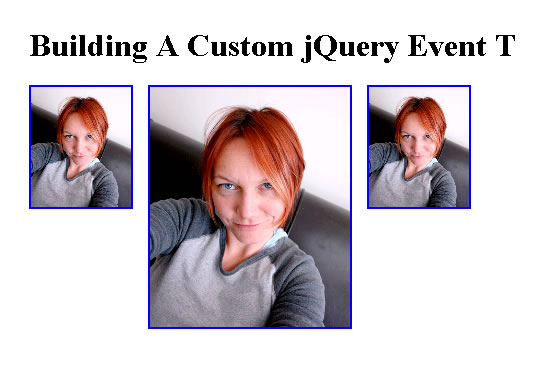
What you'll notice above is that my demo code does not define the logic of the "hesitate" event type or how it gets triggered; it simply binds to the event type on the target elements. The logic and the mechanics of the event are all handled by jQuery and my custom event type setup, which is defined by the included Javascript file, jquery.event.hestiate.js. Now that you see how the event type is getting used, let's take a look at how the event type is defined:
jquery.event.hesitate.js
// Define the Hesitate event. This event fires if a person has
// moused-over the given element and paused for the given duration
// without clicking.
//
// NOTE: To create a custom duration, update the duration
// property (in milliseconds):
// jQuery.event.special.hesitate.duration.
(function( $ ){

	// When the given element is entered, we need to set up the
	// timeout that will trigger the Hesitate event after the
	// appropriate pause duration.
	var prepareHesitate = function( event ){
		var target = $( this );

		// Store the timeout with the element's data so that we
		// can clear the timeout if the user acts within the
		// given duration.
		target.data(
			"hesitate.timer",
			setTimeout(
				function(){
					// Remove any hestitate context.
					removeHesitate( event );

					// Trigger the event handlers.
					target.triggerHandler( "hesitate" );
				},
				$.event.special.hesitate.duration
			)
		);
	};


	// When the user mouses out of the given element or clicks
	// on the given element, we want to remove the hesitation
	// timer.
	var removeHesitate = function( event ){
		// Remove the timer and its data key.
		removeHesitateTimer( $( this ) );
	}


	// This removes the hestation timer on the given element.
	var removeHesitateTimer = function( target ){
		// Clear the timer.
		clearTimeout(
			target.data( "hesitate.timer" )
		);

		// Remove the timer key.
		target.removeData( "hesitate.timer" );
	}


	// ------------------------------------------------------ //
	// ------------------------------------------------------ //


	// Define our special event, "hestiate":
	$.event.special.hesitate = {

		// This method gets called the first time this event
		// is bound to THIS particular element. It will be
		// called once and ONLY once for EACH element.
		setup: function( eventData, namespaces ){
			// Bind the three event handlers that we are going
			// to need to make sure this event fires correctly.
			$( this )
				.bind( "mouseenter", prepareHesitate )
				.bind( "mouseleave", removeHesitate )
				.bind( "click", removeHesitate )
			;

			// Return void as we don't want jQuery to use the
			// native event binding on this element.
			return;
		},

		// This method gets called when this event us unbound
		// from THIS particular element.
		teardown: function( namespaces ){
			var target = $( this );

			// Remove bound events.
			target
				.unbind( "mouseenter", prepareHesitate )
				.unbind( "mouseleave", removeHesitate )
				.unbind( "click", removeHesitate )
			;

			// We also want to remove the timer in case there is
			// one in progress.
			removeHesitateTimer( target );

			// Return void as we don't want jQuery to use the
			// native event binding on this element.
			return;
		},

		// This is the duration a user must pause over the
		// target element without acting before the hesitate
		// event will be triggered.
		duration: (2 * 1000)

	};

})( jQuery );
This is my first time trying this, so I am 100% how it all wires together. But, from what I understand, all custom jQuery events are defined as named-structures off of:
jQuery.event.special
This event definition object should contain, at the very least, two core methods, setup() and teardown(). The setup() method is a sort of event constructor that gets called exactly once for each element the first time the custom event is bound to it. The teardown() method is a sort of event destructor that gets called exactly once for each element when the custom event is unbound from it.
What you do in these methods is up to you; but, because we are building completely custom events, we need to build on top of events that are natively supported by the browser (or at least other events that might be triggered in some way). As such, from within our setup() method, we need to bind event handlers to the core events that will power our custom event. In this case, for the "hesitate" event, there are three crucial event types to monitor:
MouseEnter. When the user mouses into the target element, we have to start keeping track of their subsequent hesitation to click.
MouseLeave. When the user mouses out of the target element, we no longer need to keep track of their activity.
Click. When the user clicks on the target element, they can no longer be considered inactive or hesitating.
Once we bind to these core methods, we can then go about using them to create our custom event. In our particular case, when the user enters the target area, we create a timer that waits for inactivity. If the user clicks on the target element, or mouses out of it, we kill the inactivity timer. If the user does neither of these two things, the timer will execute and its callback will trigger the "hesitate" event on the target element. At this point, any subsequent handlers bound to this target element for the "hesitate" event will be executed.
While this works well, it should be noted that the core events (upon which are custom event is powered) are not shielded in any way. Meaning, if someone were to trigger a "click" event on our target element, it would certainly trigger the "click" handler that we are using to power the "hesitate" event.
As this is the first time that I have created a custom jQuery event type, I am sure that I am leaving juicy pieces of information out of my explanation. For instance, I have not talked about namespaces, additional event data, or per-binding custom settings; hopefully I can address such things in a future post.
Want to use code from this post? Check out the license.

Reader Comments
It would be interesting for you to compare the code to this: http://cherne.net/brian/resources/jquery.hoverIntent.html
You basically engineered it in a "clean room".
Man, you are a blogging machine!
Great stuff as always. Might be neat to use hesitate to guide a user toward a task that you think they might be wanting? Kinda a newbie nudge ;)
Expect a tech tweet tomorrow @ 9:30AM CST
I think it should be called "entice" instead of hesitate :)
(great post!)
My first thought of using hesitate was to be able to track where users are leaving their mouse so you can do some investigation into usability issues of a site.
If you keep getting people holding their cursor over something, maybe they think they're supposed to be cliking on it, or it looks "clickable"... just my first thoughts.
Good info on custom events!
@Glen,
I'll take a look at it. Quickly glanced and it looks like he based his on actual mouse movement / acceleration. Very cool.
@Elijah,
Thanks my man! I just love this stuff :)
@Chris,
That's also a good thought. At the end of the day, I just needed *something* to use in order to experiment with the topic :)
I just have to say, that you web developers are AWESOME! and don't get the credit you deserve :(
I have been following your blog for the last 2yrs. I had no idea all the stuff that goes into the websites that I navigate on a daily basis. WOW!
I have learned many cool things on your blog. I just feel like becoming a developer myself :)
Thanks!
@Katie,
Thank you very much :D I think you just made everyone's day (on this blog)... even though I know this comment is a few weeks old.
Thanks.
Always love to read and watch your posts.