
Using Javascript's Function() Constructor To Deserialize JSON Data
Last night, I was reading the jQuery Cookbook (review to come soon) and I came across something that I had never seen before; or rather, they mentioned something that I had never seen before (the concept was not actually demonstrated in the book). They mentioned in a side note that Javascript's Function() constructor could be used to evaluate JSON (Javascript Object Notation) data. I very rarely ever use the Function() constructor, so I wanted to see if I could get this to work.
The Function() constructor takes an optional list of argument names and final content argument and builds a function object using the given content as the method body such that this:
function foo( bar ){ alert( bar ); };
... and this:
var foo = new Function( "bar", "alert( bar );" );
... are equivalent.
Because our JSON data is string-based in its serialized format as is the above method body, we can easily create a function using the serialized JSON data:
<!DOCTYPE HTML>
<html>
<head>
	<title>Using Function() To Deserialize JSON Data</title>
	<script type="text/javascript">

		// Mimic the JSON string as it might come back from a
		// remote AJAX call.
		var jsonString = "{ 'myArray': ['a','b','c'] }";

		// Use the Function constructor to create a function
		// that will return the JSON object. Because the Function
		// constructor takes a string value, we can easily
		// integrate it directly into the method definition.
		//
		// NOTE: Immediately invoke the method such that it
		// returns the evaluated JSON value.
		var jsonValue = (new Function( "return( " + jsonString + " );" ))();

		// Log the new de-serialized JSON value.
		console.log( jsonValue );

	</script>
</head>
<body>
	<!--- No data. --->
</body>
</html>
As you can see, our dynamically generated method body simply returns the JSON data. When we run the above code, we get the following Firebug console output:
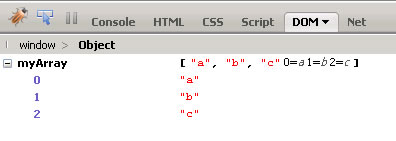
Cool - works just fine. I am not sure how this is being run internally to the Javascript engine, or if it's doing anything different than the eval() statement does. I just wanted to see if I could get it to work.
Want to use code from this post? Check out the license.

Reader Comments
That's pretty sweet. I'd like to see some speed tests done on this code Ben. Wonder if you could just create a "deserializeJSON() method once and reuse it rather than creating a new one each time.
@Andy,
As far as speed, I would assume that going the Function() route is going to be slower than just going straight to eval() simply because there's probably overhead in creating the resultant function.
I think jQuery, under the hood, will try to the native JSON object it is available, or default to eval() or something - so, the other obvious benefit to abstraction is that you can have a centralized point of branch-logic.
Doesn't appear to work that way. Must be something special in the constructor.
@Andy,
Hmmm, I don't know. I've never actually looked at their evaluation technique; but, I thought I had read something about it leveraging the internal JSON object in the new browsers.
I feel bad about posting links from ASP.NET, but anyway this performance test is quite interesting. It's about the performance between eval(), a new function and the native support of common browsers. http://bit.ly/92Fl5
@Roman,
No worries about .NET ;) It's still good results. Thanks for posting it.
This sounds a bit sketchy. Could a hacker not use this to return a malicious script as JSON data?
@Brian,
No more so than with the use of an eval() statement.
Something else to watch for as I learn AJAX then.
@Brian,
I might be very ignorant here, but I get very suspect of all the hoopla people have over the eval() / hacker stuff. It's one thing when people have an issue with AJAX-driven data; but, a lot of people get in a huff about the use of eval() to strictly internal usage.
I'm not really sure how big a problem it is. I read about it all the time.
I follow the "best practice" guidelines whenever I find them for whatever programming languages I'm using, but is that enough to protect my apps/websites? I hope so. It's not like I'm leaving out a "Welcome Hacker" mat on my virtual front porch. But those guys can be pretty persistent in finding vulnerabilities and exploiting them.
Aside: How about posting some of YOUR Best Practices for ColdFusion or JQuery or anything really?
@Brian,
MY best practices?? Hmm, that's an interesting question. I'll do some thinking and see if I can formalize some stuff.
Thanks for this article, very helpful.
@Danny,
Glad you found it useful.
the most brilliant idea i've ever seen. i tested with ASP.NET JavaScriptSerializer class and it worked. thank you.