
CFContent-Variable Response vs. Standard Output Response
I've been playing around with ColdFusion Builder Extensions lately and I'm running into some very odd behavior. Before I write anything about that, however, I wanted to confirm that a response driven by the CFContent tag and its Variable attribute is identical to a response driven by the standard ColdFusion output. To test this hypothesis, I created a simple ColdFusion page that would take XML data and return it, based on a URL variable, using either the standard ColdFusion output or the CFContent tag:
Content.cfm
<!---
	Param the method of content delivery. Basically, whether or
	not we want to use the CFContent tag to deliver the content
	back to the client (as a binary stream).
--->
<cfparam name="url.cfcontent" type="boolean" default="false" />


<!---
	Create the content that we are going to stream back. (NOTE:
	this response is the Tick's war cry!!).
--->
<cfsavecontent variable="responseData">

	<response>
		<message>Spooooooon!</message>
	</response>

</cfsavecontent>


<!---
	Check to see which streaming method we are using: either
	CFContent, or the standard output.
--->
<cfif url.cfcontent>

	<!--- Use CFContent to stream back binary data. --->

	<!---
		Convert the raw data into a binary string so we can
		use it with the CFContent tag's Variable attribute.
	--->
	<cfset responseBinary = toBinary(
		toBase64( trim( responseData ) )
		) />

	<!--- Tell client how much data to expect. --->
	<cfheader
		name="content-length"
		value="#arrayLen( responseBinary )#"
		/>

	<!--- Set a type-flag for debugging. --->
	<cfheader
		name="response-type"
		value="CFCONTENT"
		/>

	<!--- Stream the binary data to the client. --->
	<cfcontent
		type="text/xml"
		variable="#responseBinary#"
		/>

<cfelse>

	<!--- Use standard output to stream back data. --->

	<!--- Tell client how much data to expect. --->
	<cfheader
		name="content-length"
		value="#len( trim( responseData ) )#"
		/>

	<!--- Set a type-flag for debugging. --->
	<cfheader
		name="response-type"
		value="STANDARD"
		/>

	<!---
		Forgive this last piece of messiness - I just wanted
		to make sure that this methodology would finalize the
		request in the same way that CFContent would.
	--->
	<cfcontent
		type="text/xml"
	/><cfset writeOutput( trim( responseData ) ) /><cfabort />

</cfif>
As you can see above, starting with a single XML string, I configure the response in such a way that both responses halt immediately after the response data is written to the response output. Theoretically, the only difference between these two responses should be the custom CFHeader value, "response-type", which I am inserting for debugging / sanity-check purposes.
With the content page in place, I then set up a test page which would make two CFHTTP requests to the content.cfm page - one using the standard output response and one using the CFContent-driven response:
<!--- Build the URL for the standard content page. --->
<cfset standardURL = (
	"http://" &
	cgi.server_name &
	getDirectoryFromPath( cgi.script_name ) &
	"content.cfm"
	) />

<!---
	Build the URL for the cfcontent-driven content page
	(simply adding the URL-flag to the request).
--->
<cfset cfcontentURL = (standardURL & "?cfcontent=true") />


<!--- Request data from the standard url. --->
<cfhttp
	result="standardGet"
	method="get"
	url="#standardURL#"
	/>

<!--- Request data from the cfcontent url. --->
<cfhttp
	result="cfcontentGet"
	method="get"
	url="#cfcontentURL#"
	/>


<cfoutput>

	<!--- Output the standard response. --->
	<h2>
		Standard Response
	</h2>

	<cfdump
		var="#standardGet#"
		label="Standard Get"
		/>

	<p>
		Message:
		#xmlParse( standardGet.fileContent ).response.message#
	</p>

	<!--- ------------------------------------------------- --->
	<!--- ------------------------------------------------- --->

	<!--- Output the cfcontent-driven response. --->
	<h2>
		CFContent-Driven Response
	</h2>

	<cfdump
		var="#cfcontentGet#"
		label="CFContent-Driven Get"
		/>

	<p>
		Message:
		#xmlParse( cfcontentGet.fileContent ).response.message#
	</p>

</cfoutput>
As you can see, the only difference between the two CFHTTP requests is the use of the url-variable, "?cfcontent=true". When we run the above code, we get the following page output:
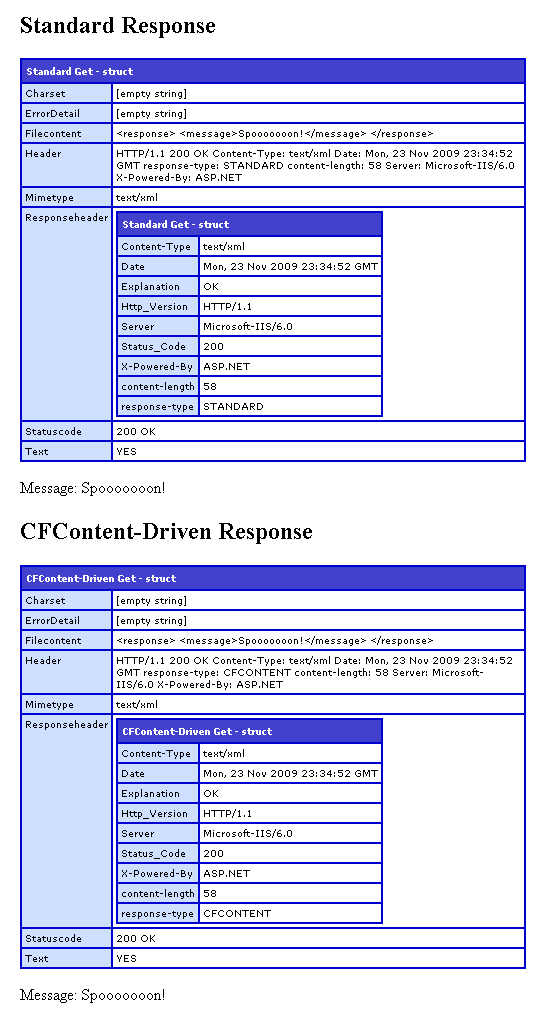
Other than the "response-type" header value that I inserted (to make sure that I didn't mess this up), there is zero difference between the two responses; both report the same status code, content type, content length, and actual file content - from the requesting standpoint, these two responses are identical.
This result is not surprising - the CFContent / Variable approach to ColdFusion responses is something that I use often; this exploration and confirmation was meant only to be a lead-up to a following blog post.
Want to use code from this post? Check out the license.

Reader Comments
I always thought you took the streamy approach because of some kind of performance gains or reduced server overhead you secretly knew about. Excited for the follow up.
@David,
No performance gain (that I know of). I just like the approach because it gives me ultimate control over what data is actually returned, including things like the content-length precision.
Thanks for posting this. It made me realize that my headers were missing because by cfheader tag was placed after the cfcontent tag.