Recently, there has been a lot of talk in the development community about jQuery's new live() event method. People are just in love with it. If you have not heard of jQuery's live() method, it's an event delegation mechanism that allows you to bind event handlers not just to all existing instances of a given node type, but also to any future instances of a given node type (by "type" I mean a set of DOM nodes matched by a given jQuery selector). This is a very cool thing, both from a development standpoint as well as from a memory and performance standpoint; but, if you don't understand how the live() method works, you might get yourself into trouble.
While there is a magical quality to it, under the hood, jQuery's live() method is quite practical. Rather than binding an event handler directly to a given node set, the live() method works by binding event handlers to the document itself and then reacting to all the events that bubble up through the DOM. The actual wiring mechanism is a bit more complicated than that, but in general, you can think of the essence of the live() event cycle as follows:
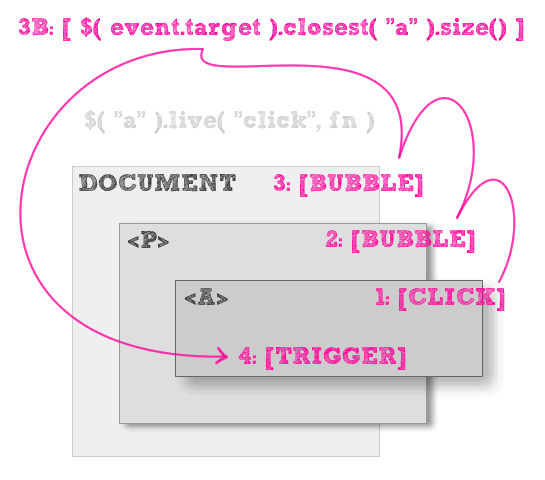
As you can see, the click event on the "A" element bubbles up to its parent element, "P," and then on to its ancestor, the document. At the document level, jQuery then checks the event target against the selector used to define the live() event. If the target matches the selector (or close enough), jQuery then triggers the event handler in the context of the target element.
This event cycle is excellent for event delegation but, it comes with a cost; because it relies completely on the ability for the given event to bubble up to the document object, it is imperative that the bubbling remains in tact. If the event bubbling breaks anywhere within the ancestor chain, the live-bound event handlers will not be triggered. To see this problem in action, take a look at this demo:
<!DOCTYPE HTML>
<html>
<head>
	<title>jQuery Live() Method And Event Bubbling</title>
	<script type="text/javascript" src="jquery-1.3.2.js"></script>
	<script type="text/javascript">

		jQuery(function( $ ){

			// Bind click events to links. This will bind a click
			// handler to all current links as well as all new
			// links added to the page.
			$( "a" ).live(
				"click",
				function( event ){
					alert( "Link clicked!" );
				}
			);

			// Cancel all click events off of paragraphs.
			$( "p" ).click(
				function(){
					return( false );
				}
			);

		});

	</script>
</head>
<body>

	<h1>
		jQuery Live() Method And Event Bubbling
	</h1>

	<p>
		I am a paragraph that contains a <a href="">link</a>.
	</p>

	<p>
		I am a paragraph that contains a <a href="">link</a>.
	</p>

	<p>
		I am a paragraph that contains a <a href="">link</a>.
	</p>

</body>
</html>
Looking at the code above, can you see what will happen with one of the "A" tags is clicked?
Nothing.
If you look at the code, you will see that we are using jQuery's live() method to bind a click handler to all the "A" elements. We are also directly binding a click handler to all of the "P" elements. The P-based click handler listens for the click event and then prevents it from being propagated (bubbling up). Now, even though each "P" element is an ancestor of each "A" element, because the live() method depends on event bubbling, the stop-propagation directive kills the live event.
jQuery's live() event method is definitely useful; but, unless you understand how it's working, things can start to fail quite quickly and for no obvious reason.

Reader Comments
Have you seen the livequery() plugin? It's similar, but its internals are a bit different, allowing it to do certain things that live() cannot. For example, live() won't work with events like blur, focus, change, etc., whereas livequery does (or at least it does with focus and blur, the two I've used). There's a decent explanation here: http://www.neeraj.name/blog/articles/882-how-live-method-works-in-jquery-why-it-does-not-work-in-some-cases-when-to-use-livequery
Not really a question about the article, but what font did you use in the event bubbling diagram?
@Thomas, I believe jQuery 1.4 (yet to be released) will support both the blur and focus events in its "live" mechanism.
@Thomas,
I believe, from what I have heard, that live() was actually inspired by the liveQuery() plugin. But, as you know, they work in very different ways.
@Dave,
The font is a free font known at Sketch Rockwell. I think you can download it here if you are interested:
http://www.urbanfonts.com/fonts/Sketch_Rockwell.htm
Ben, when I listened to your video, I was taken back at your pronunciation of live(). Since the word is a Heteronym http://bit.ly/heteronym it could be pronounced as the verb "l?v" or the adjective "la?v". I always assumed the later, but you've adopted the prior. You're probably right, but I'm very interested to know what anyone else thought.
@Luke,
To be honest, it was *painful* to pronounce it the way I did :) When I see that word, everything in my wants to pronounce it as "L'eye've". People tell me this comes as a hold-over from "liveQuery", which prople pronounced "L'iv Query". I only recently changed my pronunciation because someone told me it was wrong... but I don't care for it :)
Hmmm... Ok, I always pronounced it live-rhymes-with-give (I mean, c'mon - it's live & die!), but after arguments with a live-rhymes-with-jive colleague we went out searching.(Which you could read about here: http://www.mrspeaker.net/2009/11/12/how-to-pronounce-live/ )
Brandon Aaron says, via Twitter, that it's "live as in 'live broadcast' :)"
Do you think he's wrong, and that I might still have a chance of turning the tables on my nemesis?!
Nice explanation.
At least it encourages me to find out the logic under the hood.
@Thomas,
@James provides a special 'blur' and 'focus' handler, which can allow you to use those events with live():
http://stackoverflow.com/questions/1199293/simulating-focus-and-blur-in-jquery-live-method
This is a awesome entry.
I like it. Thanx man.
In 1.4 you can bind a parent element as the context, which would essentially allow you to avoid the bubbling problem if you had some parent returning false.
Of course, if your parent is a parent of an element that returns false on the same event as the deepest effected element, there will still be problems b/c you cannot stopPropogation, but that's usually a very rare case.
@Weixi,
Yes, good point. In 1.4, the binding methods have gotten better with the context stuff in delegate().
It's live as in "Saturday Night Live". Because it is an adjective. (Meaning something is ongoing or current, similar to "alive")
"The events are live."
In "Live and Let Die", live is a verb. (to live)
"The events hooks live on after document.ready is finished."
Anyway, does anyone know how to respond to a $("a.blah").live.click event and cancel the actual click? (eg like returning false from a conventional click handler)
For live.click it seems to start processing the page load as it starts running the handler :(
@Beetlefeet,
I had thought that returning false would work. You might have to rely on event.preventDefault() in a live() method - I can't remember.
Is there a way to prevent .live from attaching the event multiple times?
I mean you can accomplish this by creating a singleton module and making sure you event initialize only once but I was wondering if there was something built in that in fact prevents the method from reattaching multiple times
@Virgilio,
I don't think there's any way to prevent this (implicitly) only because you can have multiple callbacks attach themselves to a live-binding events (or any event binding for that matter). I suppose that jQuery could check to see if the given callback has already been bound to a given event by looping over the existing callbacks; but I assume they don't do that for performance reasons.
What kind of a situation are you in where things are getting bound more than once? Perhaps we can come up with a better approach to event binding.
Hi Ben,
thanks for the quick response.
well basically I'm working on an application where I need to use .live for most of our handlers. Our layout is like this, we have an index page that can have multiple partials as children views(tabs).
We just refactored this and establish the pattern of centralizing .live events into one single file file so it loads only once when the parent page loads as before each partial would load its .live events every time when navigating to them so our click events would fire multiple times. We stopped the firing by returning false on each live event but still we wanted to ensure that we wouldn't attach event more than once.
@Vrigilio,
Ah, OK, I see what you're saying. Yeah, to deal with content like tabs that might be loaded multiple times, I guess you'd have to either centralized (either at the page level or the module level (ie. the tabs module)), or deal with unbinding events when the content is removed.
this is more related to jquery mobile but do you think you can apply to a solution listed here?
http://forum.jquery.com/topic/how-do-i-prevent-clickthroughs-when-swipeleft-or-swipe-right
I use the following but the a href is activated immediately upon swipe, as if swipe was a click. Any way to prevent a href while swipe ?
I came here to find out more about Event Bubbling and now seem to be lost again. Have to look at the video again, and read just Ben's blog ONLY.
I have to remember not to read the comments. I always get lost in the comments. It seems like they never do any good and I always forget what the main idea was anyway.