jQuery Plugin: From - Filtering A Collection Based On Ancestors
I was playing around with a customized version of jQuery's live() method when it occurred to me that being able to filter a given jQuery collection based on a set of potential ancestors might make a useful plugin. And so, I came up with the from() plugin. From() takes a collection target ancestors and filters the existing stack down to only those elements that are descendants of the given ancestor pool:
$( "..." ).from( "#some-element" )
Before we look at how this plugin works, let's take a look at an example to see how it might be used:
<!DOCTYPE HTML>
<html>
<head>
	<title>Filtering A jQuery Collection Based On Ancestors</title>
	<script type="text/javascript" src="jquery-1.3.2.js"></script>
	<script type="text/javascript" src="jquery.from.js"></script>
	<script type="text/javascript">

		// When the DOM is ready, run scripts.
		$(function(){

			$( "li" )
				.css( "font-style", "italic" )
				.from( "#list-two" )
					.css( "background-color", "gold" )
					.end()
				.css( "font-weight", "bold" )
			;

		});

	</script>
</head>
<body>

	<h1>
		Filtering A jQuery Collection Based On Ancestors
	</h1>

	<ul id="list-one">
		<li>
			This is a list element.
		</li>
		<li>
			This is a list element.
		</li>
	</ul>

	<ul id="list-two">
		<li>
			This is a list element.
		</li>
		<li>
			This is a list element.
		</li>
	</ul>

</body>
</html>
As you can see, once the DOM is ready to be interacted with, we use jQuery to grab all the list item elements and immediately make them italic. Then, will filter that collection down to only those list item elements that are descendants of the list with id, "list-two." Those items are given a gold background. Then, using the end() method, we travel back up the collection stack, and make all list item elements bold. Running the above code, we get the following output:
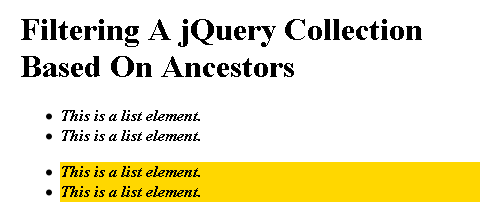
As you can see, the from() execution filtered the list items collection down to only those that were in the second list. As such, only the latter two items have a gold background.
Now, Let's take a look at the code that powers this plugin:
jquery.from.js
// Create a self-executing function closure so that we map the
// jQuery library to the $ variable without any global conflicts.
(function( $ ){

	// This plugin will filter the current collection down to the
	// items that are descendants of the given collection of
	// potential ancestors.
	$.fn.from = function( ancestors ){
		// Make sure the ancestors object is a jQuery collection.
		// This will work for a selector or an existing jQuery
		// collection.
		ancestors = jQuery( ancestors );

		// We want to filter the list of items down to the
		// descendants of the given ancestor collection. For this,
		// we will need to examine each item individually.
		return (
			this.filter(
				function(){
					// Get the complete list of ancestors of the
					// current item.
					var myAncestors = $( this ).parents();

					// Travel up the ancestor chain to see if any
					// of the nodes is in the collection of target
					// ancestors.
					for (var i = 0 ; i < myAncestors.size() ; i++){

						// If the current ancestor is in the target
						// collection, return TRUE and the current
						// node will be included by Filter().
						if (ancestors.index( myAncestors[ i ] ) >= 0){
							return( true );
						}

					}

					// If we made it this far, then none of the
					// current node's ancestors was in the
					// collection of parent nodes.
					return( false );
				}
			)
		);
	}

})( jQuery );
The magic behind this plugin is the fact that jQuery's filter() method can take a function for use in the filtering logic. Not only does this allow us to filter one element at a time, but, by using the filter() method, jQuery maintains the collection stack internally, allowing us to use the end() method to move back up the stack when necessary.
Anyway, just a small jQuery plugin, but I think it will make some of the other plugins that I am tinkering with easier to write.
Want to use code from this post? Check out the license.

Reader Comments
Ben, looks useful. One suggestion though, I'd love to see your code include a private from method that both $.fn.from and $.expr[':'].from utilize. That way you could use from as both a method and a psuedo-selector!
@Ben,
Ahh, very cool idea! You are the plugin master :) Let me see what I can do.
Hate to be the noob here, but why don't you use .foreach() instead of the for loop in your code? Is it to do with performance or something obvious I'm not seeing?
@Ettiene,
Yeah, exactly. Since it's being used inside of a plugin, I figured I would opt for the slightly more performant native loop rather than use the each() iterator.
Thanks for the quick answer, and yeah I also meant the .each() iterator :)
Your jQuery tutorial got me hooked on jQuery, even though I'm still learning. Keep up the good work!
@Ettiene,
No problem my man. Glad you like. Normally, I would just have used each(); but, my concern was that the filter() method might have to turn around and run this against a large number of comparisons - NxM - and I just panicked and wanted it to be as fast as possible.
woot! this plugin of yours (and you) got a mention in the first official jquery podcast!
http://blog.jquery.com/2009/11/13/announcing-the-official-jquery-podcast/
(in 'this week in jquery' section on the above page and around 1:11 in the podcast)
congrats, Ben!
@Azadi,
Oh bad ass! I'll have to listen to that ASAP! Thanks for letting me know.