Passing A Function To jQuery's Attr() Method For Implicit Iteration
In the past few weeks, I've outlined a number of really cool tips and tricks that I picked up from Cody Lindley's jQuery Enlightenment book; to cap it off, I wanted to cover just one more: passing a function as the second argument to the jQuery collection Attr() method. Typically, when we want to set the attribute of a given element using jQuery, we can pass the attribute name and value to the attr() method:
$( "..." ).attr( "rel", "myRel" );
This call would apply the value, "MyRel," to the "rel" attribute of each element contained within the given jQuery collection. Most of this time, this is exactly what we want to do; however, sometimes, we want each element contained within the collection to have a computed attribute value. To accomplish this, we could use the each() method for implicit iteration, executing the attr() method on each item individually:
$( "..." ).each(
	function( index ){
		$( this ).attr( "rel", ("MyRel" + index" ) );
	}
);
This works fine; but, as it turns out, we can actually shorten it up a bit but passing a function as the second argument directly to the Attr() method. In the following demo, I am going to collect all the P tags and then define their IDs based on their position within the given collection:
<!DOCTYPE HTML>
<html>
<head>
	<title>jQuery Attr() Method And Function Argument</title>
	<style type="text/css">

		#p1 {
			background-color: #FFEEEE ;
			}

		#p2 {
			background-color: #EEFFEE ;
			}

		#p3 {
			background-color: #EEEEFF ;
			}

	</style>
	<script type="text/javascript" src="jquery-1.3.2.js"></script>
	<script type="text/javascript">

		// When the DOM is ready, intialize it.
		$(function(){

			// Set the ID of each P tag.
			$( "p" ).attr(
				"id",
				function( index ){

					// Return the value that we want to store into
					// the ID attribute.
					return( "p" + (index + 1) );

				}
			);

		});

	</script>
</head>
<body>

	<h1>
		jQuery Attr() Method And Function Argument
	</h1>

	<p>
		Paragraph One
	</p>

	<p>
		Paragraph Two
	</p>

	<p>
		Paragraph Three
	</p>

</body>
</html>
As you can see, the function we pass to the Attr() method receives the index of the given element within the collection and then returns the value to be set into the attribute. When we run this, we get the following display:
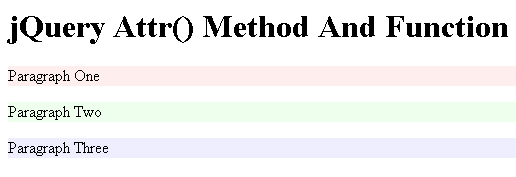
As you can see, each paragraph within the jQuery collection is given a different ID which, in turn, gives it a unique background color. This is a rather minor feature, but again, one of the many awesome efficiencies that jQuery provides in its tiny API.
Want to use code from this post? Check out the license.

Reader Comments
Interesting. Does the book say if this particular method is faster/more efficient than using an each() loop?
@Brian,
I would assume that its slightly less efficient to do it this way since it's probably another layer of abstraction above the each() method itself; but, that's just a guess.
I'm sure it wouldn't make much of a difference unless you were doing it thousands of time. And if you are, I bet the FireBug profiler would give you some good stats on which one was faster.
@Brad,
Agreed. As long as we are using an abstraction layer, we might as well go with easy over slightly more efficient.
That said, however, there are definitely bulk-processing activities where that is probably not the case.
I'm looking at the jQuery source, trying to reckon what implements this .attr(,function(){}) behaviour.
I don't see it. What am I missing?
My interest here is, looking at the jQuery source, what other native jQuery methods behave likewise? Because this is way cool.
For example, .html(function(){}) doesn't appear to work. That's OK, .html() is documented as-such, but how hard could it be to make that work?
Any insight on this? I don't see what actually executes the passed function(){} in the attr implementation.
Call it code blindness :-)
@Steven: Around line 1855 in my v1.3.3pre of jQuery are the following bits:
jQuery.fn.extend({
attr: function( name, value ) {
This is what code runs when you call the attr() method of a jQuery object. You will see the first line is this:
var elem, options, isFunction = jQuery.isFunction(value);
This tests the value to see if it is a function or not (using another built-in jQuery method.
Down a few lines is the following statement:
if ( isFunction )
value = value.call(elem,i);
That should be what does it. Call is a built-in method to all JavaScript functions that lets you specify it's this scope and the parameters.
~Brad
@Steven:
In jQuery.attr you can find a call to jQuery.prop
with options[name] (that your passed function) as second parameter.
In jQuery.prop you can read :
if ( jQuery.isFunction( value ) ) // <- value is the second param
value = value.call( elem, i );//here is the call to your passed function
Too slow...
By the way, I was talking about jQuery 1.3.2.
Thanks lads! That clarifies it. I got thrown by the proximate code-comment that implies the call is about resolving style values.
The interesting thing is, jQuery.prop() is called nowhere else in version 1.3.2. So apparently .attr() is the only method that's wired in this particular way.
I would have thought this function-for-value metaphor would be far more ubiquitous.
So damn useful. Thanks