If you need to get an anscestor of a given element, jQuery's parents() method is really useful. Not only will it crawl up through the DOM tree, it allows you to supply a jQuery selector that can filter the collection of parent nodes that is returned. This works in most cases; however, when the anscestor or parent that you are looking for depends on the context of the given element, working with the parents() traversal method might not do what you need. This is where the Closest() method can really shine. New in jQuery 1.3, the Closest() method starts with the given element, and then moves up the node tree looking for the first (and only the first) anscestor that matches the given selector.
NOTE: If the given node matches the selector, it is returned as the "closest" element and no upward traversal is performed.
To experiment with this, I have created a very simple HTML page that has two text input boxes. One of the boxes has both a DIV and a P anscestor while the other has only a DIV anscestor. When the user blurs (moves away from) a given text input box, we want to find the closest anscestor - P or DIV - and assign it the CSS class, "filled":
<!DOCTYPE HTML>
<html>
<head>
	<title>jQuery Closest() Method</title>
	<style type="text/css">

		div,
		p {
			border: 1px solid #E0E0E0 ;
			margin: 0px 0px 0px 0px ;
			padding: 20px 20px 20px 20px ;
			}

		div.filled {
			background-color: #F0F0F0 ;
			}

		p.filled {
			background-color: #FFECEC ;
			}

	</style>
	<script type="text/javascript" src="jquery-1.3.2.js"></script>
	<script type="text/javascript">

		// When the DOM is ready, initialize scripts.
		$(function(){

			// Hook up the blur event for the input boxes.
			$( "input" ).blur(
				function(){

					// When the input is blurred, we want to find
					// the closest parent that is a P or a DIV and
					// then add the CSS class, "filled" to it.
					$( this )
						.closest( "p, div" )
							.addClass( "filled" )
					;

				}
			);

		});

	</script>
</head>
<body>

	<h1>
		jQuery Closest() Method
	</h1>

	<form>

		<!--- DIV and P. --->
		<div>
			<p>
				<span>
					<input type="text" />
				</span>
			</p>
		</div>

		<br />

		<!--- DIV only. --->
		<div>
			<span>
				<input type="text" />
			</span>
		</div>

	</form>

</body>
</html>
As you can see above, when the input text box is blurred, we find the most closest parent using jQuery's Closest() method:
$( this ).closest( "p, div" ).addClass( "filled" );
Notice that we can give the Closest() traversal method several different selectors; this allows us to search for multiple types of anscestor but still stop searching once we've reached the closest one to the given element. And, when we run the above page and blur both input boxes, this is what we get:
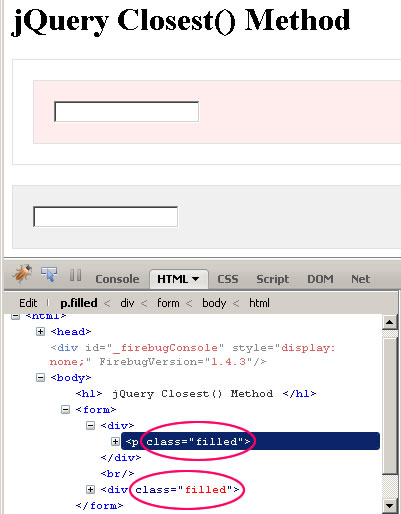
Notice that in the first case, only the P anscestor was given the "filled" class despite the fact that its parent node tree contains both P and DIV tags. Then, in the second case, only the DIV anscestor was given the "filled" class. The beauty here is that the Closest() method allows us to select the most appropriate container even when the most appropriate container changes depending on the context of the given node.
The Closest() method is very cool and very useful, especially when you start to deal with event delegation in which events are trapped at a higher level in the node tree than are the elements that triggered the event. But this got me thinking about events and event bubbling; and I wondered, as an experiment based on the above demonstration, could we accomplish the same thing using event bubbling?
In this next demonstration, all I'm going to do is change the jQuery code. Rather than having the input-blur event explicitly find the closest anscestor, we're simply going to have it trigger a custom event. jQuery will then take this custom event and start to bubble it up through the DOM node tree. To leverage that event bubbling to our advantage, we're going to bind the P and DIV tags to this custom event such that they will listen for it as it bubbles up through the node tree:
NOTE: I am only showing the jQuery updates as the HTML has not changed from above.
<script type="text/javascript">

	// When the DOM is ready, initialize scripts.
	$(function(){

		// Find all DIV and P tags and bind to the input blur
		// custom event.
		$( "p, div" ).bind(
			"inputBlur",
			function(){
				// Add the filled class to the given element.
				$( this ).addClass( "filled" );

				// Cancel the event bubbling. This way, even
				// if the given collection contains other
				// nodes higher up, the events will never
				// bubble up to them.
				return( false );
			}
		);

		// Hook up the blur event for the input boxes.
		$( "input" ).blur(
			function(){
				// Trigger our blur custom event on the input
				// box so that it will bubble up through the
				// node tree.
				$( this ).trigger( "inputBlur" );
			}
		);

	});

</script>
Notice that the event handler for the custom event, "inputBlur", returns the value, false. This will signal to the jQuery event management mechanism to stop the event from bubbling up through the document. And, since both our P and our DIV tags are listening for and then terminating this event, only the anscestor closest to the triggering element (our Input box) will ever see and be able to respond to this event.
That last section here was kind of a tangent to where I was going with the original post; but, I thought it would be nice to see how to accomplish the same outcome using a completely different approach.

Reader Comments
ah ha! good news. in prototype you have the infinitely useful .up() and .down() functions for doing this. it's great that jquery have followed suit.
@Aidan,
That's pretty cool. jQuery also has parents(), parent(), and find(); I assume these are also like up() and down(), but they have variations in the number of elements they will return in the final collection. Since I am not sure how up() and down() work, I can't say which of them are true parallels.
up and down are specifically for fetching a single element from the tree. otherwise you have to use ancestors / select to match on multiple elements.
basically both frameworks now have the same functions with completely different naming conventions.
@Aidan,
Ahh, gotcha. Well, at least they both have them - naming aside :)
Nice article, Ben!
@Aidan, I think .up() is different from .closest(). It's more like .parents(':first') or .parents(':eq(someindex)'). The .closest() method starts with the matched element itself and then works its way up the DOM tree until it finds a match -- unlike .up() and parents(), which start at the parent element. For example, $('#foo').closest('.myclass') could match #foo itself if it also has a class of "myclass." This makes .closest() useful for event delegation.
@Karl,
Thaks Karl!
@Karl - that's an important distinction and as you say, actually very useful. that's something I has wished up and down did in the past.
Great post. Especially the extra effort to duplicate and give an excellent example of event bubbling.
I'm learning a bunch form you, Any Matthews, and and Jason Dean.
When are you going to continue your Connect video posts?
@Mark,
Thank a lot! I know the four of us (Andy, Todd, Jason) have been super busy, but we're definitely down for some more video recordings.
Tonight, I'm gonna try to record a new jQuery Presentation that I'm working on... fingers crossed.
Hey man,
Just wanted to throw some props your way... I saw your slide demo last night...Very nice.
-Cypherpunk
Keep it nerdy \m/
@JustLaunched,
Are you referring to something I did??