
A long time ago, it used to work on the iPhone Safari browser that if your form inputs had the term "zip" or "phone" in the form field name, clicking on it would default the resultant iPhone keyboard to a numeric keyboard. While this forced us to use some really poor naming conventions, it increased the usability of our web-based iPhone applications in a very palpable way, removing unnecessary clicks for data entry. Unfortunately, this feature was lost somewhere among the many subsequent iPhone firmware updates.
It felt like all was lost and there was no hope... until now. Dorinake, in the comments of my previous post, just explained that if he changed the Type attribute of his form inputs to "number" then he would get the numeric keyboard on the iPhone browser. I also confirmed this, and after doing a bit more testing, it looks like the iPhone now (in the latest firmware updates) supports a small sub-set of the HTML 5 input types:
- Number
- Url
To test this, I set up a tiny sample page to see how each of these input Types would default the keyboard on the iPhone:
<!DOCTYPE html PUBLIC "-//W3C//DTD XHTML 1.0 Transitional//EN" "http://www.w3.org/TR/xhtml1/DTD/xhtml1-transitional.dtd">
<html>
<head>
	<title>Defaulting The iPhone Keyboard To: Number, Email, Url</title>
</head>
<body>

	<h1>
		Defaulting The iPhone Keyboard To: Number, Email, Url
	</h1>

	<form>

		Type="Number":<br />
		<input type="number" /><br />
		<br />

		Type="Url":<br />
		<input type="url" /><br />
		<br />

		Type="Email":<br />
		<input type="email" /><br />

	</form>

</body>
</html>
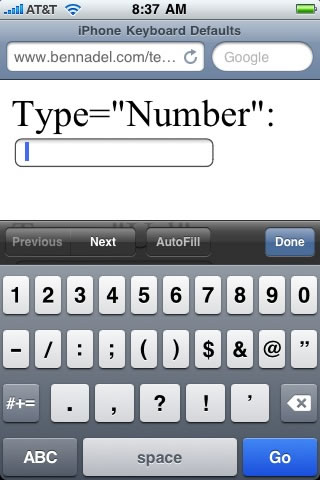
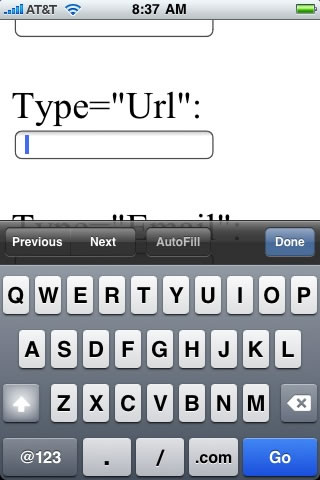
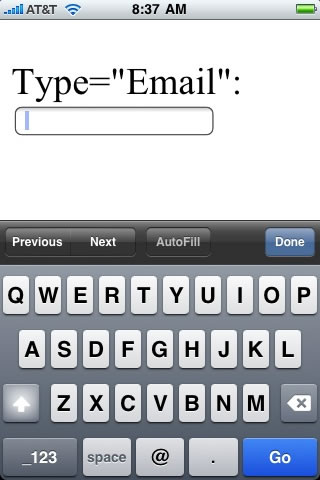
As you can see, the Type attributes of the above Input fields are Number, Url, and Email respectively. When I open this page on my iPhone browser and click on the individual form fields, here are the keyboards that I get:
iPhone Input Type="Number"
iPhone Input Type="Url"
iPhone Input Type="Email"
This is so awesome! And, what's great is that any browser that doesn't recognize these new HTML 5 input types will simply treat the input as a Text input. As such, this is completely backwards compatible. After discussing this insight with some people, it seems that even on the some of the most up-to-date phones, there are people who are not seeing the appropriate keyboards; we're not sure why this is happening but, there's certainly no harm in putting in the appropriate input types in the meantime.

Reader Comments
Woot. Thanks for sharing this. I wonder if Apple updated their docs? The last time I did research into this, they _did_ have decent documentation about writing web apps for the iPhone, so I'd be willing to bet they have this documented.
@Raymond,
Would you mind posting a link the docs? I am not sure where they are.
What's exciting about this is that due to the MMS updates, I am sure most everyone is going to be updating their iPhones; which means, most people will get this updates.
Will do - I'm in the middle of my own blog post though. ;)
@Raymond,
No worries :)
I thought we had this worked out between you two? No overlapping blog authoring. Whomever goes first, must wait at least 30 minutes before the next person can start authoring their post. Sheesh.
"There can be only one."
I'm looking now Ben. I'm now remembering how much of a pain in the ass Apple's site is. I can say that it does NOT require the 99 dollar program fee. Digging now.
Well I found it:
http://developer.apple.com/safari/library/documentation/AppleApplications/Reference/SafariWebContent/Introduction/Introduction.html
But while it mentions some special stuff in forms, it does not mention what you found.
@Todd,
HA ha.
@Raymond,
Awesome! I don't think I've every seen that page AND I have actually tried to find good documentation on this stuff (granted via Google rather than Apple's site). Thanks.
More data:
http://ajaxian.com/archives/html5-features-in-latest-iphone-application-cache-and-database
FYI, the db stuff is incredibly cool and no one (that I know of) is working with this yet. It's much like the db support for AIR, but the browser itself supports it. I've meant to look into it, but haven't yet.
The second item described there looks to be real nice for web based HTML apps for the iPhone.
More URLs: The db stuff is freaking incredible: http://blog.bemoko.com/2009/09/16/cool-iphone-handles-the-html5-onstorage-event-handler/
@Raymond,
Awesome stuff! I'll definitely be looking into it.... when I can find the time :(
Last URL, I promise. ;) The Safari in the newest iPhone also supports geolocation:
http://blogs.computerworld.com/iphones_safari_browser_to_include_geolocation_0
I confirmed it on my iPhone (it also works in FF3.5).
@Ben: you can add also the password type, thus you'll have a password field.
More data:
http://ajaxian.com/archives/html5-features-in-latest-iphone-application-cache-and-database
that's usefull thanks
Hi Ben,
This might be a silly question, but, do you work with iPhone apps? Or was this just a personal interest because you might have one?
@Jillian,
Yes, I do work on iPhone applications.
Very cool I always like apps that switch the keyboard were it makes since
@Ray the db stuff is way cool. There are some libraries that let you write code that will work in air, safari, google gears and fall back to flash or cookie local storage also. So write once and run on many platforms. Google uses the local storage for Gmail is safari on the iPhone. Check out setting for safari to see what site are using storage.
@Ben you should update the contact form on your blog with the new field types.
Really cool !!
So is it possible to have both types password and number ?
Something like :
<input type="password" type="number" name="n1" />
Thanks
@Drake,
I am not sure about that. I think you can only specify one type at a time.
Hi Ben,
Thanks for answering!
I was wondering about that because Dorinake said somehing like that in a previous post, but I can't test it right now. I'll let you know asap if it's possible.
I found one more0 type="tel" will give you the alphanumeric keypad!
http://potch.me/iphone
@Potch,
Ahh, nice!
What generation/firmware version do you need? Your example code doesn't work on mine.
@Nic,
I'm rocking out version 3.1 (7C144) according to my General settings.
Hi, is it possible to change input type in ASP page? I tried to do this in Javascript after page load, but Iphone seems to ignore my change.
@gorczas,
I am not sure that you can change input types at runtime? I have never tried that.
I tried and according to Firebug I succeced, but IPhone didn't notice the change :/
@Gorczas,
Gotcha. Still, I would try to avoid switching types at runtime.
Hi,
first of all thanks for the help from you guys
I have doubt
does file upload works in iphone browser , i found type file as disabled , any method to upload file from a web app
Hi guys,
Well, Apple has issued an updated doc for that on 2009-09-24...
Within this doc, you will find all keyboard types, viewport tricks, how to disable auto-correction and auto-capitalization on html fields and more....
http://developer.apple.com/safari/library/codinghowtos/mobile/userexperience/index.html
Hope this helps !
Ps: This works only for iPhone OS 3.1.x and later. ;)
Cheers!
@Ygor,
Awesome, thanks!
@Thomas,
I don't think you can upload files since the iPhone doesn't have a file system in the traditional sense.
Might try type = tel.... Numbers only no alpha on the keyboard. Worth mentioning that the search type is also available.
Great news! I talked to some of the Apple engineers working on mobile Safari at WWDC09 regarding this issue. The response I got was that the old style (setting name attribute to zip, phone etc) was non W3C standard and they had no plans to fix it. I was recommended to file a feature request in Radar. Great that they looked into this. Maybe a lot of developers have complained about this? Thanks for the tips!
@Marthin,
It's good to know that the engineers are thinking about it. At least it works with the new "type" values.
Can anyone else confirm that autofill doesn't work when you use input type="email" or type="number"?
I was beating my head against the screen trying to figure out why autofill skipped certain fields until I switched them back to input type="text" and then autofill worked again.
Seems like a major oversight.
@Nate,
I am not sure that I know much about the autofill on the iPhone. Are you talking about native browser behavior?
Yep, native browser behavior with the latest iPhone OS using Mobile Safari.
If I have a form with zip, email, and phone number fields that all use input type="text", the autofill function works fine with Mobile Safari, all fields are populated with my data.
If I change them to type="number" and type="email" to get those handy keyboard layouts, the autofill doesn't recognize the fields, and therefore leaves them blank.
For a complex checkout form, I'd say usability is better served by keeping them type="text" so autofill works.
@Nate,
Funky. Yeah, I guess at times when you want to have data autofilled, going with text is gonna be better. I think the only times I would really use this in a practical way would be to use the numeric keyboard to have people enter in numeric line items (which will never be autofilled).
I just filed a bug report with Apple. It's the same behavior with normal Safari, see:
http://clixel.com/test_form.html
I agree, for the form in question I ended up using type="number" for credit card and CVV fields, but left the phone, email and zip fields as type="text" for autofill compatibility.
@Nate,
Yeah, that makes sense - auto-filling CVV fields :)
Thanks Ben. This helped me out in a web app I'm working on.
@Andy,
No problem Andy. Totally pumped for your CFUG presentation tomorrow!
Ok, so why when I use window.prompt() does it give me a keyboard with NO option to get numbers or symbols? It's a function for adding markup, and I am letting the guest enter a URL... Can't have a URL with no dots.
Thanks.
Ah, holy jeez... It's a bug. At least I consider it a bug. If you tilt the phone on its side to get the landscape mode, the alt keyboard button shows up, and it stays in place when you rotate it back upright. Snazzy.
Thanks,
Andy
@Ben, something to watch out for:
In Safari 5 for Mac and Win, all new Web Forms 2.0 input types are supported: color, date, datetime, datetime-local, email, month, number, range, search, tel, time, url and week. In addition, new attributes pattern, required, min, max and step are honored. (If I know you, you'll LOVE pattern. Its value is a regular expression that the element's value must obey.)
But here's what to watch out for. If a form's contents don't conform to the new types or attributes, the form will not submit WITHOUT FEEDBACK TO THE USER ABOUT WHAT WENT WRONG. The focus is moved to the first element in error and that's it.
What a VICIOUSLY bad design decision. It makes all of the new features essentially unusable. The whole point of Web Forms 2.0 is that validation works even when JavaScript is off. But with this implementation, you have to do redundant JS anyway.
And here's the worst part: If the user has JS off, they never get to the server for data validation with feedback to happen there. In that sense, it's worse to use the new features than not use them.
When Safari for iOS gets Safari 5's Web Forms 2.0, you may regret adding the new types for keyboards, because you may encounter this same error-no-user-feedback problem.
Personally, on my iPad, I prefer the A1 Perfect Browser, despite its narcissistic name. But it's based on WebKit too.
@Andy,
That's strange! I would figure you'd get the same possible options in either orientation. Seems completely weird to only offer some *core* features in one orientation.
@Steve,
So, if I understand you, what you're saying is that if the form values are invalid (according to data type), there is no error message of any kind? AND, the form won't submit.
If I think I follow your logic, then what you're saying is that an attempt to use a more specific keyboard for user-experience purposes (NOT for validation purposes) might actually end up preventing the user from submitting the form?
Precisely. Not good. But here's a "progressive enhancement" workaround I just thunk up:
Define the elements with input type="text" and override to more specific input types with a jQuery $(document).ready() script. Continue to do your own JavaScript validation so that your users will get feedback. But if JavaScript is off, the form elements will remain input type="text" and as a result, the form will still submit.
P.S.: Did you see that I found the cause of your "Javascript's IN Operator Does Not Work With Strings" problem? It was while the "Recent Blog Comments" were disabled, so you might have missed it.
Here's the gist: In Java, String is a class. In JavaScript, if you don't cast it to a String object, it's a simple type.
@Steve,
That's a pretty clever idea, using the override on DOM ready. I assume you'd have to just swap out the entire input as I don't believe you can change TYPE on the fly. Awesome tip!
As far as the String comment - I saw it come through - working on catching up on stuff right now.
Yes, you can change the type attribute in HTML 5, which is what we're talking about:
(1) Browse to http://dev.w3.org/html5/spec/Overview.html#the-input-element
(2) Scroll down to "DOM interface":
(3) Note that it says "attribute DOMString type;", not "readonly attribute DOMString type;".
You can probably change it in earlier versions of HTML as well.
So anyway, in the .each(), set this.type = whatever you want. No need to create whole new elements or anything like that.
@Steve,
Very cool! I'll have to play around with that a bit as well.
Thanks for the tip, tried it and worked great!
...until I tried to use it on fields that I've spiced up with items such as a jQuery plug-in -- addClear() (http://github.com/skorecky/Add-Clear)
And also for a calendar text input that triggers a visual calendar (wouldn't want to use it there anyway - alpha keyboard shortcuts are used to jump ahead backwards for days, weeks, months, etc.)
After reading @Steve's comment about just manipulating the type with jquery after the page is loaded, I will likely just do that, and set it to run AFTER all other input:text DOM modifications.
@Steve - thanks for the link to the HTML 5 working standards - this will come in very handy!
@Derek,
I still haven't tried this for myself yet. I've been playing around with a lot of HTML5 stuff lately and some of it is really hard to wrap my head around (I spent like 5 hours today just trying to figure out some super simple CSS-based transitions [animations]). I need a vacation just to catch up on this juicy good stuff.
Nice and very helpful article Ben, I have put a link to this article on my blog as well.
http://philipbedi.wordpress.com
@Ben: I just found an easier way to allow form submission if HTML 5 / Web Forms 2.0 validation is on but JavaScript is off:
(input type=submit formnovalidate)
The formnovalidate attribute turns off HTML 5 form validation for the entire form, but only if that submit button was clicked (and only for that click... it doesn't stay off).
You can also set novalidate on any individual input element to prevent validation for just that element.
I had seen those attributes in the HTML 5 spec, but I didn't make the association to the JavaScript off / no error message problem until just now. I'm currently reading the Forms chapter of Bruce Lawson and Remy Sharp's book Introducing HTML 5. (Yes, that's the same Remy Sharp as the "jQuery for Designers" website and podcast.) They go into quite a lot of detail about the custom error message problem.
I think I'm going to revisit HTML 5 form validation and custom error messages in Safari after reading this chapter. Perhaps I've don't WebKit a disservice by prematurely criticizing the apparent lack of feedback. If they coded to the spec, and I don't know the spec well enough, it my fault, not theirs.
P.S.: Since you got your MacBook Pro, have you noticed that the new HTML 5 input types date, datetime, datetime-local, month, number, time and week all have "spinner" controls in Safari 5 for Mac, but not in Safari 5 for Windows? And that input type="search" has distinctive search box rounded corners?
@Philip,
Awesome my man - glad you found this useful.
@Steve,
You are just a whirlwind of awesome HTML5 information! I love the fact that you can turn off form validation on forms/inputs. I have not seen that discussed in any of the presentations that I have watched. Really awesome stuff - perfect for when you ultimately just want to manage default keyboard appearance on mobile devices and not for actual validation.
Sounds like a interesting book; I'll be sure to check it out.
@Ben: Are you familiar with Fig Leaf Software? (Steve Drucker, Dave Watts, Dave Gallarizzo, Bret Peters, etc?) They're a major training partner of Allaire, then Macromedia, and now Adobe. Very ColdFusiony, like yourself. Well, they run the local ColdFusion User Group, now called UseAdobe, in the Washington, DC, area.
Check out the upcoming UseAdobe meeting topic, 3 weeks from tomorrow:
http://groups.adobe.com/index.cfm?event=post.display&postid=29991
I know from your bennadel.com photos that Lancaster PA isn't too far for you to travel for user group meetings. DC's about another hour by car. If HTML 5 is worth the extra drive, hope to see you there.
P.S.: I won't be giving the talk. It was posted by FigCEO (Steve Drucker). I don't know whether he'll be giving the presentation either. I sure hope so. He gives GREAT talks on new technologies.
@Steve,
I definitely know Dave Watts by name (that guy simply dominates the CF-Talk list when I was on it). HTML5 is definitely something that I really want to dive into; I'll take a look at the class and see what kind of scheduling I have.
@Ben: I just found out that the presentation is actually a Fig Leaf training session, not a UseAdobe meeting per se. So when you go to
http://training.figleaf.com/courses/html5intro.cfm
the "Upcoming Classes" section on the right side of the detail page applies to the session. (It looks unrelated, but it isn't.) So that means that the speaker is Scott Stewart, and the Register Now hotlink in that section is how you would register to attend.
Not that it will be all that hard to find a place to sit: It'll be in the RFF Conference Center at Fig Leaf, which is where they would hold a presentation by Ben Forta or Adam Lehman. I'm guessing it could hold 100 people, maybe more.
@Steve,
I still need to figure my schedule out. I get so absent minded about this stuff. I always look up and the week is already over.
@Ben: Well, if you can't make to the UseAdobe/Fig Leaf meeting, Mark Pilgrim's book HTML5: Up and Running just came out. I guess Bruce and Remy's Introducing HTML5 book threatened to soak up the discretionary income for HTML 5 books, so O'Reilly had to jump on the release-it-now bandwagon.
My preordered copy of Mark's book arrived today. Speaking as a coder, I like Mark's book better. Bruce and Remy's book talks more to the blogger (how to organize article, aside, hgroup, etc, tags), but I don't have a blog. Mark's book talks more to those who want to code plain-old regular pages right now. Less overview, more step 1, step 2, step 3. I really got the feeling that Mark has done more actual coding in HTML 5. He also seems to have more insight into how things got the way they did.
Don't get me wrong, both books are worth having. I really like Remy's jQuery for Designers screencasts and podcasts. He's clearly a coder too. But Mark doesn't just say "these are your options". He goes on to say, "and then you'll have to do this and this and this".
If you want to check out his writing style, Mark has "dive into" websites, notably Dive Into Accessibility and Dive Into HTML 5.
@Steve,
I appreciate the insight into the books. I know what you mean about the "blog" though; I feel like every HTML5 demonstrate that I see these days centers around a Blog concept. It is useful, but it's great to get alternate points of view so you can really get a better sense of how the tags are used most effectively.
@Ben: Thanks.
Y'know, Remy wrote the HTML5 Enabling Script, about 5 lines of code that does a createElement on all of the new tags so that MSIE will style them with CSS. So I really do respect his coding skills and knowledge of HTML 5.
But Mark got so frickin' practical: He gave both the Modernizr booleans and equivalent scripts, in case you didn't want to run all of Modernizr just to find out if the browser supports offline, for example. He didn't just say that the video tag can play all of these codecs, he gave pros and cons of each and how to convert among them. He assumes you need to start coding today, in advance of full browser support, so here's how you can fake it.
I feel that I've given Bruce and Remy short shrift by saying I prefer Mark's book. Their book has stuff that Mark's doesn't have too. Like how to turn the contents of the canvas into a Data URL using toDataURL(). Mark doesn't mention that, though he does talk about drawing Unicode text with its numerous baselines.
See what I'm saying? They have different strengths. Mark just writes better to my Web App development needs, I guess.
@Gorczas: I had the same thought as an ASP.net developer. I got these to work in postbacks by overriding the Render and BeginRender events of custom server controls in ASP.NET (VB). If you want to look at the source or just grab the DLL with the toolset, I've open-sourced the project at html5asp.sourceforge.net
So I updated Safari, and they've had a bit of an aneurysm there on Infinity Loop... They've departed from their Web Kit and gone with HTML 5. So type="number" does the right(?) thing on the iPhone/Touch and brings up the numeric keyboard. But on Safari, it brings up a number select control, rather than a text box.
Anyone else notice this new "functionality"? (I appreciate it almost as much as iTunes suddenly not recognizing the multimedia keys on my keyboard and changing basic keystroke mapping. Thanks again, Mr. Jobs!)
Ok... input type="tel" does the trick. Just in case I'm not the dullest arrow in the quiver, here's a link to some *new* HTML5 input types. http://www.w3schools.com/html5/att_input_type.asp
Andy
I found that this is handled very inconsistently across browsers. I loved that Apple supported input type=number by displaying the numbers and symbols keyboard (not the telephone keypad). However using type=number has undesired effects in Google Chrome, MS/Mac Safari, and likely others once they support more HTML5 - they add the up/down spinner buttons on the right side of the input. In addition, the keyup/down event increases/decreases the number by the step attribute. That is nice but not desired for any of my inputs. In addition, I use a jquery plug-in that adds an x icon when a user types in a text input box, type=number included (google jquery addClear for this helpful script). The icon appears right over the number spinner - not helpful. Since mobile safari is the only mobile browser that works like I want, I just add an attribute numkey=1 for all text inputs where I want the numeric/symbol keyboard to appear (when the browser is mobile safari, or other browsers that work as desired), and have jquery change the input type to number.
I found that other mobile browsers bring up the telephone keyboard with no way to add periods or get back to the letter keys. It may sound like a lot of work just to save one click, but if you have a lot of number-based inputs, you could cut the number of button presses by quite a lot. Users seem to appreciate that.
"I found that this is handled very inconsistently across browsers."
Yep, welcome to HTML5. Not to sound like an old fogey, but it feels like the browser wars all over again. Glad to see improvements being made (finally!) to HTML, just wish it was a bit more consistent this time around.
I've a situation where I need to have my input type defined as a "passoword" to hide the characters as they are typed. but it needs to behave as number. How do I do it? it is for a SSN field. I tried the pattern and -wap-input-format but it only works for iPhone no go on Android or windows phone.
Apple went and messed this up with iOS 5. Now if you have input type=number, it automatically adds commas to the value as thousands separators, and restricts text to numeric characters only. That is fine for truly numeric values, but I was using this to default to the full numeric keyboard (with symbols, not the phone-style keypad) for dates/times, addresses (which usually begin with numbers), zip codes (which are numbers in U.S. but not all countries), etc. too. Yes, I know they also added support for some of those specific types of inputs, but they are NOT easier to use IMHO. I use a date and time picker with my date/time inputs, and have no interest in using Safari's built-in ones.
If anyone knows of a way to default to the full numeric keyboard (again, not the keypad), but not restrict the input type (I do that separately through Javascript to ensure browser compatibility), please let me know. I will tinker around and see if I can find anything that works.
I have a similar problem Derek, my text field is getting formatted and leading zeros are removed, both are functionalities I will like to get rid off. Anyone found a solution?
Thanks
Apple went and FURTHER messed this up with iOS 6. I had a hack to determine if the browser is iPhone/iPad, and text inputs had an attribute (numkey="1"), and it would change the input type to "number" which would default the keyboard to the numeric one. That was working ok. Now with the latest Safari updates, when the input type is number, it ignores the "size" attribute. Usually for number, I specify a small size attribute, so this is totally throwing my layout out of whack. When it comes to supporting developers, you suck, Apple...
I love how searching for fixes for input type in Mobile Safari always leads back to this blog post!
There is a better option for the number type sometimes:
http://stackoverflow.com/questions/14447668/input-type-number-is-not-showing-a-number-keypad-on-ios
this is really good blog
Great tips (though in 2014 a bit more obvious than in 2009)!
Just wanted to add that if you want to show the number picker as a dialer instead of just the number input part of the normal keyboard, add the attribute pattern="[0-9]*". This is great for inputting a zip code or a phone number!
I really enjoyed the quality information you offer to your visitors for this blog. I will bookmark your blog and have my friends check up here often.
Am I the only one who noticed that you used XHTML transitional as your doctype and then used HTML5 code?