
Understanding The IIS Mod-Rewrite Log File And Work Flow
As I have just started experimenting with URL rewriting in ColdFusion using IIS Mod-Rewrite, I have a lot of learning to do. While some of my experiments are working, I am getting some very unexpected (and frustrating) results which clearly indicate that I need to get a stronger hold on the work flow executing behind each URL rewrite. To gather some insight, I turned on logging for the rewrite process. This has to be done in the main (server-wide) configuration file, not in the override configuration files:
# Define the location of the log file.
# NOTE: This location has to be one that the windows IIS user
# has write access to.

RewriteLog "C:\Inetpub\wwwroot\...\iis_mod_rewrite2\rewrite.txt"

# Define the level of detail that should be made available
# in the log file.
# Most detail: 9
# Least detail: 0 (no logging)

RewriteLogLevel 9
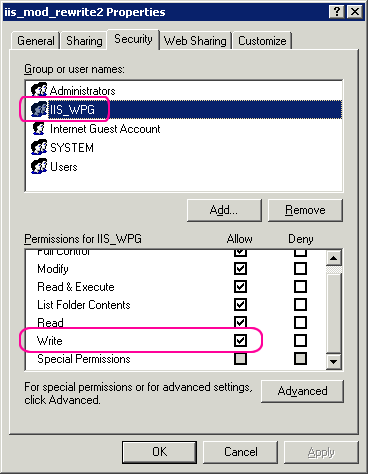
In order for IIS to be able to write to this log file, I needed to grant the IIS Windows user "write permissions" on the directory in which the log was be stored. Because I am running IIS6, this user showed up as IIS_WPG:
Once I had IIS Mod-Rewrite successfully logging web requests (which is, ALL requests on the server, by the way), I started to try different RewriteRule's to see how they were operating under the hood. The first one I set up was a simple rule that rewrites all incoming request to point to index.cfm:
# IIS Mod-Rewrite configuration file
# Turn on the rewrite rules for this access file.
# This will will handle all requests based off of
# this directory.

RewriteEngine On

# Rewrite all requests to the index.cfm file and append
# original request as a query string parameters: original.

RewriteRule ^(.+)$ index.cfm?original=$1 [L,QSA]
As you can see, no matter what request comes from the outside, all traffic will be directed to index.cfm. Furthermore, the requested sub-file path will be appended to the request as the query string parameter, "original." I have also included the QSA (Query String Append) flag such that any query string values made in the original request will also be included in the rewritten URL.
With this rule in place, I called the following URL:
./foo/bar.cfm
Now, before we go into what happens, let me tell you what I would expect to happen as someone new to URL rewriting. I would expect that I'd execute the index.cfm page and my URL scope would contain the following name-value pair:
original: foo/bar.cfm
Now, here's what really happens: Yes, the index.cfm file is executed, but my URL scope has the following unexpected name-value pair:
original: index.cfm,foo/bar.cfm
Funky! Not only am I getting the original URL in the query string, I'm also getting the rewrite URL as well (or so I think).
So what happened? If you look at my regular expression and my rewrite, it would make you think that the entire string "index.cfm,foo/bar.cfm" is what is being captured; but that can't be as index.cfm was not part of the original request! To find out more, I took a look at the log file. Here is the relevant excerpt from it (with unnecessary data removed):
init rewrite engine
with requested uriapplying pattern
'/\.htaccess$' to uri '/iis_mod_rewrite2/foo/bar.cfm'pass through
/iis_mod_rewrite2/foo/bar.cfminit rewrite engine
with requested uriapplying pattern
'^(.+)$' to uri 'foo/bar.cfm'rewrite
'foo/bar.cfm' -> 'index.cfm?original=foo/bar.cfm'split
uri=index.cfm?original=foo/bar.cfm -> uri=index.cfm, args=original=foo/bar.cfminternal redirect
with /iis_mod_rewrite2/index.cfm [INTERNAL REDIRECT]init rewrite engine
with requested uriapplying pattern
'^(.+)$' to uri 'index.cfm'rewrite
'index.cfm' -> 'index.cfm?original=index.cfm'split
uri=index.cfm?original=index.cfm -> uri=index.cfm, args=original=index.cfminternal redirect
with /iis_mod_rewrite2/index.cfm [INTERNAL REDIRECT]
Having never seen a log file like this before, it took me a good hour (and plenty of Twitter help from Emmet McGovern) to really wrap my head around what was going on. Immediately, however, I noticed that there were two calls to something marked [INTERNAL REDIRECT]. That probably had something to do with my funky resultant query string, but how? After all, I only had one rewrite rule - how could two redirects be executing? I was especially perplexed considering that I was using the "L" (Last Rule) flag on my rewrite condition.
What I came to realize was that each rewrite performed by IIS Mod-Rewrite gets reprocessed using the rewritten URL. As such, the first rewrite rule was executed on the original URL:
foo/bar.cfm
At the end of the first pass, it was rewritten to the URL:
index.cfm?original=foo/bar.cfm
At this point, the newly rewritten URL was reprocessed (sub-requested??) by the rules engine and ends up creating this new URL:
index.cfm?original=index.cfm
While this URL only has the one, "original," query string parameter, because I am using the QSA (Query String Append) flag, the query string created in the first URL rewrite (original=foo/bar.cfm) is now appended to the query string created by the second rewrite rule such that I end up with this URL:
index.cfm?original=index.cfm**&original=foo/bar.cfm**
Now, because I have a query parameter named, "original," showing up twice in the resultant query string, the two query parameter values get collapsed into a single, comma-delimited list:
original: index.cfm,foo/bar.cfm
As a note, if I removed the QSA (Query String Append) flag, I ended up with the name-value pair:
original: index.cfm
This happens because only the final query string created by the second rewrite rule is kept.
Ok, so tracing the logged rewrites helps us understand where the unexpected query string value comes from; but, it doesn't really help us understand why there are specifically two redirects being executed. After all, if there are no RewriteCond (rewrite conditions) on the RewriteRule, why execute 2 times, but not 3 times - or 4 times - or N times?
After some more reading and some back and forth on Twitter, I came up with a theory as to what was going on. Normally, with a URL rewriting system, something like this would create an endless loop of rewriting. To stop this from happening, you might set a limit to the number of rewrites that can take place using the MaxRewrites condition. From what I can gather, however, IIS Mod-Rewrite does not support this rewrite option; as such, I have to assume that it has built its rewrite engine with enough intelligence to see that it was about to enter an endless loop (rewrite result matches incoming URL) and halts the process. That would explain the two rewrite executions, but not a third.
In my experimentation, I tried using the NS (Do Not allow internal Subrequests) flag to prevent the first rewritten rule from being re-evaluated; but, from the IIS Mod-Rewrite documentation, it would appear that ISAPI does not support custom control flow at this level. If that interpretation is correct, then it makes even more sense as to why the rewrite engine was built to One) Always re-evaluate and, Two) Halt immediately at the beginning of an endless loop.
I am simultaneously new to all of the URL rewriting concepts as well as the IIS Mod-Rewrite product, so forgive me if there are any blatant misunderstandings in this explanation of the rewrite log file. It took me a number of hours and a lot of help to even get this far, so any constructive criticism would be greatly appreciated. From what I have concluded thus far, however, I have been able to more accurately predict other rewrite outcomes, which I'll address in later blog posts.
NOTE: Always remember to turn Off logging when you are not using it. Since every single web request (including IMG, CSS, and SCRIPT files) gets logged to this text file, it gets very big, very fast.
Want to use code from this post? Check out the license.

Reader Comments
You look at coldcourse at all, Ben?
@SIGEPJEDI,
What is ColdCourse?
@Ben
ColdCourse is an initial stab at a url-routing system for ColdFusion. It is the basis of various url-routing systems in various ColdFusion frameworks.
Unfortunately, it is not up to par with Django's or Rails' url-routing systems. It is also rather unRESTful, preferring the convenient familiarity of query-string parameters re-encoded as extra path info (the part of the path after /index.cfm) a la "/index.cfm?var1=val1&var2=val2" -> "/index.cfm/var1/val1/var2/val2".
To achieve a complex, resource-oriented website, you will probably need to roll out your own url-routing system, or help build one modelling it after the one in Rails or Django. However, this may not apply to most simple web apps.
Justice
@Justice,
Ah ok. Yeah, I'm gonna shy away from using path_info to get at the rewrite stuff. That's just a personal opinion. Something about it just never sat right with me.
@Ben,
Can you put a finger on it?
Justice
@Justice,
Ha ha, no, can't put a finger on it :)
@Ben,
Just a stab in the dark...
Can't you get the RegEx to exclude the index.cfm match? There is probably a more elegant solution, however if it works it could be used until such solution presents itself.
@Andrew,
Yeah, I think are correct. I wasn't worrying about the rule, per-say, I just wanted to see what was going on the hood. I'll write some more on this topic with more rule-based thoughts.
Small typo in post title: Understating -> should be Understanding? Or perhaps I don't understand :)
@Ciaran,
Ooops, thanks for catching that! Definitely do not want to understate :)
Hi Ben,
I have been having a similar problem myself which I was hoping you might have some suggestions on!
In this case the "application" is only 1 page for the testing site and no other files whatsoever. I can not find in IIS where any other 301/302 redirects may occur but after my testing I have come up with the following (I tried two different requests, one was to the address: /aa and the other to the address a.cfm) I used log level 9 for mod rewrite logging. I have been using a microsoft tool "WFetch" which is another method of running a request and seeing the server request cycle.
Neither the path/file "/aa" or "a.cfm" exist - the only file in the site root is "index.cfm" which simply creates a unique txt file in the site root every time the page is accessed so that I can also see a request is reaching that page. I am by no means a server or IIS expert and the concept of a subrequest is new to me, but this way, subrequest or not if that page gets "requested" or "accessed" twice there is 2 files generated - this of course is a problem as it means logic (whatever it may be) is being run twice.
-----------------------
.htaccess file:
-----------------------
RewriteEngine on
RewriteCond %{REQUEST_FILENAME} !-f
RewriteCond %{REQUEST_FILENAME} !-d
RewriteCond %{REQUEST_FILENAME} !-l
RewriteCond $1 !^index\.cfm
RewriteRule ^(.*)?$ /index.cfm?t=$1 [PT,L]
-----------------------
index.cfm file content:
-----------------------
index page
<!--- write a file with a unique name when ever this page is accessed --->
<cfset filename = expandpath("./") & lcase(hash(rand())) & ".txt">
<cfset time = now()>
<cffile action="write" file="#filename#" output="#time#">
-----------------------
PATH: /aa
-----------------------
WFetch log:
-----------------------
started....
WWWConnect::Close("staging.vividgemstones.com","80")\n
closed source port: 55523\r\n
WWWConnect::Connect("staging.vividgemstones.com","80")\n
IP = "204.12.122.50:80"\n
source port: 58398\r\n
REQUEST: **************\n
GET /aa HTTP/1.1\r\n
Host: staging.vividgemstones.com\r\n
Accept: */*\r\n
\r\n
RESPONSE: **************\n
HTTP/1.1 200 OK\r\n
Transfer-Encoding: chunked\r\n
Content-Type: text/html; charset=UTF-8\r\n
Server: Microsoft-IIS/7.0\r\n
X-Powered-By: ASP.NET\r\n
Date: Thu, 26 Apr 2012 03:26:09 GMT\r\n
\r\n
index page
finished.
-----------------------
Mod rewrite log:
-----------------------
init rewrite engine with requested uri /aa
applying pattern '/\.htaccess$' to uri '/aa'
pass through /aa
[per-dir c:/inetpub/wwwroot/staging.vividgemstones.com] init rewrite engine with requested uri aa
[per-dir c:/inetpub/wwwroot/staging.vividgemstones.com] applying pattern '^(.*)?$' to uri 'aa'
[per-dir c:/inetpub/wwwroot/staging.vividgemstones.com] RewriteCond: input='aa' pattern='^index\.cfm' => matched
[per-dir c:/inetpub/wwwroot/staging.vividgemstones.com] rewrite 'aa' -> '/index.cfm?t=aa'
[per-dir c:/inetpub/wwwroot/staging.vividgemstones.com] split uri=/index.cfm?t=aa -> uri=/index.cfm, args=t=aa
[per-dir c:/inetpub/wwwroot/staging.vividgemstones.com] forcing '/index.cfm' to get passed through to next API URI-to-filename handler
[per-dir c:/inetpub/wwwroot/staging.vividgemstones.com] internal redirect with /index.cfm [INTERNAL REDIRECT]
init rewrite engine with requested uri /index.cfm
applying pattern '/\.htaccess$' to uri '/index.cfm'
pass through /index.cfm
[per-dir c:/inetpub/wwwroot/staging.vividgemstones.com] init rewrite engine with requested uri index.cfm
[per-dir c:/inetpub/wwwroot/staging.vividgemstones.com] applying pattern '^(.*)?$' to uri 'index.cfm'
[per-dir c:/inetpub/wwwroot/staging.vividgemstones.com] pass through /index.cfm
init rewrite engine with requested uri /aa
applying pattern '/\.htaccess$' to uri '/aa'
pass through /aa
[per-dir c:/inetpub/wwwroot/staging.vividgemstones.com] init rewrite engine with requested uri aa
[per-dir c:/inetpub/wwwroot/staging.vividgemstones.com] applying pattern '^(.*)?$' to uri 'aa'
[per-dir c:/inetpub/wwwroot/staging.vividgemstones.com] RewriteCond: input='aa' pattern='^index\.cfm' => matched
[per-dir c:/inetpub/wwwroot/staging.vividgemstones.com] rewrite 'aa' -> '/index.cfm?t=aa'
[per-dir c:/inetpub/wwwroot/staging.vividgemstones.com] split uri=/index.cfm?t=aa -> uri=/index.cfm, args=t=aa
[per-dir c:/inetpub/wwwroot/staging.vividgemstones.com] forcing '/index.cfm' to get passed through to next API URI-to-filename handler
[per-dir c:/inetpub/wwwroot/staging.vividgemstones.com] internal redirect with /index.cfm [INTERNAL REDIRECT]
init rewrite engine with requested uri /index.cfm
applying pattern '/\.htaccess$' to uri '/index.cfm'
pass through /index.cfm
[per-dir c:/inetpub/wwwroot/staging.vividgemstones.com] init rewrite engine with requested uri index.cfm
[per-dir c:/inetpub/wwwroot/staging.vividgemstones.com] applying pattern '^(.*)?$' to uri 'index.cfm'
[per-dir c:/inetpub/wwwroot/staging.vividgemstones.com] pass through /index.cfm
-----------------------
PATH: /a.cfm
-----------------------
WFetch log:
-----------------------
started....
WWWConnect::Close("staging.vividgemstones.com","80")\n
closed source port: 58398\r\n
WWWConnect::Connect("staging.vividgemstones.com","80")\n
IP = "204.12.122.50:80"\n
source port: 58451\r\n
REQUEST: **************\n
GET /a.cfm HTTP/1.1\r\n
Host: staging.vividgemstones.com\r\n
Accept: */*\r\n
\r\n
RESPONSE: **************\n
HTTP/1.1 200 OK\r\n
Transfer-Encoding: chunked\r\n
Content-Type: text/html; charset=UTF-8\r\n
Server: Microsoft-IIS/7.0\r\n
X-Powered-By: ASP.NET\r\n
Date: Thu, 26 Apr 2012 03:30:38 GMT\r\n
\r\n
index page
finished.
-----------------------
Mod rewrite log:
-----------------------
init rewrite engine with requested uri /a.cfm
applying pattern '/\.htaccess$' to uri '/a.cfm'
pass through /a.cfm
[per-dir c:/inetpub/wwwroot/staging.vividgemstones.com] init rewrite engine with requested uri a.cfm
[per-dir c:/inetpub/wwwroot/staging.vividgemstones.com] applying pattern '^(.*)?$' to uri 'a.cfm'
[per-dir c:/inetpub/wwwroot/staging.vividgemstones.com] RewriteCond: input='a.cfm' pattern='^index\.cfm' => matched
[per-dir c:/inetpub/wwwroot/staging.vividgemstones.com] rewrite 'a.cfm' -> '/index.cfm?t=a.cfm'
[per-dir c:/inetpub/wwwroot/staging.vividgemstones.com] split uri=/index.cfm?t=a.cfm -> uri=/index.cfm, args=t=a.cfm
[per-dir c:/inetpub/wwwroot/staging.vividgemstones.com] forcing '/index.cfm' to get passed through to next API URI-to-filename handler
[per-dir c:/inetpub/wwwroot/staging.vividgemstones.com] internal redirect with /index.cfm [INTERNAL REDIRECT]
init rewrite engine with requested uri /index.cfm
applying pattern '/\.htaccess$' to uri '/index.cfm'
pass through /index.cfm
[per-dir c:/inetpub/wwwroot/staging.vividgemstones.com] init rewrite engine with requested uri index.cfm
[per-dir c:/inetpub/wwwroot/staging.vividgemstones.com] applying pattern '^(.*)?$' to uri 'index.cfm'
[per-dir c:/inetpub/wwwroot/staging.vividgemstones.com] pass through /index.cfm
As you can see the request "a.cfm" (even though the file does not exist) only is run through the mod rewrite engine once. However the other request "/aa" is run through twice before ending. This is what I have found to occur with any request that appears to be a folder - "/path/to/my/folder" or any request to a file that is not a ".cfm" (Adobe Coldfusion) such as - "/path/to/myfile.html" or "/file.xml".
I have confirmed that whether it is a full HTTP request or a subrequest as you said it may be, the file "index.cfm" (which is the only actual file in the site) is accessed twice in those cases - this was tracked by the code in the "index.cfm" page which writes a txt file every time it is accessed, hence to files generated each time that the mod rewrite rule holds true.
Any ideas?
Cheers mate
I recently had a similar problem, that was not a problem, when I first used cfm. ive done everything I thought was going to work, but still have the same problem????? ive done patches, downloaded original Macromedia cf, updated cfm 10, similar problem, only now it says index file for cfm not found, so something is going to work soon. The only site I use cfm is for affiliate site http://usbitnet.linkscout.com