Each: Unified Struct And Array Iteration In ColdFusion
The other day, I was talking to Marc Esher on Twitter about creating better StructFindValue() functionality in ColdFusion. Specifically, he wanted to add regular expression searching such that a target value could simply match a pattern rather than an entire string. I decided to see if I could build the desired functionality and quickly found that the requirement of recursively crawling over both structs and arrays lead to a whole bunch of duplicated code and logic.
After thinking it through, I figured the easiest way to fix this duplication would be to create a ColdFusion custom tag that could provide a uniform interface for looping over both structs and arrays (much like the .each() method in jQuery). This way, both the struct and array iteration logic could be reduced to a single loop rather than two separate loops. As for the tag interface, I decided to use that of a collection loop, where "Item" is the iteration variable and "Collection" is the struct or array over which we are iterating. I chose the collection interface because it felt the most generic of the two (struct vs. array).
For each iteration of the collection, Item (the iteration variable) holds a struct with the following values:
CollectionType: The type of collection, Array or Struct, over which we are iterating. This might seem like useless meta data, but I figured it might come in handy depending on the context.
Index: The index of the current iteration, starting with one.
Key: The key within the given collection being examined within the current iteration. For struct iteration, this would be the struct key. For array iteration, this would be the array index.
Value: The value within the given collection located at the current key.
The code for this ColdFusion custom tag is actually quite straightforward, requiring little more than a few CFIF statements.
Each.cfm
<!--- Check to see which mode we are executing. --->
<cfif (thistag.executionMode eq "start")>

	<!--- Param tag attributes. --->

	<!---
		This is the "index" variable name that the caller will
		be using to store the iterative value. I went with item
		rather than index only because this can iterate over
		non-array items.
	--->
	<cfparam name="attributes.item" type="variablename" />

	<!---
		This it the collection that we are iterating over. This
		might be an array, a struct, etc.
	--->
	<cfparam name="attributes.collection" type="any" />


	<!--- Start tag logic. --->


	<!--- Check to see if we have a valid collection type. --->
	<cfif (
		!isStruct( attributes.collection ) &&
		!isArray( attributes.collection )
		)>

		<!--- Invalid collection type. Throw error. --->
		<cfthrow
			type="UnsupportedCollectionType"
			message="Unsupported collection type."
			detail="Unsupported collection type. Currently, only structures and arrays are supported."
			/>

	</cfif>


	<!---
		ASSERT: At this point, we know that our collection is
		a valid type for what this custom tag can handle.
	--->


	<!---
		Check to see if we have any values in our
		collection. If not, then we can immediately break
		out of the custom tag.
	--->
	<cfif (
		(
			isStruct( attributes.collection ) &&
			!structCount( attributes.collection )
		) ||
		(
			isArray( attributes.collection ) &&
			!arrayLen( attributes.collection )
		))>

		<!--- Collection is empty. --->
		<cfexit method="exittag" />

	</cfif>


	<!---
		ASSERT: At this point, we know that our collection has
		at least ONE item in the collection.
	--->


	<!--- Create a variable to handle the loop iteration. --->
	<cfset iterationIndex = 1 />

	<!---
		Check to see what kind of data collection we have.
		Each collection type will have to be handled slightly
		differently.
	--->
	<cfif isStruct( attributes.collection )>

		<!--- Get the array of struct keys. --->
		<cfset keys = structKeyArray( attributes.collection ) />

		<!---
			Set up the item in the caller for the first
			collection iteration.
		--->
		<cfset caller[ attributes.item ] = {
			index = iterationIndex,
			key = keys[ iterationIndex ],
			value = attributes.collection[ keys[ iterationIndex ] ],
			collectionType = "struct"
			} />

	<cfelseif isArray( attributes.collection )>

		<!---
			Set up the item in the caller for the first
			collection iteration.
		--->
		<cfset caller[ attributes.item ] = {
			index = iterationIndex,
			key = iterationIndex,
			value = attributes.collection[ iterationIndex ],
			collectionType = "array"
			} />

	</cfif>

<cfelse>

	<!--- Increment the iteration index for the next loop. --->
	<cfset iterationIndex++ />

	<!---
		At this point, we have to check to see if our collection
		requires any more iterations. For this, we again will need
		to see what type of collection we are walking.
	--->
	<cfif (
		(
			isStruct( attributes.collection ) &&
			(arrayLen( keys ) LT iterationIndex)
		) ||
		(
			isArray( attributes.collection ) &&
			(arrayLen( attributes.collection ) LT iterationIndex)
		))>

		<!--- We are done walking the collection. --->
		<cfexit method="exittag" />

	</cfif>


	<!---
		ASSERT: At this point, we know that we have at least one
		more collection iteration remaining.
	--->


	<!---
		Check to see which type of collection we have and
		therefore how to update the item key for the next
		iteration.
	--->
	<cfif isStruct( attributes.collection )>

		<!---
			Set up the item in the caller for the next
			collection iteration.
		--->
		<cfset caller[ attributes.item ] = {
			index = iterationIndex,
			key = keys[ iterationIndex ],
			value = attributes.collection[ keys[ iterationIndex ] ],
			collectionType = "struct"
			} />

	<cfelseif isArray( attributes.collection )>

		<!---
			Set up the item in the caller for the next
			collection iteration.
		--->
		<cfset caller[ attributes.item ] = {
			index = iterationIndex,
			key = iterationIndex,
			value = attributes.collection[ iterationIndex ],
			collectionType = "array"
			} />

	</cfif>


	<!---
		If we've gotten this far, it's time to loop back to the
		tag body with the new item value.
	--->
	<cfexit method="loop" />

</cfif>
To test this ColdFusion custom tag, I set up a simple script that creates an array and a struct and then uses the tag to iterate over each:
<!--- Create an array. --->
<cfset myArray = [
	"Tricia",
	"Joanna",
	"Molly"
	] />

<!--- Create a struct. --->
<cfset myStruct = {
	Tricia = "Athletic",
	Joanna = "Full Figured",
	Molly = "Petite"
	} />


<strong>Each: Array Iteration</strong><br />
<br />

<cf_each
	item="index"
	collection="#myArray#">

	<cfdump
		var="#index#"
		label="Array Iteration"
		/>

	<br />

</cf_each>


<strong>Each: Struct Iteration</strong><br />
<br />

<cf_each
	item="index"
	collection="#myStruct#">

	<cfdump
		var="#index#"
		label="Struct Iteration"
		/>

	<br />

</cf_each>
As you can see, the Each.cfm ColdFusion custom tag provides a unified interface for looping over both the array and the struct. When we run the above code, we get the following page output:
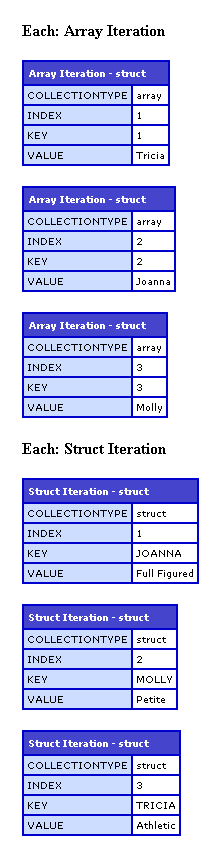
ColdFusion already has the CFLoop tag which allows us to loop over both structs and arrays quite easily. But each form of the tag has its own interface. In most cases this is not a problem. But, in the few cases where this separation of interfaces leads to logic and code duplication, I think this Each.cfm ColdFusion custom tag will allow me to create more succinct, more maintainable code.
Want to use code from this post? Check out the license.

Reader Comments
interesting approach Ben. nice job!
@Steve,
Thanks my man. I actually built this tag to simplify the topic of my next blog post:
www.bennadel.com/blog/1635-REStructFindValue-Adding-Regular-Expression-Searching-To-StructFindValue-.htm
Well done. I've use jQ's .each() function many times, and I've always thought it was a little bit of a pain to loop in CF. Thanks for this, hopefully I can find a place for it.
Very neat idea for creating a better StructFindValue() functionality in ColdFusion, thanks!
@Lionhart,
Yeah, jQuery's each() method is the best.
@Sue,
Thanks. I was inspired by Marc Esher.
what we i have nested structures like
structure1
it has two elements
structure2
structure3
structure4
need only to output contents on structur 2 or 3
then how can we do that
@Misty,
How do you need to output them? You should be able to reference the structs 2/3 directly.
Hi Ben!
i know how to output structs if they are one level deep.
i have also code for them if they are one elvel deep like this:
<cfloop list="#StructKeyList(key)#" index="k">
<cfoutput>Value: #k#</cfoutput>
</cfloop>
my structures are like this:
STRUCTS:
sysFonts
STRUCTS
acaslonpro-bold
STRUCT
Acaslonpro-Bold
Struct
Description
fonttype
location
psname
while i just need to extract the fontName of every font listed in coldfusion 8.
after this i want them to be in Comma Separed list to store as text
@Misty,
You need to set the collection of your structs to be nested struct. Something like:
<cfloop item="fontKey" collection="#XYZ.SysFonts#">
Once you are looking in the iteration of system font structures, you just need to grab the values of the location (or whatever you are trying to grab).
XYZ.SysFonts[ fontKey ].Location
@Ben,
Great!
XYZ.SysFonts[ fontKey ].Location
Did exactly what I was looking for. I can now fix the dent in the wall from me banging my head against.
Thankx Bro