
Ask Ben: Converting Javascript Variables Into ColdFusion Variables
How can I convert a JavaScript variable into a coldfusion variable?
I have been asked this question enough times that I figured it was be time to turn it into an actual Ask Ben blog post for future reference. Often times, when front-end developers start getting into server-side scripting (hopefully using ColdFusion), there is some confusion as to where the various parts of the page rendering work flow are executing. And, because of this confusion, developers get stuck trying to access one part of the work flow from another.
| |
|
|
||
| |
 |
|
||
| |
|
|
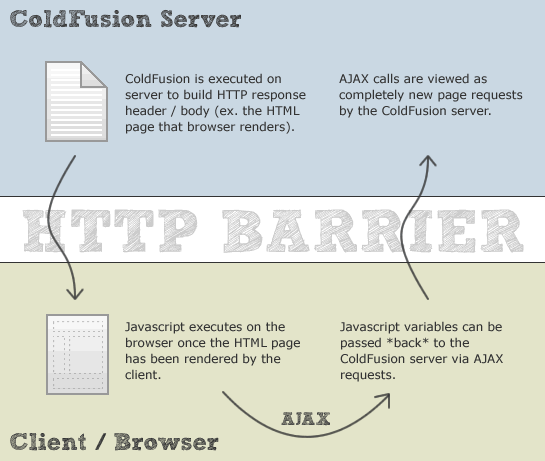
To clear up the confusion, I think you just need to step back and understand the request-response processing work flow:
- The server gets a request to deliver some content (at the given URL).
- The server constructs the response (in our case, an HTML page containing Javascript).
- The server returns the HTML data to the client (Web Browser).
- The data streams from the Server to the Client.
- The browser renders the response (HTML page) for the user at which time any embedded Javascript code executes.
Once we hit step #4, the ColdFusion server is no longer involved. In step #5, when the client renders the HTML response, it doesn't even have to know where the HTML data came from. As such, when the Javascript executes in step #5, it has no knowledge of nor any access to the ColdFusion portion of the page response work flow - these two points of execution happen at different times on different machines.
Javascript can, however, communicate with the ColdFusion server by making AJAX-based page requests. These HTTP requests are viewed by the ColdFusion server as completely new page requests by the client and do not have access to temporary ColdFusion variables created during previous requests (unless those variables were explicitly cached on the server).
So, the moral of the story is that you can't really turn a Javascript variable into a ColdFusion variable because the two are completely unrelated. Once you understand the page request / response work flow, this becomes obvious. If you want Javascript to send values back to the ColdFusion server for further processing, you can only do so via AJAX requests. I hope that this clears up some confusion.

Reader Comments
You can always write to a hidden form field if you are processing a form, etc.
Great Post
When you are calling your JavaScript you can always have the included JavaScript file end in a .cfm which would help in some cases... This will allow you to load different content based on variables that you pass... you can always pass variables through JavaScript like so...
<script type="text/javascript"
src="javascript.cfm?var1=bob&var2=frank">
</script>
This essential will pass the variables to coldfusion in which you can convert the variables into coldfusion variables using the url variable... I have used this method a few times but I don't recommend it for really robust applications.
What about <cfwddx action="cfml2js" ... />?
Sure, we can't use ColdFusion vars on the client side, but we can serialize them and return to the browser along with the rest of the JavaScript code.
json format is very helpfull to pass variables between javascript and coldfusion in ajax calls. There are 2 coldfusion functions since cf8 DeserializeJSON() and SerializeJSON().
And from you javascript code you can serialize your JS variables to a json string by using the json serializer( http://www.JSON.org/json2.js ).
@Jody,
Definitely true - a great technique.
@Alexey,
Yeah - using ColdFusion variables to help render the Javascript that ultimately gets executed by the browser is definitely some we can do, and is the easier of the two directions (server to client vs. client to server).
@Patrick,
JSON rocks! 'nuff said.
Hey Jody can i get a practical example of what u have suggested.
Thanks in advance..
@Shailesh,
What @Jody is talking about is basically getting a CFM file to "serve" up a Javascript file. Since it's a CFM file, it will push any query-string-based variables into the URL scope. So, for example, if you had the following script block:
<script src="scripts.cfm?foo=bar"></script>... then you could have a CFM file (scripts.cfm) that looked like this:
As you can see, our Javascript file content is generated by ColdFusion. Then, we use the CFContent tag to tell the browser that this file being rendered is actually a "Javascript" file, not an HTML file.
@Ben,
Thanks Ben for a detailed explanation.. :)
@Shailesh,
Any time my friend.
if i am including a y.cfm file in page x.cfm via <script>, how do i print a variable which is in y.cfm file on the x.cfm page or y.cfm page?
Ben...cannot one use the ToScript function. From the cfml 9 pdf reference page 1276-1279:
"This function can convert ColdFusion strings, numbers, arrays, structures, and queries to JavaScript or ActionScript syntax that defines equivalent variables and values."
..."Usage:
To use a ColdFusion variable in JavaScript or ActionScript, the ToScript function must be in a cfoutput region and be surrounded by number signs (#). For example, the following code uses the ToScript function to convert a ColdFusion variable to a JavaScript variable:
<cfset thisString="hello world"> <script type="text/javascript" language="JavaScript">
<cfoutput> var #toScript(thisString, "jsVar")#;
</cfoutput>
</script>
When ColdFusion runs this code, it sends the following to the client:
<script type="text/javascript" language="JavaScript"> var jsVar = "hello world";
</script>"
So it seems the ColdFusion ToScript function allows communicate of variables between CF9 and Javascript/Actionscript and in both directions.
Hi All,
it might a liltle too late... :)
but i have problem with javascript and coldfusion.
I have a 'Process' button on my CF and that button create a JavaScript 'alert' which is has value Yes/No.
If i choose Yes, then CF will run codes to update a table but if I choose No then CF will only show the table content.
So how is it the CF get the value Yes or No from JS.
I'm new comer in CF and not familiar with JavaScript (:( ),soo please help me with detail example for the solution of my problem.
Thanks all...
Regards,
Thank you SO much! Wish I'd found this before a long time in google... funny how many of the answers I finally find end up being on your blog. ;-)
I want to get the html page (or window) height in order to set the framed height of a cflayout bound tab. Apparently the only way you can get this info is through javascript (e.g. jquery), but then there's no way to automatically get the info back to CFML in order to have it set a variable for the tab height. So either my tabs (already a double-scroll in most 'lists' cases) have a scrollbar that go way off the page which is not properly functional, or, people with 21" monitors have what looks like about 3.5 inches of content near the top of their screen. (If I don't define the height, CF appears to default to giving me what looks like about 20 pixels...)
Do you know of any solution to this?
PJ
@fco,
I "think" that toScript is one-way: from CF to JS. I don't think it can go the other way (from JS to CF).
@Ben,
Hi there! can you show some sample validation using coldfusion and javascript. I'm too confused on how these two works together. I hope you could do my request.
I'd also like to see a more comprehensive example here. (please! :)
I am trying to pass variables from jQuery Mobile to my CF8 Server and vice versa.
Thanks in advance!
Hi Ben,
I am new on CF, there is a question I can't solve.
It's about cfcolumn attribute "href",I want to pass the cfselect value in "href" but it can't support JS functions or the format {Input} which is used in bind. So how to deal with it?
Thank you very much!