
Ask Ben: Collecting And Relating Sibling XML Nodes In A ColdFusion XML Document
I am just starting out with xml and CF. I don't get alot of opportunity to go much beyond cfquery and cfoutput so I have welcomed the chance to get into an xml project. This post has helped me a great deal but I am still having trouble. The xml that I am being supplied has the <id> at the same level of the data I need to relate to it. I know I need two loops, one for the array of <id>s and one for the array of <sundayData>, but how do I relate the two for each given <id>? I am tearing my hair out. Any help would be most appreciated. (note: XML and sample code removed)
You are close! I think the crucial piece of information that you are missing, which is understandable because it's not there when you output XML data, is that all ColdFusion XML element nodes have a property - XmlParent - which allows you to walk back up the ColdFusion XML tree from any given node. Once you have a handle on any node, such as <id>, you can easily walk up to it's parent and then back down to one of its siblings. That is the technique that I am using below to create the ID-based associative array:
<!--- Create XML data. --->
<cfxml variable="xmlData">

	<?xml version="1.0" encoding="UTF-8" ?>
	<mainDocument>
		<informationTableData>
			<id>0001393825</id>
			<saleDataInfo>
				<sundayData>
					<saleDate>2008-10-26</saleDate>
					<saleDataList>
						<nameOfCompany>Acme Explosives</nameOfCompany>
						<start>N/A</start>
						<sold>0</sold>
						<end>N/A</end>
					</saleDataList>
					<saleDataList>
						<nameOfCompany>Beavis Inc.</nameOfCompany>
						<start>100</start>
						<sold>25</sold>
						<end>75</end>
					</saleDataList>
				</sundayData>
			</saleDataInfo>
		</informationTableData>
		<informationTableData>
			<id>2221393333</id>
			<saleDataInfo>
				<sundayData>
					<saleDate>2008-10-26</saleDate>
					<saleDataList>
						<nameOfCompany>Hot Fusion</nameOfCompany>
						<start>500</start>
						<sold>10</sold>
						<end>490</end>
					</saleDataList>
					<saleDataList>
						<nameOfCompany>Smith Cousins</nameOfCompany>
						<start>150</start>
						<sold>50</sold>
						<end>100</end>
					</saleDataList>
				</sundayData>
			</saleDataInfo>
		</informationTableData>
	</mainDocument>

</cfxml>


<!---
	Create a struct in which the ID values of the above XML
	document will be the keys (to which the sundayData will
	be associated).
--->
<cfset objID = {} />


<!---
	Now, let's get all of the ID fields (that have a sibling
	sundayData node). For this demo, we are going to assume
	that is a requirement:

	Check for sibling node "saleDataInfo" with "sundayData":
	../saleDataInfo/sundayData
--->
<cfset arrIDNodes = XmlSearch(
	xmlData,
	"//informationTableData/id[ ../saleDataInfo/sundayData ]"
	) />

<!--- Loop over ID nodes to add them to our index object. --->
<cfloop
	index="xmlIDNode"
	array="#arrIDNodes#">

	<!---
		Create an ID-based index that points to the
		sundayData node. We can easily get the ID from the
		current node; but, to get the sundayData node, we
		have to walk the tree a bit - go up to parent node,
		then back down through saleDataInfo to get to the
		taret sundayData node.
	--->
	<cfset objID[ xmlIDNode.XmlText ] =
		xmlIDNode.XmlParent.saleDataInfo[ 1 ].sundayData[ 1 ]
		/>

</cfloop>


<!--- Output our final ID index. --->
<cfdump
	var="#objID#"
	label="ID-Based Index Of sundayData"
	/>
For this demo, I am only getting ID nodes that I know have an associated sundayData node. To enforce this, I am using the following predicate:
id[ ../saleDataInfo/sundayData ]
I just did this for fun. If you know that sundayData will always be there, this predicate is completely unnecessary; but, if sundayData is not always there, this predicate will prevent you from collecting ID nodes that won't have an associated sundayData node.
Because of our ability to walk the XML tree in both directions, we only need to gather the ID nodes and then loop over them. Once we have our ID node reference, we can easily walk the tree to get the associated sundayData node:
xmlIDNode.XmlParent.saleDataInfo[ 1 ].sundayData[ 1 ]
Once we get the XmlParent reference, we can use ColdFusion's pseudo XML node collection notation to grab the sibling element, saleDataInfo, and then its child element, sundayData.
If you didn't want to use the pseudo collection notation, you could always perform another XmlSearch() on the ID node itself:
XmlSearch(
	xmlIDNode,
	"../saleDataInfo/sundayData"
	)
This would return a single-item array of sundayData nodes (from which you would need to grab the first element).
When we run the above code, we get the following CFDump output:
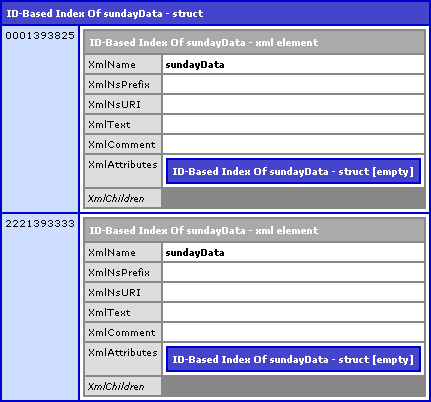
As you can see, the ID values from our XML tree act as the Keys in our index object. The value of each index is the associated sundayData node. Hope that helps!
Want to use code from this post? Check out the license.

Reader Comments
Thanks so much Ben! Sometimes I have a hard time visualizing the structure I need to get ColdFusion and Xml to play nice.
I had to change some of the code to get it to work with CF7 (like looping over the array). But the muddy waters are starting to clear a bit.
Thanks again for your help. Much appreciated.
@Robert,
No problem my man. Glad to help out.
Ben,
I am still having trouble. Is the resulting object treated as xml or as a structure? I can't seem to extract the data from the object to build coldfusion queries like you showed at:
www.bennadel.com/blog/1097-Ask-Ben-Converting-XML-Data-To-ColdFusion-Queries.htm
I am doing something similar to what you described in the above entry.
When I only had one <id> in the xml document I did this after setting the query:
<cfset sundayItems = ArrayLen(xmlData.mainDocument.informationTableData.saleDataInfo.sundayData.XmlChildren) - 1>
<cfloop index="i" from = "1" to = #sundayItems#>
<cfset temp = QuerySetCell(SundayQuery,"nameOfCompany", #xmlData.mainDocument.informationTableData.saleDataInfo.sundayData.saleDataList[i].
nameOfCompany.XmlText#, #i#)>
</cfloop>
But I'm having trouble doing the same with the objID created in your code above.
@Robert,
The objID created is an ID-based structure. Take a look at the CFDump output in the post; the ID is the key used to look up the sunday data.
Ok Ben, your Sainthood is in the works for your patience.
My confusion lay in the fact that when looping over the structure, the key id output to the browser as a string. Only after viewing the source did I see that all the xml tags were part of the output as well.
I think I got it though. The way I did it doesn't seem elegant to me but it seems to work. (Note that the second cfloop has a hard coded "to" for now.)
<cfset qSunday = QueryNew("ID, nameOfCompany","varchar, varchar" ) />
<cfloop collection="#objID#" item="ID">
<cfxml variable="sundayXML">#objID[ID]#</cfxml>
<cfloop index="i" from="1" to="2">
<cfset QueryAddRow( qCustomer ) />
<cfset qSunday[ "ID" ][ qSunday.RecordCount ] = JavaCast("string", #ID#
) />
<cfset qSunday[ "nameOfCompany" ][ qSunday.RecordCount ] = JavaCast(
"string",
sundayXML.sundayData.saleDataList[i].nameOfCompany.xmlText
) />
</cfloop>
</cfloop>
<cfdump
var="#qSunday#"
/>
Despite the fact that it works for me, if you could let me know if I did this in an absurdly roundabout way, I'd appreciate it.
Thanks again.
@Robert,
No problem; I think your confusion lies in the fact that you don't know that part of an XML document can exist on its own, outsize of the root reference.
If you look at the CFDump in my post, you'll notice that the "SundayData" that I stored in the ID-based struct is *actually* a sub-tree of the original XML document. That is to say, the sundayData node I stored in the struct is actually an XML node.
Because of this fact, this line that you have:
<cfxml variable="sundayXML">#objID[ID]#</cfxml>
... is completely redundant. You are taking an existing XML sub-tree and then turning it into a different XML document (sundayXML).
The disconnect that you are having is that you don't realize that you can simply refer to the stored sub-tree as XML already. So, for example, to get the company info, you can simply refer to:
objID[ID].saleDataList[i].nameOfCompany.xmlText
Does that make sense?
Yes, that makes complete sense. I stared at for a couple of hours late last night and I came to that same conclusion about needlessly creating another xml document.
I also have to get a handle on walking the tree. I think that once I wrap my head around that things will be a bit easier as well.
Your help is much appreciated.
Tell your boss I said you can have the rest of the day off.
@Robert,
Ha ha, no problem. Working with XML is odd at first, but you just have to get used to the structure. It's really just a combination of arrays and structures that you're used to working with. Just takes practice.
Hit me up if you have any more questions.