
Ask Ben: Selecting XML Nodes That Have A Given Parent Node Using XPath
Let's say I have an XML file with the following data in it: [private information]. Right now, the way the component parses the XML file, it returns all instances of DUNS it finds. Is there any way to limit the tag that is searches through and only return say the DUNS from the BasicInfo parent tag? If so, can you provide an example on how that might be done? Thanks again!
When you search for nodes in a given XML document by name (ex. //name), it will return nodes anywhere in that XML document with the matching name. This is what you are experiencing. If you want to return only nodes within a given parent node, then you just have to be a little bit more specific in you XPath. There are two ways to do this:
Specify the parent node in the node path.
Specify the parent node in the target node predicate.
Before we get into those two options, let's first build ourselves a test ColdFusion XML document:
<!--- Generate ColdFusion XML document. --->
<cfxml variable="xmlData">

	<category>
		<name>Bodybuilding Books</name>

		<books>
			<book>
				<name>Muscle: Confessions Of An Unlikely Bodybuilder</name>
				<author>Samuel Wilson Fussell</author>
			</book>
			<book>
				<name>Gorilla Suit: My Adventures In Bodybuilding</name>
				<author>Bob Paris</author>
			</book>
		</books>
	</category>

</cfxml>
In this demo XML document, you can see that we have three "name" nodes: one for the Category and one for each Book node. Like you have experienced, if we searched for:
<!--- Query for all names. --->
<cfset arrNameNodes = XmlSearch(
	xmlData,
	"//name"
	) />

<!--- Output resultant node set. --->
<cfdump
	var="#arrNameNodes#"
	label="//name"
	/>
... we'd get back all three:
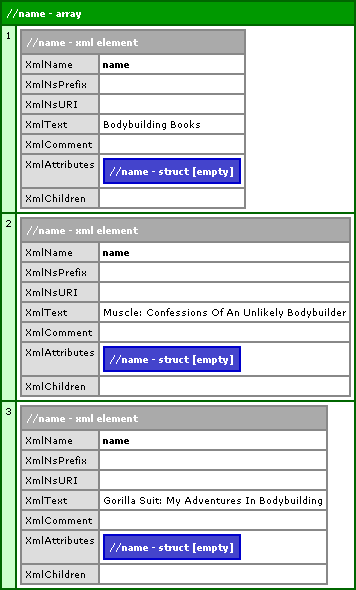
But, if we want to only get back the Name nodes contained within the Book nodes, we have to use one of the two XPath options above. We can specify the parent node in the node search path:
<!---
	Query for all name nodes that are contained within a
	book node.
--->
<cfset arrNameNodes = XmlSearch(
	xmlData,
	"//book/name"
	) />
This will search for Name nodes that are contained within book nodes:
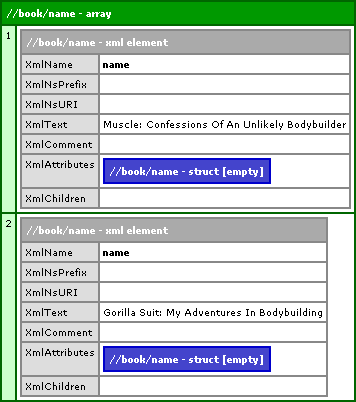
We can also search for all Name nodes and then specify in the predicate that it must have a Book parent node:
<!---
	Query for all name nodes that are children of
	the parent node: book.
--->
<cfset arrNameNodes = XmlSearch(
	xmlData,
	"//name[ parent::book ]"
	) />
This will search for all Name nodes and then filter the node set based on the parent node of the given node. Running the above code gives us the same node set as above.
Either of these methods will return only the two Name nodes contained within the Book nodes. The former, however, is probably faster as you limit your search earlier on in the XPath; but, I have not done any performance testing on this.
Want to use code from this post? Check out the license.

Reader Comments
Somewhat related question, once you find a node, is there a way to determine the parent?
In your books example, let's modify the xml to include an id attribute in the book tag. Once I find all the name nodes, I want to find the parent and if the parent is "book", then get the id.
I know I could just search for all book nodes, but my real case I want to find all name nodes, book or otherwise, and then do different business logic based on the parent and other factors.