
Ask Ben: Manually Enforcing Basic HTTP Authorization In ColdFusion
I'm working with a remote sms interface through a web service, and our endpoint is a cfc file that they hit. Our cfc returns wddx and is a remote cfc extended through ColdSpring. My question is: if we wanted to return an http statuscode of 401 Bad Credentials in the event Basic http authentication fails, will ColdFusion allow us to simply specify that in a cfheader tag w/in the component? I have tried this and it's simply returning 200 OK regardless. I don't want to have to go through the framework to have this process execute, which is the reason for the cfc endpoint instead.
Let me start this off by stating that I am not a security expert in any way and I happen to know very little about HTTP authorization. From what I have read (in preparation for this demo), there are several different forms of HTTP authorization that range in terms of complexity and security. The ColdFusion CFHTTP tag only supports BASIC authorization, not NTLM authorization. As such, that is the form that I will demonstrate.
I have set up a simple remote ColdFusion component with a single remote access method, Test(). Test() does nothing but return the string, "Method access successful!". While the Test() method is remote/public, the CFC itself, Remote.cfc, does check HTTP Authorization. I am now going to call this remote method using ColdFusion's CFHTTP and CFHTTPParam tags - once without login credentials and then once with credentials.
CFHTTP Without Credentials
<!--- Call CFC directly without authentication. --->
<cfhttp
	method="get"
	url="#strURL#"
	result="objGet">

	<cfhttpparam
		type="url"
		name="method"
		value="Test"
		/>

</cfhttp>

<!--- Output the response. --->
<cfdump
	var="#objGet#"
	label="CFHttp Response"
	/>
When we try to access the remote Test() method without passing in any credentials, ColdFusion returns this response:
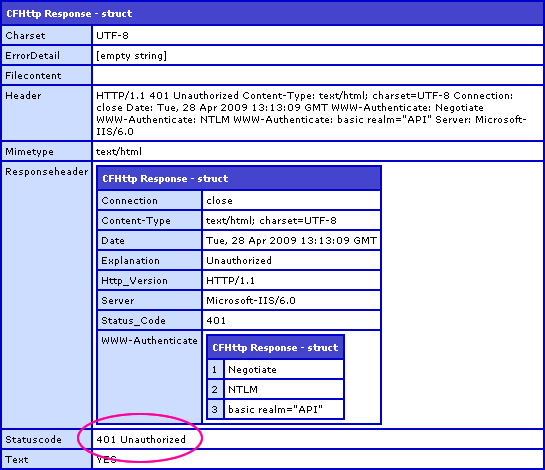
Notice that the ColdFusion application server return the status code 401 - Unauthorized. Our request failed authentication and the page request terminated.
Now, let's run the same demo, but this time, let's pass our Username and Password along with the CFHTTP tag attributes:
CFHTTP With Credentials
<!--- Call CFC directly WITH authentication. --->
<cfhttp
	method="get"
	url="#strURL#"
	username="Moops"
	password="McMoopyPants"
	result="objGet">

	<cfhttpparam
		type="url"
		name="method"
		value="Test"
		/>

</cfhttp>

<!--- Output the response. --->
<cfdump
	var="#objGet#"
	label="CFHttp Response"
	/>
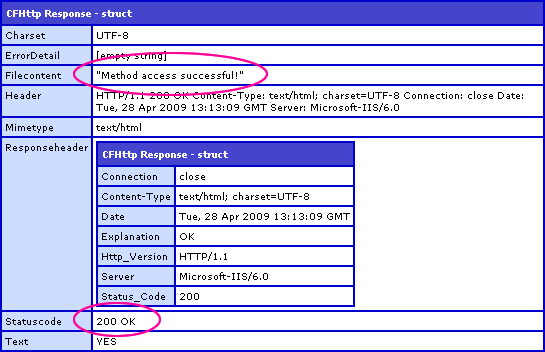
This time, when we pass in the HTTP authorization credentials with the ColdFusion CFHTTP tag, you can see that the returned status code is 200 and the FileContent of the response contains our remote Test() method return value, "Method access successful!". The request had proper authorization and the page was able to execute.
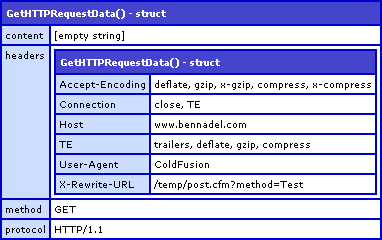
OK, so how does my ColdFusion component enforce this Basic HTTP Authorization? It's doesn't do it implicitly - the authorization headers need to be checked manually. When a request comes into the ColdFusion server, we can check the request headers for authorization information using the GetHttpRequestData() method. One without any authorization information would look like this:
One with HTTP authorization credentials passes an Authorization key in the Headers struct:
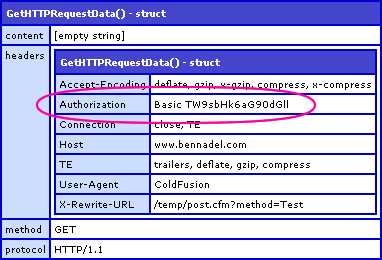
The Authorization key contains a two-item list. The first item, Basic, defines the type of authorization being used by the server. The second item (when using Basic authorization) is a Base64 encoded version of the given credentials in the following format:
username:password
Given this header, you can grab the Authorization key, decode the credentials, and then compare them against some internal login system. That is exactly what I'm doing in my Remote.cfc:
Remote.cfc
<cfcomponent
	output="false"
	hint="I am a remote-access testing component.">

	<!---
		Set up required credentials for API calls.

		NOTE: This is not really the place to do this, but I am
		doing this for the demo. Normally, you would want this
		in some sort of application-centric area or management
		system integration.
	--->
	<cfset THIS.Credentials = {
		Username = "Moops",
		Password = "McMoopyPants"
		} />


	<!--- ------------------------------------ --->


	<!--- Check request authorization for every request. --->
	<cfset THIS.CheckAuthentication() />


	<!--- ------------------------------------ --->


	<cffunction
		name="Test"
		access="remote"
		returntype="string"
		returnformat="json"
		output="false"
		hint="I am a remote-access test method.">

		<cfreturn "Method access successful!" />
	</cffunction>


	<!--- ------------------------------------ --->


	<cffunction
		name="CheckAuthentication"
		access="public"
		returntype="void"
		output="false"
		hint="I check to see if the request is authenticated. If not, then I return a 401 Unauthorized header and abort the page request.">

		<!---
			Check to see if user is authorized. If NOT, then
			return a 401 header and abort the page request.
		--->
		<cfif NOT THIS.CheckAuthorization()>

			<!--- Set status code. --->
			<cfheader
				statuscode="401"
				statustext="Unauthorized"
				/>

			<!--- Set authorization header. --->
			<cfheader
				name="WWW-Authenticate"
				value="basic realm=""API"""
				/>

			<!--- Stop the page from loading. --->
			<cfabort />

		</cfif>

		<!--- Return out. --->
		<cfreturn />
	</cffunction>


	<cffunction
		name="CheckAuthorization"
		access="public"
		returntype="boolean"
		output="false"
		hint="I check to see if the given request credentials match the required credentials.">

		<!--- Define the local scope. --->
		<cfset var LOCAL = {} />

		<!---
			Wrap this whole thing in a try/catch. If any of it
			goes wrong, then the credentials were either non-
			existent or were not in the proper format.
		--->
		<cftry>

			<!---
				Get the authorization key out of the header. It
				will be in the form of:

				Basic XXXXXXXX

				... where XXXX is a base64 encoded value of the
				users credentials in the form of:

				username:password
			--->
			<cfset LOCAL.EncodedCredentials = ListLast(
				GetHTTPRequestData().Headers.Authorization,
				" "
				) />

			<!---
				Convert the encoded credentials from base64 to
				binary and back to string.
			--->
			<cfset LOCAL.Credentials = ToString(
				ToBinary( LOCAL.EncodedCredentials )
				) />

			<!--- Break up the credentials. --->
			<cfset LOCAL.Username = ListFirst( LOCAL.Credentials, ":" ) />
			<cfset LOCAL.Password = ListLast( LOCAL.Credentials, ":" ) />

			<!---
				Check the users request credentials against the
				known ones on file.
			--->
			<cfif (
				(LOCAL.Username EQ THIS.Credentials.Username) AND
				(LOCAL.Password EQ THIS.Credentials.Password)
				)>

				<!--- The user credentials are correct. --->
				<cfreturn true />

			<cfelse>

				<!--- The user credentials are not correct. --->
				<cfreturn false />

			</cfif>


			<!--- Catch any errors. --->
			<cfcatch>

				<!---
					Something went wrong somewhere with the
					credentials, so we have to assume user is
					not authorized.
				--->
				<cfreturn false />

			</cfcatch>

		</cftry>
	</cffunction>

</cfcomponent>
For demonstration purposes, I am defining my possible credentials right in the CFC; you probably would be storing that information in a database, but for this demonstration, I'm keeping it simple. The Remote.cfc contains two utility methods: CheckAuthentication() and CheckAuthorization(). For every single page request, the Remote.cfc pseudo constructor calls the CheckAuthentication() method. This checks to see if the user is authorized (using CheckAuthorization()) and returns a 401 status code if they are not.
If the user is not trying to authorize (did not send credentials), there will be no Authorization header present (see above output). As such, I am wrapping my authorization scripts in a CFTry / CFCatch block. If any errors are raised, I know that the user either did not try to authorize or sent bad data; in either case, my CFCatch statement returns False to signify that the given user request is not authorized.
It is important to kill the current page request using CFAbort after the CFHeader tags otherwise the page would run normally, albeit with a 401 status code rather than a 200 status code. Now, this authorization check doesn't need to be in the CFC itself; it could easily be moved to a base CFC (from which all remote components inherit) or it could be put in the Application.cfc's OnRequestStart() event handler.
So again, I am no HTTP security expert, but from what I have found, this is how you can get ColdFusion to manually enforce Basic HTTP Authorization. I tried to use this same security when calling the CFC from the browser location, but this failed. FireFox seems to be trying to use the NTLM Authorization scheme with is more secure but significantly more complicated. Perhaps that's a topic for another post.
Want to use code from this post? Check out the license.

Reader Comments
Excellent Write up as usual Ben -
I think my problem was (and I did try this but may have had a problem) that I didn't cfabort after the http status call, as I was returning 'xml' data to the browser through the response of the cfc (as wddx)- which would make it valid 'xml' regardless of the authentication passing etc - which is a bit of a catch 22.
I'll give it another go - rock on Ben! (Coming to cfObjective in Mpls?)
Because I'm not one to let "it should go without saying" stop me from saying something, I'll say this:
Enforcing HTTP authentication with ColdFusion is almost always a terrible idea. If you're trying to do it, odds are that you're doing it wrong.
Think about it this way: HTTP authentication is a protocol-level construct. It's something that the web server needs to concern itself with, not your application. Let the web server do its job. There are ISAPI and Apache modules for doing HTTP authentication against databases, if that's what you need.
There's also the technical aspect: if you're going to code up HTTP authentication in CF, then you need to think not just about Basic, but also Digest and NTLM. Digest would be tricky to do in CF, and NTLM would be next to impossible. That, and there are browser-specific bugs you'd need to work around. Why sign up for that when there are security experts that have already figured that out for you?
Having said all of that, I do have a couple of pages where I check to make sure the user is logged in, and if not I throw a 401 to make them auth. But then I let the web server handle the actual authentication.
<cfif CGI.AUTH_USER EQ "">
<cfheader statuscode="401" statustext="Unauthorized">
<cfoutput><p>You need to login to access this area.</p></cfoutput>
<cfabort>
</cfif>
(You may need to configure your web server or use a different request header, but you get the point.)
@Rick,
I have also rocked out the AUTH_USER aspect before and have enjoyed letting the server handle it. Not my problem.
To be fair, I did go back and forth with the askee a bit before writing this up. From what I gathered, they were doing CFHTTP requests for computer-to-computer communication and so I felt comfortable moving forward with the Basic-only authorization.
The NTLM and some others looked really complicated and far beyond my scope of understanding. The NTLM seemed to require 3 consecutive posts for full authorization. Crazy!
Awesome writeup, and much more detailed than the one I put together awhile ago: http://www.mischefamily.com/nathan/index.cfm/2008/8/13/Basic-Authentication-With-ColdFusion
One thing to keep in mind, for Basic Authentication to be secure you need to be using SSL.
One other thing I'll mention, if you try to use this method to secure a SOAP request you may run into issues with GetHTTPRequestData(). See my post above for more info.
@Nathan,
That's too funny - I even commented on your post back then :) How quickly my mind forgets everything that I don't try out for myself.
I'll play around with the SOAP stuff - there's a whole host of functions in ColdFusion for SOAP... that I've never used.
@Ben - Ha! I didn't notice your comments when I went back to read that post :) I tend to forget the stuff I do try out, let alone the stuff I only read about...
I'm using this, or some variant thereof, to force authentication of a REST API I've been working on using Taffy. It all works perfectly in development and is a very slick solution (thanks as always, Ben!), but when I run it live it seems that the authentication details aren't passed along in the headers. The difference is I'm forced to use IIS6 on the production server, but I'm rocking IIS7 in development. (Yes. 'rocking' is the correct term. IIS7 is to IIS6 what diamonds are to compost.)
Has anyone had similar problems with IIS6?
There's a bug in your code samples, Ben. ;)
Consider someone with this password: gd$#fds:fdsa3!
It has a colon in it, so your use of listLast(...,":") will result in the user's password appearing to be "fdsa3!". Instead you should use listRest(), which returns everything after the first list element has been removed, including the list delimiters.
I'll be leaving this comment on Nathan's post too, for the benefit of anyone who comes looking in either place for basic auth examples.
@Ben
I have been lurking your site for quite some time, and haven't stepped up to comment until today. Thanks for all the great info - keep it up!
@Adam
I believe you are mistaken... as the comments mention above the code in question, the Authorization data follows the format:
Basic XXXXXX
XXXXXX is the encoded username:password.
Using listLast(authVar," ") where a space is the delimeter, the returned data is XXXXXX.
It is only after you run this through the ringer of toBinary and toString, where the colon appears (if included in the password).
FWIW, I lurk your site often, also - thanks for the great work you've done with REST... interestingly, the reason why I am playing with HTTP Auth is for a RESTful API I'm building for some server-to-server communications.
Hi Jason,
Thanks for checking up on that, but I still stand firm on my position. :)
There are actually two listLast()'s in use, and you're right that the one using a space as a delimiter is fine. (Perhaps I should have been more explicit in my previous comment.)
The one that will cause issues, if and only if the plain-text password contains a colon, is this one:
...which is run after toBinary and toString.
[And with regards to my own blog and REST/Taffy, thanks! :D]
@Adam
Oops! My mistake! I hadn't gotten that far in my testing - I'm still baby stepping my way through the process.
@Adam, @Jason,
After reading these comments, I double-checked my latest implementation and I am happy to report that I am using listFirst() and listRest().