Changing The Root Node In A ColdFusion XML Document Using XSLT
The other day, I answered a reader's question on changing the name of an XML root node. I demonstrated how to do this using string parsing and how to do it using XML manipulation. In the comments, Matthew suggested that I could use XSLT to do this as well. His example hard-coded the attribute names, so I wanted to demonstrate how to use XSLT to change the root name and dynamically copy all attributes of the root node as well. Plus, to be honest, my XSLT is getting pretty rusty, so this was a great opportunity to dust of the old brain.
<!---
	Create an XML string that has a root node that gets
	repeated within the body of the XML as well.
--->
<cfsavecontent variable="strXmlData">

	<list id="my-to-do-list">
		<item>
			List Item A
		</item>
		<item>
			List Item B
		</item>
		<item>
			<list>
				<item>
					Sub Item A
				</item>
				<item>
					Sub Item B
				</item>
			</list>
		</item>
		<item>
			List Item D
		</item>
	</list>

</cfsavecontent>


<!--- Define XSLT to repace the root node. --->
<cfsavecontent variable="strXSLData">

	<?xml version="1.0" encoding="ISO-8859-1"?>
	<xsl:transform
		version="1.0"
		xmlns:xsl="http://www.w3.org/1999/XSL/Transform">


		<!--- Define new root node name BELOW. --->

		<xsl:variable name="new-root-node">
			<xsl:text>masterlist</xsl:text>
		</xsl:variable>

		<!--- Define new root node name ABOVE. --->


		<!--- --------------------------------------------- --->


		<!--- Match the root node. --->
		<xsl:template match="/*">

			<!--- Create a new element with new node name. --->
			<xsl:element name="{$new-root-node}">

				<!---
					Copy all attributes of the existing root
					node into the new root node.
				--->
				<xsl:for-each select="@*">

					<xsl:attribute name="{name()}">
						<xsl:value-of select="." />
					</xsl:attribute>

				</xsl:for-each>

				<!--- Copy all children of the root node. --->
				<xsl:copy-of select="*" />

			</xsl:element>

		</xsl:template>

	</xsl:transform>

</cfsavecontent>


<!--- Transform the XML. --->
<cfset xmlNew = XmlTransform(
	Trim( strXmlData ),
	Trim( strXSLData )
	) />


<!--- Output new XML document with new root node. --->
<cfdump
	var="#XmlParse( xmlNew )#"
	label="New XML Root"
	/>
In the above example, I set a variable at the top of the XSLT definition. This variable holds the name of the new root node. Then, I match the root node in the only template and create an element with the new name (using dynamic curly-brace evaluation to set the name value). I then loop over each attribute in the root node and create a copy of it in my new element. Then, I simply use the copy-of element to get a deep copy of all the children.
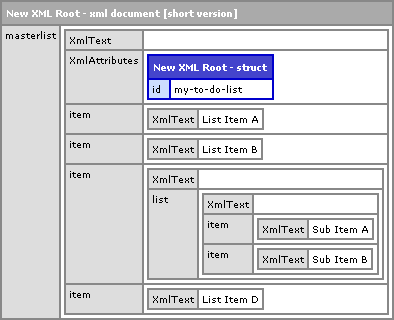
When we run the above code, we get the following CFDump output:
I guess this post was more for my benefit as I just wanted to use it as an excuse to practice my XML transformations. The XSLT tag set is so different that the ColdFusion / HTML tags that I'm used to using that if I don't practice from time to time, it all goes away. Heck, even with this post, the majority of the time was spent flipping back and forth from the XSLT documentation to get the syntax right.
Want to use code from this post? Check out the license.

Reader Comments
Ben,
Thanks for your XSLT posts on this. I did have a little problem with this code. When i have attributes on my original root node, when i pass them through this xslt transformation, the attributes are put on the first child node of the root node.
<ben id='nadel'>
<post>xxxxx</post>
.....
</ben>
changing the root node to matthew
and the first post node now has id='nadel' not the root node.
hope that makes sense. I can send you my example code in an email if you need to see it.
-Matthew
It only seems to be a problem when the xml file has a namespace. I went back and tried a few more things. It will copy the id attribute over, but the xmlns attribute i had on my root node was removed from the root node and put on the first child node.
@Matthew,
Hmmm, to be honest, I dislike name spaces and I'm not all that good at them. So, are you going another route? Or did you get it to work with name spaces?
For now i just used the JDOM java library built into cf to do it. Ill play around more with the xslt stuff.
Cheers,
-Matthew
Matthew,
Sounds good.