
Ask Ben: Changing The Root Node In A ColdFusion XML Document
I just had a quick regex. I need to replace the first and last xml nodes in an xml string. Basically was doing a quick and dirty way to change the root node of an xml document instead of creating a new root node and copying recursively all the data from one xml object to the new xml object. I can do a simple find "xxx" and replace it with "yyy" but xxx may be part of a child node somewhere like xxxBen or something. so i really want to pinpoint the start and end tags of the string, and also deal with the declaration, and leave all attributes in the root node (if they exist) intact. When you get a minute, do you mind helping?
I know you want to see the string-parsing method, rather than the new root node creation, but I will show you both methodologies as I think that they are both nice to know about. The major difference with the two is that the latter (new root node creation) requires you to parse the XML string into an actual ColdFusion XML document whereas the former only requires that you parse the string with a regular expression.
So first, let's start out be creating our XML data string and storing it in a ColdFusion content buffer:
<!---
	Create an XML string that has a root node that gets
	repeated within the body of the XML as well.
--->
<cfsavecontent variable="strXmlData">

	<list id="my-to-do-list">
		<item>
			List Item A
		</item>
		<item>
			List Item B
		</item>
		<item>
			<list>
				<item>
					Sub Item A
				</item>
				<item>
					Sub Item B
				</item>
			</list>
		</item>
		<item>
			List Item D
		</item>
	</list>

</cfsavecontent>
You'll notice that the element node, "list," appears several times in the document - the root node and a nested node. I have done this to make sure that neither of these techniques replaces the nested node incorrectly.
OK, so now let's replace the root node, "list," with the new root node, "masterlist." With our first approach, we are going to use Regular Expressions to replace the first open tag and last close tag of the xml document string:
<!---
	Replace the first and last nodes of the document with a
	new node name. We are going to do this in two step. Start
	with the first tag.
--->
<cfset strXmlData = REReplace(
	strXmlData,
	"<\w+",
	"<masterlist",
	"one"
	) />

<!---
	Now, we want to replace the LAST close node in the document.
	Because we want to replace the last close node, we want the
	expression to end in the $ so that it is the end of the
	document.
--->
<cfset strXmlData = REReplace(
	strXmlData,
	"(</)\w+([^>]*>\s*)$",
	"\1masterlist\2",
	"one"
	) />


<!--- Parse and output new XML. --->
<cfdump
	var="#XmlParse( Trim( strXmlData ) )#"
	label="New XML Document"
	/>
To keep the node attributes intact in our first REReplace(), we are only replacing the open bracket and node name of the first element (ie. <list becomes <masterlist); in doing so, we are only changing the node name and nothing else. Then, in our second replace, we replace the last close node of the document. Here, we actually have to replace the entire node as we need to use the $ to signify the end of the string data (in the regular expression). However, by using captured groups in our regular expression, we can replace everything other than the node name without having to know much about it.
When we replace the node and CFDump out the resulting XML document, we get the following:
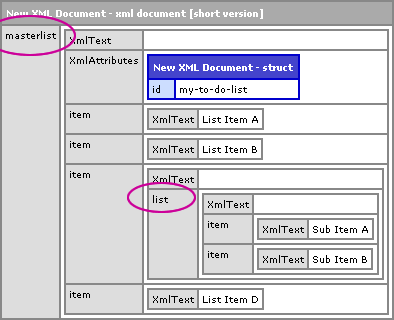
As you can see, the root node, "list," has been replaced with, "masterlist," and the XML attributes have been kept intact.
Ok, now that you see how to do this with regular expressions, let's take a look at actually changing the structure of an existing XML document. Well, sort of - before we have an actual XML document, we are going to wrap the existing XML string in a our new root node, "masterlist." Then, we're going to parse it into an XML document and transfer the original child nodes and XML attribute data into the new root node. Once this is done, we're simply going to delete the old root node.
<!--- Add the new XML root node around the document. --->
<cfsavecontent variable="strXmlData">

	<masterlist>
		#strXmlData#
	</masterlist>

</cfsavecontent>

<!---
	Now, parse the xml string into an XML document and transfer
	the child nodes to the master list root node.
--->
<cfset xmlData = XmlParse( Trim( strXmlData ) ) />

<!---
	Add all of the original children to the new root of the
	XML document. This creates a *copy* of the original child
	nodes, NOT a copy-by-reference!! You will lose any references
	you had to the original nodes.

	NOTE: This uses the undocumented AddAll() method. If you might
	want to wrap this up in a UDF, ArrayAppendAll().
--->
<cfset xmlData.XmlRoot.XmlChildren.AddAll(
	xmlData.masterlist.list.XmlChildren
	) />

<!--- Copy any XML attributes. --->
<cfset StructAppend(
	xmlData.XmlRoot.XmlAttributes,
	xmlData.XmlRoot.XmlChildren[ 1 ].XmlAttributes
	) />

<!--- Delete first child to get rid of old root node. --->
<cfset ArrayDeleteAt( xmlData.XmlRoot.XmlChildren, 1 ) />
There's a few points to take away from the above code. For starters, we are using the undocumented AddAll() method to append an entire array to another array. If you are uncomfortable doing this, I would recommend just making a UDF called ArrayAppendAll() and wrapping the .AddAll() method call in that (in case the feature ever becomes unavailable in future versions of ColdFusion). Second, when we transfer the XML children to the new root node, these nodes get transferred by value, not by reference. This means that if you have any existing variable references to the original child nodes, those references will not point to the transported XML children.
That said, this method results in the exact same XML document as the regular expression replace method. The first is going to be more efficient as it's only string parsing. The latter has string parsing (into XML) and XML document manipulation - a lot more going on. But, I thought it could be beneficial to see both techniques in order to make the most informed decision.
Want to use code from this post? Check out the license.

Reader Comments
Ben,
Without running this, to me it looks like the first method will keep the "id" attributes with a value of "my-to-do-list" in-tact for the root node. But, it looks like since that attributes is not in the new root node that your are adding in the second that it will be wiped out.
Is that the case? or am I miss-understanding what will happen when you add all the children?
@Chris,
The StructAppend() in the second version takes care of the attributes. So yes, I do have to do a bit more finagling to get the attributes to copy.
Hi Ben
This would be so easy with XSLT!
Here you go (put this after your XML cfsavecontent):
<cfsavecontent variable="xsl">
<xsl:transform version="1.0" xmlns:xsl="http://www.w3.org/1999/XSL/Transform">
<xsl:template match="@*|node()">
<xsl:element name="masterlist">
<xsl:attribute name="id">
<xsl:value-of select="//@id" />
</xsl:attribute>
<xsl:copy-of select="child::*" />
</xsl:element>
</xsl:template>
</xsl:transform>
</cfsavecontent>
<cfcontent variable="#ToBinary(ToBase64(XMLTransform(strXmlData,xsl)))#" type="text/xml" />
Cheers
Matthew
@Matthew
I see you match all the attributes, but then add an ID attribute. How do you add the attributes if you dont know what the attributes are? It may or may not be an ID attribute. Is this easy to do as well in XSLT?
@Matthew (1),
Ahhh, I always forget about XSLT. I've used it a bunch of times but for some reason it never pops into my head as an answer. Thanks a lot for the reminder!
@Matthew (2),
You can copy all attributes using XSLT - you don't have to specify the given attribute. I leaned this when testing XSLT on XHTML:
www.bennadel.com/index.cfm?dax=blog:1455.view
I'll try to put this example in place as I need to keep hammering it into my mind!! :)
@Matthew 1,
Thanks for the XSLT tip.
@Matthew Abbott,
I posted an example that copies the root node with new name and dynamic attributes. Mostly, I just wanted to practice my XSLT - it gets so rusty so fast:
www.bennadel.com/index.cfm?dax=blog:1573.view
Hi Ben,
I have got a requirement to read an XML document (specifically in iTunes XML format) and present it to user in an HTML Form page where they can edit element values and properties (attributes) and can submit the form and I need to save them back in the same XML doc with updated values.
On top of that I need to offer a way so user can add more elements say actor's in the same document.
I was wondering if you can point me to right direction on what's the best way to do it or if you have any example on how to do this?
I am thinking of reading the XML and presenting in an HTML form and providing DHTML way with JScript to add or remove elements, do you think this is the right way forward?
Thanks in advance.
Philip
@Philip,
Wow, that's a really interesting problem. I don't have any great advice. I guess a DHTML-style interface that allows a user to drill down through the XML would be very useful. But then, posting the information back to the server? I guess you would have to serialize the data back to XML before you post it?
I'll do something thinking on this. That might actually be a fun problem to try out :)