
Converting CSS Data To XPath Using ColdFusion
Now that we have our CSSElementSelectorToXPath() and CSSSelectorToXPath() ColdFusion user defined functions for converting CSS selectors into XPath queries, we can build on those to convert an actual chunk of style data into XPath selectors and flattened CSS rules. When you think about the consistency with which CSS is defined, you can see that the open/closed curly braces can be used as CSS list delimiters:
h1 { color: red } h2 { color: black }
If we split the CSS data on the closed curly braces, we get the following:
- h1 { color: red
- h2 { color: black
As you can see, when we use the closed curly brace as a list delimiter, it gives us each individual set of rules as a list item. And, once we have that, I think you can see that the open curly braces within each resulting item now separates the CSS selector from the CSS properties. In essence, CSS can be thought of a multi-delimiter list. And, once we see it this way, we can easily split it up and leverage our existing CSS user defined functions.
The following UDF, CSSToXPath(), does just that, building on top of our existing CSSSelectorToXPath() method:
<cffunction
	name="CSSToXPath"
	access="public"
	returntype="array"
	output="false"
	hint="I convert CSS data to XPath-compatible data.">

	<cfargument
		name="CSS"
		type="string"
		required="true"
		hint="I am the CSS data to converto XPath."
		/>

	<!--- Define the local scope. --->
	<cfset var LOCAL = {} />

	<!--- Set up the default result set of search values. --->
	<cfset LOCAL.Searches = [] />

	<!---
		First, we want to strip out any STYLE tags in case
		this was sent to us within tags.
	--->
	<cfset LOCAL.CSSData = REReplace(
		ARGUMENTS.CSS,
		"</?style[^>]*>",
		"",
		"all"
		) />

	<!--- Now, let's strip out all CSS comments. --->
	<cfset LOCAL.CSSData = REReplace(
		LOCAL.CSSData,
		"/\*[\s\S]*?\*/",
		"",
		"all"
		) />

	<!---
		Now that we have stripped out tags and comments and we
		are dealing with raw CSS, let's break the data up into
		individual sets of rules. To do this, we will split the
		CSS on the end bracket.
	--->
	<cfset LOCAL.CSSRules = ListToArray(
		Trim( LOCAL.CSSData ),
		"}"
		) />


	<!---
		Now that we have our data split up into groups of rules
		by selector, let's go through each one and try to convert
		the CSS selector into XPath and to clean up the CSS.
	--->
	<cfloop
		index="LOCAL.CSSRule"
		array="#LOCAL.CSSRules#">

		<!--- Split the CSS selector from the CSS data. --->
		<cfset LOCAL.CSSSelector = Trim(
			ListFirst( LOCAL.CSSRule, "{" )
			) />

		<!--- Get the CSS properties. --->
		<cfset LOCAL.CSSProperties = Trim(
			REReplace(
				ListLast( LOCAL.CSSRule, "{" ),
				"\s+",
				" ",
				"all"
				)
			) />

		<!--- Create the search object. --->
		<cfset LOCAL.Search = {
			Selector = LOCAL.CSSSelector,
			CSS = LOCAL.CSSProperties,
			XPath = CSSSelectorToXPath( LOCAL.CSSSelector )
			} />

		<!--- Add to the results. --->
		<cfset ArrayAppend(
			LOCAL.Searches,
			LOCAL.Search
			) />

	</cfloop>


	<!--- Return the searches. --->
	<cfreturn LOCAL.Searches />
</cffunction>
First, we strip out any STYLE tags and any CSS comments to make sure that we are working with pure CSS data. Then, we split up the CSS data and parse it into XPath queries and flattened CSS properties.
To test this ColdFusion user defined function, let's create some CSS data and the parse it into XPath queries:
<!--- Store CSS data. --->
<cfsavecontent variable="strCSS">

	<style type="text/css">

		/* This is the CSS * for our email. */

		* {
			font-family: verdana, arial ;
			font-size: 12px ;
			line-height: 17px ;
			margin: 0px 0px 0px 0px ;
			padding: 0px 0px 0px 0px ;
			}

		h1,
		h2,
		h3,
		p,
		table {
			margin-bottom: 16px ;
			}

		h1 {
			font-size: 16px ;
			}

		h2 {
			border-bottom: 2px solid #E0E0E0 ;
			margin-bottom: 12px ;
			margin-top: 23px ;
			padding-bottom: 4px ;
			}

		h3 {
			margin-bottom: 12px ;
			}

		td.field-label {
			font-weight: bold ;
			padding: 0px 10px 5px 0px ;
			text-align: right ;
			}

		td.field-value {
			padding: 0px 0px 5px 0px ;
			}


		/* CSS for our invoice list. */

		td#order-items {
			border: 1px solid #666666 ;
			width: 100% ;
			}

		table#order-items th {
			background-color: #E0E0E0 ;
			border-bottom: 1px solid #999999 ;
			padding: 3px 5px 3px 5px ;
			text-align: left ;
			}

		table#order-items td {
			padding: 3px 5px 3px 5px ;
			}

		div#footer {
			border-top: 2px solid #E0E0E0 ;
			padding-top: 7px ;
			}

		div#footer p {
			color: #666666 ;
			font-size: 10px ;
			line-height: 14px ;
			}

	</style>

</cfsavecontent>


<!--- Convert the CSS data to XPath queries. --->
<cfset arrCSSRules = CSSToXPath( strCSS ) />

<!--- Output the CSS as XPath. --->
<cfdump
	var="#arrCSSRules#"
	label="CSS As XPath"
	/>
When we run the above code, we get the following output:
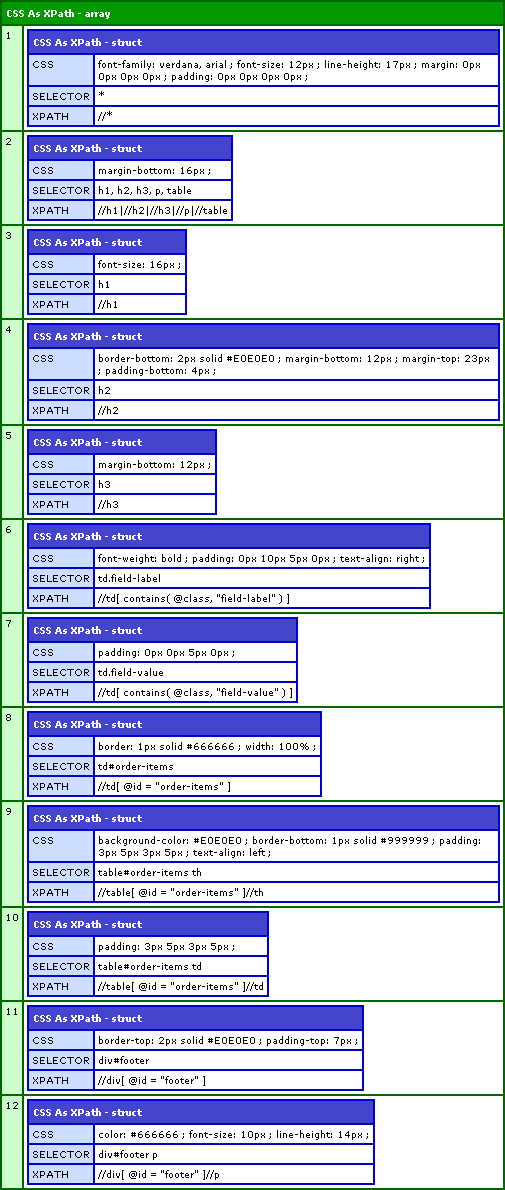
As you can see, each CSS selector (both simple and compound) were successfully converted into XPath queries. Using this set of ColdFusion user defined functions, we can now easily merge CSS and XHTML compliant data into one, flattened set of information.
Want to use code from this post? Check out the license.

Reader Comments
Ah, I was wondering if your next move was going to be figuring out a way of feeding a standard block of CSS into your XHTML style system. Didn't occur to me that you could treat the CSS as a series of list elements delimited by the closing curly bracket: nice work!
@Brian,
Thanks man. Now that we have a collection of style and XPath queries, it should be a piece of cake to iterate over the list, find the target nodes, and append the style.
i have read your article really it is very nice and useful for me. i have also read some article regarding http://www.labstech.org/cleanup-css-html-js-codes-2014-05-13/