
Ask Ben: Parsing CSV Strings With Javascript Exec() Regular Expression Command
Just curious if you can help me with this.... I have a user enter the following string: website "content approval" new - into a text box and need to break it up so that it is 3 separate words eg:
1) website
2) content approval
3) newI have tried using the following RegEx - "([^\\"]|\\.)*" but this only gets whats enclosed in the double quotes, how can I also select the other 2 words but excluding what I have already picked out within the double quotes?
When I see your sample string, I immediately think of Comma Separated Values in which the separating character is the space rather than a comma. That's why the middle two words are qualified (quoted) - because we need to escape the space contained within the value. The good news is that I have done a lot of CSV parsing in ColdFusion. So, to help you solve this problem, I have decided to take my CSVToArray() ColdFusion user defined function and port it to Javascript.
Unfortunately, it looks like Javascript does not support atomic grouping; as such, I had to take out some of Steve Levithan's awesome CSV parsing optimizations. But, optimizations aside, the simplified regular expression pattern seems to work fine. And, since we're not going to be parsing huge strings into data arrays, I don't foresee any real problems.
That said, here is the Javascript port of my CSVToArray() UDF:
<script type="text/javascript">

	// This will parse a delimited string into an array of
	// arrays. The default delimiter is the comma, but this
	// can be overriden in the second argument.
	function CSVToArray( strData, strDelimiter ){
		// Check to see if the delimiter is defined. If not,
		// then default to comma.
		strDelimiter = (strDelimiter || ",");

		// Create a regular expression to parse the CSV values.
		var objPattern = new RegExp(
			(
				// Delimiters.
				"(\\" + strDelimiter + "|\\r?\\n|\\r|^)" +

				// Quoted fields.
				"(?:\"([^\"]*(?:\"\"[^\"]*)*)\"|" +

				// Standard fields.
				"([^\"\\" + strDelimiter + "\\r\\n]*))"
			),
			"gi"
			);


		// Create an array to hold our data. Give the array
		// a default empty first row.
		var arrData = [[]];

		// Create an array to hold our individual pattern
		// matching groups.
		var arrMatches = null;


		// Keep looping over the regular expression matches
		// until we can no longer find a match.
		while (arrMatches = objPattern.exec( strData )){

			// Get the delimiter that was found.
			var strMatchedDelimiter = arrMatches[ 1 ];

			// Check to see if the given delimiter has a length
			// (is not the start of string) and if it matches
			// field delimiter. If id does not, then we know
			// that this delimiter is a row delimiter.
			if (
				strMatchedDelimiter.length &&
				(strMatchedDelimiter != strDelimiter)
				){

				// Since we have reached a new row of data,
				// add an empty row to our data array.
				arrData.push( [] );

			}


			// Now that we have our delimiter out of the way,
			// let's check to see which kind of value we
			// captured (quoted or unquoted).
			if (arrMatches[ 2 ]){

				// We found a quoted value. When we capture
				// this value, unescape any double quotes.
				var strMatchedValue = arrMatches[ 2 ].replace(
					new RegExp( "\"\"", "g" ),
					"\""
					);

			} else {

				// We found a non-quoted value.
				var strMatchedValue = arrMatches[ 3 ];

			}


			// Now that we have our value string, let's add
			// it to the data array.
			arrData[ arrData.length - 1 ].push( strMatchedValue );
		}

		// Return the parsed data.
		return( arrData );
	}

</script>
I decided to go with the Regular Expression Exec() command rather than the Javascript String Replace method simply because I have done so much with the String Replace method lately. Don't worry too much about the regular expression itself - that stuff is meant to be written, not read.
With this new Javascript user defined function in place, let's set up a little test for text box input:
<form>

	<p>
		<input type="text" value="" size="40"
			onblur="console.log( CSVToArray( this.value, ' ' ) );"
			/>
	</p>

</form>
Here, we are allowing the user to enter a value into the text box and onBlur of that input box, we are going to use FireBug to log the CSV parsed value of the entered text. When we run this on your sample data, we get the following:
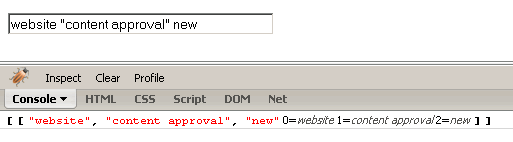
As you can see from the Console, we get an array of arrays. Since there are no line breaks, the CSV array only contains one child array (one child array per row of data). From this, you can see that the first child array holds the three values you need to get at.
I hope this helps.
Want to use code from this post? Check out the license.

Reader Comments
Couldn't you use the javascript .split() function here to break up the string into an array? It seems much simpler than the regex you suggested.
just an idea.
larry
@Larry,
The String.split() takes a regex for the delimiter. Seeing as the delimiter in our case (space) can be escaped by surrounding qutoes, I am not sure how doable it is. I am certainly open to am more simple solution though if you have thoughts.
I think that's pretty much the RegExp you need: 'website "content approval" new'.match(/^(\w+)\s?"(.*)"\s?(\w+)$/i); Outputs: ["website "content approval" new", "website", "content approval", "new"] You could use ".slice(1)" to pop the first element, which is obviously not needed. cheers
@H3, Most excellent post! I am not sure if I have ever used the String.match( regex ) function before. I will definitely have to take some more time to look into it. Much appreciated!
From my reading the split() function can take either a regex or a simple string. given your string website "content approval" new You'd want to to use " as the delimiter. Then your resulting array would be website content approval new The only difficult part would be parsing the delimiter, that's where the regex would come in. btw what the foo are kinky points? regards, larry
it looks like the blog app doesn't like returns, lets try that again<br/><br/> From my reading the split() function can take either a regex or a simple string. given your string <br/><br/>website "content approval" new<br/><br/> You'd want to to use " as the delimiter. Then your resulting array would be <br/><br/> website <br/><br/> content approval <br/><br/> new <br/><br/> The only difficult part would be parsing the delimiter, that's where the regex would come in. <br/><br/> btw what the foo are kinky points? <br/><br/> regards, larry
@Larry,
The Kinky Points are for the shop:
www.bennadel.com/shop/kinky-solutions-shop.htm
Hmm, I just made some commenting updates. They might be stripping out the line breaks. I will get to the bottom of this ASAP!
@Larry,
Thanks for helping me debug! I guess when I do an AJAX post vs. a standard FORM post the line breaks come through differently (even though they are both "POST" actions).
@Ben, Thank you heaps for this.
It has now put me on the right track :)
> @Larry,
> Thanks for helping me debug! I guess when I do an AJAX post
> vs. a standard FORM post the line breaks come through
> differently (even though they are both "POST" actions).
Any time Ben. Good to know you got things working again (of course until I post this I really have no clue that it will work properly).
larry
Ben, Very useful code! I had a problem when using it with IE where in the special case that the first character is the delimiter, the code fails to store an empty string representing the empty value preceeding the delimiter. So I addeed the following code right before your while loop and it took care of the problem:
if (strData.charAt(0) == strDelimiter)
arrData [arrData.length - 1].push ("")
@Steve,
Hmm, interesting. The algorithm should capture an empty field in the beginning. Were you getting this in IE only? Or on all browsers?
Haven't tried another browser. But in studying the regular expression, I could see how the regexp engine could match the first delimiter rather than the "^" and then match whatever followed--simply skipping over the empty field. I tried to move the "^" to the beginning of the expression, but then the engine skipped over what immediately followed the first delimiter in an attempt not to get stuck in a loop.
@Steve,
I think you are correct about the ^ being first. I think it was put at the end because it is not the "normal" delimiter. I'll have a play with it, see what I can do.
What if you wanted to parse a string that contained a delimiter, but except for circumstances where it was contained in quotes:
Eg. 'ChartHeight = 400;ChartName = "Test;";ChartWidth = 600';
Here, my delimiter is the colon, but I have quoted values that don't span the distance between actualy delimiters so the function above does not work. I want to get:
array[0] = 'ChartHeight = 400';
array[1] = 'ChartName = "Test;"';
array[2] = 'ChartWidth = 600';
Thanks,
Rob
@Rob,
When you call the function, are you passing in the delimiter you want to use:
CSVToArray( your_data, ";" )
Ben,
Yes, I'm passing in the colon as the delimiter parameter. The problem is that in your regular expression search, quoted values assume the quoted value is surrounded by delimiters. In this case, we have a quoted delimiter "Test;", but this is preceeded by 'ChartName = '. This results in:
[0] = "ChartHeight = 400"
[1] = "ChartName = "
[2] = ""
[3] = "ChartWidth = 600"
Regards,
Rob
How would I use this on an actual .CSV file?
This works:
var classList = loadFile("/KC/data/classes.csv");
var classes = CSVToArray( classList , "," );
function loadFile(url)
{
var req = false;
// branch for native XMLHttpRequest object
if (window.XMLHttpRequest && !(window.ActiveXObject))
{
try { req = new XMLHttpRequest() }
catch(e) { req = false }
}
else // branch for IE/Windows ActiveX version
{
if (window.ActiveXObject)
{
try { req = new ActiveXObject("Msxml2.XMLHTTP") }
catch(e) { try { req = new ActiveXObject("Microsoft.XMLHTTP") }
catch(e) { req = false }
}
}
}
if(req)
{
req.open("GET", url, false);
req.send("");
return req.responseText
}
return ''
}
@Rob,
Ahhh, I see. You are using single quotes as the field qualifier, not double quotes. I am not sure, but I believe that CSV uses double quotes as its standard (but I could be off on that).
I think all you have to do is change the double quotes to single quotes in the regular expression:
// Delimiters.
"(\\" + strDelimiter + "|\\r?\\n|\\r|^)" +
// Quoted fields.
"(?:'([^']*(?:''[^']*)*)'|" +
// Standard fields.
"([^'\\" + strDelimiter + "\\r\\n]*))"
That might work.
Since the delimiter is space, you can replace it with ',' using a litle bit of regex: somestring.replace(/(^\s*|\s*$)/, ",");
And then use String.split() to accomplish the task. KISS.
I'm not actually working with typical CSV data. I'm working with a string where there are a number of name-value pairs separated by semicolons. I want to split the string by these semicolons, except where the semicolon is inside of double quotes. Does this make it more clear?
ok DB, ever heard of character escaping....first off, escape them from you're data, then it wont be such a brain smasher for you. now if you still cant get it, send it to me, i'll fix, and send it back to you, along with my bill ofcourse.
@Rob,
Try this:
var data = "ChartHeight = 400;ChartName = \"Test;\";ChartWidth = 600";
var values = data.match( new RegExp( "[^\";\r\n]+(\"[^\"]*\")*", "g" ) );
for( i in values ){
document.write( values[ i ] + "<br />" );
}
This gives you:
ChartHeight = 400
ChartName = "Test;"
ChartWidth = 600
I'm using your code to parse a CSV file (pasted into a textarea) that contains almost 8000 lines with 4-5 records per line. It is taking an inordinate amount of time. With 1000 records it took about 45 seconds, but I've been running it with the 8000 records for over 10 minutes so far and there's no sign of stopping. Is there any way to optimize or speed this up somehow? Or at least display some sort of progress indicator (I tried adding a document.getElementById('progressDiv').InnerHTML = arrData.length at the end of the "while" loop, but it doesn't seem to work).
Testing in Safari on OS X.
Hmm... seems the massive delay had to do with outputting the data, and not parsing the CSV. Parsing 7034 records and storing them in localStorage using JSON only takes 0.179 seconds. Very nice. Thanks :)
@Dosboy,
Yeah, output can be a beast, especially if you are output incrementally with each row.
Thanks for posting this. I'm testing it out on some CSV data, but running into trouble when using it on anything with more than one line. The main array only ends up with one nested array that contains all the values from the CSV file. It doesn't break at the end of a line to create a new nested array and it is also ignoring the first value of each new line starting with the 2nd line.
Any pointers? Thanks.
@Jens,
Sounds like the algorithm isn't picking up the line breaks. Is there a quote around the whole file or anything (something that might make the parser think it should be in one value)?
I discovered that I needed to use a <textarea> in my form to paste CSV data into instead of a <input type="text"> to get it to recognize the line breaks. Now it's working perfectly.
Thanks again for posting this!
PS - I'm using Chrome and didn't check this behavior in other browsers.
@Jens,
Ahh, gotcha. Yeah, the textarea is probably gonna be safe cross-browser.
If you'd like to take a look at (and download) an open-source javascript object that will parse a CSV file (or any type of delimited file) in one call, visit http://splitterjsobj.sourceforge.net/
That page contains a live demo with examples, and one of the examples happens to be a CSV "file."
The object provides an enhanced split() method, and a method that splits a string on an array of delimiters (which is used to parse a file).
The object supports user-defined quote characters which can be used to escape the delimiter(s) -- for example, to include commas and/or line feeds in the field values of the CSV file. Also, a user-defined escape char can escape the quotes, etc ... The object is intended as a complete solution to the problem of splitting a string. The object is free, of course. I wrote it because I needed to parse a space-delimited file in a previous project, and one thing led to another ...
@Brian,
Interesting stuff, thanks for the link.
Hi Ben, Thanks for this script, and the bit of regex lesson.
I'm running your function on csv files exported from excel and I've come across some cases where say the first cell in the table is blank, the exported csv file will start with a comma. Your function will omit the first empty cell in this case, and start with the next cell. I'm not savvy enough with regex to understand why this is, but I fixed the issue by adding
if (strData.charAt(0)==strDelimiter) strData = " ".concat(strData);
as the second line of the function.
I'm sure you could find a better fix, just a head's up.
Thanks again
@Micah,
Hmmm, I had thought that RegExp would allow for empty strings in the beginning; but, I am sure that I never tested that use case :) I had some help writing this regular expression. When I am in front of my other computer, I'll see if I can play around with this a bit.
@Micah,
And thanks for your solution! Very simple and to the point.
Thanks for this excellent code! Very useful. I came across one tricky issue: I have a file with a comma as delimeter, but directly after the comma there can be a space (but other files don't have a space). For example: CSVToArray('"x", "y", "value"'). The function cannot handle that.
Can the code be changed such that it can handle optional whitespaces between the delimeter and the values?
Very nice, works great even for huge files.
One problem I'm having is that it never exits the while loop if I pass it an empty file. Any suggestions?
This is great, but what if the string contains both double and single quotes? For example, my delimited file contains lines that might look like this:
=hyperlink("http://www.google.com","This isn't working")|5|Blah blah blah
Yep, that's a hyperlink function which requires double quotes to work. I also have text in there with single quotes, so this in the regex won't work:
"(?:'([^']*(?:''[^']*)*)'|" +
because it results in this going in first:
=hyperlink("http://www.google.com","This isn
Any thoughts on how to make that work?
Nice job on the parser. This has the be one of the few exceptional examples of a JS CSV parser I have been able to find after extensive searching on the web.
It's interesting that you catch all delimiters in one match but differentiate newlines from commas (or whatever the user-specified delimiter is) by checking the length of the match. I can't say that I have ever seen that technique used anywhere else before.
One question, I may be wrong but isn't this implementation missing an edge case? Ie. values that contain newline chars between quotes (that should be interpreted as data).
Although I didn't use your code directly I used a similar approach and your example helped be better understand the nitty-gritty details of how the regex works.
Have you ever considered doing single char matches combined with a FSM (Finite State Machine)? I just recently came across an approach suggested by another developer that I have successfully implemented as a line-splitter (that properly parses newlines in values).
Eventually, I'm going to extend the FSM to handle all CSV parsing and measure the performance vs the more complex regex solution (similar to the one you presented).
If you're interested in taking a look at an alternative implementation, the project can be found at:
http://code.google.com/p/jquery-csv/
When passing an empty data string ("") to the CSVToArray <bold>hangs in an endless loop</bold>.
To fix this bug I added:
right after
This assumes an empty file means "empty table"/"no items". If you think an empty file should mean "one empty string item" you could return [[""]] instead.
BTW: This also fixes the issue with passing handling null/undefined strData. Without this fix passing a null to the function returns:
{{{
[["null"]]
}}}
Udo
Regarding the previous post:
the check can be simplified to
Udo
Data starting with a comma, or more generally, starting with a delimiter is not handled correctly by CSVToArray. The "unquoted empty string" before this first delimiter is dropped.
This problem was already reported before for IE, and I can confirm this problem also exists for Firefox, Opera, Safari, and Chrome. Also data starting with a linefeed (row separator) show this problem.
Here some examples of the current behavior:
I fixed this issue by adding
just after
in the while loop.
Here the new results:
Feel free to add the change to your function.
Udo
Hi,
I would just like to point out that if your data string starts with a certain character, the function will go into an infinite while loop.
So far I have seen this with hex EF.
I had an issue where I was getting an empty row at the end of the array when the CSV string ended in a newline character. I fixed the issue by adding
Immediately before
if (strData != "") {
}
Add this around the function so that the delimiter itself does not attempt to be parsed, just a little bug :)
I would like to pull in a URL such as this <http://www.findu.com/cgi-bin/posit.cgi?call=N0MPM-11&time=1&start=61&comma=1> which returns a CSV file.
I use a bit of regex to rip off the html stuff like this;
$patterns = array();
$patterns[0] = '/<TITLE>.*<\/TITLE>/';
$patterns[1] = '/<[^>]*>/';
$patterns[2] = '/ /';
$csvdata = preg_replace($patterns, "", $csvdata);
$csvdata = preg_replace("/(^[\r\n]*|[\r\n]+)[\s\t]*[\r\n]+/", "\n", $csvdata);
Which returns a very nice looking CSV file as such (much shortened);
DTTM,LATITUDE,LONGITUDE,COURSE,SPEED,ALTITUDE
20140520144702,41.39500,-92.88800,31.0,8.0,1289
20140520144806,41.39683,-92.88600,69.0,5.0,1873
20140520144911,41.39817,-92.88317,60.0,7.0,2342
20140520145014,41.39850,-92.88000,113.0,7.0,2962
So the issue is I'm too new at this to understand how to integrate my code with yours in such a way that all I have to do is call the URL something like this:
csv2json(http://www.findu.com/cgi-bin/posit.cgi?call=N0MPM-11&time=1&start=61&comma=1)
And have it return a json object ready for use by Google Maps. Can you give me a working model to start from?
Thanks in advance.