
Ask Ben: Using Regular Expressions To Parse Data In ColdFusion
I really like how you used Javascript's String Replace method last week to parse data with regular expressions. This seems like a really powerful tool. Is there any way to do the same thing in ColdFusion?
In Javascript, functionality like this is made possible, in part, because in Javascript, you can define anonymous, inline functions to be executed for each pattern match in the String replace method. In ColdFusion, you cannot define inline methods in this manner. You can, however, use things like RELoop, my ColdFusion custom tag for looping over regular expression patterns, to accomplish a similar functionality.
Since it's been a while since I've mentioned my RELoop tag, I'll give you a quick summary. RELoop is a ColdFusion custom tag that loops over regular expression pattern matches in a target string and makes each subsequent pattern match available for a given iteration of the loop. The match can be returned as a simple string or as a collection of captured groups. These can be treated individually or modified and stored back into the target string resulting in a new text value.
Here is a summary of the tag attributes:
Index
This is the CALLER-scoped variable into which we will store the contextual match. This may be a string or a struct depending on whether the user wants the Groups returned (as defined by the ReturnGroups attribute below).
Text
This is the target text in which we will be searching for and iterating over the regular expression pattern matches.
Pattern
This is the regular expression pattern that we will be matching. Since we are using the Java regular expression engine, this goes by the java.util.regex.Pattern syntax, not necessarily by the ColdFusion regex syntax (there are slight differences in the way these two engines operate - the Java regular expression engine is faster, more powerful, and more robust).
Variable
This is the optional, CALLER-scoped variable into which the resulting string will be placed. This uses the Pattern Matcher's AppendReplacement() and AppendTail() methods to build up a new text value. It replaces the current match with whatever you have stored in the Index variable at the end of each pattern match iteration. Note: If no Variable attribute is defined, the internal algorithm does not waste time creating a new string value.
ReturnGroups
This flags whether to return the single matched pattern or to return a structure with the set of captured groups. If a structure is returned, it stores the entire match in the "0" key. It then stores each captured group in the group-based index key. Additionally, it returns the number of captured groups in the GroupCount key.
Ok, now that we are up to speed on my RELoop ColdFusion custom tag, let's duplicate last week's Javascript demo in ColdFusion:
<!--- Store our test data. --->
<cfset strData = "[event=action][id=longuuid][a=b][c=D]" />

<!--- Create our data collection of name-value pairs. --->
<cfset objData = {} />


<!---
	Using our regular expression loop ColdFustion custom tag,
	loop over the matches, grapping the captured groups on each
	pattern iteration.
--->
<cf_reloop
	index="objMatch"
	text="#strData#"
	pattern="\[(\w+)=([^\]]*)\]"
	returngroups="true">

	<!---
		Store the name-value pair into our collection using
		the first (name) and second (value) captured groups from
		the pattern.
	--->
	<cfset objData[ objMatch[ 1 ] ] = objMatch[ 2 ] />

</cf_reloop>


<!--- Output our name-value collection. --->
<cfdump
	var="#objData#"
	label="Name-Value Collection"
	/>
Just as in the Javascript version of this algorithm, I am looping over each regular expression pattern match. Then, for each match, I am simply storing the name-value pair, as defined by our two matched groups, into our data collection. When we run the above code and output the final data struct, we get:
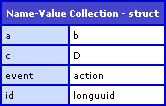
As you can see, the data string was successfully parsed into a collection of name-value entries using regular expression groups and my RELoop ColdFusion custom tag.
Want to use code from this post? Check out the license.

Reader Comments
That's Exactly what I was looking for, thanks Ben!
Sick tag too, first time I've seen it
@Don,
Awesome man, glad you like it. I love regular expressions and looping over the pattern matches is definitely something that needs to be more built into the ColdFusion feature set. I have used this tag a bunch of times and really really like its functionality.