
Ben! Its no secret I've always been not too keen on regex, but this is really killing me. I've been reading your regex posts trying to figure how to parse a string just like this: [event=action][id=longuuid][a=b][c=D] and so forth. After a good hour of eye strain and plucking at my keyboard, I thought it might be wise to ask for your help. The best I could come up with was: strData = str.split('\[?\[*\[?\]') which left a much annoying [ at the beginning of each index. At one point I was able to get that [ appear on just the First index, but... thats useless too. Hope you can help, take it easy!
You are on the right track - regular expressions are definitely something that we can use in this situation. The trick here is to see how we can break down the regular expression pattern. As you can see, when we look at your sample data string and abstract it out, what is it? It's really a series of values that match this general pattern:
[name=value]
In the example data, there are four such pattern matches. Rather than trying to match the entire data string, let's worry about matching just a single name-value pair; if we can do that, you'll see that using the Javascript String.replace() method, we can actually deal with each match individually. So, what is the regular expression pattern that we need to use? First, let's think about what groups we want to capture. If we could capture the name and the value into two separate groups, that would make our lives much easier:
[(name)=(value)]
Now that we have that, what can our name consist of? For the sake of the demo, I am going to say it can consist of any "word" character:
\w+
Likewise, I will say that the value will contain every character until the closing bracket:
[^\]]*
Now, let's combine all of that into a single regular expression:
[(\w+)=([^\]]*)]
Now that we have a regular expression that matches a single name-value pair, we can use the Javascript String replace() method to loop over each pattern and build our collection of name-value pairs. When using the Javascript String replace() method, if you pass it a method reference rather than a replacement string, Javascript will execute that method for each matched pattern, passing the matched string and each captured group to it as arguments. This makes things quite nice:
<script type="text/javascript">

	// This will parse data in the form of [name=val] into
	// and object of name value pairs.
	function ParseData( strData ){

		// Create a default collection for the entirety of
		// our name-value pairs.
		var objCollection = {}

		// Replace the values, passing each name-value pair
		// to our method which will add it to the collection.
		// In our regular expression, we are going to capture
		// two groups - the name and the value.
		strData.replace(
			new RegExp( "\\[(\\w+)=([^\\]]*)\\]", "gi" ),
			function( $0, $1, $2 ){
				// Add the name value pair to the collection.
				objCollection[ $1 ] = $2;
			}
			);

		// Return our parsed collection.
		return( objCollection );
	}


	// ---------------------------------------- //


	// Store our data string.
	var strData = "[event=action][id=longuuid][a=b][c=D]";

	// Parse the data into an object.
	var objData = ParseData( strData );

	// Output values, one per line.
	for (var strKey in objData){

		document.write(
			strKey + " : " +
			objData[ strKey ] +
			"<br />"
			);

	}

</script>
When we run this code, we get the output:
event : action
id : longuuid
a : b
c : D
The data string is successfully parsed into a collection of name-value pairs and the output to the screen.
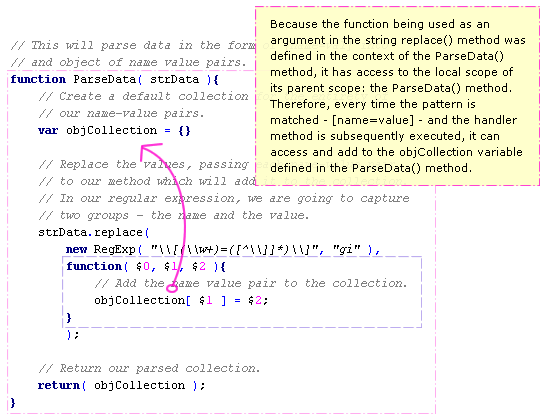
As you can see from the example code, because each of our captured groups is passed to our replace() method handler, all we need to do is add that name:value pair to the collection defined locally to the ParseData() method. In addition to the power of the Javascript String replace() method, the magic behind this is the power of Javascript closures. For an in-depth look at Javascript closures, you can read my other post; but, the basic rundown is this:
I hope this helps.

Reader Comments
I didn't know you could do that with string.replace(). I always thought- and read- that the second argument had to be a string.
Very cool
@Matt,
Yeah, it's an awesome feature!
One thing about javascript replace, not completely related to tis article but something I have seen people struggle with, is the missing 'All' attribute that we CF people are used to have. It is actually quite simple to emulate with regexp.
If I for instance want to remove dashes from a UUID, I do:
myString.replace(/-/g,'');
So, myString.replace('-',''); will replace the first - with nothing, but by simply adding the slashes and the 'g' you emulate the 'All' attribute in CF.
@Stefan,
Good point. When you use regular expressions in Javascript, you have to supply certain flags to get a certain type of functionality. I am not a huge fan of the implicit regex pattern as denoted by "/" delimiters, so I use the new RegExp() notation. Either way, you have the option to return upto three tags (that I know of):
"g": global replace. As you said, if you leave this out, the replace() method will only execute the first replace.
"i": case-insensitive matching.
"m": multi-line matching.
If anyone wants to see how to do this in ColdFusion rather than Javascript, check out this post:
www.bennadel.com/index.cfm?dax=blog:1497.view
Hi Ben,
a bit off-topic (using your site search (several different searches) didn't deliver the post describing your site-changes as regards to the commenting system), but how does this new commenting system work for you? I cannot see that your number of comments or points increase when you add a comment ;-) Or don't the rules apply to you as a site-owner?
Oh, and antoher thing, how can I get my picture next to my comment? Where do you get the picture from?
@Sebastiaan,
The comment data is not displayed on a per-comment basis, although that would be a cool feature. All comments show the current user data, which is why you are not seeing any increment.
The comment pictures are being pulled from: http://en.gravatar.com.
And how are the points counted? I thought 2 points per comment (I had 16 comments and 32 points) but after my 17th comment I suddenly had 44 points ;-) Or is that giving away too much? Maybe a (another) sick (e.g. good!) RegEx you've written?
@Sebastiaan,
The points per comment is a bit calculated and a bit random (for fun).